
The right audio mixer for podcasting can simplify microphone control, headphone monitoring, guest connections, and computer recording in one setup. The best choice depends on your microphone type, show format, and how much hands-on control you want.
We compare 10 standout mixers and podcast bundles across beginner, streaming, and multi-speaker use cases, with attention to connectivity, mixing features, portability, and long-term flexibility.
Best 10 Audio Mixer for Podcasting Picks for 2026
Best All-in-One Bundle

- Two XLR inputs with 60dB preamps
- Eight customizable sound-effect pads
- Battery-powered operation up to 8 hours
Best For: Portable two-person podcasting and streaming
Best Adaptive Digital Mixer

- 7-inch touchscreen with three control modes
- AutoMix supports up to two microphones
- USB, NDI, and SD-card recording options
Best For: Guided podcast production and two-person shows
Best Premium Production Studio
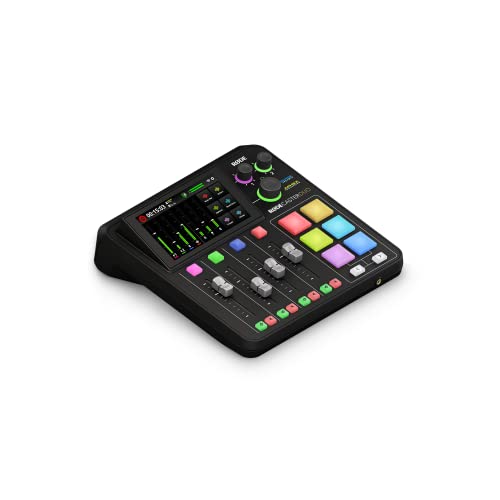
- High-gain Revolution Preamps for two inputs
- Four faders, touchscreen, and six SMART pads
- APHEX processing and broadcast-quality effects
Best For: Hands-on podcasting and professional content creation
Best for Larger Setups

- 10 channels for mics, instruments, and devices
- Bluetooth playback with USB-C recording
- 24 GigFX+ effects with tap tempo
Best For: Multi-source podcasts, streaming, and band practice
Best All-in-One Starter

- Mixer, condenser mic, tripod, and cables included
- Supports two people and multiple streaming devices
- Built-in effects, voice changer, reverb, and denoise
Best For: Beginners building a complete podcast or streaming setup
Best Traditional Mixer

- Eight-input analog mixer with equalization
- Stereo USB interface for computer or mobile use
- Mixes PC and gaming audio into streaming output
Best For: Creators wanting hands-on analog mixing for streaming
Best for Live Effects

- Voice changers, background effects, and podcast modes
- Dual DSP noise reduction with Bluetooth accompaniment
- Supports up to three mobile phones for streaming
Best For: Interactive live streams, gaming, and effect-heavy podcasts
Best USB Starter

- XLR mic input with 48V phantom power
- Direct monitoring and dedicated gain control
- USB plug-and-play use with Mac and PC
Best For: Solo podcasts and vocal or instrument recording
Best Versatile Podcast Hub

- Three XLR inputs with 48V phantom power
- USB PC recording and headphone monitoring
- Bluetooth, USB playback, EQ, echo, and delay
Best For: Multi-source podcasting and streaming setups
Best for Multi-Input Control

- Six channels with four XLR microphone inputs
- Three-band EQ and 16 DSP effects
- USB playback, Bluetooth, and 48V phantom power
Best For: Larger podcast and live audio setups
Best All-in-One Bundle – MAONO E2 Gen2
The MAONO E2 Gen2 is a practical audio mixer for podcasting when you want a ready-to-use setup for two hosts, streaming, and recording. Its two XLR combo inputs, 60dB preamps, USB-C and 3.5mm connectivity, sound pads, and built-in battery make it flexible for mobile or computer-based production.
Best For: Beginners, co-hosted podcasts, streamers, and creators who want portable features in one bundle.
Pros:
- Two low-noise XLR inputs with up to 60dB of gain
- Eight customizable sound-effect buttons and pitch-changing effects
- Loopback, one-touch mute, Bluetooth, and phone connectivity
- Built-in 1500mA battery offers up to eight hours of use
Cons:
- The supplied notes do not specify the complete bundle contents
- Its many effects and routing options may take time to learn
Choose the E2 Gen2 if portability and built-in creative controls matter as much as clean two-microphone recording. It is especially convenient for creators who move between phones, tablets, and computers.
Best Adaptive Digital Mixer – Mackie DLZ Creator XS
The Mackie DLZ Creator XS is an adaptable audio mixer for podcasting that adjusts to different experience levels. Its 7-inch touchscreen offers Easy, Enhanced, and Pro modes, while AutoMix helps balance two microphones when hosts or guests speak at the same time.
Best For: Podcasters and streamers who want guided controls, automatic mic balancing, and standalone recording options.
Pros:
- Three control modes accommodate beginners through advanced users
- AutoMix manages levels for up to two microphones
- Records or streams through USB-C, NDI, or directly to an SD card
- Six customizable trigger pads support samples and production controls
Cons:
- Condenser microphones require 48V phantom power to be enabled
- It has two channels, limiting larger microphone setups
- The unit requires corded power
The DLZ Creator XS is a strong fit when ease of use and production automation are priorities. Its touchscreen workflow and AutoMix can reduce setup work without removing access to more advanced controls.
Best Premium Production Studio – RØDECaster Duo
The RØDECaster Duo combines recording, mixing, streaming, and content-production tools in a compact audio mixer for podcasting. Two Neutrik combo inputs, high-gain Revolution Preamps, broadcast-style faders, SMART pads, touchscreen control, and APHEX processing give creators a complete studio-style workflow.
Best For: Podcasters and content creators who want high-quality preamps, hands-on mixing, and built-in broadcast processing.
Pros:
- Two combo inputs with up to 76dB of gain
- Four broadcast-quality faders and six SMART pads
- Includes APHEX effects such as Aural Exciter and Big Bottom
- Supports headphone and headset monitoring through the 3.5mm TRRS input
Cons:
- Its two microphone inputs are less suitable for larger panels
- It is corded rather than battery powered
- The supplied notes list USB connectivity but do not detail broader computer compatibility
The RØDECaster Duo is a polished choice for creators who value tactile controls and studio-style effects. It makes the most sense for a compact, professional-feeling setup built around one or two primary microphones.
Best for Larger Setups – Mackie ProFX10v3+
The Mackie ProFX10v3+ is a versatile audio mixer for podcasting when you need more channels for guests, instruments, phones, or other sources. It combines 10-channel analog mixing with Bluetooth playback, USB-C recording, Onyx preamps, and 24 GigFX+ effects.
Best For: Multi-source podcasts, live streams, band practice, and creators who need more inputs than compact two-channel mixers provide.
Pros:
- Ten channels accommodate microphones, instruments, phones, and computers
- Onyx preamps are included on every mic channel
- Bluetooth playback and multi-mode USB recording
- GigFX+ provides 24 effects with tap tempo
Cons:
- Its larger channel count may be unnecessary for a simple two-mic podcast
- The mixer requires corded power
- The supplied notes do not specify the included accessories
Select the ProFX10v3+ if expansion and source flexibility are more important than a compact footprint. It is well suited to podcasts that also incorporate music, instruments, live streaming, or several connected devices.
Best All-in-One Starter – MAONO S1 Podcast Bundle
The MAONO S1 is an audio mixer for podcasting that combines a mixer, condenser microphone, cables, and tripod in one starter package. Its controls include built-in effects, voice changing, reverb, monitoring, and noise reduction, making it practical for beginners recording on a computer or mobile device.
Best For: New podcasters, live streamers, and creators who want a bundled setup with entertaining sound effects.
Pros:
- Includes a condenser microphone, tripod, cable, windscreen, and mixer.
- Supports up to two people, four devices, and four streaming platforms simultaneously.
- Offers recordable effects, built-in effects, voice changing, reverb, and denoise controls.
- Works with Windows, Mac OS, smartphones, iPhones, and tablets.
Cons:
- The mixer supports 3.5mm microphones and does not support phantom power.
- A phone OTG adapter may be required, and a guitar or keyboard adapter is not included.
- The included feature set may require reading the manual and setup guidance.
Choose this model if convenience and creative live-production features matter more than traditional studio connectivity. Check the mixer’s dimensions and your device ports before buying.
Best Traditional Mixer – Behringer XENYX 802S
Behringer XENYX 802S Premium Analog 8-Input Mixer with USB Streaming Interface
Check Price On AmazonThe Behringer XENYX 802S is an audio mixer for podcasting built around analog mixing and equalization, with eight inputs and a stereo USB interface. It is suited to creators who want to blend computer or gaming audio directly into a streaming output while keeping a conventional mixer layout.
Best For: Podcasters, streamers, and home recordists who prefer analog controls with USB computer or mobile connectivity.
Pros:
- Provides eight inputs for flexible source mixing.
- Combines analog mixing and equalization with an ultra-low-noise design.
- Includes a stereo USB audio interface for a computer or mobile device.
- Supports direct mixing of PC or gaming sounds into the streaming output.
Cons:
- It is a mixer only; the supplied notes do not indicate that a microphone or other accessories are included.
- Its corded-electric design is less portable than battery-powered options.
- The listed dimensions are substantial, so desk space should be checked.
This is the stronger fit for users who want hands-on analog control and straightforward USB streaming rather than built-in voice-changing or sound-effect features. Plan to supply your own microphone and cables as needed.
Best for Live Effects – SINWE F988 Podcast Sound Card
The SINWE F988 is an audio mixer for podcasting focused on live production, with DSP noise reduction, Bluetooth accompaniment, voice changers, and preset effects. Its compact sound card accepts XLR, 3.5mm, and Bluetooth sources and can connect with Windows, Mac OS, iPad, and smartphones, though adapters may be needed.
Best For: Live streamers, gaming creators, and podcasters who want voice effects, background sounds, and multi-phone streaming options.
Pros:
- Includes 16 fixed background effects, seven podcast and recording modes, and four voice-changer modes.
- Offers dual DSP noise reduction, voice-over, elimination, and internal-play functions.
- Supports Bluetooth accompaniment and connections for up to three mobile phones.
- Compatible with Windows, Mac OS, iPad, and smartphones.
Cons:
- Adapters may be required for iPads and smartphones.
- The listed warranty information is inconsistent, citing both 12 months and 90 days.
- Its four-channel design may offer less input capacity than larger mixers.
The F988 stands out when interactive effects and mobile live streaming are central to your workflow. It is less compelling for buyers seeking a simple, traditional mixer without performance-oriented sound effects.
Best USB Starter – FIFINE SC1 Audio Mixer
If you want a compact audio mixer for podcasting, the FIFINE SC1 focuses on straightforward USB recording with an XLR microphone input and a dedicated instrument connection. Its plug-and-play design works with Mac and PC, while direct monitoring helps you hear your recording in real time.
Best For: Solo podcasters, vocal recording, and creators who also connect guitar or bass.
Pros:
- XLR input with 48V phantom power for compatible condenser microphones.
- Dedicated mic gain, output-volume, and monitoring controls.
- USB connectivity, 192 kHz maximum sample rate, and compatibility with software supporting USB audio devices.
Cons:
- Only one XLR microphone interface is provided.
- Its compact three-channel design is better suited to smaller setups than multi-guest productions.
The SC1 is a practical choice when simplicity, direct monitoring, and instrument support matter more than having numerous microphone channels or built-in effects.
Best Versatile Podcast Hub – Aveek 5-Channel Audio Mixer
The Aveek 5-channel board is a flexible audio mixer for podcasting when you need several input types and convenient playback options. It combines three XLR inputs with stereo line connections, USB PC recording, Bluetooth streaming, USB-drive playback, and headphone monitoring.
Best For: Podcasters and streamers who want multiple inputs, onboard effects, and music playback features.
Pros:
- Three XLR inputs with switchable 48V phantom power for condenser microphones.
- Built-in USB recording chip supports plug-and-play PC recording.
- Includes two-band EQ, gain controls, echo and delay effects, and headphone monitoring.
- Supports Bluetooth streaming and USB-stick playback or recording.
Cons:
- Bluetooth, USB, and four/five-channel functions cannot be used simultaneously.
- Bluetooth is specified for use within 15 feet.
- Outputs are intended for active speakers or powered amplification rather than passive speakers directly.
Choose the Aveek if your podcast setup benefits from flexible source connections and built-in playback or effects. Its simultaneous-use limitation is worth considering before building a more complex workflow.
Best for Multi-Input Control – 6-Channel DSP Audio Mixer
This six-channel console is an audio mixer for podcasting when you need more physical inputs and hands-on mixing controls. It provides four XLR inputs, stereo channels, USB and Bluetooth functions, a three-band EQ, and 16 DSP effects for shaping voices and other audio sources.
Best For: Larger podcast, streaming, karaoke, and live setups using several microphones or instruments.
Pros:
- Six input channels, including four XLR inputs and 1/4-inch connections.
- 48V phantom power supports compatible condenser microphones.
- Three-band EQ, independent faders, and 16 DSP effects provide hands-on control.
- USB playback and Bluetooth streaming add convenient source options.
Cons:
- At 2.3 kg, it is less portable than compact USB mixers.
- The supplied warranty is listed as 90 days from purchase.
- Its traditional analog design may require more manual setup than a simple plug-and-play interface.
The six-channel layout makes this a strong fit for microphone-heavy or performance-oriented productions. It is most appealing if you want physical faders, broader connectivity, and built-in effects in one console.
How We Picked the Best Audio Mixer for Podcasting
We evaluated each option for the features that matter most during real podcast production: microphone compatibility, input count, headphone monitoring, computer connectivity, gain control, phantom power, routing, portability, and ease of use. We also considered whether a mixer suits solo recording, remote interviews, live streaming, music, or multi-person studio sessions.
Models with bundled microphones or accessories were assessed for convenience, while standalone mixers were judged on expandability and control. Because podcast workflows vary widely, the list includes compact digital production studios, traditional analog mixers, USB interfaces, and entry-level sound boards.
Quick Comparison
| Best For | Look For | Product Types Represented |
|---|---|---|
| Solo podcasts | Simple USB recording, one microphone input, headphone monitoring | Compact interfaces and podcast bundles |
| Two-person shows | Multiple mic inputs, independent gain controls, phantom power | Small analog and digital mixers |
| Live streaming | Bluetooth, sound effects, loopback, quick mute controls | Podcast production consoles and sound cards |
| Growing studios | More channels, flexible routing, reliable USB connectivity | Multi-channel mixers |
Key Buying Factors for an Audio Mixer for Podcasting
Inputs and Microphone Compatibility
Count the microphones you will use at the same time, then leave room for growth. XLR inputs are preferred for studio microphones and condenser microphones requiring 48V phantom power. A 3.5mm input can be useful for lavalier microphones, phones, or bundled accessories, but it is less versatile than XLR.
USB Recording and Routing
USB connectivity lets the mixer send audio to a computer for recording or streaming. Check whether it supports a straightforward stereo mix or offers separate-channel routing. Loopback can be valuable for adding computer audio, interviews, music, or video-call guests to a live broadcast.
Monitoring and Controls
Dedicated headphone outputs, a mute button, gain knobs, monitor level control, and clear meters make recording easier. Digital mixers may add presets, touch controls, effects, and programmable routing; analog models typically provide faster, more direct control.
Portability and Workflow
Choose a compact unit for mobile recording or limited desk space. Larger mixers are better when you need several microphones, instruments, or permanent connections. Built-in effects and pads can speed up production, but they should not replace a clean signal path and dependable monitoring.
Who Should Buy Which Audio Mixer for Podcasting?
Choose a Compact Podcast Bundle If You Are Starting Out
Bundled mixers are convenient for beginners who want a coordinated setup with a microphone and basic accessories. They can reduce compatibility issues and lower the initial cost.
Choose a Digital Production Console for Interviews and Streaming
Digital podcast mixers are the strongest fit for creators who need sound effects, Bluetooth or computer audio, quick channel control, and repeatable show presets.
Choose an Analog USB Mixer for Flexible Studio Use
An analog mixer is a practical choice for podcasters who prefer physical faders and knobs, need several inputs, or may connect instruments and other line-level sources.
Choose a Basic Sound Card for Casual Streaming
Simple sound boards work well for low-cost streaming, voice chats, and straightforward solo recording. Confirm driver support, phantom-power behavior, and headphone monitoring before buying.
Before ordering, match the mixer’s input count and connection types to your current microphones, then consider the next upgrade you are likely to make. That approach helps ensure your Audio Mixer for Podcasting remains useful as your show grows.