
The best wireless document scanners make it easier to turn receipts, forms, invoices, and contracts into searchable digital files without staying tethered to a computer.
These 10 options range from compact mobile models to fast desktop scanners with automatic duplexing, cloud connectivity, and larger document feeders. Use the guide below to match scanning speed, portability, connectivity, and workload capacity to your needs.
Best 10 Document Scanner for Wireless Picks for 2026
Best High-Capacity Pick

- 45 ppm single-pass duplex scanning
- 100-sheet Auto Document Feeder
- Wi-Fi, touchscreen, and cloud-ready features
Best For: Busy offices scanning large document batches
Best Portable Wireless Pick
ScanSnap iX100 Wireless Mobile Scanner

- Scans up to 260 documents per charge
- Wi-Fi and USB connectivity
- Automatically organizes scans in the cloud
Best For: Traveling users and mobile document capture
Best USB Office Value

- 50-sheet feeder for office stacks
- Duplex scanning with OCR support
- USB connection and TWAIN integration
Best For: Fixed home-office or business workstations
Best Compact Duplex Pick
ScanSnap iX1300 Wireless Scanner

- Compact design for small desks
- Up to 30 ppm double-sided scanning
- Wi-Fi, USB, and computer-free use
Best For: Small workspaces needing versatile duplex scanning
Compact Wireless Pick
- Compact 11.7-inch-wide design
- 30 ppm duplex scanning
- Wi-Fi to devices and cloud
Best For: Home offices and small desks
High-Capacity Wireless Upgrade

- 45 ppm duplex scanning
- 100-sheet document feeder
- Wi-Fi 6 and USB-C
Best For: Busy offices and shared workflows
Touchscreen Office Choice

- 35 ppm duplex scanning
- 100-sheet ADF
- Computer-free cloud and USB saving
Best For: Home and office document workflows
Premium Wireless Powerhouse

- 45ppm duplex scanning and 100-sheet feeder
- Wi-Fi 6, USB-C, mobile, and cloud support
- 4-year protection plan included
Best For: High-volume office and home-office scanning
Compact Duplex All-Rounder

- Compact design for space-limited desks
- 30ppm duplex scanning with automatic corrections
- Scans documents, receipts, photos, and cards
Best For: Compact home offices and everyday scanning
Best High-Capacity Pick – Epson WorkForce ES-590W
For offices that need a productive document scanner for wireless workflows, the Epson WorkForce ES-590W combines Wi-Fi and USB connectivity with fast duplex scanning. Its 100-page feeder, 4.3-inch touchscreen, and direct-to-cloud options make it well suited to larger scanning batches.
Best For: Busy home offices and small businesses scanning large stacks of documents.
Pros:
- Scans double-sided pages in a single pass at up to 45 ppm.
- 100-sheet Auto Document Feeder supports larger batches.
- Wireless scanning works with computers or mobile devices.
- Touchscreen supports computer-free scanning to email, cloud storage, or USB drives.
Cons:
- Its desktop design takes more space than a portable scanner.
- Some advanced AI-ready features may be more than occasional users need.
The ES-590W is the strongest productivity-focused choice here, especially if wireless access, high capacity, and fast duplex performance matter more than portability.
Best Portable Wireless Pick – ScanSnap iX100 Wireless Mobile Scanner
The ScanSnap iX100 is a practical document scanner for wireless use when portability is the priority. It connects over Wi-Fi or USB, runs on a long-life battery, and handles receipts, photos, business cards, and other small documents without requiring a desktop setup.
Best For: Mobile professionals and users who scan away from a traditional desk.
Pros:
- Battery can scan up to 260 documents on a single charge.
- Compact, lightweight design is easy to carry.
- Wi-Fi connects directly to devices or through a wireless network.
- Automatic organization can route different document types to cloud services.
Cons:
- It provides simplex rather than duplex scanning.
- Its portable format is better suited to individual items than large paper stacks.
Choose the iX100 when cordless convenience and cloud organization outweigh the need for high-volume, double-sided scanning.
Best USB Office Value – Epson WorkForce ES-400 II
The Epson WorkForce ES-400 II is a straightforward desktop document scanner for users who want efficient duplex scanning and useful office software over a wired USB connection. Its 50-sheet feeder, OCR support, and document-management integration make it a capable home-office or business option.
Best For: Home and office users who do not need wireless connectivity.
Pros:
- 50-sheet Auto Document Feeder helps process stacks efficiently.
- Duplex scanning captures both sides of a page.
- OCR can create searchable PDFs and editable Word or Excel files.
- Double-feed detection and skew correction help support reliable feeding.
Cons:
- USB is the listed connection type, so it lacks built-in wireless scanning.
- Its desktop footprint is less convenient for mobile use.
The ES-400 II makes sense for a fixed workstation where dependable paper handling, OCR, and software integration are more important than wireless access.
Best Compact Duplex Pick – ScanSnap iX1300 Wireless Scanner
The ScanSnap iX1300 is a compact document scanner for wireless setups where desk space is limited. It supports Wi-Fi and USB, scans both sides at up to 30 ppm, and can handle documents, receipts, photos, and plastic cards with or without a computer.
Best For: Small workspaces needing versatile wireless and duplex scanning.
Pros:
- Space-saving design fits more easily on crowded desks.
- Fast duplex scanning reaches up to 30 ppm.
- Wi-Fi supports computers, mobile devices, cloud services, and Chromebook scanning through the mobile app.
- Handles varied media, including thick items and plastic cards.
Cons:
- 20-sheet capacity is smaller than the desktop feeders in this roundup.
- It is not the best fit for frequent high-volume batch scanning.
The iX1300 offers a balanced combination of wireless flexibility, duplex speed, and compact design, making it a strong choice for smaller offices and multipurpose scanning.
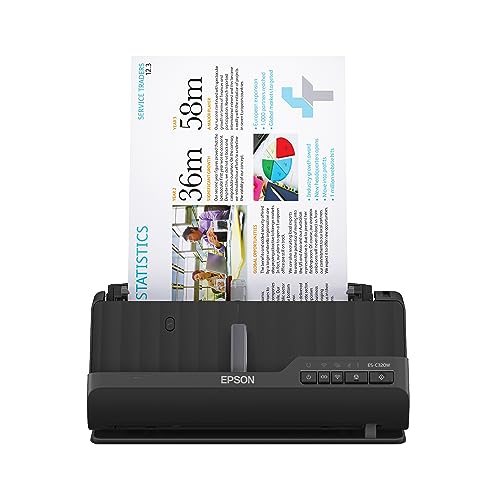
Compact Wireless Pick – Epson WorkForce ES-C320W
If you need a document scanner for wireless use without giving up much desk space, the Epson WorkForce ES-C320W is a practical fit. Its Wi-Fi connection supports scanning to computers, mobile devices, and cloud accounts, while duplex scanning and a 20-page ADF help streamline everyday paperwork.
Best For: Home offices and small workspaces that need compact wireless scanning.
Pros:
- Ultra-compact design measures 11.7 inches wide and weighs 3.9 pounds.
- Scans both sides of a page in one pass at up to 30 pages per minute.
- Supports Wi-Fi scanning to smartphones, tablets, computers, and cloud storage.
- Handles paper, cards, and passports with its flexible scan path.
Cons:
- The 20-page ADF is smaller than those on higher-capacity desktop models.
- Its compact design may be better suited to moderate batches than heavy office workloads.
The ES-C320W emphasizes convenience and space savings. It is a strong choice when wireless access and a small footprint matter more than maximum feeder capacity.
High-Capacity Wireless Upgrade – ScanSnap iX2500
The ScanSnap iX2500 is a document scanner for wireless workflows that prioritizes speed, capacity, and sharing. With a 100-sheet feeder, 45-page-per-minute duplex scanning, Wi-Fi 6, USB-C, and a touchscreen, it is designed for busy home offices and professional settings.
Best For: High-volume users who want fast wireless or USB scanning with customizable profiles.
Pros:
- 45 ppm double-sided scanning handles documents quickly.
- Large 100-sheet feeder supports longer scanning sessions.
- Wi-Fi 6 and USB-C provide flexible connection options.
- Touchscreen profiles, cloud support, and automatic organization simplify recurring workflows.
Cons:
- At 7.7 pounds, it is less portable than compact desktop scanners.
- Its broader feature set may be more than occasional users need.
The iX2500 stands out for users who scan frequently and share the device across multiple workflows. Its larger feeder and faster rated speed make it the most productivity-focused option in this selection.
Touchscreen Office Choice – Epson WorkForce ES-580W
For a document scanner for wireless office use that can work without a computer, the Epson WorkForce ES-580W combines a touchscreen interface with a 100-sheet ADF. It scans at up to 35 pages per minute, captures both sides automatically, and can send files to USB, email, or supported cloud services.
Best For: Home and office users who want computer-free scanning and built-in document organization tools.
Pros:
- 4.3-inch touchscreen makes wireless scanning controls accessible.
- 100-sheet ADF handles larger batches and varied paper sizes.
- Supports direct saving to USB, email, and services such as Dropbox, Google Drive, and OneDrive.
- OCR, blank-page deletion, background removal, and skew correction assist with file cleanup.
Cons:
- Its 35 ppm speed is lower than the ScanSnap iX2500’s rated speed.
- The unit has a larger desktop footprint than the compact ES-C320W.
The ES-580W is a versatile middle ground for users who want a substantial feeder and hands-off file handling. Its touchscreen and computer-free options are especially useful in an office environment.
Premium Wireless Powerhouse – ScanSnap iX2500
If you need a document scanner for wireless workflows, the ScanSnap iX2500 is built for high-volume home-office or business use. It combines Wi-Fi 6 and USB-C connectivity with fast 45ppm double-sided scanning, a 100-sheet feeder, and a large touchscreen for streamlined operation.
Best For: Busy offices, professionals, and households scanning large batches of mixed documents, receipts, photos, and cards.
Pros:
- Fast duplex scanning at up to 45 pages per minute with a 100-sheet feeder
- Wi-Fi 6, USB-C, mobile, and cloud connectivity
- Touchscreen profiles and automatic file optimization, naming, and sorting
- Includes a 4-year protection plan
Cons:
- At 7.7 pounds, it is less portable than a mobile scanner
- Its premium feature set may be more than occasional users need
The iX2500 stands out when speed, capacity, and hands-off organization matter. Its wireless flexibility and broad device support make it a strong choice for a connected scanning setup.
Go-Anywhere Wireless Scanner – Epson WorkForce ES-60W
For a portable document scanner for wireless use, the Epson WorkForce ES-60W keeps the setup compact and simple. It is a single-sheet mobile scanner that can scan a page in as fast as 4 seconds and work with a PC, Mac, iOS, or Android device.
Best For: Travelers, mobile professionals, and anyone who needs to scan receipts, IDs, or individual documents away from a desk.
Pros:
- Compact 10.56-ounce design for easy portability
- Battery-powered wireless scanning plus USB connectivity
- Scans pages up to 8.5 by 72 inches, along with IDs and receipts
- Includes OCR for searchable PDFs and editable Word or Excel files
Cons:
- Single-sheet feeding is less convenient for large batches
- Designed for mobile scanning rather than high-volume duplex workflows
The ES-60W is a practical choice when size and wireless convenience outweigh feeder capacity. Its automatic connection switching and OCR tools add useful flexibility for work on the road.
Compact Duplex All-Rounder – ScanSnap iX1300
The ScanSnap iX1300 is a versatile document scanner for wireless setups where desk space is limited. Its compact design supports Wi-Fi or USB connections, while duplex scanning, a 20-sheet capacity, and automatic image corrections make everyday document handling straightforward.
Best For: Small offices, home users, and shared workspaces that need a compact scanner for documents, receipts, photos, and cards.
Pros:
- Space-saving design with Wi-Fi and USB connectivity
- Fast duplex scanning at up to 30 pages per minute
- Handles documents, thick items, receipts, photos, and plastic cards
- Automatic de-skew, color optimization, and blank-page removal
Cons:
- Its 20-sheet capacity is smaller than a full-size office scanner’s
- It is less lightweight and travel-friendly than a single-sheet mobile model
The iX1300 offers a balanced middle ground: more capable than a basic portable scanner while taking up less room than a larger office unit. It is especially appealing for wireless scanning in a compact workspace.
How We Picked the Best Document Scanner for Wireless
We focused on scanners that support wireless connectivity or offer wireless versions, while considering the features that matter most in real document workflows: duplex scanning, automatic document feeders, scan speed, portability, software compatibility, and cloud-oriented features. The selection includes compact mobile scanners for travel, desktop models for home offices, and higher-capacity machines for busy workgroups.
Because the right Document Scanner for Wireless use depends heavily on volume and workspace, we included products with different form factors rather than ranking every model by speed alone. USB connectivity was also considered useful as a backup when wireless access is unavailable or a direct connection is preferred.
Quick Comparison
- Best for high-volume desktop scanning: Look at the Epson WorkForce ES-590W, ES-580W, or ScanSnap iX2500 models.
- Best for compact home-office use: The Epson WorkForce ES-C320W and ScanSnap iX1300 offer space-saving designs with duplex scanning.
- Best for travel: The ScanSnap iX100 and Epson WorkForce ES-60W are designed for mobile scanning.
- Best for wired desktop value: The Epson WorkForce ES-400 II is a strong fit when wireless access is not essential.
Key Buying Factors for a Document Scanner for Wireless Use
Wireless Connectivity and Software
Check whether the scanner supports Wi-Fi directly, which operating systems are supported, and whether its software can send files to your preferred cloud services. A reliable mobile app can be especially important when scanning away from a desk.
Duplex Scanning and Feeder Capacity
Automatic two-sided scanning saves time on multipage documents. A larger automatic document feeder is helpful for invoices, forms, and records, while compact models may require more frequent page loading.
Speed and Daily Workload
For occasional receipts and short documents, portability may matter more than top speed. Busy offices should prioritize higher pages-per-minute ratings, dependable feeding, and a feeder sized for typical batches.
Size and Portability
Measure your available desk space, including room for paper input and output. Mobile scanners are easier to store and transport, but desktop models generally provide faster batch scanning and more convenient feeding.
Image Quality and File Handling
Look for dependable text recognition, searchable PDF creation, and controls for color, resolution, and file format. These features reduce manual cleanup and make scanned records easier to find later.
Who Should Buy Which Document Scanner for Wireless?
Choose a desktop wireless model if you regularly scan batches of paperwork and want a permanent home-office or team setup. The ES-590W, ES-580W, and iX2500 families are the most suitable starting points for heavier workloads.
Choose a compact desktop scanner if workspace is limited but you still want an automatic feeder and duplex scanning. The ES-C320W and iX1300 are practical choices for smaller offices and household filing.
Choose a portable scanner if you travel, visit clients, or scan documents in multiple locations. The iX100 and ES-60W are better suited to light, on-the-go tasks than large batches.
Choose the ES-400 II if you want a capable desktop document scanner and can work with a USB connection. Before buying, confirm that its connectivity and included software match your workflow.