
A document scanner with ADF can turn stacks of invoices, forms, receipts, and records into searchable digital files with far less hands-on work. The 10 models in this roundup cover compact home-office scanners, wireless options, and faster desktop units for heavier workloads.
Use the comparison and buying advice below to match speed, capacity, connectivity, and software features to the way you handle documents every day.
Best 10 Document Scanner with Adf Picks for 2026
Best Overall

- 50-sheet ADF for office stacks
- Duplex scanning with OCR support
- Double-feed detection and skew correction
Best For: Efficient home-office and small-business scanning
Best Space-Saving Design

- Upright design saves desk space
- 30-sheet ADF with 25-ppm duplex scanning
- Handles cards, photos, receipts, and documents
Best For: Compact workspaces with varied scanning needs
Best Wireless Upgrade

- 100-sheet ADF for high-volume batches
- 45-ppm duplex scanning
- Wi-Fi and 4.3-inch color touchscreen
Best For: Busy offices needing wireless and computer-free scanning
Best for Easy Setup

- 45 ppm double-sided scanning with a 100-sheet ADF
- Wi-Fi 6, USB-C, touchscreen, and cloud support
- Automatic file optimization and paper-feed protections
Best For: Fast, flexible home-office and small-business scanning
Best Wireless Workflow

- 35 ppm duplex scanning with a 100-sheet ADF
- Scan directly to USB, email, or cloud services
- OCR and automatic image-cleanup features
Best For: Computer-free wireless scanning and digital organization
Compact Duplex Pick

- 20-page ADF for small batches
- Single-pass duplex scanning up to 30 ppm/60 ipm
- Compact USB design with document, card, and passport support
Best For: Small workspaces and everyday two-sided scanning
High-Volume Workhorse

- 100-page ADF for larger batches
- Up to 45 ppm/90 ipm duplex scanning
- TWAIN and ISIS drivers for system integration
Best For: Busy offices and high-volume document workflows
Wireless Space Saver
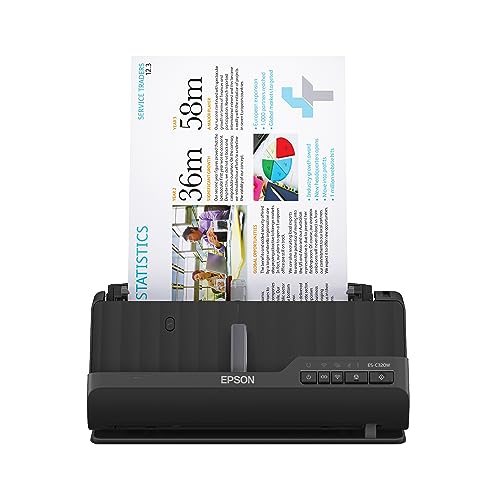
- Wi-Fi scanning to devices and cloud accounts
- 20-page ADF with single-pass duplex scanning
- Compact design supports paper, cards, and passports
Best For: Wireless scanning in home offices and small workspaces
Best Overall – Epson WorkForce ES-400 II
The Epson WorkForce ES-400 II is a strong document scanner with ADF for busy home offices and small businesses. Its 50-sheet feeder, duplex scanning, OCR, and automatic image adjustments help streamline everyday paperwork.
Best For: Users who want efficient wired scanning with strong file-management tools.
Pros:
- 50-sheet ADF supports scanning stacks of documents.
- Duplex scanning captures both sides efficiently.
- OCR can create searchable PDFs and editable Word or Excel files.
- Double-feed detection and skew correction help protect scanning accuracy.
Cons:
- Wireless connectivity is not listed in the supplied specifications.
- Cloud and email workflows depend on the included software and setup.
With ScanSmart software, TWAIN support, and cloud-sharing options, the ES-400 II is a practical choice for organized document workflows without requiring a large office footprint.
Best Space-Saving Design – Canon imageFORMULA DR-C225 II
The Canon imageFORMULA DR-C225 II is a compact document scanner with ADF designed for organized desktop use. Its upright design, 30-sheet feeder, and duplex scanning make it useful when workspace is limited.
Best For: Buyers who need a compact scanner that handles varied document types.
Pros:
- Space-saving upright design with top feed and top eject.
- Scans both sides at up to 25 pages per minute.
- Handles receipts, photos, business cards, plastic cards, and thick or thin documents.
- Includes cloud-scanning options and bundled PDF software.
Cons:
- The 30-sheet ADF is smaller than those on the Epson models listed here.
- Its supplied connection is USB rather than wireless.
The DR-C225 II balances a small footprint with broad media compatibility, making it a sensible option for desks that need document digitization without sacrificing flexibility.
Best Wireless Upgrade – Epson WorkForce ES-590W
The Epson WorkForce ES-590W is a high-capacity document scanner with ADF for users who want fast, flexible workflows. It combines a 100-sheet feeder, 45-ppm duplex scanning, Wi-Fi, and a color touchscreen for computer-free scanning options.
Best For: High-volume users who want wireless scanning and direct touchscreen controls.
Pros:
- Large 100-sheet ADF supports bigger document batches.
- Duplex scanning reaches up to 45 pages per minute.
- Wi-Fi supports scanning from a computer or mobile device.
- Touchscreen can send scans to email, cloud storage, or a USB flash drive.
Cons:
- Its one-year limited warranty is shorter than the Canon DR-C225 II’s listed three-year warranty.
- Wireless and touchscreen features may be more than casual users need.
For demanding workflows, the ES-590W stands out through its larger feeder, higher listed speed, and versatile wireless and computer-free scanning features.
Best Easy-Setup Option – Canon imageFORMULA R40II
The Canon imageFORMULA R40II is a straightforward document scanner with ADF for users who prioritize simple setup. It connects by USB-C, scans both sides at up to 45 pages per minute, and includes a 60-sheet feeder for routine office batches.
Best For: Windows and macOS users seeking simple wired scanning with one-touch operation.
Pros:
- 60-sheet ADF supports everyday document batches.
- Duplex scanning reaches up to 45 pages per minute.
- Handles receipts, business cards, reports, contracts, and long documents.
- Includes Canon CaptureOnTouch software and USB-C setup.
Cons:
- Does not support TWAIN or ISIS drivers according to the supplied notes.
- Designed exclusively for the included CaptureOnTouch software.
- Wireless connectivity is not listed.
The R40II offers capable speed and useful media handling in a simple package, but its software and driver limitations make it better suited to buyers comfortable with Canon’s included workflow.
Best for Easy Setup – ScanSnap iX2500
The ScanSnap iX2500 is a versatile document scanner with ADF for busy home offices and small businesses. Its 45-page-per-minute duplex scanning, 100-sheet feeder, touchscreen, and wireless or USB connectivity make it well suited to frequent scanning and flexible workflows.
Best For: Users who want a fast, connected scanner with customizable profiles and broad cloud support.
Pros:
- Scans both sides at up to 45 pages per minute.
- 100-sheet ADF, Wi-Fi 6, USB-C, and touchscreen controls.
- Automatic optimization, naming, sorting, and cloud-service support.
- Skew detection, multi-feed sensing, and a brake roller help reduce paper problems.
Cons:
- May offer more features than occasional users need.
- Requires compatible modern operating systems and devices.
Choose the iX2500 if speed, wireless flexibility, and streamlined document organization matter most. Its customizable profiles and direct device or cloud workflows make it a strong all-around option.
Best Plug-and-Scan – Canon imageFORMULA R30
The Canon imageFORMULA R30 is a straightforward document scanner with ADF for users who value easy setup. It connects by USB, uses embedded software without installation, and scans both sides of documents at up to 25 pages per minute.
Best For: Windows users who want a simple USB scanner for mixed document batches.
Pros:
- Plug-and-scan operation with software embedded in the device.
- Duplex scanning at up to 25 pages per minute.
- 60-sheet ADF handles documents, invoices, contracts, and business cards.
- Converts paper documents into searchable digital formats.
Cons:
- USB connectivity only; no wireless scanning.
- TWAIN and ISIS drivers are not supported.
- Listed system requirements specify Windows 7.
The R30 is a practical choice when minimal setup is more important than wireless features or top scanning speed. Its embedded software and mixed-batch handling keep routine office scanning simple.
Best Wireless Workflow – Epson ES-580W
The Epson WorkForce ES-580W is a wireless document scanner with ADF designed for convenient home and office workflows. Its 100-sheet feeder, 35-page-per-minute duplex scanning, touchscreen, and direct-to-cloud or USB options reduce the need for a connected computer.
Best For: Households and offices that want wireless, computer-free scanning with OCR and cloud destinations.
Pros:
- 100-sheet ADF supports various paper types and sizes.
- Scans up to 35 pages per minute with single-step duplex capture.
- 4.3-inch touchscreen enables direct scanning to USB, email, and cloud services.
- OCR, blank-page removal, auto cropping, background removal, and skew correction.
Cons:
- Wireless connectivity is emphasized rather than USB connectivity.
- Listed compatibility varies by operating system and software feature.
The ES-580W stands out for flexible destination options and built-in organization tools. It is especially useful when you want to scan directly to cloud storage or create searchable files without relying on a computer.
Compact Duplex Pick – Epson WorkForce ES-C220
The Epson WorkForce ES-C220 is a practical document scanner with ADF for small workspaces. Its 20-page feeder, single-pass duplex scanning, and compact footprint make it well suited to everyday batches without taking over your desk.
Best For: Home offices and users who want a compact USB scanner for routine two-sided documents.
Pros:
- Compact design saves 60% of desk space.
- Scans both sides in one pass at up to 30 ppm/60 ipm.
- 20-page ADF handles paper of varying sizes.
- Supports documents, cards, and passports with its flexible scan path.
Cons:
- USB connectivity only; it does not offer wireless scanning.
- The ADF capacity is smaller than the 100-page capacity of the DS-530X.
The ES-C220 is a strong space-saving choice when you need duplex performance and useful image adjustments, including blank-page deletion, skew correction, and OCR assistance through Epson ScanSmart.
High-Volume Workhorse – Epson DS-530X
The Epson DS-530X is a document scanner with ADF built for larger batches and demanding office workflows. Its 100-page feeder, 45 ppm duplex speed, and TWAIN and ISIS drivers make it a capable fit for document-management environments.
Best For: Offices scanning high volumes of paperwork or integrating a scanner with document-management systems.
Pros:
- Scans at up to 45 ppm/90 ipm with single-pass duplex scanning.
- Large 100-page ADF supports bigger batches.
- TWAIN and ISIS drivers support broad software integration.
- Handles extra-long pages, folded documents up to 11 x 17 inches, and ID cards.
Cons:
- Larger and heavier than the compact ES-C220 and ES-C320W.
- USB connectivity only; wireless scanning is not listed.
- Its higher-volume capabilities may be more than needed for occasional home scanning.
Choose the DS-530X when feeder capacity, speed, reliability features, and integration matter more than portability. Ultrasonic double-feed detection and blank-page removal add practical safeguards for regular batch work.
Wireless Space Saver – Epson WorkForce ES-C320W
The Epson WorkForce ES-C320W is a wireless document scanner with ADF for users who want flexible scanning from a compact desktop unit. Its 20-page feeder and single-pass duplex scanning suit routine batches, while Wi-Fi supports scans to computers, mobile devices, and cloud accounts.
Best For: Home offices and small teams that want compact duplex scanning with wireless convenience.
Pros:
- Wireless scanning works with smartphones, tablets, computers, and cloud storage.
- Compact design saves 60% of desk space.
- Captures both sides in one pass at up to 30 pages per minute.
- Scans standard paper, cards, and passports.
Cons:
- The 20-page ADF is intended for smaller batches.
- Its listed duplex speed is lower than the DS-530X’s 45 ppm rating.
The ES-C320W adds meaningful connectivity flexibility without giving up the compact design of a desktop scanner. It is a particularly convenient choice when documents need to reach multiple devices or cloud destinations.
How We Picked the Best Document Scanner with Adf
We focused on desktop document scanners with automatic document feeders and duplex scanning, since these features make multi-page jobs faster and reduce manual page turning. The selection includes models from Epson, Canon, and ScanSnap across several use cases, including compact workspaces, wireless offices, cloud-based workflows, and higher-volume scanning.
We also considered practical specifications such as rated speed, ADF capacity, document-size flexibility, connectivity, software convenience, and support for common operating systems. A high page-per-minute rating is useful, but it matters less if the scanner is difficult to configure or lacks the workflow tools you need.
Quick Comparison
| Best For | What to Prioritize | Models to Consider |
|---|---|---|
| Home offices and everyday paperwork | Simple setup, duplex scanning, dependable software | Epson ES-400 II, Canon R40II |
| Wireless and cloud workflows | Wi-Fi, mobile access, direct cloud destinations | Epson ES-590W, ES-580W, ES-C320W, ScanSnap iX2500 |
| Compact desks | Small footprint and a capable ADF | Epson ES-C220, Epson ES-C320W, Canon DR-C225 II |
| Higher-volume document jobs | Fast scanning, larger feeder capacity, business connectivity | Epson DS-530X, Epson ES-590W |
| Minimal software setup | Plug-and-scan operation | Canon R30 |
Key Buying Factors for a Document Scanner with Adf
ADF Capacity and Duplex Scanning
A larger feeder lets you process more pages before reloading. Duplex scanning captures both sides in one pass, which is especially valuable for contracts, forms, and mixed office records. For occasional home use, a smaller 20-page feeder may be sufficient; frequent batch scanning benefits from a larger capacity.
Speed and Workload
Look at the rated pages per minute, but also consider whether your documents are single- or double-sided. Faster models are worthwhile for invoices, archived files, and recurring administrative work. Compact scanners trade some speed for portability and easier placement.
Connectivity and Software
USB is reliable and usually simplest for one computer. Wi-Fi is more flexible for shared offices, laptops, and mobile workflows. Cloud-ready software can send files to online storage or business services, while TWAIN and ISIS support may be important for established office systems.
Document Handling and Output
Check whether the scanner supports the paper sizes and thicknesses you use, including receipts, business cards, long documents, or folded pages. Searchable PDF creation, automatic image correction, blank-page removal, and text recognition can save substantial cleanup time.
Who Should Buy Which Document Scanner with Adf?
Choose a compact Epson ES-C220 or ES-C320W when desk space is limited and your scanning volume is modest. The Canon R30 is a practical choice when straightforward plug-and-scan operation matters more than advanced configuration. For a general home office, the Epson ES-400 II and Canon R40II offer a balanced mix of speed, duplex handling, and ease of use.
Choose a wireless model such as the Epson ES-590W, ES-580W, ES-C320W, or ScanSnap iX2500 if you scan from multiple computers or want a less cable-dependent workflow. For sustained business workloads, the Epson DS-530X or ES-590W is better suited to faster batches and larger document queues.