
Legal teams need scanners that handle contracts, pleadings, exhibits, correspondence, and mixed paper sizes without slowing down document workflows. The right model can improve searchable archives, simplify sharing, and reduce manual filing.
We compared 10 leading options across speed, duplex performance, portability, connectivity, feeding capacity, and ease of use to help law firms, attorneys, and legal departments choose with confidence.
Best 10 Document Scanner for Legal Documents Picks for 2026
Best Overall

- 50-sheet duplex ADF for batch scanning
- OCR creates searchable PDFs and editable files
- Double-feed detection and skew correction
Best For: Law offices scanning routine batches of case files
Best Portable
Brother DS-640 Compact Scanner

- Lightweight, compact design for mobile use
- USB-powered without a wall outlet
- OCR and image-enhancement software included
Best For: Mobile legal professionals scanning one document at a time
Best Wireless

- 100-sheet ADF for larger batches
- 35 ppm duplex scanning
- Wireless, touchscreen, and computer-free scanning
Best For: Legal offices sharing scans across devices and cloud services
Best Premium Workflow
ScanSnap iX2500 Wireless Scanner

- 45 ppm duplex scanning with 100-sheet feeder
- Wi-Fi 6 and USB-C connectivity
- Custom profiles and automatic file organization
Best For: Busy firms needing fast, repeatable scanning workflows
Best High-Volume Choice
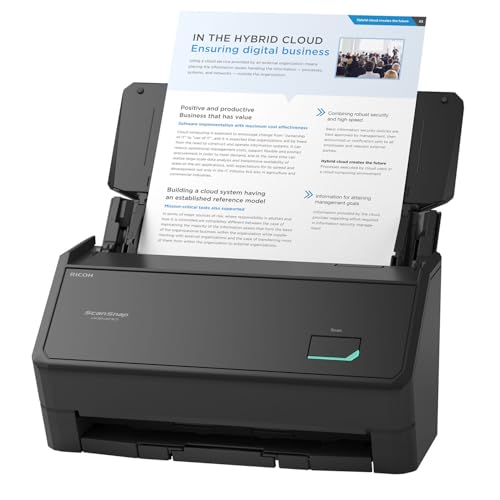
- Scans up to 45 pages per minute
- 100-sheet feeder for larger batches
- Automatic cleanup and deskewing
Best For: High-volume office scanning and organized case-file workflows
Best for Comfort

- Lightweight, compact mobile design
- USB-powered with no battery required
- OCR creates searchable PDFs and editable files
Best For: Single-page legal document scanning on the go
Best Compact Pick

- Up to 30 ppm duplex scanning
- USB and Wi-Fi connectivity
- Compact design for small desks
Best For: Small legal offices and home workspaces
Best Simple Pick

- Up to 45 ppm duplex scanning
- 100-page automatic document feeder
- 4.3-inch touchscreen with Wi-Fi
Best For: Busy firms scanning large document batches
Best Overall – Epson WorkForce ES-400 II
The Epson WorkForce ES-400 II is a practical document scanner for legal documents when you need to process stacks of case files efficiently. Its 50-sheet automatic document feeder, duplex scanning, OCR support, and double-feed detection make it well suited to routine office digitization.
Best For: Law offices and home offices scanning batches of legal paperwork to searchable PDFs or editable files.
Pros:
- 50-sheet ADF and duplex scanning help speed through multi-page files.
- OCR can create searchable PDFs and convert scans to Word or Excel.
- Ultrasonic double-feed detection and skew correction help protect scan accuracy.
- Supports email and popular cloud storage services through Epson ScanSmart.
Cons:
- USB is the listed connection type, so it is less flexible than wireless models.
- Its 300 dpi resolution is geared toward standard documents rather than specialized archival work.
Choose this model for dependable, straightforward batch scanning and document-management integration. It offers the core features most legal-document workflows need without adding wireless hardware.
Best Portable – Brother DS-640 Compact Scanner
The Brother DS-640 is a compact document scanner for legal documents when portability matters more than high-volume automation. It scans at up to 16 pages per minute, connects through USB, and can run from a computer through its included micro USB 3.0 cable.
Best For: Attorneys, investigators, and mobile professionals who need to capture individual documents, receipts, cards, or forms away from the office.
Pros:
- Lightweight design is about 1.5 pounds and less than a foot long.
- USB-powered operation works where there is no wall outlet.
- Supports Windows, Mac, and Linux, plus multiple scan-to destinations and OCR.
- Image tools include background removal, text enhancement, and automatic color adjustment.
Cons:
- Its one-sheet capacity is slower for large legal-file batches.
- USB connectivity requires a computer or compatible host device.
- Its listed 300 dpi resolution is intended for everyday document capture.
The DS-640 is a useful second scanner for courthouse visits, client meetings, or fieldwork. For a permanent office station processing large stacks, a duplex desktop scanner with an ADF will be more efficient.
Best Wireless – Epson WorkForce ES-580W
The Epson WorkForce ES-580W is a flexible document scanner for legal documents, combining wireless connectivity with a 100-sheet feeder and duplex capture. Its touchscreen and computer-free options make it convenient for offices that need to send files directly to USB, email, or cloud storage.
Best For: Busy legal offices that need high-capacity scanning and flexible delivery to computers, mobile devices, USB drives, or cloud accounts.
Pros:
- 100-sheet ADF handles larger document batches than smaller desktop models.
- Scans up to 35 pages per minute and captures both sides in one pass.
- Wireless operation and a 4.3-inch touchscreen support computer-free workflows.
- OCR creates searchable PDFs and editable Word or Excel files.
Cons:
- Its larger feature set may be more than needed for occasional scanning.
- The supplied specifications list a high 580-watt wattage figure, which may warrant checking operating requirements.
This is a strong choice when legal-document intake involves multiple users or destinations. The large feeder, duplex speed, and wireless workflow can reduce the steps between paper files and organized digital records.
Best Premium Workflow – ScanSnap iX2500 Wireless Scanner
The ScanSnap iX2500 is a premium document scanner for legal documents that emphasizes streamlined organization and connectivity. It combines 45-page-per-minute duplex scanning, a 100-sheet feeder, Wi-Fi 6, USB-C, customizable profiles, and automatic file optimization.
Best For: Professional offices that want fast scanning with personalized workflows for sending, naming, and sorting documents.
Pros:
- 45 ppm double-sided scanning and a 100-sheet feeder support substantial workloads.
- Wi-Fi 6 and USB-C provide flexible connection options.
- Touchscreen profiles and Quick Menu shortcuts can simplify repeat workflows.
- Multi-feed and skew detection help reduce jams, paper damage, and data loss.
Cons:
- The 7.7-pound desktop design is less portable than compact mobile scanners.
- Its advanced workflow features may be unnecessary for occasional users.
- Compatibility requirements vary by operating system and device.
The iX2500 stands out for firms that value speed and repeatable document organization. Its combination of a fast feeder, wireless or USB operation, and customizable profiles makes it a capable central scanner for a busy practice.
Best Plug-and-Scan Pick – Canon imageFORMULA R30
For a document scanner for legal documents, the Canon imageFORMULA R30 is a practical choice when you want quick duplex scanning without installing separate software. Its 60-sheet feeder and ability to handle contracts, invoices, business cards, and mixed document batches make it well suited to routine office filing.
Best For: Offices that want simple USB scanning for contracts and other mixed paperwork.
Pros:
- Scans both sides simultaneously at up to 25 pages per minute.
- 60-sheet automatic document feeder supports individual and mixed batches.
- Embedded software requires no installation and updates automatically.
- 600 dpi resolution supports searchable digital document workflows.
Cons:
- USB connection is the listed connectivity option.
- TWAIN and ISIS drivers are not supported.
- Plug-and-scan setup is specified for Windows 7 or later requirements.
The R30 emphasizes straightforward operation and dependable batch handling rather than broad driver compatibility. It is a strong fit for legal offices that value a simple setup and frequent duplex scanning.
Best High-Volume Choice – ScanSnap iX2400
The ScanSnap iX2400 is a strong document scanner for legal documents when speed and automated image cleanup matter. It scans up to 45 pages per minute, includes a 100-sheet feeder, and can automatically remove blank pages, correct skew, and rotate pages.
Best For: Busy legal offices processing large batches of documents, receipts, IDs, and business cards.
Pros:
- One-touch scanning reaches speeds of up to 45 pages per minute.
- 100-sheet feeder supports larger scanning jobs.
- Automatically detects size and color depth, removes streaks and blank pages, and corrects skew.
- ScanSnap Home helps manage and edit scanned documents and other media.
Cons:
- Uses a wired USB connection rather than a listed wireless option.
- Its stated minimum requirements begin with Windows 10 or macOS Monterey 12.
- Its 7.1-pound weight is less portable than a compact mobile scanner.
With the fastest listed throughput and largest feeder in this group, the iX2400 is geared toward productivity. Its automatic cleanup features can also reduce routine preparation of scanned case files.
Best for Comfort – Epson WorkForce ES-50
The Epson WorkForce ES-50 is a practical document scanner for legal documents when portability is more important than batch capacity. This lightweight, USB-powered model scans single sheets, receipts, ID cards, and documents up to 8.5 by 72 inches, making it useful for mobile work.
Best For: Attorneys and staff who scan individual documents while traveling or working away from the office.
Pros:
- Compact 1.3-inch profile and 9.44-ounce weight suit mobile use.
- USB-powered operation requires no batteries or external power supply.
- OCR can create searchable PDFs and editable Word or Excel files.
- Includes a TWAIN driver and supports Windows and Mac systems.
Cons:
- Single-sheet capacity is less suitable for large case-file batches.
- Scans one page in approximately 5.5 seconds, slower than the desktop models listed here.
- Requires manually inserting sheets through its automatic feeding mode.
The ES-50 trades desktop throughput for exceptional portability and useful OCR features. It is a sensible companion scanner for capturing documents, receipts, and IDs during client visits or travel.
Best Compact Pick – ScanSnap iX1300
If you need a document scanner for legal documents without giving up much desk space, the ScanSnap iX1300 is a flexible choice. Its compact design, duplex scanning, automatic image adjustments, and USB or Wi-Fi connectivity suit small offices and home workspaces.
Best For: Legal professionals who want a compact scanner for documents, cards, receipts, and occasional thicker media.
Pros:
- Space-saving design measures just 4.5 inches deep by 11.7 inches wide.
- Scans both sides at up to 30 ppm with automatic de-skew, color optimization, and blank-page removal.
- Supports USB, Wi-Fi, mobile devices, cloud services, and computer-free scanning.
- Handles documents, photos, receipts, business cards, and plastic cards.
Cons:
- The 20-sheet standard capacity is better suited to small or moderate batches than large case files.
- Its 4.4-pound design is compact, but not as travel-oriented as a dedicated portable scanner.
The iX1300 balances office convenience and scan quality particularly well. It is a practical fit for firms that need searchable, organized digital records while keeping the scanner unobtrusive.
Best Heavy-Duty Pick – Canon imageFORMULA R10
The Canon imageFORMULA R10 is a portable document scanner for legal documents when mobility and simple setup matter. It is USB powered, includes a 20-sheet feeder, and can scan both sides of a document in a single pass.
Best For: Mobile legal professionals, remote offices, and users who scan moderate amounts of paperwork from different locations.
Pros:
- Lightweight, compact design is convenient for home offices, classrooms, and remote work.
- Duplex scanning reaches up to 12 pages per minute.
- Handles legal documents, receipts, business cards, and plastic or embossed cards.
- Built-in software supports editing, straightening, trimming, and custom scan destinations.
Cons:
- USB is the listed connection type, so it does not offer wireless scanning.
- The suggested daily volume of 500 scans is aimed at moderate workloads rather than high-volume production.
- The product is not intended for photographs on photo paper or photographic media.
For attorneys and staff who regularly work away from a permanent desk, the R10 emphasizes portability over speed. Its straightforward USB-powered design makes it easy to add scanning wherever a Windows or Mac computer is available.
Best Simple Pick – Epson WorkForce ES-590W
For a busy practice processing substantial case files, the Epson WorkForce ES-590W is a high-capacity document scanner for legal documents. It combines up to 45 ppm duplex scanning, a 100-page automatic document feeder, wireless connectivity, and computer-free scan destinations.
Best For: Law firms and records teams that routinely digitize larger batches of paperwork.
Pros:
- Scans both sides in a single pass at up to 45 ppm.
- 100-page automatic document feeder supports larger scanning batches.
- 4.3-inch color touchscreen enables scanning to email, cloud storage, or a USB flash drive without a computer.
- Offers USB and Wi-Fi connectivity, plus AI-ready document processing features.
Cons:
- At 8.2 pounds and 6.7 inches deep, it requires more dedicated desk space than the portable options.
- Its listed minimum system requirements specify Windows, which may limit compatibility for some Mac users.
- Its 18-watt power rating is higher than the Canon R10’s listed consumption.
The ES-590W is the strongest choice here for throughput and batch handling. Its larger feeder, fast duplex capture, and touchscreen workflows can reduce hands-on time when converting paper-heavy legal records.
How We Picked the Best Document Scanner for Legal Documents
We evaluated these scanners for the demands of legal work rather than casual home scanning. Important considerations included automatic document feeder performance, reliable two-sided scanning, optical resolution, paper-handling flexibility, connection options, and compatibility with common Windows and Mac workflows.
We also considered whether each scanner suits a high-volume office, a small practice, a courtroom bag, or a home office. Features such as wireless connectivity, one-touch operation, USB power, searchable-document workflows, and minimal setup can make a meaningful difference when staff scan files repeatedly throughout the day.
Quick Comparison
| Best For | Recommended Models | Why They Stand Out |
|---|---|---|
| High-volume office scanning | Epson ES-400 II, ES-580W, ES-590W | Fast duplex scanning and desktop document feeders |
| Wireless document workflows | Epson ES-580W, ES-590W, ScanSnap iX2500, iX1300 | Convenient network or wireless connectivity |
| Portable legal work | Brother DS-640, Epson ES-50, Canon R10 | Compact designs for travel and smaller desks |
| Simple plug-and-scan setup | Canon R30 | Office-friendly operation with minimal installation |
| One-touch scanning | ScanSnap iX2400 | Streamlined controls for repeat workflows |
Key Buying Factors for a Document Scanner for Legal Documents
Duplex Scanning and Feeder Reliability
Two-sided scanning is essential for contracts, discovery materials, and case files. A dependable automatic document feeder helps process multi-page documents efficiently, while good paper handling reduces interruptions caused by jams or misfeeds.
Speed and Duty Cycle
Choose a fast desktop scanner if you regularly digitize client files, invoices, or discovery batches. Portable scanners are better for occasional use, court preparation, or scanning a few pages at a time. Rated speeds are useful for comparison, but real-world performance depends on resolution, paper condition, and workflow software.
Connectivity and Software
USB is dependable and easy to secure, while Wi-Fi can support shared office workflows and scanning from multiple devices. Check compatibility with your operating system, cloud destinations, document-management platform, and OCR tools before buying.
Paper Size, Resolution, and Security
Most legal paperwork is letter or legal size, but confirm the scanner supports the documents you handle most often. Optical resolution around 300 dpi is generally sufficient for searchable records and readable text. For confidential case materials, also consider where files are stored, who can access connected services, and whether your office requires a local-only workflow.
Who Should Buy Which Document Scanner for Legal Documents?
Large firms and busy legal departments should prioritize the Epson ES-590W, ES-580W, or ES-400 II for faster batch scanning and desktop productivity. The Canon R30 is a practical choice for offices that value straightforward, low-friction operation.
Small practices and home offices may prefer the ScanSnap iX2400 or iX2500 for simplified daily scanning, while the ScanSnap iX1300 offers a more compact wireless option. Attorneys who work away from the office should look at the Brother DS-640, Epson ES-50, or Canon R10, especially when USB portability matters more than high-volume throughput.
Before purchasing, estimate your typical daily page count, identify whether wireless scanning is genuinely useful, and verify legal-size support and software compatibility. Matching the scanner to your workload will matter more than choosing the fastest specification on paper.