
The best document scanner under $300 can make paper-heavy work faster without requiring a large office machine. The models in this roundup range from compact mobile scanners to faster desktop units with automatic document feeders and duplex scanning.
We compared connectivity, scanning speed, paper handling, portability, setup, and everyday usability to help you choose a scanner that fits your workload and workspace.
Best 10 Document Scanner Under 300 Picks for 2026
Wireless Space-Saver

- USB and Wi-Fi connectivity
- Up to 30 ppm duplex scanning
- Compact design for small desks
Best For: Wireless home-office and mixed-media scanning
Portable Pick

- Weighs only 9.44 ounces
- USB-powered mobile operation
- OCR for searchable and editable files
Best For: Travelers and single-sheet receipt or document scanning
Workflow Specialist

- 30 ppm duplex scanning
- 50-sheet automatic feeder
- Barcode naming and 255 scan profiles
Best For: Repeatable office workflows and organized batch scanning
Best Desktop Workflow Scanner
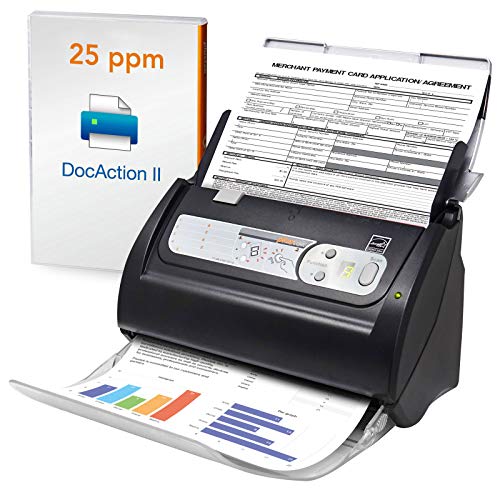
- 50-sheet standard capacity
- Up to 255 customizable scan settings
- OCR and barcode-based document organization
Best For: Windows-based office document workflows
Best Pocket-Size Mobile Scanner

- Up to 16 pages per minute in color or black-and-white
- Micro USB-powered and about one pound
- Supports Windows, Mac, and Linux
Best For: Travelers and single-page mobile scanning
Portable Duplex Pick

- Two-sided scanning at up to 8 ppm
- Slim, lightweight design for travel
- Cloud, PDF, JPG, Windows, and Mac support
Best For: Portable personal scanning and mixed documents
Ultra-Lightweight Choice

- Weighs less than 1 lb
- USB bus-powered operation
- Automatic scanning with built-in OCR
Best For: Traveling users and searchable document workflows
Fast Simplex Option

- Up to 15 ppm one-sided scanning
- USB-powered compact design
- WorkScan software for editing and cleanup
Best For: Light to medium home-office scanning batches
Office-Ready Choice – Canon imageFORMULA R30
If you need a document scanner under 300 for regular office paperwork, the Canon imageFORMULA R30 is built for convenient batch scanning. Its 60-sheet feeder, duplex scanning, and plug-and-scan setup make it practical for invoices, contracts, business cards, and mixed document batches.
Best For: Home offices and small businesses scanning frequent batches of standard documents.
Pros:
- Scans both sides simultaneously at up to 25 pages per minute.
- 60-sheet automatic document feeder supports mixed paper batches.
- Embedded software requires no installation and updates automatically.
- 600 dpi resolution supports detailed document captures.
Cons:
- USB connectivity only; wireless scanning is not listed.
- TWAIN and ISIS drivers are not supported.
- Requires a Windows 7-or-newer computer.
The R30 emphasizes straightforward office productivity rather than portability. It is a strong fit when feeder capacity and simple USB operation matter more than mobile or wireless features.
Wireless Space-Saver – ScanSnap iX1300
For shoppers comparing a document scanner under 300 that can fit into a compact workspace, the ScanSnap iX1300 combines a small footprint with USB and Wi-Fi connectivity. It handles documents, receipts, photos, cards, and other media while offering automated image adjustments and multiple scan destinations.
Best For: Flexible home offices, compact desks, and users who want wireless or computer-free scanning options.
Pros:
- Supports USB and Wi-Fi connections to computers, mobile devices, and cloud services.
- Duplex scanning reaches up to 30 pages per minute.
- Automatic de-skew, color optimization, and blank-page removal simplify cleanup.
- Compact design measures 4.5 inches deep by 11.7 inches wide by 3.3 inches high.
Cons:
- The 20-sheet feeder is smaller than those on several office-focused models.
- Compatibility requirements vary across Windows, macOS, iOS, Android, and ChromeOS.
- Its feature set may be more than needed for occasional single-page scanning.
The iX1300 is the most connectivity-focused option in this group. Its compact design and wireless workflow make it especially useful when desk space and flexible destinations are priorities.
Portable Pick – Epson WorkForce ES-50
The Epson WorkForce ES-50 is a practical document scanner under 300 for mobile workers and light-duty digitizing. This lightweight, USB-powered model scans single sheets, receipts, ID cards, and long documents without requiring batteries or an external power supply.
Best For: Travel, mobile work, receipts, ID cards, and users who scan one sheet at a time.
Pros:
- Lightweight design weighs 9.44 ounces.
- USB power simplifies setup on the go.
- Scans documents up to 8.5 by 72 inches, plus receipts and ID cards.
- OCR can create searchable PDFs and editable Word and Excel files.
Cons:
- Single-sheet capacity is less convenient for large batches.
- Scanning speed is listed at up to 5.5 seconds per page.
- USB connectivity is the only listed connection type.
The ES-50 prioritizes portability over throughput. Choose it when a compact scanner for occasional documents and receipts is more valuable than an automatic feeder or duplex workflow.
Workflow Specialist – Plustek PS188
The Plustek PS188 is a compelling document scanner under 300 for users who want fast duplex scanning and configurable document workflows. Its 50-sheet feeder, barcode file naming, full-text search engine, and customizable scan profiles are aimed at organized, repeatable office processing.
Best For: Small offices managing recurring document batches, searchable files, and barcode-based organization.
Pros:
- Duplex scanning reaches up to 30 pages per minute.
- 50-sheet automatic document feeder handles cards through documents up to 200 inches long.
- Supports up to 255 customizable scan profiles.
- Barcode recognition can save scans using the barcode number as the filename.
Cons:
- USB is the only listed connection type.
- Compatibility is listed for Windows 7, 8, 10, and 11.
- Its workflow features may be unnecessary for basic occasional scanning.
The PS188 stands out for document-management features rather than minimal setup. It is a good match for users who scan repeatedly and want profiles, searchable content, and automated file naming.
Best Portable Duplex Scanner – Canon imageFORMULA R10
If you need a document scanner under 300 for mobile work, the Canon imageFORMULA R10 combines a compact design with duplex scanning and a 20-sheet automatic feeder. It connects by USB and works with Windows and Mac computers.
Best For: Remote workers, home offices, classrooms, and users who need portable two-sided scanning.
Pros:
- Scans both sides simultaneously at up to 12 pages per minute.
- 20-sheet automatic document feeder handles receipts, cards, reports, and legal documents.
- USB-powered design is lightweight and easy to move.
- Built-in scanning software supports editing, organization, and custom scan destinations.
Cons:
- Not intended for scanning photographs on photo paper or photographic media.
- USB connection is the listed connection type, with no wireless feature specified.
The R10 is a practical choice when portability matters but you still want an automatic feeder and duplex capability. Its 500-scan suggested daily volume suits regular personal or small-office scanning.
Best Desktop Workflow Scanner – Plustek PS186
For shoppers seeking a document scanner under 300 for organized desktop workflows, the Plustek PS186 emphasizes customizable one-touch scanning and automatic image correction. It connects by USB and includes OCR for searchable PDF files.
Best For: Windows users managing recurring paperwork, searchable archives, and barcode-organized documents.
Pros:
- Stores up to 255 customized favorite scan settings for single-touch access.
- 50-sheet standard capacity supports larger batches than the portable models listed here.
- OCR converts paper documents into searchable, editable files.
- Automatic rotate, crop, deskew, and blank-page removal help streamline processing.
Cons:
- Supplied system requirements list Windows 7/8/10 rather than Mac or Linux support.
- At 3.7 pounds, it is less travel-friendly than a compact mobile scanner.
- The listed power consumption is 18 watts.
The PS186 is best suited to a fixed workspace where repeatable settings and batch handling are more important than portability. Its barcode and FTP/NAS features add useful options for structured document management.
Best Pocket-Size Mobile Scanner – Brother DS-640
The Brother DS-640 is a strong document scanner under 300 for users who prioritize size and flexibility. It weighs about one pound, runs from a micro USB 3.0 cable, and scans color or black-and-white documents at up to 16 pages per minute.
Best For: Travelers, students, mobile professionals, and anyone scanning receipts or cards without an outlet.
Pros:
- Compact design is less than one foot long and about 1.5 inches thick.
- USB-powered operation works from a PC or laptop without a separate outlet.
- Scans color and black-and-white documents at up to 16 pages per minute.
- Supports Windows, Mac, and Linux, with scan-to destinations including cloud services, email, and OCR.
Cons:
- Its single-sheet capacity requires feeding documents one at a time.
- The listed resolution is 300 dpi, lower than the 600 dpi specifications of the other options.
- Some image features, including rotation, are identified as PC-only.
The DS-640 makes the most sense for occasional, on-the-go scanning rather than large batches. Its broad operating-system support and low-power USB design make it especially convenient for flexible mobile setups.
Portable Duplex Pick – Canon imageFORMULA P-208II
If you need a document scanner under 300 for home, travel, or occasional office use, the Canon imageFORMULA P-208II combines a slim design with useful everyday versatility. It scans receipts, photos, business cards, and longer documents, while duplex scanning captures both sides in a single pass.
Best For: Travelers and home users who want portable two-sided scanning with cloud-storage support.
Pros:
- Scans both sides simultaneously at up to 8 pages per minute.
- Compact, lightweight design fits easily in a briefcase or bag.
- Supports searchable PDF, JPG, and direct scanning to services such as Dropbox and Google Drive.
- Works with Windows and Mac and includes bundled scanning software.
Cons:
- Its standard sheet capacity is limited to one sheet.
- USB connection is required.
- Maximum speed is more suited to personal workloads than large batches.
The P-208II is a practical choice when portability and duplex scanning matter more than high-volume throughput. Its broad media support and cloud options make it especially convenient for organizing mixed paperwork on the go.
Ultra-Lightweight Choice – Plustek S410 Plus
The Plustek S410 Plus is a strong document scanner under 300 for users who prioritize minimal size and simple computer-powered operation. Its sheet-fed design handles documents, business cards, plastic ID cards, invoices, and receipts, while built-in OCR helps create searchable and editable files.
Best For: Mobile users who want an ultra-light scanner with automatic processing and OCR features.
Pros:
- Weighs less than 1 lb and has a slim, travel-friendly profile.
- Runs from a USB connection without batteries or an external power source.
- Automatically processes scans and saves them to designated folders.
- Plustek DocAction supports OCR and saving to local, FTP, and shared folders.
Cons:
- USB operation requires a compatible computer connection.
- Windows 7 or later is listed as the minimum system requirement.
- Its standard sheet capacity is one sheet.
Choose the S410 Plus if easy transport and streamlined file handling are your priorities. Its automatic workflow and OCR support add useful productivity features to a particularly compact scanner.
Fast Simplex Option – HP HPPS100 Mobile Scanner
For shoppers comparing a document scanner under 300, the HP HPPS100 stands out for its compact size and 15-page-per-minute simplex scanning. It is designed for single-sheet jobs involving invoices, letters, receipts, photos, and business cards, with USB power and software for editing and file organization.
Best For: Home offices, commuters, and small businesses handling light to medium one-sided scanning batches.
Pros:
- Scans at up to 15 pages per minute in black and white or color.
- Very lightweight, weighing 3 ounces according to the supplied details.
- Supports documents from 2 x 2.9 inches up to 8.5 x 14 inches.
- HP WorkScan includes auto-scan, size detection, cropping, cleanup, and destination saving tools.
Cons:
- Simplex scanning captures one side at a time.
- USB 2.0 connection and power are required.
- The supplied specifications list 300 dpi, despite the product description citing 1200 dpi resolution.
The HPPS100 is well suited to users who want speed in a small footprint and do not need automatic two-sided scanning. Its software adds practical controls for cleaning up and organizing everyday scans.
How We Picked the Best Document Scanner Under 300
We focused on scanners that offer practical value for home offices, students, remote workers, and small businesses. Our comparison considered advertised scan speed, single- or double-sided scanning, automatic document feeder capacity, USB or wireless connectivity, portability, software and setup requirements, and compatibility with common documents such as invoices, forms, receipts, and contracts.
Because scanning needs vary widely, this list includes both desktop models designed for batches and compact sheet-fed scanners intended for travel or occasional use. We also considered whether each scanner’s design makes it easy to store, transport, and operate regularly.
Quick Comparison
- Best for plug-and-scan convenience: Canon imageFORMULA R30
- Best for wireless desktop scanning: ScanSnap iX1300
- Best for portability: Epson WorkForce ES-50 or Brother DS-640
- Best for higher-volume batches: Plustek PS188
- Best for simple USB scanning: Canon imageFORMULA R10
- Best for occasional personal use: Canon imageFORMULA P-208II or HPPS100
Key Buying Factors for a Document Scanner Under $300
Automatic Document Feeder and Capacity
An automatic document feeder is valuable when you regularly scan multiple pages. Larger capacities reduce reloading, while compact models that scan one sheet at a time are better suited to receipts, forms, and small jobs.
Duplex Scanning
Duplex scanning captures both sides of a page in one pass. It is especially useful for contracts, applications, tax documents, and double-sided office paperwork. If most of your documents are single-sided, it may be less important.
Speed and Workload
Advertised pages-per-minute ratings are useful for comparing models, but real-world results depend on document size, resolution, color mode, and software. Choose a faster desktop scanner for recurring batches and a mobile model for occasional scans.
Connectivity and Power
USB-powered scanners are convenient for laptops and travel. Wireless models offer more flexible placement and can simplify shared home-office use. Check whether the scanner requires installed software, a specific operating system, or a direct computer connection.
Size and Portability
Compact scanners are easier to store and carry but commonly have smaller feeders and lower throughput. Desktop units take up more space yet are generally more comfortable for repeated scanning sessions.
Who Should Buy Which Document Scanner Under 300?
Choose a desktop document scanner with an automatic feeder if you scan invoices, records, or multi-page paperwork every week. The Canon R30, ScanSnap iX1300, and Plustek PS188 are strong fits for organized home offices and small businesses.
Choose a portable scanner if you work from different locations, travel frequently, or scan only a few pages at a time. The Epson ES-50, Canon R10, Brother DS-640, Plustek S410 Plus, and Canon P-208II prioritize compact storage and easy transport.
For basic personal scanning on a budget, the Plustek PS186 and HPPS100 can make sense when you do not need high-volume speed or advanced paper handling. Before buying, confirm your preferred connection, operating-system support, and whether duplex scanning or an automatic feeder is essential to your workflow.