
The best compact MIDI interfaces make it easier to connect keyboards, synthesizers, controllers, and computers without sacrificing valuable desk space. The right model depends on whether you need simple USB connectivity, MIDI routing, audio recording, or standalone hardware control.
We selected 10 options covering dedicated MIDI interfaces, USB host devices, audio interfaces with MIDI, and compact cables, so you can match features and connections to your setup.
Best 10 Compact Midi Interfaces Picks for 2026
Best Hybrid MIDI Router

- Standalone USB host connects USB and DIN MIDI gear
- Advanced routing, filtering, mapping, and splitting
- Supports complex MIDI data and multiple operating systems
Best For: Hybrid hardware setups and compact performance rigs
Best Compact MIDI Keyboard

- 25-key USB-C controller with upgraded slim keybed
- USB-powered for portable music production
- Includes Analog Lab Intro presets and Ableton Live Lite
Best For: Mobile producers and compact desktop studios
Best Compact Recording Interface
Focusrite Scarlett Solo 3rd Gen

- One mic preamp and one Hi-Z instrument input
- Records up to 24-bit/192kHz
- Includes Air mode, monitor outputs, and software bundle
Best For: Solo vocalists, guitarists, and home recording
Best MIDI Distribution Hub

- Splits one 5-pin MIDI input to five outputs
- Supports clock, sysex, timecode, MPE, and all channels
- USB-C powered with low-latency wired transmission
Best For: Hardware rigs needing reliable MIDI signal distribution
Versatile Studio Hub

- 4-in/4-out audio with MIDI I/O
- 192kHz support and 120dB dynamic range
- Auto Gain, Clip Safe, and Air modes
Best For: Compact studios with multiple instruments and recording inputs
Pedalboard MIDI Specialist

- 2-in/2-out MIDI with zero-latency transmission
- Standalone USB or 9V DC power
- Advanced routing, filtering, and mapping
Best For: Guitarists and pedalboard-based MIDI setups
Portable Recording Companion
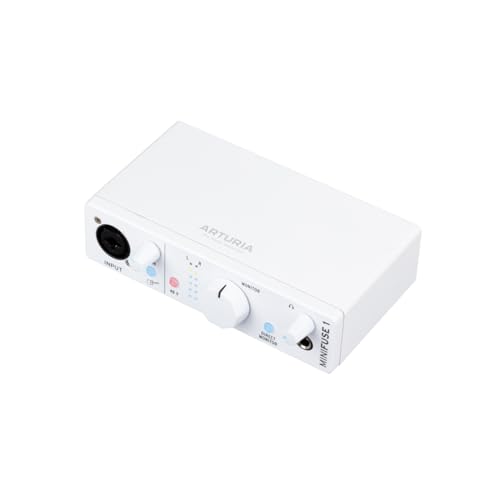
- Single combo input with 48V phantom power
- MIDI I/O, loopback, and USB-A hub
- Includes recording and music-production software
Best For: Solo musicians and beginner-friendly portable recording
Best All-Around Router

- Standalone 3-in/3-out MIDI routing
- USB-C support across major operating systems
- Filtering, merging, splitting, and mapping tools
Best For: Home studios and multi-device MIDI rigs
Best Simple USB Host
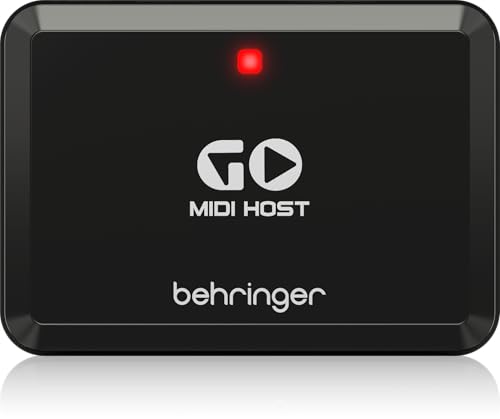
- Compact MIDI/USB host interface
- Plug-and-play connection for keyboards
- USB connectivity with one listed channel
Best For: Basic keyboard-to-USB MIDI setups
Best Budget Cable Interface

- One MIDI input and one MIDI output
- USB-C connection for computers and iPad
- LEDs provide power and signal feedback
Best For: Single-instrument recording and editing setups
Best Hybrid MIDI Router – CME H2MIDI Pro
The CME H2MIDI Pro is one of the most versatile compact midi interfaces for connecting modern USB MIDI gear with traditional 5-pin DIN hardware. It works without a computer as a USB host, or connects to Mac, Windows, iOS, Android, Linux, and ChromeOS systems through USB-C.
Best For: Hybrid hardware setups, guitarists, producers, and performers who need MIDI routing, filtering, mapping, or splitting in a very small unit.
Pros:
- Connects USB class-compliant MIDI devices directly to 5-pin DIN hardware without a computer.
- Supports up to eight USB MIDI devices through a standard USB hub.
- Handles complex MIDI data, including clock, sysex, MTC, and MPE.
- HxMIDI Tools enables advanced routing and up to four saved presets.
Cons:
- Its advanced routing features may require time to configure in the software.
- It provides MIDI connectivity rather than microphone or instrument audio inputs.
Choose the H2MIDI Pro when compact size and flexible MIDI control matter more than audio recording. Its dual host/client operation makes it particularly useful for mixed legacy and USB-based rigs.
Best Compact MIDI Keyboard – Arturia MicroLab Mk3
The Arturia MicroLab Mk3 is a portable choice among compact midi interfaces for musicians who want a small keyboard controller for mobile production or a space-conscious studio. Its 25-key slim keybed, USB-C connection, and USB-powered design make it easy to add to a laptop-based setup.
Best For: Mobile producers, beginners, and desktop musicians who want responsive keys and straightforward control in a compact format.
Pros:
- Small, lightweight, USB-powered design suits mobile music-making.
- Upgraded slim keybed is designed for a responsive playing feel.
- Includes four buttons, two touch strips, 500 Analog Lab Intro presets, and Ableton Live Lite.
- Plug-and-play USB-C connectivity keeps setup simple.
Cons:
- Its 25-key layout offers less range than a full-size keyboard.
- USB connectivity is intended for computer-based use rather than standalone hardware routing.
The MicroLab Mk3 is a practical pick when playable keys and portability are the priority. It is less suited to complex hardware MIDI routing, but its included software and simple USB connection make it accessible for quick music creation.
Best Compact Recording Interface – Focusrite Scarlett Solo 3rd Gen
The Focusrite Scarlett Solo 3rd Gen is a compact audio interface for recording vocals, guitar, and bass rather than controlling MIDI hardware. For buyers comparing compact midi interfaces with small recording devices, the Solo stands out with one XLR mic preamp, one Hi-Z instrument input, and USB connectivity for computer-based production.
Best For: Solo musicians, vocalists, guitarists, podcasters, and home producers who need compact audio recording and headphone monitoring.
Pros:
- Combines an XLR microphone input with a Hi-Z instrument input.
- Records at up to 24-bit/192kHz with high-performance converters.
- Air mode can add clarity to acoustic instruments and vocals.
- Includes headphones and balanced monitor outputs plus a useful software bundle.
Cons:
- It is an audio interface, not a dedicated MIDI interface.
- Solo users may find the single mic preamp limiting for multi-microphone recording.
Consider the Scarlett Solo if your compact setup needs audio inputs rather than MIDI routing. Its focused I/O is well suited to one-person recording, while the included software helps you start producing quickly.
Best MIDI Distribution Hub – CME MIDI Thru5 WC
CME MIDI Thru5 WC 1-in-5-out MIDI Thru | 5-pin DIN, High-speed, Optional Bluetooth
Check Price On AmazonThe CME MIDI Thru5 WC is a purpose-built option for compact midi interfaces and hardware rigs that need to distribute one MIDI input to five outputs. Its 5-pin DIN connections, USB-C power, and high-speed optocoupler design make it suitable for studio, stage, and pedalboard use.
Best For: Musicians who need reliable one-to-five MIDI distribution for synthesizers, sequencers, drum machines, or pedalboard hardware.
Pros:
- Routes one MIDI input to five standard 5-pin MIDI outputs.
- Supports all MIDI channels and messages, including clock, sysex, timecode, and MPE.
- Designed for low latency, low jitter, and accurate transmission.
- Compact reinforced housing and USB-C bus power suit portable setups.
Cons:
- It is a MIDI thru box, not a computer MIDI interface.
- The USB-C port supplies power only and does not carry MIDI data.
- Its fixed one-input/five-output design does not provide flexible routing.
The MIDI Thru5 WC is a strong choice when dependable signal duplication is the main requirement. Select it for straightforward hardware distribution, but choose the H2MIDI Pro instead if you need computer connectivity or programmable MIDI processing.
Versatile Studio Hub – Scarlett 4i4 4th Gen
The Focusrite Scarlett 4i4 4th Gen is a strong choice when compact MIDI interfaces also need to handle microphones, instruments, and multiple line-level devices. Its 4-in/4-out layout, MIDI I/O, USB-C connectivity, and 192kHz support suit compact home studios with several pieces of gear.
Best For: Musicians who need MIDI alongside multiple recording inputs and outputs.
Pros:
- Combines two mic preamps, two Hi-Z inputs, four line inputs, four line outputs, and MIDI I/O.
- Offers up to 24-bit/192kHz operation and a 120dB dynamic range.
- Includes Air mode, Auto Gain, and Clip Safe features for easier recording.
- Comes with a broad software bundle, including Ableton Live Lite and Pro Tools Intro+.
Cons:
- Its 2.2-pound, 7.09-inch-wide body is less minimal than a dedicated MIDI-only interface.
- Requires USB connectivity and includes a USB-C power supply for the listed setup.
Choose the Scarlett 4i4 when your compact rig is centered on recording as much as MIDI control. It offers more audio routing than a basic MIDI interface while remaining relatively compact for a small studio desk.
Pedalboard MIDI Specialist – CME U4MIDI WC
The CME U4MIDI WC is purpose-built for shoppers seeking compact MIDI interfaces with flexible routing and pedalboard-friendly dimensions. It provides 2-in/2-out 5-pin MIDI, zero-latency transmission, optional standalone power, and tools for filtering, mapping, merging, and splitting MIDI data.
Best For: Guitarists, pedalboard users, and MIDI setups that need advanced routing without a computer.
Pros:
- Compact 5.51-by-1.5-by-1.3-inch design weighs just 3.49 ounces.
- Supports 2-in/2-out MIDI with zero latency and jitter-free transmission.
- Can run from USB 5V or 9V DC power for standalone use.
- UxMIDI Tools adds MIDI thru, split, merge, mapper, and filter functions.
Cons:
- It is a MIDI interface rather than an audio interface for microphones or instruments.
- Optional Bluetooth MIDI requires the separately noted WIDI Core feature.
- The listed manufacturer warranty is one year.
For a compact pedalboard or hardware-MIDI rig, the U4MIDI WC focuses on portability and routing control rather than audio recording. Its standalone power options make it especially practical when you want to leave the computer out of the signal chain.
Portable Recording Companion – Arturia MiniFuse 1
The Arturia MiniFuse 1 suits buyers who want compact MIDI interfaces in a small audio-recording package. It pairs a single combo input with MIDI in/out, balanced outputs, a headphone output, loopback, and a USB hub for portable voice, guitar, synth, and content-creation setups.
Best For: Beginners, solo musicians, and creators recording one primary source at a time.
Pros:
- Compact 5.9-by-3.9-by-1.65-inch interface with MIDI input and output.
- Combo mic/instrument/line input includes 48V phantom power.
- Provides balanced line outputs, headphone volume control, loopback, and a USB-A hub.
- Includes Ableton Live Lite, Analog Lab Intro, Arturia FX, Guitar Rig 6 LE, and other software.
Cons:
- Its single audio input is less suitable for recording several sources simultaneously.
- The listed operating-system compatibility is limited to Windows and macOS.
- It has two line outputs rather than the larger output count of a multichannel interface.
The MiniFuse 1 is a practical entry point if you need MIDI connectivity but prioritize straightforward single-source recording. Its included software, loopback feature, and five-year warranty add useful value for a compact desktop or mobile setup.
Best All-Around Router – CME U6MIDI Pro
The CME U6MIDI Pro is a strong choice for musicians who need compact MIDI interfaces with more routing flexibility than a basic cable. Its standalone 3-in/3-out design supports MIDI merge, split, thru, filtering, and mapping, while USB-C connectivity works with a broad range of computers and mobile devices.
Best For: Home studios, live rigs, and setups using multiple MIDI keyboards, synthesizers, drum machines, or controllers.
Pros:
- Standalone 3-in/3-out MIDI routing without requiring a computer.
- USB-C plug-and-play support for macOS, iOS, Windows, Android, Linux, and Chrome OS.
- Supports broad MIDI data types, including clock, SysEx, MIDI timecode, and MPE.
- Compact 2.56-by-3.29-by-1.32-inch design with low stated weight.
Cons:
- Advanced routing and filtering configuration requires software on supported devices.
- Provides MIDI connectivity only, not audio inputs or outputs.
For a compact MIDI interface that can grow with a more complex setup, the U6MIDI Pro stands out for its dedicated routing tools, wide OS compatibility, and three-input/three-output layout.
Best Simple USB Host – Behringer GO MIDI HOST
Behringer GO MIDI HOST Compact MIDI/USB Host Interface for Plug-and-Play Connectivity
Check Price On AmazonThe Behringer GO MIDI HOST is aimed at musicians seeking compact MIDI interfaces for straightforward USB connectivity. Its plug-and-play design is intended to connect a keyboard with USB equipment, making it a practical option when you want a simple host interface rather than a full routing hub.
Best For: Keyboard players who need a basic USB MIDI host connection.
Pros:
- Compact MIDI/USB host format for plug-and-play connectivity.
- Designed for use with keyboards.
- Lists USB connectivity and a 192 kHz maximum sample-rate specification.
Cons:
- The supplied specifications list one channel, offering less routing capacity than multi-port interfaces.
- Operating-system details are limited to Windows in the supplied information.
- The notes provide fewer configuration details than competing options in this roundup.
The GO MIDI HOST makes the most sense when your priority is a compact, uncomplicated USB host connection for a keyboard rather than extensive MIDI routing or multiple DIN ports.
Best Budget Cable Interface – LEKATO MIDI to USB-C Cable
The LEKATO MIDI Cable is a practical pick for musicians comparing compact MIDI interfaces that need a direct, cable-style connection. Its USB-C connector, one MIDI input, and one MIDI output connect standard MIDI instruments to a Windows computer, Mac, or iPad without requiring a separate interface box.
Best For: Simple one-keyboard or synthesizer recording, editing, and playback setups.
Pros:
- One MIDI input and one MIDI output support up to 16 channels.
- USB-C connection works with Windows, macOS, and iPad setups according to the supplied notes.
- Plug-and-play operation uses a built-in driver with no special driver installation required.
- LED indicators show power and signal activity for easier troubleshooting.
Cons:
- Its one-in/one-out design is less suitable for multi-device MIDI routing.
- Older or specific vintage instruments may require particular driver settings or proprietary interfaces.
- The 6.5-foot cable format may be less convenient than a small detachable interface for some rigs.
Choose the LEKATO when you want a direct, low-complexity connection between one standard MIDI instrument and a compatible computer or tablet. Its indicators and plug-and-play design are useful for basic studio work, but larger setups will need more I/O.
How We Picked the Best Compact Midi Interfaces
We focused on connection flexibility, port configuration, computer and hardware compatibility, physical size, ease of use, and the type of workflow each device supports. The selection includes straightforward USB-to-MIDI adapters, multi-port interfaces, MIDI thru solutions, USB host boxes, and audio interfaces that add MIDI to recording setups.
Because “compact” can mean different things, we considered both small desktop devices and compact all-in-one interfaces. We also looked for products suited to common use cases such as controlling external synthesizers, recording a keyboard into a computer, expanding a MIDI rig, and connecting modern USB-C devices.
Quick Comparison
| Type | Best For | What to Check |
|---|---|---|
| USB MIDI interface | Connecting traditional MIDI hardware to a computer | Input/output count and connector type |
| USB host interface | Using USB MIDI gear without a computer | Host compatibility and power requirements |
| MIDI thru box | Sending one MIDI signal to multiple devices | Number of thru outputs |
| Audio interface with MIDI | Recording instruments and controlling MIDI gear | Audio inputs, phantom power, and MIDI ports |
| MIDI-to-USB-C cable | Simple, low-cost keyboard connections | Compatibility, cable length, and driver needs |
Key Buying Factors for Compact Midi Interfaces
Port Count and Routing
Check how many MIDI inputs and outputs you actually need. A one-in, one-out interface is enough for a single keyboard or synthesizer, while multi-port models are better for several instruments. If one controller must feed multiple devices, a MIDI thru unit may be more appropriate than a conventional interface.
USB Host Versus Computer Interface
A standard USB MIDI interface connects MIDI hardware to a computer or tablet. A USB host interface serves a different purpose: it lets USB MIDI controllers communicate with traditional five-pin MIDI equipment, often without a computer. Confirm which side of the connection your setup requires before buying.
Audio Features
If you also record microphones, guitars, or line-level instruments, an audio interface with MIDI can reduce desk clutter and simplify your setup. Compare input count, microphone preamp quality, headphone monitoring, phantom power, and USB-C support—not just MIDI specifications.
Compatibility and Power
Verify support for your computer, tablet, operating system, and USB connector. Some hardware MIDI devices require their own power supply, while USB-powered models may draw power from the host. For mobile or standalone use, power requirements are especially important.
Who Should Buy Which Compact Midi Interfaces?
Choose a basic USB MIDI interface or MIDI cable if you need the simplest connection between one keyboard and a computer. Pick a multi-port MIDI interface if your studio includes several hardware instruments or you need independent MIDI inputs and outputs.
A USB host model is the better choice for linking modern USB controllers to older synthesizers, drum machines, or MIDI modules without relying on a computer. A MIDI thru box suits performers and hardware-heavy setups that need to distribute one signal to several devices.
Finally, choose an audio interface with MIDI if recording sound is as important as sending MIDI data. These models can serve as the central hub for a compact home studio, while dedicated MIDI interfaces are usually the better fit when audio inputs are unnecessary.