
Finding a reliable Thunderbolt cable under $50 can be surprisingly difficult. Cable length, bandwidth, charging capacity, display support, and certification all affect whether a cable performs as expected.
We selected 10 affordable Thunderbolt 3, Thunderbolt 4, Thunderbolt 5, and USB4-compatible options for laptops, docks, monitors, storage devices, and high-power charging setups.
Best 10 Thunderbolt Cables Under 50 Picks for 2026
Top-Tier Speed
Anker Prime Thunderbolt 5 Cable

- 80Gbps transfers and 240W charging
- Supports dual 8K displays at 60Hz
- 3.3-foot cable with 18-month warranty
Best For: Power users with Thunderbolt 5 laptops and multi-display setups
Reliable Workhorse

- 40Gbps transfers for docks and eGPUs
- Up to 100W charging and 5K display support
- Two-year coverage with lifetime support
Best For: Thunderbolt 3 docks, displays, and compatible laptops
Future-Ready Value
Silkland USB4 Thunderbolt 5 Cable

- 80Gbps data with 240W charging
- Up to 120Gbps display bandwidth
- Four-foot braided, USB-IF certified design
Best For: High-bandwidth creative, gaming, and professional workstations
Best Two-Pack
Maxonar USB4 Thunderbolt 4 Cables

- Two 3.3-foot cables for flexible setups
- 40Gbps transfers and 240W power delivery
- Supports single 8K or dual 4K displays
Best For: Home-office users who need one cable at the desk and another for travel
Best Value 6-Foot Pair

- Two 6-foot braided cables
- Up to 40Gbps and 240W
- Supports 8K and 4K video
Best For: Two-cable laptop and monitor setups
Maximum Bandwidth Pick

- Up to 80Gbps on supported devices
- Supports dual 8K displays
- 240W charging and braided build
Best For: Thunderbolt 5 and high-resolution display setups
Certified Compact Choice
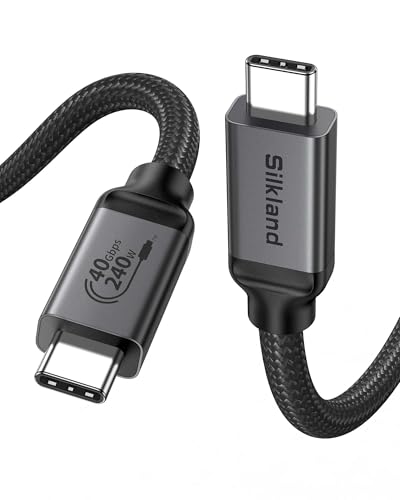
- USB-IF certified USB4 cable
- Up to 40Gbps and 240W
- 8K and dual 4K support
Best For: Short, tidy side-by-side connections
Future-Ready Pick

- Up to 80Gbps data transfer
- Supports high-resolution multi-display setups
- 240W PD and durable braided construction
Best For: Long-reach workstation and high-bandwidth display setups
Travel-Friendly Value
2-Pack USB-C Thunderbolt 4 Cables

- Includes two compact 5-inch cables
- Up to 40Gbps and 8K video support
- 240W charging with E-Marker safety chip
Best For: Travel bags, spare cables, and compact USB-C setups
Balanced Long-Cable Pick

- 6.6-foot USB-C-to-USB-C design
- 40Gbps data and 8K display support
- 240W charging with reinforced braided build
Best For: Everyday desktop connections to monitors, SSDs, docks, and laptops
Top-Tier Speed – Anker Prime Thunderbolt 5 Cable
For shoppers comparing thunderbolt cables under 50, the Anker Prime Thunderbolt 5 Cable stands out for high-end performance in a compact 3.3-foot length. It supports up to 80Gbps transfers, 240W charging, and dual 8K displays at 60Hz, making it a strong fit for demanding laptop and multi-monitor setups.
Best For: Power users who need maximum transfer speed, high-wattage charging, and advanced display support.
Pros:
- 80Gbps data transfer supports moving 5GB files in about one second under suitable conditions.
- 240W USB-C charging supports fast charging for compatible laptops.
- Supports dual 8K displays at 60Hz with up to 120Gbps display bandwidth.
- Includes an 18-month warranty and USB-IF specification compliance.
Cons:
- The 3.3-foot length may be limiting for some desk layouts.
- Its Thunderbolt 5 capabilities require compatible devices to reach maximum performance.
This is the performance-focused pick in the group. If your devices support Thunderbolt 5 and you want one cable for fast storage, displays, and charging, the Anker Prime offers impressive headroom.
Reliable Workhorse – Plugable Thunderbolt 3 Cable
Among thunderbolt cables under 50, the Plugable Thunderbolt 3 Cable is a practical choice for docks, external graphics, displays, and everyday USB-C connectivity. Its 40Gbps bandwidth, 100W charging, and broad Thunderbolt, USB, and DisplayPort Alt Mode compatibility cover many Mac, Windows, and Chromebook setups.
Best For: Dock users and laptop owners who want dependable Thunderbolt 3 performance with broad backward compatibility.
Pros:
- 40Gbps data transfer is suited to Thunderbolt docks and eGPU applications.
- Supports up to two 4K displays at 60Hz or one 5K display at 60Hz, depending on the host.
- Provides up to 100W charging for compatible laptops and devices.
- Includes two-year coverage and lifetime support.
Cons:
- The 2.6-foot length may not suit distant docks or monitors.
- It cannot charge gaming laptops that require more than 100W, or may charge them more slowly.
- It is an older Thunderbolt 3 cable rather than a newer Thunderbolt 5 option.
Plugable emphasizes compatibility and support rather than cutting-edge specifications. It is a sensible value option for established Thunderbolt 3 workstations, especially when 100W charging is sufficient.
Future-Ready Value – Silkland USB4 Thunderbolt 5 Cable
If you are shopping for thunderbolt cables under 50 and want newer USB4 capabilities, the four-foot Silkland cable combines 80Gbps bidirectional data with 240W charging. It also advertises 120Gbps unidirectional display bandwidth for compatible systems, plus backward compatibility with Thunderbolt 4, Thunderbolt 3, USB4, and USB 3.2.
Best For: Creators, gamers, and professionals building a high-bandwidth USB-C setup with demanding displays or storage.
Pros:
- 80Gbps data transfer supports fast movement of large files.
- 120Gbps display bandwidth can support dual 8K/6K or triple 4K at 144Hz on compatible hardware.
- 240W charging includes PD 3.1 support and backward compatibility with lower power levels.
- USB-IF certified, braided, triple-shielded, and backed by 24-month customer care.
Cons:
- Actual speed and display performance depend on the connected devices.
- The advanced display features require compatible Thunderbolt 5 or USB4 hardware.
Silkland offers a strong balance of length, durability, and next-generation capability. It makes the most sense when your computer, dock, monitor, or SSD can use its higher bandwidth rather than for basic charging alone.
Best Two-Pack – Maxonar USB4 Thunderbolt 4 Cables
For shoppers seeking thunderbolt cables under 50, the Maxonar two-pack adds useful flexibility for home, office, or travel setups. Each 3.3-foot cable supports 40Gbps transfers, 240W power delivery, and single 8K or dual 4K display connections through compatible Thunderbolt 4 and USB4 ports.
Best For: People who need two capable cables for a dock, monitor, SSD, laptop, or separate workspaces.
Pros:
- Two cables provide convenient value for desk and travel use.
- 40Gbps performance suits external SSDs, docks, and large file transfers.
- 240W power delivery uses an E-Marker chip to negotiate charging safely.
- Braided nylon construction and reinforced connectors are designed for frequent use.
Cons:
- The 3.3-foot length may be short for some dock or monitor arrangements.
- Maximum charging, display, and transfer performance depends on the connected hardware.
- It supports 8K or dual 4K displays, but not the higher display bandwidth advertised by Thunderbolt 5 cables.
The Maxonar pack is a practical choice when quantity matters as much as speed. It delivers modern USB4 and Thunderbolt 4 features without requiring separate cables for charging, data, and display connections.
Best Value 6-Foot Pair – 40Gbps USB4 Cable
For shoppers comparing thunderbolt cables under 50, this two-pack offers a practical mix of speed, charging power, and extra reach. Each 6-foot USB-C cable supports up to 40Gbps data transfer, 240W charging, and high-resolution video when paired with compatible devices.
Best For: Laptop, monitor, tablet, and dock setups that benefit from two longer USB-C cables.
Pros:
- Includes two 6-foot braided cables for flexible desk setups.
- Supports up to 40Gbps transfers, 8K at 60Hz, and 4K at 144Hz on compatible hardware.
- Offers up to 240W charging with an E-Marker chip and USB Power Delivery support.
Cons:
- Actual performance depends on the connected devices and their supported standards.
- The 6-foot length may experience some signal loss, and video use can share available bandwidth.
This is a strong value-oriented choice if you need two durable, longer cables rather than a single short connection. Confirm that your USB-C ports support DisplayPort Alt Mode before expecting video output.
Maximum Bandwidth Pick – 80Gbps USB4 Cable
Among thunderbolt cables under 50, this short USB4 cable stands out for its advertised 80Gbps bandwidth and advanced display support. It is designed for compatible Thunderbolt 5, Thunderbolt 4, USB4, and USB-C devices, with 240W charging and a durable braided construction.
Best For: Users with compatible 80Gbps hardware who need very high-speed transfers or multiple high-resolution displays.
Pros:
- Advertises up to 80Gbps data transfer for supported devices.
- Supports dual 8K or 6K displays, triple 4K at 144Hz, and 4K at 480Hz on compatible setups.
- Provides up to 240W charging and includes reinforced connectors with a 10,000-plus bending test claim.
Cons:
- 80Gbps performance requires devices that support that speed.
- The notes state it is not compatible with Thunderbolt displays and Thunderbolt docks.
- At 3.3 feet, it is best for nearby components rather than floor-level or widely spaced equipment.
This cable makes the most sense for a cutting-edge USB4 or Thunderbolt 5 setup where the host and peripherals can actually use 80Gbps. Check display and dock compatibility carefully before buying.
Certified Compact Choice – Silkland 40Gbps USB4 Cable
For buyers seeking thunderbolt cables under 50 with certification credentials, this 3.3-foot Silkland cable combines USB-IF certification with 40Gbps transfers, 240W charging, and high-resolution display support. Its compact length is suited to devices positioned close together.
Best For: Side-by-side laptop, monitor, dock, SSD, and charger connections where a short cable keeps the setup tidy.
Pros:
- USB-IF certified and listed as meeting full USB4 specifications.
- Supports up to 40Gbps, 8K at 60Hz, and dual 4K at 60Hz with compatible equipment.
- Offers up to 240W charging with backward compatibility for 100W, 140W, and 180W charging.
Cons:
- The 3.3-foot length may be too short for devices positioned farther apart.
- Display resolution, transfer speed, and charging depend on the connected hardware.
- The manufacturer recommends cables under 5 feet for stable docking performance, limiting this model’s reach.
This is a sensible compact option when certification and broad USB4, Thunderbolt 3, and Thunderbolt 4 compatibility matter. Choose a longer version if your computer or dock sits several feet from the connected device.
Future-Ready Pick – Thunderbolt 5 10-Foot Cable
If you need thunderbolt cables under 50 for a long desktop setup, this 10-foot Thunderbolt 5-compatible cable stands out for its combination of high bandwidth, display support, and 240W power delivery. It supports up to 80Gbps data transfer, although actual performance depends on the connected devices.
Best For: Users connecting high-resolution displays, external SSDs, eGPUs, or other USB-C peripherals across a larger workspace.
Pros:
- Supports up to 80Gbps data transfer and up to 120Gbps video bandwidth.
- Can support configurations including dual 6K, dual 8K, or triple 4K 144Hz displays when devices support them.
- Offers up to 240W PD with a 48V/5A rating.
- 10-foot length, braided construction, EMI resistance, and 24K gold-plated connectors suit demanding setups.
Cons:
- Its maximum speeds and display capabilities require compatible host devices, displays, and peripherals.
- The 10-foot length may be excessive for compact or travel setups.
This is the most ambitious option in the group for a high-bandwidth workstation. Choose it when you specifically need extra reach and Thunderbolt 5-class capabilities rather than a compact everyday cable.
Travel-Friendly Value – 2-Pack USB-C Thunderbolt 4 Cables
Among thunderbolt cables under 50, this two-pack is a practical choice for people who want compact cables for charging, data transfer, and display connections. Each cable supports up to 40Gbps, 8K video output, and up to 240W charging with compatible equipment.
Best For: Travelers and users who need a spare cable for laptops, tablets, phones, docks, monitors, or other USB-C devices.
Pros:
- Two cables provide a convenient spare or multi-device setup.
- Supports up to 40Gbps data transfer and 8K video output.
- Up to 240W charging with an E-Marker chip and support for PD 3.1.
- Short, lightweight 5-inch design is easy to carry.
Cons:
- The 5-inch length is limiting for connecting devices placed farther apart.
- Actual data, charging, and display performance depends on device and charger compatibility.
This pack prioritizes portability and convenience over reach. It makes sense for a travel bag, docking station, or anyone who prefers keeping an extra high-speed USB-C cable available.
Balanced Long-Cable Pick – ZIKNYDO 40Gbps 6.6-Foot Cable
This ZIKNYDO cable is a balanced option among thunderbolt cables under 50, offering a 6.6-foot reach with 40Gbps data transfer, 8K display support, and 240W charging. Its USB-C-to-USB-C design works with Thunderbolt 3 and 4 devices and is described as upward compatible with Thunderbolt 5.
Best For: Desktop users who want one longer cable for an SSD, monitor, laptop, eGPU, dock, or charger.
Pros:
- 6.6-foot length offers more setup flexibility than short travel cables.
- Supports up to 40Gbps data transfer and up to 8K display output.
- Provides up to 240W PD 3.1 charging at 5A.
- Braided construction, tensile steel reinforcement, aluminum housing, and 24K gold-plated plugs support durability.
Cons:
- It is a single cable rather than a multi-pack.
- Maximum speed, resolution, and charging output require compatible equipment.
For most workstations, this offers a useful middle ground between compact portability and extended reach. It is a sensible all-purpose choice when 40Gbps performance is sufficient and a 6.6-foot cable is preferable.
How We Picked the Best Thunderbolt Cables Under 50
We compared these cables by advertised data bandwidth, charging support, display capabilities, connector compatibility, length, construction, and value. We also considered whether each model clearly identifies support for Thunderbolt generations, USB4 standards, Power Delivery, and high-resolution displays.
Because specifications can vary by host device and accessory, advertised maximums should be treated as capability limits rather than guaranteed performance in every setup. A Thunderbolt 5 cable may work with older devices, but it will not make a Thunderbolt 3 or USB4 port operate beyond its own limits.
Quick Comparison
| What to Compare | Best For |
|---|---|
| 40Gbps Thunderbolt 3 or 4 | Docks, SSDs, and most high-speed peripherals |
| 80Gbps Thunderbolt 5 or USB4 | Newer systems and demanding display or storage workflows |
| 240W charging | High-power laptops and compatible USB-C devices |
| 3.3 to 4 feet | Desk setups with minimal cable slack |
| 6 to 10 feet | Monitors, docks, and less tightly arranged workspaces |
Key Buying Factors for Thunderbolt Cables Under 50
Bandwidth and Compatibility
Choose 40Gbps for most Thunderbolt 3 and 4 accessories. Consider an 80Gbps Thunderbolt 5 or USB4 cable if you own newer hardware or want more headroom for high-resolution displays and fast storage. Confirm that the cable supports the exact ports on both devices.
Charging Power
A cable rated for 100W may be sufficient for many ultrabooks, while 240W support is more suitable for powerful laptops and future upgrades. The charger, computer, and cable must all support the desired Power Delivery level; a high-rated cable alone cannot increase charging speed.
Display Support and Length
Check the resolution and refresh-rate requirements of your monitor setup, particularly when using multiple displays through a dock. Shorter cables are often easier to manage and may be preferable for maximum reliability. Longer cables provide flexibility but deserve closer attention to certification and stated performance.
Build Quality and Certification
Braided jackets, reinforced connectors, and strain relief can improve durability in frequently moved setups. USB-IF or Thunderbolt certification adds useful assurance, although device compatibility and system configuration still matter.
Who Should Buy Which Thunderbolt Cables Under 50?
For everyday laptop docking, external SSDs, and standard high-speed peripherals, a certified 40Gbps Thunderbolt 4 cable is usually the most sensible choice. Buyers with Thunderbolt 3 hardware can save money with a compatible Thunderbolt 3 cable when 100W charging and 40Gbps data are sufficient.
Choose an 80Gbps Thunderbolt 5 or USB4 option for newer computers, advanced display configurations, or a setup intended to remain useful through future upgrades. A 240W model makes sense for high-performance laptops, while a two-pack is convenient for desks with several USB-C connections. Finally, select a 6- to 10-foot cable only when the extra reach is genuinely useful; otherwise, a shorter cable is typically easier to route and store.