
The best Blu-ray drives for disc ripping make it easier to archive movie collections, read UHD media, and create dependable local backups. The right choice depends on more than speed: compatibility, connection type, firmware support, and included accessories all matter.
We’ve gathered 10 internal and external drives for Windows and Mac users, including portable USB models, slim laptop-style units, and faster desktop burners. Use the guide below to narrow the list based on your discs, computer, and preferred ripping setup.
Best 10 Blu Ray Drives for Disc Ripping Picks for 2026
Best Internal Powerhouse
ASUS BW-16D1HT 16X Blu-ray Burner

- 16x Blu-ray reading and writing
- BDXL support up to 128GB
- M-DISC compatible
Best For: Desktop PC users seeking speed and high-capacity disc storage
Best Premium External Option
archgon Aluminum UHD 4K Blu-ray Writer

- External USB design for PC and Mac
- Reads UHD Blu-ray discs
- Aluminum enclosure with M-DISC support
Best For: Users needing a polished external drive for mixed disc formats
Best Portable Multitasker

- Reads and writes BD, DVD, and CD
- USB-A and USB-C connectivity
- Built-in hub and TF/SD card slot
Best For: Portable laptop use, backups, and flexible peripheral connectivity
Best High-Speed External Drive
ASUS BW-16D1X-U 16X USB Blu-ray Drive
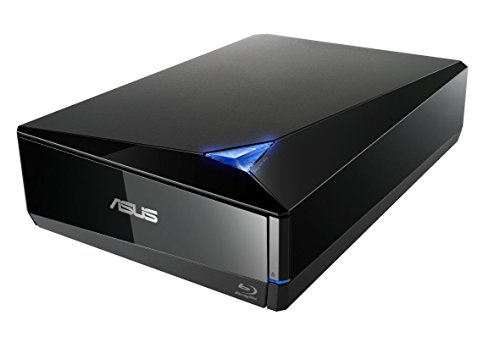
- 16x external Blu-ray writing
- BDXL support up to 128GB
- Works with Mac and PC via USB 3.0
Best For: Users wanting fast external performance without installing an internal drive
Best Slim Internal Option
BU40N 4K UHD SATA Blu-ray Drive

- Slim 9.5mm SATA design
- Reads and burns Blu-ray, DVD, and CD
- Supports BDXL and 4K UHD playback
Best For: Compatible laptops and compact Windows systems
Best Portable XL Choice
Buffalo Portable USB Blu-ray Drive

- Portable USB drive for Windows and Mac
- Supports BDXL and up to 6x BD-R writing
- Includes cables and CyberLink software
Best For: External disc backup, ripping, and media work
Best Simple Legacy External Drive
LG BP50NB40 USB Blu-ray Rewriter
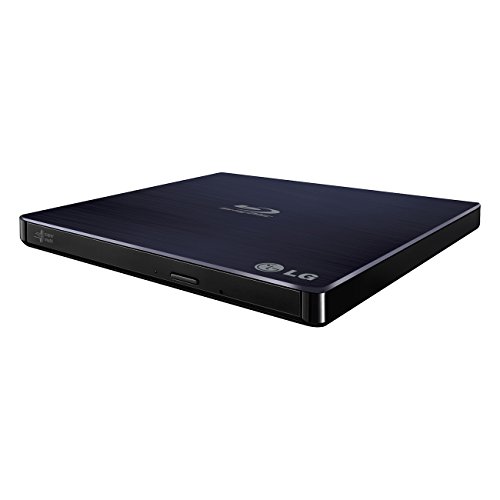
- Slim external USB Blu-ray rewriter
- Windows and Mac compatible
- Supports M-DISC media
Best For: Basic disc writing and ripping on older computers
Most Expandable

- USB 3.0 and USB-C connectivity
- Supports BD-XL up to 100GB and M-DISC
- Six-port hub with SD/TF support
Best For: Users needing optical media support plus extra connectivity
Best Portable Hub

- USB 3.0 and Type-C plug-and-play connections
- Two USB ports plus SD/TF slot
- Slim design with embedded cable
Best For: Laptop users wanting a portable drive and file-transfer hub
Best for Stable Power

- Includes an extra USB power cable
- Supports Windows, macOS, and Linux
- Reads and writes Blu-ray, DVD, and CD
Best For: Computer users seeking broad OS support and steadier power
Best Internal Powerhouse – ASUS BW-16D1HT 16X Blu-ray Burner
ASUS BW-16D1HT - Ultra-Fast 16X Blu-ray Burner with M-DISC Support, Black, 1 Year Warranty
Check Price On AmazonFor shoppers comparing blu ray drives for disc ripping, the ASUS BW-16D1HT is a strong internal option when you want high-speed reading and writing in a desktop PC. Its SATA connection, 16x optical speeds, BDXL support, and M-DISC compatibility make it suitable for large backups and long-term disc storage.
Best For: Desktop PC users who prioritize fast disc handling, BDXL capacity, and M-DISC support.
Pros:
- 16x Blu-ray read and write speeds
- Supports BDXL discs up to 128GB
- M-DISC support for archival storage
- SATA 6.0 Gb/s interface for internal installation
Cons:
- Requires a compatible 5.25-inch drive bay
- Designed for PC systems rather than portable use
The BW-16D1HT is a practical pick for a tower build or workstation that needs fast Blu-ray transfers and substantial disc capacity. Choose it if internal installation is acceptable and portability is not a priority.
Best Premium External Option – archgon Aluminum UHD 4K Blu-ray Writer
archgon Premium Aluminum External USB 3.0 UHD 4K Blu-Ray Writer Super Drive for PC and Mac
Check Price On AmazonThe archgon external drive is a versatile choice among blu ray drives for disc ripping if you need USB connectivity and support for both PC and Mac. Its aluminum enclosure reads UHD Blu-ray discs and writes regular Blu-ray, DVD, and CD media, although UHD playback and Mac UHD support have important software limitations.
Best For: PC or Mac users wanting a premium external enclosure and broad optical-media compatibility.
Pros:
- External USB design works with PC and Mac
- Reads UHD Blu-ray discs
- Writes regular Blu-ray, DVD, and CD media
- Supports M-DISC BD-R media
Cons:
- UHD Blu-ray playback requires compatible third-party software
- Mac users cannot use the drive for UHD Blu-ray playback according to the supplied notes
- UHD playback compatibility should be checked before purchase
With its aluminum body and external USB format, the archgon is convenient for systems without an internal bay. It is especially appealing for PC users who need UHD reading, but software requirements should be verified first.
Best Portable Multitasker – External 8-in-1 Blu-ray Drive
This compact external model is a flexible choice among blu ray drives for disc ripping, combining Blu-ray, DVD, and CD support with a built-in USB hub and TF/SD card slot. Its USB-A and USB-C connectivity suits modern laptops, while its 6x Blu-ray speed is aimed at convenient everyday use rather than maximum performance.
Best For: Laptop and MacBook users who want portable disc access plus extra USB and memory-card connectivity.
Pros:
- Reads and writes Blu-ray, DVD, and CD media
- USB-A and USB-C 3.0 connection options
- Built-in four-port USB hub and TF/SD card slot
- Includes a carrying case and disc sleeves
Cons:
- Does not support 4K Blu-ray playback
- BD-XL is read-only and cannot be recorded
- Maximum Blu-ray recording capacity is 50GB
The slim design and bundled accessories make this drive convenient for travel, backups, and general media access. Consider it when versatility and portability matter more than fast Blu-ray writing or UHD playback.
Best High-Speed External Drive – ASUS BW-16D1X-U 16X USB Blu-ray Drive
The ASUS BW-16D1X-U combines external convenience with 16x Blu-ray reading and writing, making it a compelling option among blu ray drives for disc ripping when you use both Mac and PC computers. It also supports BDXL and M-DISC media, while its included power adapter helps accommodate a desktop-style external setup.
Best For: Mac and PC users who want fast external Blu-ray performance and large-capacity disc support.
Pros:
- 16x Blu-ray read and write speeds
- Supports BDXL discs up to 128GB
- Compatible with Windows and Mac OS X 10.6 or later
- M-DISC support and included power adapter
Cons:
- Larger and heavier than slim portable drives
- Requires external power in addition to USB connectivity
- Supplied operating-system details list Windows support separately from Mac compatibility
This model is a good fit when you want the speed of an internal burner without opening your computer. Its larger enclosure is less travel-friendly, but the 16x performance and BDXL support make it well suited to demanding disc workflows.
Best Slim Internal Option – BU40N 4K UHD SATA Blu-ray Drive
For builders looking for blu ray drives for disc ripping, the BU40N is a slim internal SATA option with Blu-ray, DVD, and CD reading and writing support. It also supports BDXL media and 4K UHD Blu-ray playback, although UHD playback is limited to compatible Windows software.
Best For: Laptop upgrades and compact Windows systems with a 9.5mm SATA optical-drive bay.
Pros:
- Slim 9.5mm SATA form factor fits compatible laptops.
- Reads and burns Blu-ray, DVD, and CD media.
- Supports BDXL up to 100GB and 4K UHD Blu-ray playback.
- Includes a three-year after-service warranty.
Cons:
- Requires an internal 9.5mm SATA bay and is not a standalone external drive.
- UHD Blu-ray playback is supported with Windows software, while Mac users cannot play or write UHD discs according to the supplied notes.
The BU40N is a practical choice when you need an internal Blu-ray writer for a compatible laptop. Confirm the drive-bay size and operating-system requirements before buying, especially if UHD playback is important.
Best Portable XL Choice – Buffalo Portable USB Blu-ray Drive
The Buffalo BRXL-PUS6U3-BK/N is a portable external pick for blu ray drives for disc ripping, backups, and media work. Its USB connection works with Windows PCs and Macs that have compatible Type-A ports, while the included software supports playback, editing, and disc burning.
Best For: Users who want a compact external Blu-ray drive with BDXL support and broad Windows/Mac compatibility.
Pros:
- Portable, thin design measuring about 5.8 by 5.4 by 0.6 inches.
- Supports USB 3.2 Gen 1, USB 3.0, and USB 2.0 Type-A connections.
- Handles BDXL discs, with BD-R writing up to 6x.
- Includes USB, power, and boost cables plus CyberLink software.
Cons:
- Uses Type-A USB connections, so newer computers may require an adapter.
- External power support and a USB charger may be needed in some setups.
- BDXL writing is limited to 4x, while BD-RE XL writing is limited to 2x.
With its portable enclosure, included cables, and bundled software, Buffalo offers a well-equipped external solution for disc archiving and ripping workflows. Check your computer’s ports and power setup before ordering.
Best Simple Legacy External Drive – LG BP50NB40 USB Blu-ray Rewriter
LG BP50NB40 6x Blu-ray Rewriter BD-RE/8x DVD±RW DL USB 2.0 Slim External Drive (
Check Price On AmazonThe LG BP50NB40 is a slim external choice for blu ray drives for disc ripping, optical backups, and everyday disc writing. It connects through USB 2.0 and is listed as compatible with Windows and Mac computers, with support for M-DISC media.
Best For: Users who need a straightforward, quiet external Blu-ray rewriter for older Windows or Mac computers.
Pros:
- Slim external design with a compact 0.6-inch height.
- Compatible with PCs running Windows and Mac operating systems.
- Supports M-DISC media for compatible archival use.
- Offers up to 6x Blu-ray and 8x DVD read speeds.
Cons:
- USB 2.0 is slower than newer USB 3.x interfaces.
- The supplied operating-system list is limited to older Windows versions through Windows 8.1.
- Product notes do not specify BDXL support.
The BP50NB40 remains appealing if low-speed USB connectivity is sufficient and you value a slim, quiet external enclosure. For faster transfers or modern USB connectivity, the Buffalo model is the stronger alternative in this roundup.
Most Expandable – 7-in-1 External Blu-ray Drive
For shoppers comparing blu ray drives for disc ripping, the Dainty 7-in-1 model combines Blu-ray, DVD, and CD read/write capability with USB 3.0 and USB-C connectivity. Its integrated hub and extra power cable make it a flexible choice for computers that need more ports or steadier operation.
Best For: Users who want a portable Blu-ray drive with expansion ports, broad disc support, and Windows or Mac compatibility.
Pros:
- Supports Blu-ray, DVD, CD, and M-DISC reading and writing, including BD-XL up to 100GB.
- Offers USB 3.0 and USB-C connections with listed Blu-ray read speeds up to 6x.
- Six expansion ports support USB devices and SD/TF cards.
- Includes an additional USB power cable for situations where extra power is needed.
Cons:
- The six-port hub may be unnecessary if you only need a basic disc drive.
- Actual performance can depend on the computer, disc, and available USB power.
- Disc-writing functions require compatible software and operating-system support.
Its combination of disc-writing support, portability, and hub functionality makes this a versatile option for a desk or travel setup. It is especially appealing when a single accessory needs to handle both optical media and peripheral connections.
Best Portable Hub – 5-in-1 Blu-ray DVD Drive
Among blu ray drives for disc ripping, this BUNUD model emphasizes portability and simple plug-and-play connectivity. It includes both USB 3.0 and Type-C cables, plus two USB ports and an SD/TF slot for moving files between a computer and external storage.
Best For: Laptop and desktop users who want a slim Blu-ray reader/writer with basic hub features and Windows or Mac compatibility.
Pros:
- Reads and writes Blu-ray, DVD, and CD media for backups, file transfers, and media use.
- Includes USB 3.0 and Type-C connections with no-driver plug-and-play setup.
- Two USB ports and an SD/TF slot add convenient file-transfer options.
- Slim, lightweight design includes an embedded cable for easier storage.
Cons:
- Does not play 4K Ultra HD discs.
- Not compatible with tablets, TVs, projectors, Chrome OS, vehicles, or smartphones.
- Its listed BD-ROM video read speed is 2x, with up to 6x maximum BD reading.
This drive is a practical fit for a compatible Windows or Mac computer, particularly when portability and extra USB or card access matter. Check the stated compatibility limits before buying, especially if you use 4K discs or a nontraditional playback device.
Best for Stable Power – External Blu-ray Drive
For blu ray drives for disc ripping, the Dainty external drive pairs USB 3.0 and Type-C connectivity with an additional USB power cable. It supports reading and writing CD, DVD, and Blu-ray media, while requiring separate playback or burning software for computer use.
Best For: Windows, macOS, or Linux laptop and PC users who prioritize broad operating-system support and a steadier power setup.
Pros:
- Supports Blu-ray, DVD, and CD reading and writing, with listed Blu-ray speeds up to 6x.
- Additional USB power cable is designed to reduce interruptions caused by insufficient power.
- Works with Windows, macOS, and Linux computers according to the supplied notes.
- Combines USB 3.0 and Type-C cables in a compact, portable design.
Cons:
- Playback and writing software is not included and must be obtained separately.
- Not compatible with TVs, tablets, PS4, iPads, Chromebooks, projectors, or vehicles.
- Requires suitable software and a compatible computer for Blu-ray playback or burning.
The extra power cable gives this model a useful advantage for longer reading or writing sessions, while its operating-system coverage is broader than many basic external drives. Plan on adding compatible Blu-ray software before expecting full playback or ripping functionality.
How We Picked the Best Blu Ray Drives for Disc Ripping
We focused on drives that support Blu-ray reading and, where specified, writing or rewriting. The selection includes internal SATA models, portable USB drives, slim external units, and options advertised for UHD 4K Blu-ray media. We also considered connection standards, operating-system compatibility, portability, power requirements, and whether the drive is suited to regular archiving rather than occasional playback.
Specifications can vary by firmware, software, disc type, and host computer. In particular, UHD ripping may require a compatible drive, appropriate firmware, and separate ripping software; a drive’s ability to play commercial discs does not automatically guarantee UHD backup compatibility.
Quick Comparison
- Best for desktop performance: The ASUS internal 16X models offer high writing speeds for compatible desktop PCs.
- Best for portability: Buffalo, LG, and several slim USB models are easier to carry between computers.
- Best for Mac and PC flexibility: External USB 3.0 or USB-C drives generally provide the simplest cross-platform setup.
- Best for compact upgrades: The BU40N is a slim SATA option for compatible laptops, enclosures, or custom builds.
- Best for broader connectivity: Multi-port external models may include USB-A, USB-C, or additional card and peripheral functions.
Key Buying Factors for Blu-Ray Drives for Disc Ripping
Drive Type and Installation
Internal SATA drives are a good fit for desktop towers and can deliver consistent performance without occupying a USB port. External drives are easier to install and move, but they may need a second cable or included power supply, especially with demanding media.
UHD and Disc-Format Support
Check support for BD-ROM, BD-R, BD-RE, DVD, and CD formats before buying. If UHD Blu-ray is important, verify the exact model and firmware requirements rather than relying only on “4K” wording in a listing. Writing speed is separate from ripping compatibility and does not guarantee faster read performance in every situation.
Connection, Power, and Software
USB 3.0 or newer is preferable for large disc images, while USB 2.0 models can still work but may take longer. USB-C compatibility may require an adapter or cable. Also confirm whether playback or burning software is included; ripping applications are often separate and may have their own format and operating-system requirements.
Who Should Buy Which Blu Ray Drives for Disc Ripping?
Choose an internal ASUS drive if you have a desktop PC and want higher advertised writing speeds. Choose a portable Buffalo, LG, archgon, or similar external model if you need straightforward use across multiple computers. A slim SATA drive makes sense for a compatible laptop or enclosure project, while a USB-C multi-function drive is better for newer laptops with limited USB-A ports. For occasional disc access, prioritize quiet operation, bus power, and easy compatibility over maximum write speed. For large collections, prioritize reliable cooling, stable connectivity, supported media formats, and software that matches your operating system.