
The right capture card can make your stream look sharper, reduce gameplay delay, and simplify the connection between a console, camera, and computer. The best choice depends on more than the advertised resolution.
We compared these 10 models by passthrough capability, capture quality, connection type, compatibility, and practical streaming features so you can choose a card that matches your setup and budget.
Best 10 Capture Cards for Live Streaming Picks for 2026
Best Value

- 4K30 input with 1080p60 capture
- Plug-and-play USB 3.0 and USB-C connectivity
- Works with consoles, cameras, OBS, and major operating systems
Best For: Budget-conscious streamers needing portable, multi-device capture
Premium Console Pick

- 4K60 capture with Windows HDR10 support
- 1440p120 and 1080p240 high-refresh passthrough
- 3.5mm input for chat or commentary audio
Best For: Current-generation console creators with modern computers
Beginner-Friendly Choice
- 1080p60 capture from 4K HDMI sources
- Driver-free setup with OBS, Streamlabs, and XSplit
- Compatible with consoles, PCs, and cameras
Best For: New streamers wanting simple, portable 1080p capture
High-Refresh Powerhouse
AVerMedia Live Gamer Ultra 2.1

- Up to 4K144 Windows capture and 4K144 passthrough
- HDMI 2.1 with HDR and VRR support
- Party chat and 5.1-channel audio features
Best For: Advanced high-refresh PC and console streaming setups
Best Zero-Latency Value
Redragon VC321 4K Capture Card
- 1080p60 capture with 4K input
- Zero-latency HDMI pass-through
- Plug-and-play Windows and Mac support
Best For: Gamers and creators wanting simple 1080p60 capture
Best Multi-Device Compatibility
- 4K input with 2K30 and 1080p60 support
- USB-A and USB-C interfaces
- Works across Windows, Mac, Linux, and iPadOS
Best For: Streamers using varied computers, tablets, and consoles
Best for Gaming Audio Features
Fifine AmpliGame V3 Capture Card

- 1080p60 capture over USB 3.0
- 4K30 HDMI loop-out for responsive play
- LINE IN, headset ports, and RGB lighting
Best For: Console streamers wanting audio controls and RGB
Best Portable Pick

- 1080p60 output with up to 4K30 input
- USB 3.0 and USB-C connectivity
- Compact, plug-and-play design
Best For: Portable streaming and USB-C setups
Best for Console Pass-Through

- 4K60 HDMI input and loop-out
- 1080p60 capture over USB 3.0
- 3.5mm mic input for commentary
Best For: Console gaming and low-latency streaming
Best Simple Starter
- 4K input with 1080p30 output
- Supports cameras and major consoles
- Plug-and-play setup without external power
Best For: Basic streaming and beginner setups
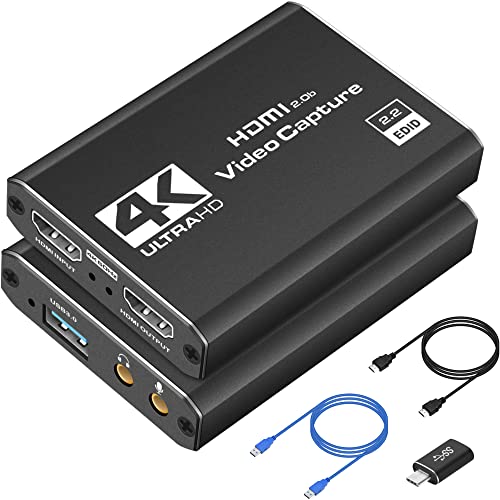
Best Value – Compact 4K HDMI Capture Card
This VIXLW model is a practical choice among capture cards for live streaming if you want 4K HDMI input, 1080p60 capture, and broad device compatibility without external power. Its USB 3.0 and USB-C connectivity suits OBS, Zoom, Twitch Studio, and similar setups.
Best For: Streamers and mobile creators using consoles, cameras, or tablets with Windows, macOS, Linux, or Android devices.
Pros:
- Accepts up to 4K at 30Hz HDMI input and records at 1080p60 or 2K30.
- Plug-and-play operation with USB 3.0, USB-C, and no external power requirement.
- Supports PS4, PS5, Xbox, Switch, cameras, OBS, Zoom, and multiple operating systems.
- Compact aluminum-alloy design is convenient for portable streaming setups.
Cons:
- Capture output is limited to 1080p60 or 2K30 rather than 4K recording.
- Tablet use requires OTG support, and the connected HDMI source should be tested first.
Choose this card when flexibility and easy setup matter more than native 4K recording. It offers a strong feature set for entry-level and travel-oriented live streaming.
Premium Console Pick – Elgato 4K S Capture Card
The Elgato 4K S is aimed at console creators who want 4K60 capture, high-refresh passthrough, and HDR10 support. It is a polished option among capture cards for live streaming, with an analog audio input for in-game chat or commentary.
Best For: PS5, Xbox Series X/S, and Switch 2 users building a high-quality Windows, Mac, or USB-C iPad streaming setup.
Pros:
- Captures video at up to 4K60 with HDR10 support on Windows.
- Supports 1440p120 or 1080p240 passthrough for high-refresh gaming.
- Analog 3.5mm audio input can capture game chat or commentary.
- Compatible with current-generation consoles and multiple modern platforms.
Cons:
- Requires relatively recent operating systems and hardware, including Windows 11 or macOS 13 and later.
- The supplied details list 1080p as the capture resolution specification despite the stated 4K60 capture feature.
This is a sensible upgrade for creators who prioritize 4K capture and smooth passthrough. Check your computer’s CPU, GPU, and operating system before buying.
Beginner-Friendly Choice – 1080p60 USB Capture Card
This Dcyfol capture card keeps the basics simple: connect an HDMI source over USB 3.0, open compatible software, and start streaming or recording at up to 1080p60. It is a straightforward option among capture cards for live streaming, with support for common consoles, cameras, OBS, Streamlabs, and XSplit.
Best For: Beginners and traveling creators who want plug-and-play capture for PS5, Xbox, Switch, PC, or a camera.
Pros:
- Captures smooth 1080p60 video from a 4K HDMI source.
- Requires no drivers and works with OBS Studio, Streamlabs, and XSplit.
- Supports PS5, PS4, Xbox, Nintendo Switch, PCs, and cameras.
- Compact design and included adapters support flexible setup options.
Cons:
- It records at 1080p60 rather than native 4K.
- Requires a USB 3.0 port and compatible Windows or Mac system.
For an uncomplicated starter setup, this model covers the most common streaming sources and software. It is better suited to 1080p workflows than creators seeking advanced HDR or high-refresh capture.
High-Refresh Powerhouse – AVerMedia Live Gamer Ultra 2.1
The AVerMedia Live Gamer Ultra 2.1 is built for demanding gaming and streaming setups. Its HDMI 2.1 passthrough, USB 3.2 Gen 2 connection, 4K144 Windows capture, HDR, VRR, and party-chat audio make it one of the most capable capture cards for live streaming in this group.
Best For: Advanced PC and console streamers using high-refresh displays, HDMI 2.1 sources, and compatible Windows workflows.
Pros:
- Captures up to 4K144 MJPEG on supported Windows PCs; macOS capture reaches 4K60.
- Passes through up to 4K144 HDR/VRR, 1440p240, or 1080p360 on compatible displays.
- Supports HDMI 2.1, HDR, VRR, party chat, and 5.1-channel audio in compatible workflows.
- Includes USB-C, HDMI 2.1, and 4-pole audio cables, plus a three-year warranty.
Cons:
- Advanced capture features require a supported Windows 10 or 11 system.
- Displays using DSC may limit 4K passthrough to 4K120.
- Its feature set may be excessive for basic 1080p streaming.
This is the strongest fit for high-refresh gaming rigs and creators who need modern HDMI 2.1 features. Verify your display, source, USB connection, and computer support before relying on the highest modes.
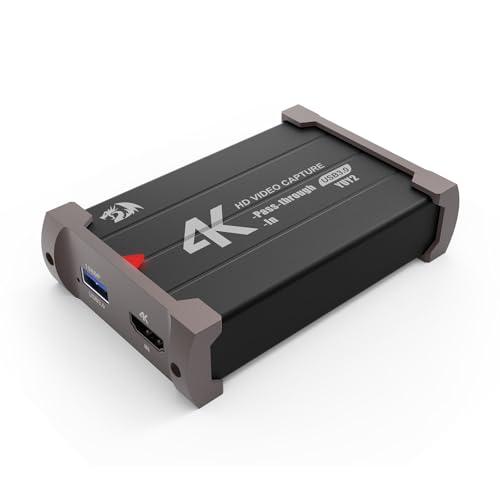
Best Zero-Latency Value – Redragon VC321 4K Capture Card
The Redragon VC321 is a practical choice among capture cards for live streaming if you want 1080p at 60fps capture, 4K input support, and zero-latency HDMI pass-through. Its plug-and-play design works with Windows and newer macOS systems, making it suitable for console gameplay, cameras, and OBS-based setups.
Best For: Gamers and creators who want simple 1080p60 capture with 4K pass-through.
Pros:
- Captures up to 1080p at 60fps and supports 4K 30fps input.
- Zero-latency HDMI pass-through helps preserve real-time gameplay.
- Plug-and-play setup requires no additional drivers or power source.
- Works with Windows 7 or later, macOS 10.15 or newer, consoles, and cameras.
Cons:
- Capture resolution is limited to 1080p.
- Compatibility is limited to HDMI-based sources.
Choose the VC321 if straightforward setup and responsive pass-through matter more than higher-than-1080p recording. Its broad device compatibility and simultaneous audio-video capture make it a flexible entry-level streaming tool.
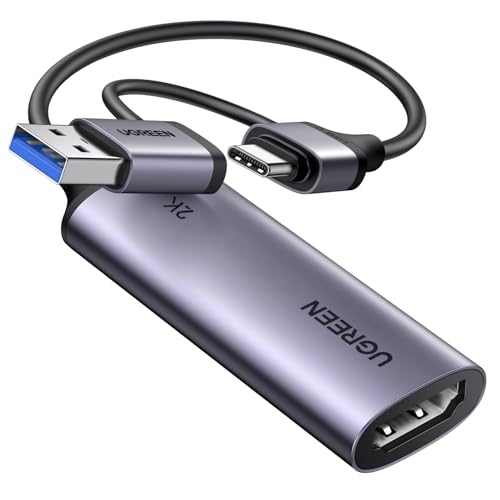
Best Multi-Device Compatibility – UGREEN 2K HDMI Capture Card
UGREEN’s capture card is a versatile option among capture cards for live streaming, supporting 4K input, 2K output at 30fps, and 1080p at 60fps. USB-A and USB-C connectivity expands compatibility across computers, tablets, phones, and devices such as the Switch, PS5, Xbox Series X, and Meta Quest.
Best For: Streamers who use multiple USB device types or want 2K output flexibility.
Pros:
- Supports 4K 30Hz input, 2K 30fps output, and 1080p 60fps capture.
- Includes both USB-A and USB-C interfaces for broader device compatibility.
- USB 3.0 provides up to 5Gbps data transfer and low-delay streaming.
- Works with Windows, macOS, Linux, iPadOS 17 or later, and popular streaming software.
Cons:
- Only supports unidirectional HDMI input to USB output.
- HDCP must be disabled for listed PS4 and PS5 use.
- iPadOS compatibility requires version 17 or later.
The UGREEN model stands out for connection flexibility and operating-system support. It is a strong fit for varied streaming environments, provided your source is HDMI and your target device meets the stated USB or iPadOS requirements.
Best for Gaming Audio Features – Fifine AmpliGame V3 Capture Card
The Fifine AmpliGame V3 adds gaming-focused connections and RGB lighting to the core features expected from capture cards for live streaming. It captures 1080p at 60fps over USB 3.0, offers 4K 30fps HDMI loop-out for low-latency play, and includes LINE IN and headset ports for communication.
Best For: Console streamers who want audio connections, RGB effects, and 1080p60 capture.
Pros:
- Captures smooth 1080p video at 60fps through USB 3.0.
- 4K 30fps HDMI loop-out supports delay-free gameplay monitoring.
- LINE IN and headset ports support expanded gaming audio setups.
- Offers nine RGB lighting modes and works with OBS, Twitch, YouTube, and Discord.
Cons:
- Requires USB 3.0 and HDMI input/output connections.
- Capture resolution is limited to 1080p.
- The supplied original USB cable is recommended for best performance.
The AmpliGame V3 is a good match for gaming-centric broadcasts where audio access and desk aesthetics matter. Its plug-and-play operation keeps setup approachable, while the loop-out helps maintain responsive play during recording.
Best Portable Pick – 1080p60 USB-C Capture Card
For shoppers comparing capture cards for live streaming, this compact HDMI-to-USB capture card offers 1080p at 60fps output and USB-C/USB connectivity. It supports up to 4K input at 30Hz and works with common streaming software such as OBS Studio, making it practical for gaming, meetings, recording, and mobile setups.
Best For: Portable live streaming, gaming capture, online meetings, and users who need USB-C compatibility.
Pros:
- Captures up to 1080p at 60fps or 2K at 30Hz.
- Includes USB 3.0 and USB-C connectivity for broad device compatibility.
- Plug-and-play design requires no external power or additional drivers.
- Compact aluminum body supports portability and heat dissipation.
Cons:
- It is intended for capture software and cannot directly cast to a monitor or TV.
- USB 2.0 connections may limit bandwidth and resolution.
- Audio setup in OBS may require restarting the software.
This is a versatile budget-oriented option when portability and 1080p60 capture matter more than advanced pass-through features. Use a USB 3.0 port whenever possible for the best results.
Best for Console Pass-Through – 4K60 HDMI Capture Card
Among capture cards for live streaming, this model stands out for its 4K60 HDMI loop-out, 1080p60 capture, and built-in microphone input. It is designed for low-latency gameplay while supporting consoles, cameras, OBS Studio, Streamlabs, and other popular streaming platforms.
Best For: Console streamers who want HDMI pass-through, 1080p60 capture, and external microphone support.
Pros:
- Supports 4K at 60Hz input and loop-out while capturing up to 1080p at 60fps.
- HDMI loop-out helps provide lag-free gameplay on a connected display.
- 3.5mm microphone input allows external commentary for games or interviews.
- Works with Windows, macOS, Linux, Android, major consoles, cameras, and streaming software.
Cons:
- It does not support 4K120 or 4K144 input.
- The microphone input does not record party chats.
- OBS may need to be restarted after audio configuration.
This is the strongest fit of the three for a dedicated gaming setup because its loop-out reduces the impact of capture latency. It is less suitable if you require 4K capture rather than 4K input and pass-through.
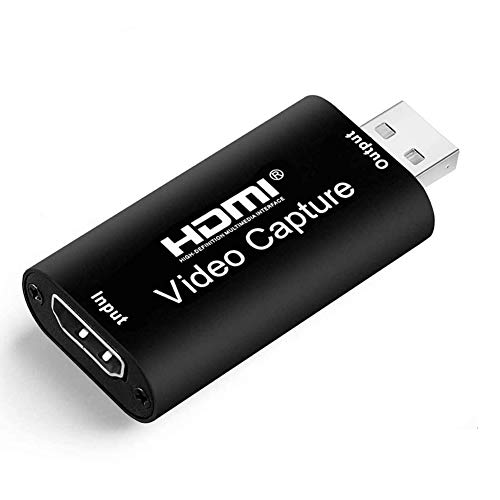
Best Simple Starter – Full HD USB 2.0 Capture Card
If you want straightforward capture cards for live streaming, this HDMI-to-USB 2.0 model keeps the setup simple. It accepts up to 4K input and outputs 1080p at 30fps, with support for cameras, consoles, Windows, Mac, Linux, OBS, Twitch, YouTube, and other listed software.
Best For: Beginners, basic camera streaming, video conferencing, teaching, and 1080p30 capture.
Pros:
- Supports 4K input with 1080p output at 30fps.
- Works with DSLR cameras, camcorders, action cameras, and gaming consoles.
- Plug-and-play operation requires no external driver or power supply.
- Includes a lifetime replacement or refund guarantee for quality issues according to the listing.
Cons:
- USB 2.0 limits capture performance compared with USB 3.0 models.
- Maximum output is 1080p at 30fps, not 60fps.
- It captures a single HDMI signal channel and does not list HDMI loop-out.
This is a sensible entry-level choice for basic streaming and recording when 30fps Full HD is sufficient. Gamers seeking smoother 60fps footage or display pass-through should consider a higher-spec model.
How We Picked the Best Capture Cards for Live Streaming
We focused on the specifications that matter during real streaming sessions: supported input and capture resolutions, frame rates, HDMI passthrough, connection standards, operating-system compatibility, and ease of setup. USB 3.0 models generally offer enough bandwidth for 1080p capture, while advanced HDMI 2.1 cards are better suited to high-refresh-rate gaming and newer consoles.
We also considered whether each card fits a beginner setup, a dedicated streaming PC, a camera-based broadcast workflow, or a gaming system where low-latency passthrough is essential. Advertised 4K input does not always mean 4K recording, so check both specifications before buying.
Quick Comparison
| Best For | What to Look For |
|---|---|
| Budget streaming | 1080p at 60fps, USB 3.0, broad software compatibility |
| Console gaming | HDMI passthrough, low latency, console support |
| 4K gaming | 4K input, high-refresh passthrough, reliable bandwidth |
| Camera streaming | Clean HDMI output, stable capture, suitable frame rates |
| Portable setups | USB-C connectivity, compact design, plug-and-play operation |
Key Buying Factors for Capture Cards for Live Streaming
Capture Resolution and Frame Rate
For most Twitch, YouTube, and social streams, 1080p at 60fps is a strong target because it delivers smooth motion without excessive bandwidth or computer load. A card that accepts 4K input can be useful when you want to play in 4K while sending a lower-resolution feed to your streaming software. Confirm whether 4K refers to input, passthrough, or actual recording.
Passthrough and Latency
HDMI passthrough sends the source signal to a monitor or television while the computer captures it. Look for passthrough that supports your preferred resolution and refresh rate. Zero-latency or low-latency designs are especially important for competitive games.
Connection and Compatibility
USB 3.0 is preferable to older USB standards for high-frame-rate video. USB-C may describe the connector rather than the underlying speed, so verify the specification. Check compatibility with Windows or macOS, OBS, your console, camera, and any required drivers. HDCP-protected content may not be capturable.
Audio and Camera Support
If you stream from a DSLR, camcorder, or action camera, make sure it provides a clean HDMI output and that the capture card supports the needed video format. For console setups, confirm how game audio, microphone audio, and party chat will be routed.
Who Should Buy Which Capture Cards for Live Streaming?
Choose an affordable 1080p USB card if you are starting out, streaming from a single console, or mainly need smooth Full HD footage. Choose a 4K-input model if you want to preserve a high-resolution source while streaming or recording at 1080p. Choose an HDMI 2.1 card if you use a PS5, Xbox Series X, or gaming PC with high-refresh-rate 4K output and want compatible passthrough.
For camera streaming, prioritize clean HDMI support, dependable audio handling, and stable long-session performance over gaming-focused features. Before ordering, compare the card’s maximum capture rate with your computer’s USB port and confirm that your complete cable and display chain supports the signal you intend to use.