
The best high-speed Blu-ray drives make it easier to burn large backups, archive media, play Blu-ray discs, and work with 4K UHD content without relying on an aging optical drive.
This roundup compares internal and external models across writing speed, connectivity, UHD compatibility, portability, and long-term storage features so you can choose the right drive for your setup.
Best 10 High Speed Blu Ray Drives Picks for 2026
Best Overall External Speed
ASUS BW-16D1X-U 16X USB 3.0 Blu-ray Drive
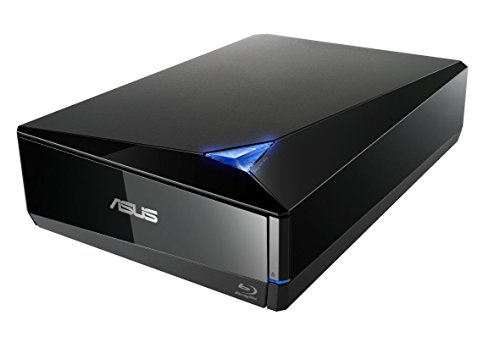
- 16x Blu-ray read and write speeds
- USB 3.0 for Mac and Windows
- BDXL support up to 128GB
Best For: Fast external Blu-ray backups and disc burning
Best Internal M-DISC Bundle
LG WH14NS40 14X Blu-ray Burner
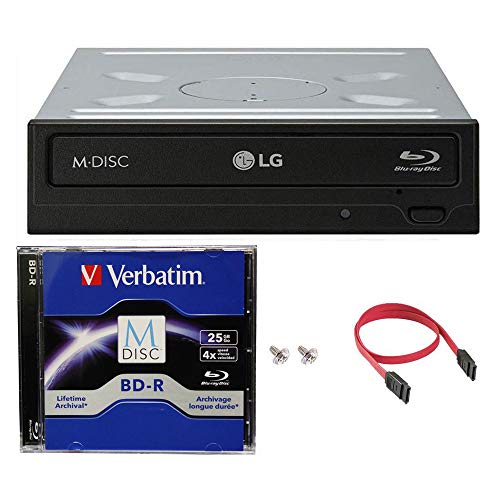
- 14x BD-R writing speed
- Includes 25GB M-DISC and cables
- Internal SATA installation
Best For: Desktop PCs needing archival Blu-ray storage
Best UHD External Option
archgon Aluminum USB 3.0 4K Blu-ray Writer

- Reads UHD 4K Blu-ray discs
- 12x regular Blu-ray writing
- Aluminum USB 3.0 enclosure
Best For: PC users seeking external UHD Blu-ray support
Best Internal 16X Burner
ASUS BW-16D1HT 16X Blu-ray Burner

- 16x Blu-ray read and write speeds
- BDXL support up to 128GB
- M-DISC compatible
Best For: Desktop PCs needing a fast internal Blu-ray burner
Best Plug-and-Play Pick

- USB 3.0 and USB-C connectivity
- Built-in USB and SD/TF expansion
- Reads and writes Blu-ray, DVD, and CD
Best For: Portable media playback, burning, and file transfers
Best Internal Upgrade
9.5mm SATA 4K UHD Blu-ray Writer
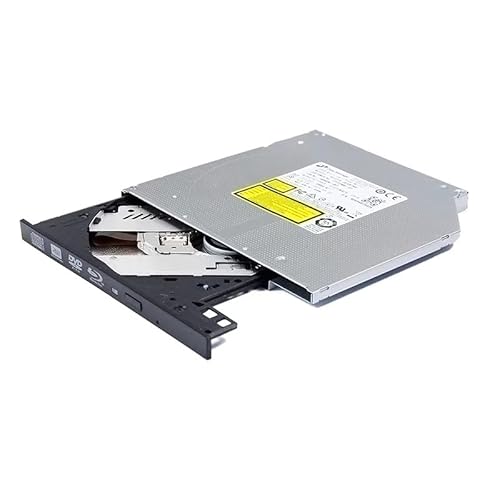
- 6x UHD Blu-ray read and write support
- Handles BDXL discs up to 128GB
- Supports M-DISC archival media
Best For: Compatible 9.5mm SATA laptop upgrades
Best Branded Slim Burner
ASUS External BDXL Blu-ray Drive

- USB-A and USB-C cable support
- BDXL and M-DISC burning
- Slim 240g external design
Best For: Portable ASUS Blu-ray and archival-media burning
Best Slim Internal Drive
BU40N 6X SATA 4K Blu-ray Drive

- 6x Blu-ray writing with 4K UHD playback support
- Slim 9.5mm SATA design for compatible laptops
- Reads and writes Blu-ray, DVD, and CD media
Best For: Compatible Windows laptops needing an internal 4K-capable Blu-ray drive
Best Proven Portable Burner
LG WP50NB40 Portable Blu-ray Burner

- Up to 6x BD-R and dual-layer Blu-ray burning
- Includes 100GB BDXL M-DISC and CyberLink software
- Portable USB 2.0 design for laptops and desktops
Best For: Portable Blu-ray burning with bundled archival media
Best USB 3.0 Flexibility

- USB 3.0 and Type-C connectivity
- Up to 6x Blu-ray read speed with broad media support
- Extra USB power cable helps stabilize operation
Best For: Portable Blu-ray use with Windows, macOS, or Linux computers
Best Overall External Speed – ASUS BW-16D1X-U 16X USB 3.0 Blu-ray Drive
If you want high speed Blu-ray drives without installing hardware inside your computer, the ASUS BW-16D1X-U is a practical external option. It combines 16x Blu-ray read and write speeds, BDXL capacity up to 128GB, USB 3.0 connectivity, and compatibility with both Mac and Windows systems.
Best For: Users who need a fast, portable external Blu-ray drive for Mac or PC backups, media, and data storage.
Pros:
- 16x Blu-ray writing and reading speeds
- Supports BDXL discs up to 128GB and M-DISC media
- USB 3.0 connection works with Mac and Windows computers
- Includes CyberLink Power2Go 8 with optional file encryption
Cons:
- Requires an external power adapter
- At 2.6 pounds, it is less travel-friendly than slim portable drives
- Listed operating-system compatibility is limited to older Windows versions and Mac OS X 10.6 or later
With fast writing, broad computer compatibility, and large-disc support, this ASUS model is a strong all-around choice for high-speed external Blu-ray recording.
Best Internal M-DISC Bundle – LG WH14NS40 14X Blu-ray Burner
The LG WH14NS40 is an internal SATA burner for desktop PCs that want high speed Blu-ray drives with archival-media support. Its bundle includes an M-DISC BD, SATA cable, power cable, and mounting screws, making it a convenient choice for a compatible 3.5-inch drive bay.
Best For: Desktop PC owners who want an internal Blu-ray burner with M-DISC support and included installation accessories.
Pros:
- Burns BD-R at up to 14x and reads BD-R at up to 12x
- Supports M-DISC for long-term data storage
- Includes a 25GB M-DISC BD, cables, and mounting screws
- Also reaches 16x DVD and 48x CD write speeds
Cons:
- Requires a desktop PC with a 3.5-inch bay and SATA interface
- Listed operating-system support ends with Windows 8
- Its 4MB buffer is smaller than some newer optical drives
This bundle is especially appealing when archival storage matters and you already have a suitable desktop chassis for an internal SATA installation.
Best UHD External Option – archgon Aluminum USB 3.0 4K Blu-ray Writer
archgon Premium Aluminum External USB 3.0 UHD 4K Blu-Ray Writer Super Drive for PC and Mac
Check Price On Amazon
archgon Premium Aluminum External USB 3.0 UHD 4K Blu-Ray Writer Super Drive for PC and Mac
Check Price On AmazonFor shoppers comparing high speed Blu-ray drives with UHD capability, the archgon external writer adds 4K UHD Blu-ray reading to a USB 3.0 aluminum enclosure. It can read and write regular Blu-ray, DVD, and CD media, while UHD playback requires compatible Windows hardware and additional software.
Best For: PC users who want an external aluminum drive that supports UHD Blu-ray reading alongside regular disc writing.
Pros:
- Supports UHD 4K Blu-ray reading
- Reads and writes regular Blu-ray, DVD, and CD media
- USB 3.0 external connectivity works with PC and Mac hardware
- Supports M-DISC BD-R and uses an aluminum enclosure
Cons:
- UHD playback requires compatible PC hardware and separately purchased CyberLink PowerDVD
- UHD Blu-ray software support is not available for Mac according to the supplied notes
- Listed Blu-ray read speed is 6x and write speed is 12x
This is the specialist pick for UHD-focused PC users, but buyers should verify hardware and software requirements before ordering.
Best Internal 16X Burner – ASUS BW-16D1HT 16X Blu-ray Burner
ASUS BW-16D1HT - Ultra-Fast 16X Blu-ray Burner with M-DISC Support, Black, 1 Year Warranty
Check Price On AmazonThe ASUS BW-16D1HT is a straightforward internal choice for shoppers seeking high speed Blu-ray drives in a desktop PC. Its SATA 6Gb/s interface supports 16x Blu-ray reading and writing, while BDXL and M-DISC compatibility expand its storage and archival options.
Best For: Desktop PC builders who prioritize maximum listed Blu-ray speed and high-capacity disc support.
Pros:
- 16x Blu-ray read and write speeds
- BDXL support for up to 128GB on one disc
- M-DISC support for long-term data storage
- SATA 6.0Gb/s interface and 8MB cache
Cons:
- Requires an available 5.25-inch internal drive bay
- Designed primarily for Windows 7, 8, Vista, and XP systems
- Does not provide the convenience of an external USB enclosure
If your desktop has the required bay and SATA connection, this ASUS burner offers the highest listed Blu-ray speed in the lineup along with useful archival and high-capacity media support.
Best Plug-and-Play Pick – 5-in-1 External Blu-ray Drive
If you want high speed Blu-ray drives for a laptop or desktop without opening the computer, this BUNUD external model is a flexible option. It connects through USB 3.0 or USB-C, supports Blu-ray, DVD, and CD reading and writing, and adds two USB ports plus SD/TF card slots for convenient file transfers.
Best For: Users who want a portable external Blu-ray burner with extra connectivity for Windows PCs or compatible Macs.
Pros:
- USB 3.0 and USB-C connectivity with plug-and-play setup.
- 5-in-1 design includes two USB ports and SD/TF card slots.
- Supports Blu-ray, DVD, and CD playback, burning, backups, and file transfers.
- Slim portable design includes an embedded cable and a one-year warranty.
Cons:
- Does not play 4K Ultra HD discs.
- Not compatible with iPads, tablets, TVs, projectors, phones, cars, or Chrome OS.
- Blu-ray video read speed is listed as 2x, with up to 6x maximum noted.
This is a practical all-around choice when portability and added USB or memory-card access matter more than UHD disc support. Check your computer’s operating system and available port before buying.
Best Internal Upgrade – 9.5mm SATA 4K UHD Blu-ray Writer
For shoppers seeking high speed Blu-ray drives inside a compatible laptop, this BU40N-style internal writer offers a 9.5mm tray-loading SATA design. It supports 6x UHD Blu-ray and BDXL media, including up to 128GB quad-layer discs, but installation requires a matching laptop bay and separately sourced software and accessories.
Best For: Experienced users upgrading a 9.5mm SATA laptop optical bay who need BDXL, M-DISC, and UHD Blu-ray support.
Pros:
- Supports 6x UHD BD-ROM, BD-R, BD-R DL, and BDXL reading, plus 6x BD-R and BD-R DL writing.
- Reads and writes BDXL media up to 128GB.
- Supports M-DISC for longer-term photo, video, and data storage.
- Tray-loading SATA design fits many compatible 9.5mm laptop bays.
Cons:
- Requires a compatible 9.5mm SATA tray-loading laptop bay.
- Software, cables, instructions, and installation tools are not included.
- Warranty is listed as six months.
This drive makes sense for a hands-on laptop upgrade rather than a plug-and-play setup. Confirm the bay height, bezel, interface, and software requirements before ordering.
Best Branded Slim Burner – ASUS External BDXL Blu-ray Drive
ASUS SBW-06D5H-U BDXL External Ultra Slim Blu-ray and MDisc Burner USB 3.1 USB-C 2 Cables Black
Check Price On AmazonThe ASUS SBW-06D5H-U is a slim external option for shoppers comparing high speed Blu-ray drives with both USB-A and USB-C connectivity. It supports BDXL and M-DISC burning and includes two cables, making it easier to connect to compatible laptops or desktops with different USB ports.
Best For: Users who want a compact ASUS external Blu-ray and M-DISC burner for a laptop or desktop.
Pros:
- USB 3.1 Gen 1 connectivity with both Type-A and Type-C cables.
- Supports BDXL and M-DISC burning.
- Ultra-slim 240g design is well suited to portable use.
- Listed write speeds include up to 10x for supported media.
Cons:
- The supplied specifications do not detail operating-system support beyond macOS.
- Listed read speed is 8x, while Blu-ray read speed is also specified as 6x in the details.
- The notes do not confirm included playback or burning software.
Choose this model when a recognizable brand, slim enclosure, dual USB cable support, and archival media compatibility are priorities. Verify the included software and your computer’s operating-system compatibility before purchase.
Best Slim Internal Drive – BU40N 6X SATA 4K Blu-ray Drive
For laptop owners seeking high speed blu ray drives in a slim internal format, the BU40N offers 6x Blu-ray writing and 4K UHD Blu-ray playback support. Its 9.5mm SATA tray-loading design fits compatible laptops, while support for BDXL, 3D Blu-ray, DVD, and CD media adds flexibility. UHD playback requires compatible Windows software such as CyberLink PowerDVD.
Best For: Compatible Windows laptops needing an internal 4K-capable Blu-ray drive.
Pros:
- Supports 4K UHD Blu-ray playback, BDXL, and 3D Blu-ray discs.
- Reads and writes Blu-ray, DVD, and CD media.
- Slim 9.5mm SATA form factor suits compatible laptops.
- Includes a stated three-year after-service warranty.
Cons:
- Requires a compatible 9.5mm SATA optical-drive bay.
- UHD Blu-ray playback is limited to Windows because suitable Mac UHD software is not available according to the notes.
- Drive-only configuration does not include playback software.
This is a practical choice when you specifically need an internal slimline replacement and 4K UHD support. Verify the laptop’s bay size and SATA compatibility before buying.
Best Proven Portable Burner – LG WP50NB40 Portable Blu-ray Burner
The LG WP50NB40 is a portable option for shoppers comparing high speed blu ray drives with broad disc support. It connects over USB 2.0, burns BD-R media at up to 6x, and includes CyberLink burning software plus a 100GB BDXL M-DISC. Its compact design works with laptops and desktop computers running supported Windows or Mac operating systems.
Best For: Users wanting a portable Blu-ray burner with bundled software and archival M-DISC media.
Pros:
- Burns BD-R and dual-layer Blu-ray media at up to 6x.
- Includes a 100GB BDXL M-DISC for long-term data storage.
- Supports DVD and CD burning with faster listed speeds for those formats.
- Includes buffer under-run prevention and 4MB of cache memory.
Cons:
- Uses USB 2.0 rather than the faster USB 3.0 interface.
- Listed operating-system support is older, including Windows XP through 8.1 and Mac OS X 10.7.5 or later.
- Includes a one-year manufacturer warranty.
The LG is a sensible bundle for basic disc burning and portable archival use, especially if the included M-DISC is valuable to you. Its USB 2.0 connection is the main limitation for speed-focused buyers.
Best USB 3.0 Flexibility – Dainty External Blu-ray Drive
The Dainty external drive is aimed at buyers who want high speed blu ray drives with modern connection options. USB 3.0 provides up to 5Gbps bandwidth, and the included cables support both USB 3.0 and Type-C computers. It reads Blu-ray discs at up to 6x, supports common DVD and CD formats, and requires separately purchased playback or burning software.
Best For: Windows, macOS, or Linux laptop and PC users who need a portable USB 3.0 or Type-C Blu-ray drive.
Pros:
- Offers USB 3.0 and Type-C connectivity for newer computers.
- Supports Blu-ray, DVD, and CD reading and writing.
- Includes an additional USB power cable for more stable operation.
- Compact design is convenient for travel and mobile workspaces.
Cons:
- Playback and writing software is not included.
- Not compatible with TVs, tablets, PS4, iPads, Chromebooks, projectors, or vehicles.
- Maximum Blu-ray write speeds vary by media, with some formats listed at 2x.
This drive stands out for connection flexibility and a supplemental power lead, making it a useful external option for compatible computers. Budget separately for Blu-ray software before expecting full playback functionality.
How We Picked the Best High Speed Blu Ray Drives
We focused on the features that matter most in real-world use: maximum Blu-ray writing speed, support for BDXL and M-DISC media, 4K UHD capability, connection type, physical format, and compatibility with modern computers. The selection includes full-size internal burners for desktops, slim SATA models for compatible laptops and small-form-factor systems, and portable USB drives for Mac and PC users.
Advertised speed is only one consideration. Media quality, software support, computer hardware, and the type of disc being used can all affect actual performance. Models with USB 3.0, USB 3.1, or USB-C connections generally offer a better fit for large file transfers than older USB 2.0 designs.
Quick Comparison
- Fastest desktop-class options: 16x ASUS internal and external Blu-ray burners are suited to frequent disc creation and large backups.
- Best for archival storage: Drives with M-DISC support are appropriate for users preserving photos, documents, and other important files for the long term.
- Best for portability: Slim ASUS, LG, archgon, BU40N, and generic USB models are easier to carry between systems.
- Best for 4K-focused setups: Look for explicit UHD support and verify that your playback software and computer meet the required specifications.
- Best for desktop upgrades: Internal SATA drives offer a cleaner installation and avoid occupying a USB port.
Key Buying Factors for High-Speed Blu-Ray Drives
Writing Speed and Media Support
16x drives can be a strong choice for frequent burning, while 6x and 14x models may be sufficient for occasional backups. Check whether the drive supports BD-R, BD-RE, BDXL, DVDs, CDs, and M-DISC if those formats are important to you. Maximum speed depends on the disc, so use compatible, reputable media.
4K UHD Compatibility
Do not assume every Blu-ray burner can play commercial 4K UHD discs. Confirm UHD support at the drive level and check the operating system, playback application, display connection, and copy-protection requirements before buying.
Connection and Installation
External USB 3.0 and USB-C models are the easiest choice for laptops, Macs, and shared workstations. Some include both cable types, which improves flexibility. Internal SATA drives are better for a permanent desktop installation but require an open bay, data connection, power connection, and compatible mounting hardware.
Size, Noise, and Power
Full-size drives are often faster and more robust, whereas slim drives are easier to transport. External models may need a separate power adapter or dependable USB power, particularly during sustained writing. Consider ventilation and noise if the drive will be used for long burning sessions.
Who Should Buy Which High Speed Blu Ray Drives?
Choose a fast 16x ASUS drive if you regularly create discs and want high throughput. Choose an LG internal burner for a straightforward desktop upgrade or an M-DISC-oriented archival setup. An aluminum archgon or slim ASUS/LG external drive is a practical choice for portable Mac and PC use. BU40N SATA models suit compatible thin systems and custom installations. Generic USB drives can work for occasional reading and burning when low cost and broad device compatibility matter most, but verify reviews, included cables, and software before ordering.