
A thoughtful gaming gift can make her setup more comfortable, more personal, or easier to take on the go. These ideas range from desk and display upgrades to accessories for streaming and handheld gaming.
Gaming Christmas Gifts to Explore
1. OffiGo L-Shaped Electric Standing Desk
A Roomy Setup Upgrade
OffiGo L-Shaped Electric Standing Desk
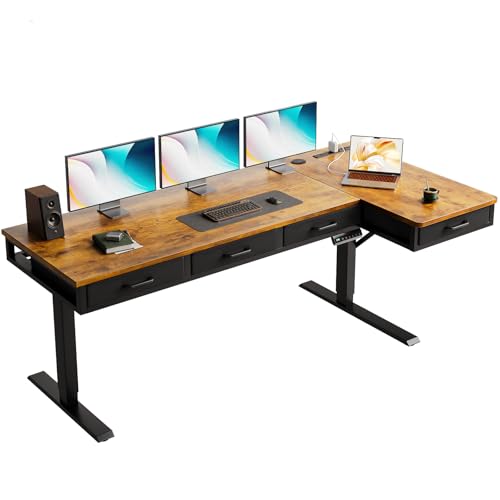
- L-shaped surface fits into a room corner and includes an extra 15-inch board.
- Electric height adjustment offers three presets, with a stated range of 29.9 to 46.1 inches.
- Four fabric drawers and built-in USB, Type-C, and outlet connections add storage and charging options.
Best For: A gamer creating or refreshing a dedicated desk setup.
2. GTPLAYER Big and Tall Gaming Chair
A Cushioned Gaming Seat
GTPLAYER Big and Tall Gaming Chair

- Wide seat, high back, and spring lumbar support are designed for extended sitting.
- Backrest reclines from 90 to 135 degrees and includes a footrest.
- Carbon-black faux leather upholstery and a wipe-clean care instruction.
Best For: A gamer looking for a roomy chair for play, reading, or relaxing.
3. Z-Edge 27-Inch Curved QHD Gaming Monitor
A Sharper View for Games
Z-Edge 27-Inch Curved QHD Gaming Monitor

- 27-inch curved display with 2560 × 1440 QHD resolution.
- Supports up to 165Hz through DisplayPort and up to 144Hz through HDMI.
- Two HDMI inputs and one DisplayPort support connecting multiple devices.
Best For: A PC gamer seeking a higher-resolution, high-refresh display.
4. HUANUO Dual Monitor Desk Mount
A Two-Screen Desk Refresh
HUANUO Dual Monitor Desk Mount

- Fits two 13–32-inch screens, each weighing 4.4–19.8 pounds, with VESA 75 × 75 or 100 × 100 mounting holes.
- Offers tilt, swivel, rotation, and height adjustment; includes cable management.
- Requires a compatible wooden desk, 0.59–3.54 inches thick, with clearance beneath it.
Best For: A gamer or streamer who works with two compatible monitors.
5. Acer Wireless Multi-Platform Gaming Headset
Wireless Audio for Team Play
Acer Wireless Multi-Platform Gaming Headset

- Includes a 2.4GHz USB dongle and also supports Bluetooth 6.0, according to the title.
- Flip the boom microphone up to mute; the listing states up to 70 hours of battery life at 50% volume.
- Listed as compatible with PS5, PS4, PC, Nintendo Switch, and Steam Deck.
Best For: A multiplayer gamer who uses voice chat across supported platforms.
6. Acer A640 4K Webcam
A Camera for Streams and Calls

- Supports 4K at 30fps and 2K or 1080p at 60fps, with autofocus.
- AI noise-canceling microphone and a physical privacy shutter are included.
- USB connection is plug-and-play; the listing says it has no built-in speakers.
Best For: A gamer who streams, joins video calls, or plays on camera.
7. Quntis Curved Monitor Light Bar
Colorful Desk Lighting
Quntis Curved Monitor Light Bar

- Designed for curved monitors over 34 inches or large flat screens; extends up to 26 inches.
- Front light has adjustable brightness and color temperature; the backlight offers 15 RGB modes.
- Foldable dual bars and a clamp mount help direct light across the desk.
Best For: A gamer with a large screen who enjoys customizing desk lighting.
8. tomtoc Handheld Gaming Carrying Case
9. MAONO PD100X USB/XLR Gaming Microphone
A Mic for Chat and Streaming
MAONO PD100X USB/XLR Gaming Microphone

- Connects by USB or XLR; XLR cable is not included.
- USB mode provides RGB controls, tap-to-mute, gain and monitoring controls, and a headphone jack.
- Includes a desktop stand and is listed for PC, PS4, and PS5 use.
Best For: A gamer who chats, streams, or records gameplay commentary.
10. JSAUX 6-in-1 Handheld Gaming Dock
Handheld-to-Monitor Dock
JSAUX 6-in-1 Handheld Gaming Dock

- Listed for Steam Deck, ROG Ally and Ally X, Legion Go and Go S, and MSI Claw; not for ROG Xbox Ally models.
- Provides HDMI 2.1 output, Gigabit Ethernet, three USB-A 3.0 ports, and USB-C power delivery up to 100W.
- Supports HDMI output up to 4K at 120Hz when used with compatible equipment.
Best For: A handheld PC player who wants to connect a supported device to a monitor and peripherals.
11. Redragon K668 Hot-Swappable RGB Keyboard
A Keyboard She Can Customize
Redragon K668 Hot-Swappable RGB Keyboard

- Full-size wired keyboard with 108 keys, four shortcut keys, and RGB lighting modes.
- Hot-swap sockets accept many 3-pin or 5-pin switches without soldering.
- Includes two keycap sets and adjustable two-stage feet.
Best For: A PC gamer who likes customizing controls and keyboard appearance.
12. Acer USB 3.0 HDMI Capture Card
A Starter Capture Setup
Acer USB 3.0 HDMI Capture Card

- Accepts 4K input and supports 1080p at 60Hz output, according to the listing.
- Includes HDMI loop-out and a 3.5mm microphone input for commentary.
- Listed for consoles and computers, with support for apps including OBS and VLC.
Best For: A creator who wants to capture gameplay from a supported console or PC.
13. Large Black Stitched-Edge Desk Mat
More Room for Mouse Movement
Large Black Stitched-Edge Desk Mat

- Extended surface is listed as 35.4 × 15.7 inches and can fit a keyboard and mouse.
- Rubber base is designed to grip the desk; stitched edges help resist fraying.
- Water-resistant coating can be wiped clean, according to the listing.
Best For: A gamer who wants a broad surface for a keyboard and mouse.
14. EasySMX X15 Wireless Gaming Controller
A Controller for Multiple Devices
EasySMX X15 Wireless Gaming Controller

- Supports Windows PC, Steam, Switch, Android, and iOS, with wireless and wired connection modes.
- Hall-effect joysticks and triggers, two programmable back buttons, and dual vibration are listed features.
- The 1000mAh battery is listed for up to 20 hours of play; no mic jack or gyro sensor.
Best For: A gamer who prefers a controller for platformers, racing, or action games.
Choosing a Gaming Christmas Gift for Her
Start with how she plays and what she already owns. A desk, chair, or monitor can reshape a stationary setup, while a headset, controller, or carrying case suits someone who moves between rooms or takes a handheld console along. Streaming gifts are most useful when she already creates content or has mentioned wanting to try it. If you are unsure, ask about the part of her setup she would most like to improve, or notice what she uses every session.
Think about the comfort and space around her play, too. A chair is a substantial gift, and fit depends on the recipient and available room. A standing desk needs enough floor space for its L shape and clearance to adjust. A monitor light bar is aimed at screens over 34 inches or large flat displays, so it may not suit a compact monitor. Smaller accessories such as a desk mat or microphone can refresh a setup without changing its main furniture.
Set a Budget That Matches the Upgrade
For a modest present, focus on practical accessories that add to an existing setup: a large desk mat, a carrying case, or a controller. Mid-range gifts can support a particular activity, such as a headset for team chat, a keyboard for PC play, or a microphone for streaming. Larger purchases such as a monitor, chair, or standing desk are better chosen with the recipient’s input, since size, comfort, desk space, and device needs matter.
Price alone does not decide whether a gift feels thoughtful. A small item that matches her habits can be more useful than a major upgrade she cannot easily fit or connect. If family or friends are combining gifts, agree on the intended setup change first—for example, improving comfort at the desk or making handheld play easier on a larger screen.
Check Compatibility and Personalization
Before choosing a gaming Christmas gift, identify the console, computer, or handheld model it needs to work with. Headset and controller support varies by platform. The JSAUX dock lists several handheld PCs, but explicitly excludes ROG Xbox Ally models. The tomtoc bag lists multiple handheld devices, though fit for a particular console and its accessories should be checked against her exact model.
For a monitor, consider the connection available on her computer or console. This Z-Edge monitor lists HDMI and DisplayPort inputs, with different maximum refresh rates by connection. A dual-monitor mount has several requirements: screen size and weight limits, VESA holes, and a suitable wooden desk with enough thickness and underside clearance. A capture card also needs a compatible USB 3.0 connection and a supported device or recording app.
Personalization can mean matching her color preferences, play style, or desk layout. The keyboard includes alternate keycaps and customizable lighting; the microphone offers RGB controls in USB mode; the controller’s RGB can be turned off. These details help make a gift feel considered without assuming every gamer wants a brightly lit setup.
Timing and Last-Minute Decisions
For gifts that depend on dimensions or compatibility, check those details before ordering and leave time to ask a discreet question if needed. Furniture, monitor arms, and larger screens may require assembly or rearranging a room, so consider whether she has space and help available. For streaming equipment, check what she already owns: a webcam, microphone, and capture card each serve different jobs, and the right choice depends on her current setup.
When choosing close to Christmas, prefer a gift whose fit is easy to confirm from the device she uses or the space she has. A carrying case, desk mat, or supported controller may be simpler to evaluate than a chair or desk. If a bigger upgrade is clearly what she wants but details are uncertain, a note explaining the intended gift can preserve the surprise while letting her confirm size and setup needs. The best gaming Christmas gift ideas for women are grounded in how she actually plays, whether that means a more comfortable desk session, multiplayer chat, content creation, or portable gaming.