
The best Logitech controller for your PC depends on what you play. A simple USB gamepad suits many everyday games, while racing wheels, flight controls, and farming equipment are built for specific simulations.
These 10 picks cover several distinct control styles, including closely related models. Use the guide below to narrow your choice by game support, available space, and the controls you actually need.
Best 10 Logitech Controller for PC Picks for 2026
Everyday PC Gamepad
Logitech G F310 Wired Controller

- Familiar console-style controls
- Four-switch floating D-pad
- Six-foot USB cord
Best For: Wired play across varied PC games
Immersive Racing Setup
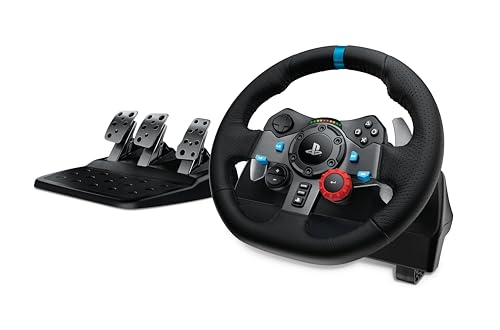
- Force-feedback steering
- Pressure-sensitive pedals
- 900-degree wheel rotation
Best For: PC and PlayStation racing simulations
Basic USB Pick
Logitech F310 Plug-and-Play Gamepad
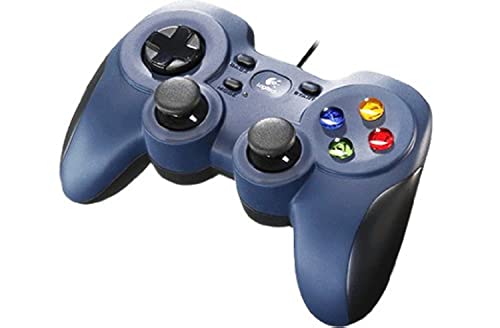
- USB plug-and-play connection
- 10 programmable buttons
- 8-way D-pad
Best For: Wired Windows PC gaming
Advanced Racing Controls
Logitech G923 Wheel and Pedals

- TRUEFORCE in supported games
- Programmable dual clutch
- LED RPM and 24-point selector
Best For: Racing games with supported wheel features
Space Sim Pick
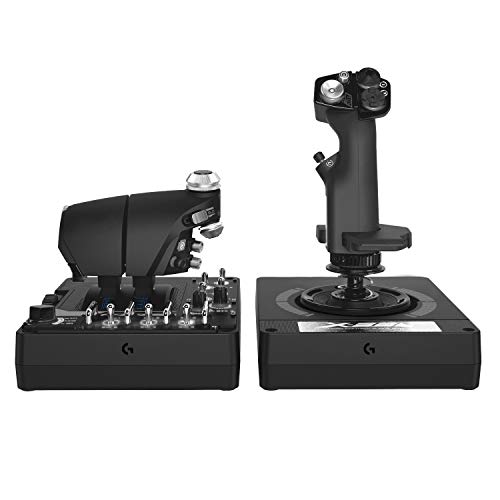
- Twin throttles and adjustable stick force
- Mini analog sticks for multidirectional control
- Requires two USB 2.0 ports
Best For: PC space and flight sim players seeking a configurable HOTAS
Racing Sim Pick
Logitech G920 Wheel, Pedals & Shifter

- Wheel, pedals, and six-speed shifter included
- Dual-motor force feedback
- Mounts to a table or racing rig
Best For: PC and Xbox racers who want manual shifting
Command-Heavy Flight Pick
Logitech G X52 Flight Control System
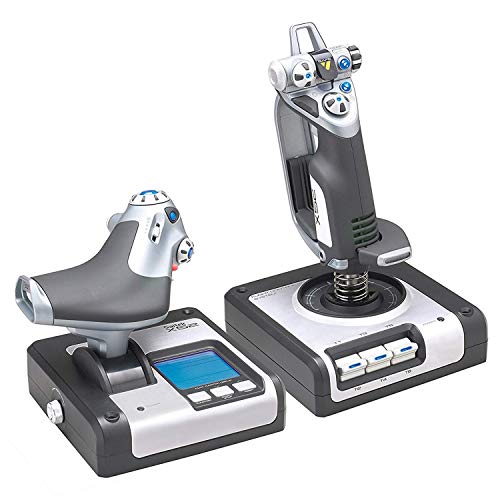
- 282 programmable commands across three modes
- LCD displays programmed commands
- Adjustable grip and lockable twist rudder
Best For: Flight and space sim players with extensive command maps
Farm Sim Specialist
Logitech G Farm Simulator Bundle

- 900-degree tractor-style steering
- Side-panel attachment controls
- 37 programmable buttons
Best For: Dedicated farming simulation controls
Flight Yoke Setup
Logitech G PRO Flight Yoke System
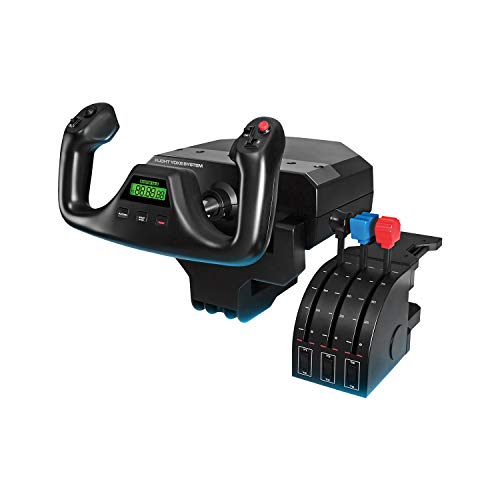
- Yoke and throttle quadrant included
- At least 54 programmable controls
- Two-position desk clamps
Best For: Windows flight simulation with yoke controls
Combat Flight Controls

- Separate stick and progressive throttle
- Adjustable throttle resistance
- Illuminated buttons and LCD display
Best For: PC flight sims using stick-and-throttle controls
Everyday PC Gamepad – Logitech G F310 Wired Controller
Logitech G F310 Wired Gamepad Controller Console - Blue/Black | Console-like layout, 4-switch D-pad
Check Price On AmazonIf you want a Logitech controller for PC games without a wireless setup, the F310 offers a familiar console-style layout and a six-foot USB cord. Its game support covers both older favorites and newer titles.
Best For: PC players who want a straightforward wired gamepad for a variety of games.
Pros:
- Familiar button layout minimizes the learning curve.
- Four-switch floating D-pad responds to quick direction changes.
- Profiler software can map keyboard and mouse commands for games without gamepad support.
Cons:
- Six-foot cable limits how far you can sit from the PC.
- Profiler customization requires software installation.
The F310 is a practical pick when broad game support and familiar controls matter more than wireless freedom. Check your game’s requirements before relying on software-based button mapping.
Immersive Racing Setup – Logitech G29 Wheel and Pedals
For racing fans searching for a Logitech controller for PC, the G29 replaces a handheld gamepad with a force-feedback wheel and pressure-sensitive pedals. It also supports PlayStation 5 and PS4 racing titles.
Best For: PC and PlayStation racers who want a wheel-and-pedal driving setup.
Pros:
- Force feedback and helical gearing provide detailed, smooth steering.
- Pressure-sensitive brake pedal has adjustable pedal faces.
- 900-degree rotation supports wide, hand-over-hand turns.
Cons:
- Wired wheel and pedal setup takes more space than a handheld gamepad.
- Driving Force Shifter is an additional accessory, not part of the listed wheel-and-pedal kit.
Choose the G29 when steering feel and pedal control are the priority. If you mostly play non-racing games, a standard gamepad will be a more versatile choice.
Basic USB Pick – Logitech F310 Plug-and-Play Gamepad
This F310 listing is a simple Logitech controller for PC shoppers who want USB plug-and-play connectivity. Its listed features include 10 programmable buttons and an 8-way D-pad.
Best For: Windows PC players seeking a wired controller with programmable inputs.
Pros:
- USB plug-and-play connection keeps initial setup simple.
- Ten programmable buttons offer input flexibility.
- 8-way D-pad supports directional controls.
Cons:
- Corded power means it is not a wireless option.
- The listing names Windows XP, Vista, and 7; verify compatibility if you use a newer version.
Consider this listing for the F310’s core wired controls, but confirm your Windows version and the listing’s details before buying.
Advanced Racing Controls – Logitech G923 Wheel and Pedals
If your search for a Logitech controller for PC is really about racing, the G923 pairs a wheel and pedals with TRUEFORCE feedback in supported games. This PlayStation version is also listed for PS5 and PS4.
Best For: PC and PlayStation racing players who want additional wheel-based controls and compatible-game feedback.
Pros:
- TRUEFORCE provides game-engine-linked feedback in supported titles.
- Programmable dual clutch supports launch assist in compatible games.
- LED RPM indicator, 24-point selector, and progressive brake spring add racing controls.
Cons:
- TRUEFORCE and dual-clutch functions depend on game support.
- G HUB download is needed for the full software experience.
The G923 makes the most sense if the racing games you play support its specialized features. Check compatibility before choosing it primarily for TRUEFORCE or launch control.
Space Sim Pick – Logitech G X56 HOTAS
If your search for a logitech controller for pc is really about commanding a spacecraft or aircraft, the X56 offers a separate joystick and twin-throttle setup with extensive programmable controls. It needs two USB 2.0 ports, so check your PC setup before buying.
Best For: PC space and flight sim players who want a configurable HOTAS with hands-on controls.
Pros:
- Mini analog sticks support multidirectional movement and separate weapon control.
- Hall-effect sensors provide 16-bit aileron and elevator axes.
- Four spring options adjust stick force; twin throttles have a friction adjuster and lock.
- Distinctly shaped controls help with navigation while using VR.
Cons:
- Requires two USB 2.0 ports.
- Designed for flight and space sims rather than general-purpose games.
The X56 makes sense when you will use its broad control set; otherwise, its specialized layout may be more than you need.
Racing Sim Pick – Logitech G920 Wheel, Pedals & Shifter
For racing, this logitech controller for pc swaps a handheld layout for a steering wheel, pedals, and six-speed H-pattern shifter. Dual-motor force feedback adds tire and handling sensations, while built-in clamps secure the wheel and shifter to a table or racing rig.
Best For: PC or Xbox racers who want a wheel-and-pedal setup with manual shifting.
Pros:
- Includes wheel, pedals, and a six-speed H-pattern shifter.
- Dual-motor force feedback simulates changes in grip and handling.
- Mounting clamps help keep the wheel and shifter in place.
- Leather-covered wheel and shifter details, with metal pedals.
Cons:
- Requires space to mount the wheel and shifter.
- Specialized for racing rather than other game genres.
Choose this bundle if tactile steering and gear changes matter more to you than the convenience of a compact controller.
Command-Heavy Flight Pick – Logitech G X52 Flight Control System
If you need a logitech controller for pc flight sims with many commands close at hand, the X52 combines a HOTAS layout with 282 programmable commands across three modes. Its multifunction LCD lets you review programmed commands before activating them.
Best For: Flight and space sim players who want extensive command mapping and an adjustable joystick grip.
Pros:
- Magnetic, non-contact X and Y axis sensors support accurate control.
- LCD shows programmed commands and includes a flight-planning clock.
- Five-position grip helps bring buttons within reach.
- Twist rudder can be locked when using separate rudder pedals.
Cons:
- Its extensive command mapping takes time to configure.
- HOTAS design is geared toward simulations, not general-purpose gaming.
The X52 is a practical choice if you value accessible controls and an on-device command reference during longer sim sessions.
Farm Sim Specialist – Logitech G Farm Simulator Bundle
If you need a Logitech controller for PC farming simulations, this bundle combines a steering wheel, pedals, and side panel for managing vehicles and equipment. Its 900-degree wheel rotation is designed to match the feel of tractor steering.
Best For: PC players who want dedicated controls for farming simulation.
Pros:
- Side-panel loader stick controls equipment attachments.
- Dual analog sticks let you control your character between vehicles.
- Cruise-control speed dial and 37 programmable buttons put farm functions within reach.
Cons:
- Its farming-focused controls are less versatile for other game types.
- The wheel, pedals, and side panel require more setup space than a single controller.
Choose this if controlling tractors and attachments is your priority; its specialized layout is the main reason to buy it.
Flight Yoke Setup – Logitech G PRO Flight Yoke System
For a Logitech controller for PC flight simulation, this system pairs a yoke with a separate throttle quadrant. The stainless-steel yoke shaft and included desk clamps support a stable, hands-on cockpit setup.
Best For: Windows flight-sim players who prefer a yoke and throttle to a joystick.
Pros:
- Includes a flight throttle quadrant and two desk clamps.
- POV hat, buttons, and three-position mode switch offer at least 54 programmable controls.
- Two-position clamps allow mounting on a range of desks.
Cons:
- Requires desk mounting and space for both the yoke and throttle.
- Supported simulators require an optional software download.
This is a practical pick when you want yoke-style aircraft control and plenty of assignable functions, provided you have room to mount the components.
Combat Flight Controls – Logitech G Saitek X52 Pro
If your search for a Logitech controller for PC is really about flight-sim stick control, the X52 Pro pairs a joystick with a progressive throttle. Its illuminated buttons and LCD multi-function display add information and control at the desk.
Best For: PC flight-sim players who want a separate stick and adjustable throttle.
Pros:
- Throttle resistance is adjustable, with afterburner and idle detents.
- Five-position handle adjustment accommodates different hand sizes.
- Contactless X- and Y-axis sensing and a centering spring support precise stick input.
Cons:
- Requires two USB 2.0 ports.
- Game-specific programming uses an optional software download.
The X52 Pro suits players who value throttle feel and customizable stick controls; check your available USB ports before choosing it.
How We Picked the Best Logitech Controller for PC
We grouped the 10 selected products by intended use rather than treating every device as an interchangeable gamepad. The selection spans two F310 listings, racing wheels and pedals, a farming bundle, and flight-simulation controls. The most useful differences are control layout, PC connection, game compatibility, desk space, and whether a bundle includes the accessories you expect. Closely related listings deserve a careful contents check before purchase.
Quick Comparison by Game Type
- General PC gaming: The F310 listings are the straightforward choices if you want a compact, wired gamepad.
- Racing: The G29, G923, and G920 wheel bundles offer wheel-and-pedal controls. Check platform labeling and included accessories; the listed G920 package includes a Driving Force Shifter.
- Flight simulation: The X52, X52 Pro, and X56 offer joystick-and-throttle-style controls. The PRO Flight Yoke System takes a different approach for aircraft that use a yoke.
- Farming simulation: The Farm Simulator Bundle is the specialized option for that style of play.
Key Buying Factors for a Logitech Controller for PC
Match the Controller to Your Games
Start with the control scheme your games support. A gamepad is the most flexible option here, but it cannot replace the steering feel of a wheel or the dedicated axes of a flight setup. Check each game’s controller settings for wheel, yoke, joystick, throttle, and button-mapping support before investing in specialized hardware.
Check Compatibility and Bundle Contents
Confirm that the exact listing supports your version of Windows and that you can access any software needed for setup or customization. For the F310, check a game’s input requirements and the controller’s selected input mode if buttons are not recognized as expected. Console labels also matter if you plan to use one device beyond PC: the G29 and G923 listings emphasize PlayStation compatibility, while the G920 listing emphasizes Xbox compatibility. Do not assume accessories shown in photos are included; verify pedals, shifter, mounts, and cables in the specific package.
Plan for Space and Setup Time
A wired gamepad needs little room. Wheels need a stable mounting surface and pedal space; flight controls and yokes also need reachable, secure positions. More programmable controls can be useful in complex simulations, but they may take longer to configure. If your desk doubles as a work area, consider how often you will install and remove the equipment.
Who Should Buy Which Logitech Controller for PC?
Choose an F310 listing for an affordable-feeling, uncomplicated gamepad setup, while comparing the two listings for current compatibility information and package details. Choose a G29, G923, or G920 if racing is the priority; pick the bundle that fits your console plans and shifter needs. For flight games, consider an X52 or X52 Pro for a joystick-and-throttle layout, an X56 if extensive programmable inputs matter, or the PRO Flight Yoke System if you prefer yoke-style aircraft controls. The Farm Simulator Bundle makes the most sense for dedicated farming-simulation players. The right Logitech Controller for PC is the one your games support and your space can accommodate.