
If you need a workstation that can keep up with design, photo, video, and 3D work, ASUS ProArt gear is built with creators in mind. These picks focus on color accuracy, connectivity, cooling, and practical expandability.
This roundup covers complete desktop-focused components plus one mobile creator system, so you can choose the right setup for your workflow and budget.
Best 10 Asus Proart Desktop for Creators Picks for 2026
Best ProArt Creator Bundle
ASUS ProArt X870E Creator Bundle

- AM5 support for Ryzen 9000/8000/7000 CPUs
- 16+2+2 power stages for demanding workloads
- 360mm AIO and airflow-focused wood case
Best For: Creators building a premium AMD workstation with a cohesive ProArt look.
Best Color Accuracy
ASUS ProArt PA278CGRV 27" QHD Monitor
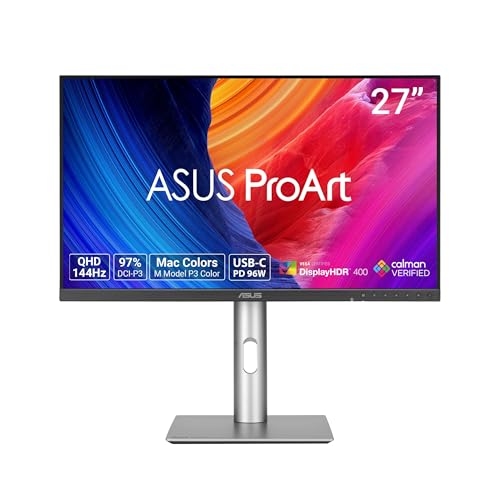
- Delta E < 2 factory calibration
- 97% DCI-P3 and 100% sRGB coverage
- USB-C with 96W power delivery
Best For: Creators who need accurate color, smooth motion, and a tidy USB-C workspace.
Best for Creator I/O
ASUS ProArt X870E Creator WiFi Motherboard

- Dual USB4 plus 10 Gb and 2.5 Gb LAN
- PCIe 5.0 x16 and four M.2 slots
- 16+2+2 power stages for stable AM5 builds
Best For: Creators building a fast, expandability-focused AM5 workstation.
Best Color Accuracy for Creators
ASUS ProArt 27” 4K HDR Monitor

- Factory-calibrated Delta E < 2 color accuracy
- 99% DCI-P3 and 99% Adobe RGB coverage
- USB-C PD 96W, DisplayPort, and daisy-chain support
Best For: Editors, designers, and photographers who need accurate color in a compact 4K display.
Best Creator Connectivity

- Dual Thunderbolt 5 and Thunderbolt 4 support
- 10 GbE, 2.5 GbE, and WiFi 7 networking
- Five M.2 slots with PCIe 5.0 readiness
Best For: Creators building a high-connectivity Intel workstation with room to expand.
Best Color-Accurate Creator Monitor
ASUS ProArt PA279CV 27" 4K Monitor
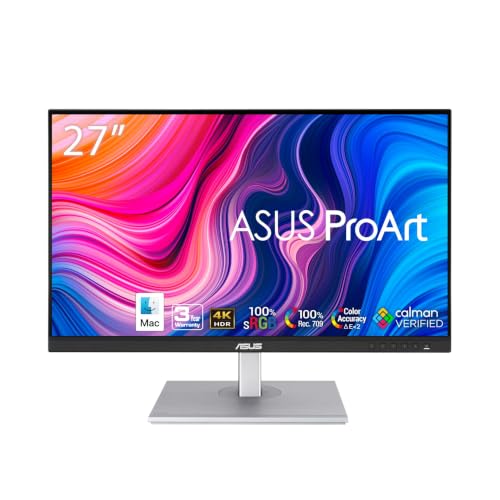
- Delta E < 2 factory calibration
- 100% sRGB / Rec. 709 coverage
- USB-C 65W, HDMI, DisplayPort, USB hub
Best For: Color-focused creators who want a reliable 4K monitor for editing and design.
Best for High-Airflow Creator Builds
ASUS ProArt PA602 Creator Case

- Dual 200mm fans and 420mm radiator support
- Tool-less PCIe mounting with GPU holder
- Front USB-C 20Gbps plus integrated fan hub
Best For: Creators building a cool-running, workstation-style E-ATX PC with easy assembly features.
Best for Mobile AI Creators
ASUS ProArt P16 Creator Laptop 16" OLED

- 3K OLED 120Hz touch display for detailed visual work
- Ryzen AI 9 HX 370 plus RTX 5070 for demanding edits
- 32GB RAM and 2TB SSD suit large creative projects
Best For: Creators who want a portable, high-performance machine for editing, design, and AI-assisted workflows.
Best Color-Accurate Monitor
ASUS ProArt PA278CV 27" QHD Monitor

- Calman Verified Delta E < 2 and 100% sRGB color accuracy
- USB-C with 65W power delivery for cleaner single-cable setups
- 27-inch QHD IPS panel with ergonomic stand and daisy-chaining
Best For: Creators who need an accurate, clutter-free monitor for editing and design.
Best Color-Accurate Display
ASUS ProArt PA278QV 27” WQHD Monitor

- Calman Verified with ΔE < 2 tuning for dependable accuracy
- 100% sRGB and Rec. 709 coverage for creator workflows
- Ergonomic stand and eye-care features for long sessions
Best For: Creators who need an accurate 27-inch monitor for editing and design.
Best ProArt Creator Bundle – ASUS ProArt X870E Creator Bundle
If you want an asus proart desktop for creators that feels purpose-built from the ground up, this ASUS ProArt bundle is a strong starting point. It pairs a creator-focused X870E motherboard with a stylish wood-accented mid-tower case and a 360mm liquid cooler, giving you the core pieces for a high-end Ryzen workstation with solid thermal and connectivity headroom.
Best For: Creators building a polished AMD AM5 workstation for demanding editing, rendering, and AI-assisted workflows.
Pros:
- AM5 platform support for Ryzen 9000, 8000, and 7000 series CPUs
- Strong power delivery and advanced connectivity for creator workloads
- 360mm AIO cooling and high-airflow case for better thermal control
- Distinctive ProArt design with a FSC-certified wood front panel
Cons:
- Bundle includes core components only, so you still need CPU, RAM, storage, and GPU
- Higher-cost option than a standard mainstream PC platform
- Best value depends on whether you want a full custom build
This bundle makes sense when you want a creator-first platform with premium cooling, workstation-grade power delivery, and a more refined look than a typical gaming case. For anyone assembling an asus proart desktop for creators, it offers a clean foundation that balances performance, thermals, and presentation.
Best Color Accuracy – ASUS ProArt PA278CGRV 27" QHD Monitor
If you’re building an asus proart desktop for creators, this ProArt monitor is a practical match for color-critical work, smooth timeline scrubbing, and day-to-day editing. The 27-inch QHD IPS panel, wide DCI-P3 coverage, and factory calibration make it a strong pick for photo, video, and design workflows where accuracy matters.
Best For: Creators who want a well-calibrated 27-inch monitor with strong color consistency, USB-C convenience, and enough refresh rate to feel smooth during fast-moving projects.
Pros:
- Factory calibrated with Delta E < 2 for accurate color out of the box
- 97% DCI-P3 and 100% sRGB coverage for creator-friendly color work
- 144Hz VRR with FreeSync helps motion feel smoother while editing or previewing
- USB-C with up to 96W power delivery reduces cable clutter
Cons:
- QHD is sharp, but not as spacious as 4K for detailed timelines or huge canvases
- Best features are geared more toward creators than general entertainment
For an asus proart desktop for creators, this monitor stands out as a dependable balance of color accuracy, connectivity, and comfort. It is especially appealing if you want a creator-first display that can double as a clean single-cable workstation setup.
Best for Creator I/O – ASUS ProArt X870E Creator WiFi Motherboard
If you’re building an asus proart desktop for creators, this board stands out for its mix of high-bandwidth connectivity and next-gen platform support. It pairs AMD AM5 compatibility with PCIe 5.0, DDR5, dual USB4, and both 10 Gb and 2.5 Gb Ethernet, making it a strong foundation for content workflows that move large files and rely on fast peripherals.
Best For: Creators who want a high-end AM5 motherboard with serious connectivity for editing, rendering, AI workloads, and fast networked storage.
Pros:
- Dual USB4, WiFi 7, and 10 Gb Ethernet for fast transfer and peripheral support
- PCIe 5.0 x16 and four M.2 slots for modern GPUs and high-speed storage
- 16+2+2 power stages and ProCool II design for strong, stable performance
- AI Overclocking, AI Cooling, and AI Networking II add smart tuning tools
Cons:
- Motherboard-only product, so you still need a CPU, RAM, storage, and case
- Premium feature set likely makes it pricier than mainstream creator boards
- Overkill if your workflow doesn’t need 10 Gb LAN or dual USB4
For a high-end asus proart desktop for creators, this motherboard is most compelling when connectivity and expandability matter as much as raw performance. It is especially well suited to users building a workstation that needs room to grow without sacrificing speed.
Best Color Accuracy for Creators – ASUS ProArt 27” 4K HDR Monitor
If you’re building an asus proart desktop for creators, the PA279CRV is a smart display match thanks to its factory-calibrated 4K panel, wide gamut coverage, and single-cable USB-C connectivity. It’s geared toward editors, designers, and photographers who need dependable color without adding extra setup complexity.
Best For: Color-critical creative work like photo editing, video grading, and graphic design on a compact 27-inch 4K monitor.
Pros:
- 99% DCI-P3 and 99% Adobe RGB coverage for strong color fidelity
- Factory pre-calibrated to Delta E < 2 and Calman Verified
- USB-C with 96W power delivery simplifies laptop or desktop setups
- Ergonomic stand and daisy-chain support help keep a workspace tidy
Cons:
- 27 inches may feel small if you want a larger editing canvas
- Not aimed at high-refresh gaming or motion-focused use
- Premium color features can push it above basic office-monitor pricing
For creators who care more about accurate output than flashy extras, this ASUS ProArt display is an easy fit. It pairs especially well with an asus proart desktop for creators because the workflow stays clean, color-true, and ready for serious production work.
Best Creator Connectivity – ASUS ProArt Z890-CREATOR WIFI
If you’re building an asus proart desktop for creators, this ProArt Z890 board is aimed at users who need fast storage, high-bandwidth I/O, and workstation-grade networking in one platform. It’s ready for Intel Core Ultra Series 2 CPUs and adds the kind of connectivity that makes a creator-focused build easier to expand over time.
Best For: Video editors, 3D artists, and power users who want a creator workstation motherboard with Thunderbolt 5, WiFi 7, and multiple M.2 slots.
Pros:
- Dual Thunderbolt 5 plus Thunderbolt 4 support for fast external drives and displays
- 10 GbE + 2.5 GbE LAN and WiFi 7 for strong wired and wireless connectivity
- Five M.2 slots and PCIe 5.0 support for high-speed storage and next-gen GPUs
- Creator-friendly tools like ProArt Creator Hub, AI OC, and AI Cooling II
Cons:
- Requires a separate CPU, RAM, storage, and graphics card to complete the build
- Feature-rich design may be overkill for basic office or casual use
- Premium motherboard pricing can stretch creator build budgets
Overall, this board makes a strong foundation for an asus proart desktop for creators who value speed, expandability, and professional-grade connectivity more than flashy aesthetics.
Best Color-Accurate Creator Monitor – ASUS ProArt PA279CV 27" 4K Monitor
If you’re building an asus proart desktop for creators, this 27-inch 4K ProArt monitor is a strong match for color-critical work. It pairs a sharp UHD panel with factory calibration, wide sRGB/Rec. 709 coverage, and a simple USB-C setup that keeps a desk clean.
Best For: Designers, photo editors, and video creators who want accurate color, 4K clarity, and easy single-cable connectivity.
Pros:
- Factory calibrated with Delta E < 2 for dependable color accuracy
- 100% sRGB and 100% Rec. 709 coverage suits creative workflows
- USB-C with 65W power delivery plus HDMI, DisplayPort, and USB hub
- 5-year warranty adds long-term peace of mind
Cons:
- 60Hz refresh rate is geared more toward work than fast motion
- Not as immersive as larger ultrawide options for multitasking
- Built-in speakers are not a selling point if you need audio quality
For an asus proart desktop for creators, the PA279CV stands out as a practical monitor-first upgrade: accurate out of the box, easy to connect, and sized well for editing without overwhelming a home or studio desk.
Best for High-Airflow Creator Builds – ASUS ProArt PA602 Creator Case
If you’re building an asus proart desktop for creators, the ASUS ProArt PA602 is a smart case choice thanks to its high-airflow front intake, oversized 200mm fans, and support for serious cooling hardware. It leans more toward thermals and build convenience than flashy styling, which makes it a practical fit for workstations that need to stay cool under long editing, rendering, or content-production sessions.
Best For: Creators who want an E-ATX case with excellent airflow, flexible radiator support, and helpful build features for a workstation-class PC.
Pros:
- Dual 200mm front fans and a 420mm radiator support make it strong for cooling-heavy creator rigs.
- Tool-less PCIe mounting, GPU holder, and power lock latch simplify assembly and upgrades.
- Front USB-C 20Gbps and integrated fan hub add modern connectivity and easier cable control.
- Front dust indicator helps you stay ahead of maintenance for consistent airflow.
Cons:
- Large E-ATX footprint is not ideal for compact desks or smaller setups.
- Focuses on practicality over RGB-heavy aesthetics, so it may feel too understated for some.
- It is a case only, so you still need to supply the rest of the workstation components.
For an asus proart desktop for creators, the PA602 stands out as a cooling-first enclosure that prioritizes reliability, space, and easier building over gimmicks. If your workflow pushes sustained loads and you want a case built for clean, high-performance assembly, this is an excellent fit.
Best for Mobile AI Creators – ASUS ProArt P16 Creator Laptop 16" OLED
If you want an asus proart desktop for creators alternative that still travels well, the ProArt P16 brings a creator-focused mix of a 3K 120Hz OLED touch display, Ryzen AI 9 HX 370 power, and RTX 5070 graphics. It’s built to handle photo work, video editing, 3D tasks, and AI-assisted workflows without feeling like a compromise.
Best For: Creators who need workstation-class performance in a portable 16-inch laptop for editing, design, and AI-heavy production work.
Pros:
- 3K OLED touchscreen with 120Hz refresh rate for sharp, smooth creative work
- Ryzen AI 9 HX 370 and RTX 5070 deliver strong performance for editing and rendering
- 32GB RAM and 2TB SSD provide plenty of headroom for large projects
- ASUS DialPad adds useful hands-on control in creative apps
Cons:
- Not a true desktop replacement if you want maximum upgradeability
- Premium specs likely put it above casual creator budgets
- Battery life may drop quickly under heavy GPU workloads
For creators comparing an asus proart desktop for creators setup versus a portable machine, this model stands out as a high-end hybrid: powerful enough for demanding projects, but still easy to carry between studio, office, and client meetings.
Best Color-Accurate Monitor – ASUS ProArt PA278CV 27" QHD Monitor
If you want a reliable display to pair with an asus proart desktop for creators, the ASUS ProArt PA278CV is built around accuracy, workspace, and everyday workflow comfort. Its 27-inch QHD IPS panel, factory calibration, and USB-C connectivity make it a strong fit for editing, design, and multitasking without adding clutter.
Best For: Graphic designers, photo editors, and video creators who need a color-accurate 27-inch monitor with simple USB-C connectivity.
Pros:
- Calman Verified with Delta E < 2 and 100% sRGB for dependable color accuracy
- USB-C with 65W power delivery reduces cable clutter for Mac and PC setups
- 27-inch QHD IPS screen gives you sharp detail and extra room for timelines and palettes
- Ergonomic stand plus daisy-chaining help build a flexible creative workstation
Cons:
- 75Hz refresh rate is fine for creative work, but not ideal for fast-paced gaming
- Resolution is excellent for productivity, though some users may prefer 4K for ultra-fine detail
For an asus proart desktop for creators, this monitor makes the most sense when color fidelity and desk efficiency matter more than flashy specs. It is a practical, creator-first display that balances accuracy, ergonomics, and easy connectivity.
Best Color-Accurate Display – ASUS ProArt PA278QV 27” WQHD Monitor
If you want a dependable display to pair with an asus proart desktop for creators, the ASUS ProArt PA278QV is built around accuracy first. Its Calman Verified tuning, ΔE < 2 claim, and 100% sRGB/Rec. 709 coverage make it a solid choice for photo editing, design, and everyday content work without a lot of calibration fuss.
Best For: Creators who need a color-accurate 27-inch monitor for photo editing, graphic design, and video workflows.
Pros:
- Factory-calibrated color with strong sRGB and Rec. 709 coverage
- WQHD 27-inch IPS panel gives you plenty of room for editing timelines and tool palettes
- Ergonomic stand and eye-care features support long studio sessions
- Good connectivity, including DisplayPort, HDMI, DVI-D, Mini DP, and a USB hub
Cons:
- Not aimed at wide-gamut HDR or ultra-high-end color grading
- 75Hz panel is fine for smooth work, but not a gaming-first spec
Overall, the PA278QV is a practical pick for creators who value dependable color and comfortable day-to-day use over flashy extras. For an asus proart desktop for creators, it’s a balanced monitor that helps keep your workflow efficient and your visuals consistent.
How We Picked These Asus Proart Desktop for Creators Options
We prioritized creator-first features that matter in real workflows: accurate displays, strong I/O, USB-C power delivery, PCIe 5.0 support, dependable thermal design, and chassis flexibility for large GPUs and radiators. We also looked for products that fit common production needs, from photo editing and motion graphics to content creation and mixed desktop setups.
Quick Comparison
For most buyers, the display choices cover the widest range of needs: QHD models are a smart fit for everyday editing and dual-monitor desks, while 4K ProArt panels are better for detail work and color-critical finishing. On the system side, the X870E and Z890 ProArt motherboards are the most important foundation pieces for a modern Asus Proart Desktop for Creators, especially if you want PCIe 5.0, fast storage, and robust power delivery. The PA602 case and bundle options make sense when you are building a quiet, high-airflow workstation with room for serious cooling.
Key Buying Factors for Asus Proart Desktop for Creators
Display Resolution and Color Accuracy
If your work depends on precision, look for validated color performance such as ΔE < 2 and wide-gamut coverage like DCI-P3 or Adobe RGB. QHD is often enough for general editing, but 4K is the safer choice for retouching, timelines, and detailed design work.
Platform and Upgrade Headroom
Choose AMD AM5 or Intel LGA 1851 based on your preferred CPU ecosystem, but make sure the board supports the storage, graphics, and memory expansion you expect to use over the next few years. Creator builds benefit from extra M.2 slots, high-speed networking, and stable power delivery.
Cooling, Case Fit, and Noise
A strong case and AIO cooler matter if you plan to run high-performance CPUs or GPUs for long sessions. Look for radiator support, straightforward cable management, and good dust control to keep maintenance low.
Connectivity and Workflow Convenience
USB-C with power delivery, built-in hubs, and high-quality rear I/O can simplify a desk full of peripherals. For hybrid work, creator laptops can be useful when you need one machine that travels without sacrificing performance.
Who Should Buy Which Asus Proart Desktop for Creators?
If you are building a new desktop from scratch, start with the motherboard and case, then pair them with the right monitor for your content type. If your focus is editing or color work, the 27-inch ProArt 4K displays are the most versatile choice. If you need a balanced everyday workspace, a QHD ProArt monitor is easier to drive and still very sharp. Choose the PA602 case and the bundled motherboard/case/cooling package if you want a more complete foundation for a high-end build. And if mobility matters as much as desktop-class performance, the ProArt P16 is the best fit for creators who split time between studio and travel.