
Choosing video conferencing equipment with wireless screen sharing can make meetings faster, cleaner, and far less dependent on cables or adapters.
Below, we break down the top options for different room sizes and workflows, so you can match the right system to your team’s collaboration style.
Best 10 Video Conferencing Equipment with Wireless Screen Sharing Picks for 2026
One-Click Room Conferencing
Barco ClickShare CX-20 Gen 2 Wireless Conferencing System

- USB-C one-click wireless sharing
- Works with Microsoft Teams and Zoom
- Automatic operation for simple room use
Best For: Small rooms that need fast wireless sharing
Modular Platform Hub
Poly G7500 Video Conference Equipment

- Modular room solution with third-party support
- Works with nearly every video platform
- NoiseBlockAI and Acoustic Fence reduce noise
Best For: Teams building a flexible room-based conference setup
Enterprise Wireless Sharing
Barco ClickShare C-10 Wireless Presentation System

- One-click wireless sharing with no software download
- Two users can share side by side in full HD
- ISO27001 security plus remote management
Best For: Medium to large rooms needing secure collaborative sharing
All-in-One BYOD Share Bar
Fanvil CA400 Video Conference Solution

- Wireless 4K UHD screen sharing
- 8 array mics with 3W vocal-enhanced speaker
- Built-in UVC camera in an all-in-one BYOD unit
Best For: Rooms that want an integrated share, camera, and audio bundle
Yealink content-sharing add-on

- Lets users present PC content on supported Yealink systems
- Includes HDMI, USB, USB-C, RJ45, and Wi‑Fi options
- Works with Windows and macOS for BYOD sharing
Best For: Supported Yealink rooms that need flexible PC content sharing
MeetHub wireless sharing kit

- True 4K wireless screen sharing for room displays
- Plug-and-play USB-C dongle with no apps or drivers
- Supports BYOM and multiple device platforms
Best For: Rooms that want simple plug-and-play wireless presentations
Yealink all-in-one room bar

- Triple 4K cameras with 151° ultra-wide coverage
- 8-mic array with 5-meter voice pickup range
- Supports Teams Rooms, Zoom Rooms, and BYOD
Best For: Small rooms needing an integrated conferencing bar with BYOD support
Fast Wireless Sharing Hub
BenQ InstaShow VS25 Driver-Free Wireless Conferencing
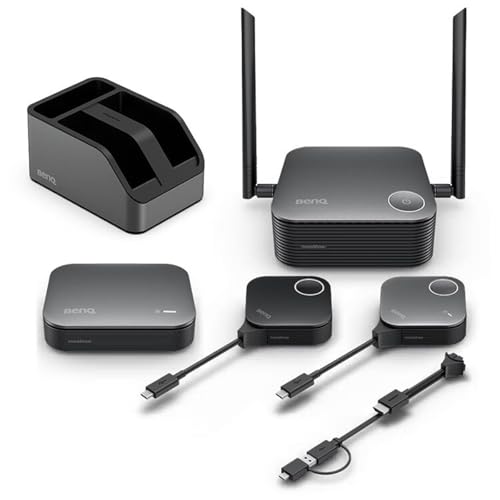
- No-driver wireless sharing in seconds
- Supports Windows, macOS, and Linux
- CVSS 4.0 security with touchback control
Best For: Secure, plug-and-play presenting in mixed-device rooms
All-in-One Room Bar
Barco ClickShare Bar Pro 4K Wireless Conference System

- Combines camera, mic, and conferencing in one bar
- 4K content sharing with touchback and annotation
- Designed for medium meeting rooms
Best For: Medium rooms needing a single wireless conferencing bar
Touch-Control Meeting Bar
Yealink A10-020 4K Teams/Zoom Meeting Bar

- 4K all-in-one bar with 8 MEMS microphones
- Includes CTP18 touch panel for room control
- Teams and Zoom certified with AI framing
Best For: Small rooms that need a certified Teams or Zoom setup
One-Click Room Conferencing – Barco ClickShare CX-20 Gen 2 Wireless Conferencing System
If you’re comparing video conferencing equipment with wireless screen sharing for a small meeting room, the ClickShare CX-20 Gen 2 is built around simplicity. It uses a USB-C button for one-click sharing and is designed to work with Microsoft Teams and Zoom, so it fits neatly into common hybrid meeting setups.
Best For: Small meeting rooms that need fast, one-button wireless sharing with Teams and Zoom compatibility.
Pros:
- One-click wireless screen sharing via USB-C button.
- Compatible with Microsoft Teams and Zoom.
- Automatic operation keeps setup straightforward.
- Compact modern design with a 1-year warranty.
Cons:
- Product details don’t list advanced room audio or camera features.
- May be more focused on sharing than full-room system customization.
Overall, the CX-20 Gen 2 is a practical pick when you want wireless presenting to feel effortless rather than technical. It’s a clean fit for teams that prioritize quick content sharing and platform compatibility in a compact conference space.
Modular Platform Hub – Poly G7500 Video Conference Equipment
For buyers building video conferencing equipment with wireless screen sharing around an existing room setup, the Poly G7500 stands out as a modular hub. It connects with cameras, microphones, and third-party components, while supporting nearly every major video platform for flexible meeting-room use.
Best For: Medium to large rooms that need a flexible, modular conferencing base with broad platform support.
Pros:
- Modular room solution that works with cameras, microphones, and third-party components.
- Compatible with nearly every video platform.
- Poly NoiseBlockAI and Acoustic Fence help reduce background noise.
- Remote provisioning, updates, and monitoring through Poly Lens.
Cons:
- Wireless screen sharing is not specifically listed in the supplied details.
- Designed as a core room component, so it may require additional hardware to complete the setup.
In practice, the G7500 is best viewed as the flexible center of a conference room rather than an all-in-one shortcut. If your priority is integration, manageability, and broad calling compatibility, it offers a strong foundation.
Enterprise Wireless Sharing – Barco ClickShare C-10 Wireless Presentation System
The ClickShare C-10 is a strong fit if you want video conferencing equipment with wireless screen sharing for medium to large meeting rooms. It supports one-click wireless sharing, side-by-side content display in full HD, and interactive features like annotation and blackboarding, making it useful in collaborative hybrid meetings.
Best For: Medium to large meeting rooms that need secure wireless presentation and interactive content sharing.
Pros:
- One-click wireless screen sharing with no software download required.
- Two users can share side by side in full HD.
- Interactive tools include annotation, blackboarding, and touch back support.
- ISO27001-certified security and remote management support.
Cons:
- Some advanced collaboration features may exceed the needs of basic rooms.
- Best suited to existing meeting-room environments rather than simple plug-and-play personal use.
For organizations that want wireless sharing to feel polished and secure, the C-10 is built with enterprise deployment in mind. Its mix of content-sharing flexibility, security, and remote management makes it well suited to standardized conference room rollouts.
All-in-One BYOD Share Bar – Fanvil CA400 Video Conference Solution
The Fanvil CA400 is an all-in-one option for buyers seeking video conferencing equipment with wireless screen sharing and a built-in meeting-room bundle. It combines 8 array microphones, a 3W vocal-enhanced speaker, a UVC camera, and wireless 4K UHD screen sharing in a single BYOD device.
Best For: Conference rooms that want an all-in-one wireless sharing, camera, mic, and speaker solution.
Pros:
- Wireless 4K UHD screen sharing supports easy content presentation.
- Includes 8 array microphones and a 3W vocal-enhanced speaker.
- Built-in UVC camera and BYOD design simplify room setup.
- Compatible with smartphones, laptops, PCs, tablets, and conferencing software.
Cons:
- All-in-one design may be more than some small teams need.
- Details emphasize the bundle more than advanced management or security features.
As a room device, the CA400 is aimed at teams that want fewer separate components and a cleaner meeting experience. If wireless presenting, audio pickup, and integrated video are all priorities, it offers a streamlined package.
Yealink content-sharing add-on – Yealink VCH51 Package
If you need video conferencing equipment with wireless screen sharing for a Yealink room setup, the VCH51 Package is built to let users present PC content into compatible Yealink systems. It supports BYOD workflows for MeetingBar A20/A30 and MeetingEye 400/600, while offering wired and wireless connection options for flexible meeting-room use.
Best For: Yealink rooms that need a compact content-sharing module for BYOD presentations and stable PC screen sharing.
Pros:
- Supports PC content presentation on Yealink video conferencing systems
- Offers HDMI, USB, USB-C, RJ45, and Wi‑Fi connectivity options
- Compatible with Windows 7/8.1/10 and macOS 10.6 or higher
- Designed for a stable and clear presentation experience
Cons:
- Limited to compatible Yealink systems for full BYOD use
- Not a standalone conferencing bar or camera system
The VCH51 is best viewed as a room integration accessory rather than a full conferencing kit. For organizations already using supported Yealink hardware, it adds practical content-sharing flexibility without complicating the setup.
MeetHub wireless sharing kit – MeetHub Kit
The MeetHub Kit is a strong pick if you want video conferencing equipment with wireless screen sharing that is designed for simple room presentations and BYOM meetings. It uses a USB-C wireless HDMI dongle approach, so teams can share content quickly to a TV, projector, or monitor without installing apps or drivers.
Best For: Meeting rooms that need easy plug-and-play wireless screen sharing with true 4K output and BYOM support.
Pros:
- True 4K output for clearer presentations and detailed visuals
- Plug-and-play setup with no WiFi, apps, or drivers required
- Supports BYOM workflows with Zoom, Microsoft/Google Meet, and more
- Works across Windows, macOS, iOS, and Android devices
Cons:
- Best suited to rooms that already have display and conferencing hardware
- Wireless range and quad-view features may be more than small teams need
Overall, the MeetHub Kit focuses on fast deployment and broad compatibility rather than complexity. If your priority is simple wireless screen sharing with professional-looking 4K presentation quality, it fits that role well.
Yealink all-in-one room bar – Yealink MeetingBar A25
The Yealink MeetingBar A25 is a full all-in-one option for teams looking for video conferencing equipment with wireless screen sharing in a small-room setup. Along with its triple 4K camera system and built-in audio hardware, it supports BYOD use so a connected laptop can join meetings through third-party apps while using the bar’s peripherals.
Best For: Small rooms that want an integrated 4K conferencing bar with strong audio, wide framing, and BYOD flexibility.
Pros:
- Triple-camera system with 151° ultra-wide field of view
- Built-in 8-microphone array and 5-meter voice pickup range
- Supports native Teams Rooms, Zoom Rooms, and BYOD mode
- Includes CTP25 touch panel and mounting hardware for deployment
Cons:
- Bulkier and more complex than a simple content-sharing dongle
- Designed for small rooms, so it may be overkill for basic huddle use
This is the most complete system of the three, especially if you want an integrated device rather than a separate camera, mic, and sharing accessory. It is a better fit for rooms that need dependable meeting-room performance and room-wide capture in one package.
Fast Wireless Sharing Hub – BenQ InstaShow VS25 Driver-Free Wireless Conferencing
For teams building video conferencing equipment with wireless screen sharing, the BenQ InstaShow VS25 is aimed at fast, driver-free meetings where people need to share content without touching the network or installing software. It supports Windows, macOS, and Linux, and it’s designed for BYOM/BYOD use with Zoom, Microsoft Teams, or Google Meet.
Best For: Secure, plug-and-play wireless presenting in mixed-device meeting rooms
Pros:
- One-tap wireless connection with no drivers, software, or network setup
- Works across Windows, macOS, and Linux for BYOM/BYOD workflows
- Wireless touchback control supports interactive displays up to 40 ft away
- CVSS 4.0 certification, 128-bit encryption, HDCP, and WPA3 Enterprise support
Cons:
- Focuses on screen sharing and collaboration rather than built-in camera/audio hardware
- Best suited to rooms that already have conferencing equipment in place
- May be more than needed for very basic presentation setups
The VS25 stands out when security and simplicity matter more than added room hardware. If you want wireless sharing that feels quick for presenters and manageable for IT, this is a strong fit.
All-in-One Room Bar – Barco ClickShare Bar Pro 4K Wireless Conference System
The Barco ClickShare Bar Pro is built for video conferencing equipment with wireless screen sharing in medium meeting rooms, combining a 120° camera, microphone, and wireless conferencing in one unit. It also adds 4K content sharing plus interactive tools like touchback, annotation, and blackboarding for meetings that mix discussion and presentation.
Best For: Medium rooms that want a single all-in-one conferencing bar with wireless sharing
Pros:
- All-in-one design combines camera, microphone, and conferencing features
- Wireless conferencing works with any videoconferencing platform
- 4K content sharing plus touchback, annotation, and blackboarding
- 120° wide-angle camera and 5-year warranty
Cons:
- Tailored to medium-sized rooms, so it may be oversized for small spaces
- All-in-one bars can be less flexible than separate modular components
- Higher-end feature set may be unnecessary for simple sharing-only use cases
This is a practical choice when you want to consolidate room AV into one device while keeping wireless sharing central to the experience. It is especially appealing for IT teams that want fewer components to manage.
Touch-Control Meeting Bar – Yealink A10-020 4K Teams/Zoom Meeting Bar
The Yealink A10-020 is a compact option for video conferencing equipment with wireless screen sharing, pairing a 4K meeting bar with the CTP18 touch panel for easier room control. It’s certified for Microsoft Teams and Zoom, supports Wi-Fi and wired connectivity, and includes AI features like auto framing and speaker tracking for small rooms.
Best For: Small meeting rooms that want a certified Teams or Zoom setup with touch control
Pros:
- All-in-one bar includes 4K camera, 8 MEMS microphones, speaker, and computing unit
- CTP18 touch panel simplifies meeting control
- Certified for Microsoft Teams and Zoom with native experiences
- AI auto framing, speaker tracking, and an electric privacy shutter
Cons:
- Designed for small rooms, so it may not suit larger conference spaces
- Wireless screen sharing is not the main emphasis compared with the meeting-bar feature set
- Requires room hardware installation rather than being a simple portable presenter device
If you want a polished room system instead of a basic adapter, this Yealink package offers a balanced mix of audio, video, and control. The touch panel and platform certifications make it easy to standardize for recurring meetings.
How We Picked the Best Video Conferencing Equipment with Wireless Screen Sharing
We focused on systems that combine dependable video calling with easy wireless content sharing, especially models designed for business meeting rooms. Priority went to products with strong room coverage, simple onboarding, broad platform support, and clear value for common use cases like huddle rooms, medium conference rooms, and hybrid presentations.
Quick Comparison
For smaller spaces, all-in-one bars and compact kits tend to be easiest to deploy. For larger rooms or teams that present often, modular systems and dedicated wireless presentation tools usually offer better flexibility, stronger connectivity options, and smoother screen sharing. If your main need is content-first collaboration, choose a system built around wireless sharing; if video quality and room capture matter most, look for a conferencing system with integrated cameras, microphones, and speaker tracking.
Key Buying Factors for Video Conferencing Equipment with Wireless Screen Sharing
Room Size and Coverage
Match the system to the room. Small rooms do well with single-bar solutions, while medium and large rooms may need wider camera fields of view, additional microphones, or multiple connection points to keep everyone visible and audible.
Wireless Sharing Experience
Look for true plug-and-play sharing, low-latency casting, and support for guest users. Some systems rely on USB-C buttons or dongles, while others support BYOM or BYOD workflows that let attendees connect their own laptops quickly.
Video and Audio Quality
Wireless sharing is only useful if the meeting is easy to hear and see. Favor 4K-capable systems, solid microphone pickup, echo reduction, and camera features that keep remote participants engaged.
Compatibility and Deployment
Check whether the system works well with your preferred meeting platforms and room controls. Teams-certified setups, Android-based all-in-one units, and PC-connected kits each fit different IT environments and support needs.
Who Should Buy Which Video Conferencing Equipment with Wireless Screen Sharing?
If you want the simplest all-in-one setup for a small room, choose a compact conferencing bar. If your team needs frequent content sharing in medium or large rooms, a dedicated wireless presentation system may be the better fit. Organizations that prioritize managed deployment, platform certification, and consistent room standards should lean toward enterprise-ready Video Conferencing Equipment with Wireless Screen Sharing that scales across multiple rooms.