
If your laptop runs hot during gaming, editing, or long work sessions, the right cooling pad can make a noticeable difference in comfort and performance.
This roundup focuses on the best laptop cooling pad with sealed foam chamber options for 2026, with an emphasis on airflow strength, fit, and practical features.
Best 10 Laptop Cooling Pad with Sealed Foam Chamber Picks for 2026
High-Airflow Choice
KLIM Mistral Turbo Cooling Pad

- Two 4500 RPM fans for strong airflow
- Rubber seal improves pressure and cooling efficiency
- Three speeds plus RGB and extra USB
Best For: Gamers who prioritize maximum cooling over low noise
Value Pick
llano V12 No-RGB Cooling Stand

- 5.5-inch turbo fan with memory foam seal
- Touch controls, LED display, and 36W power
- Dust filter plus 3-port USB hub
Best For: Users who want sealed-chamber cooling without RGB lighting
Premium Compact Pick
KLIM Everest Sealed Foam Cooler
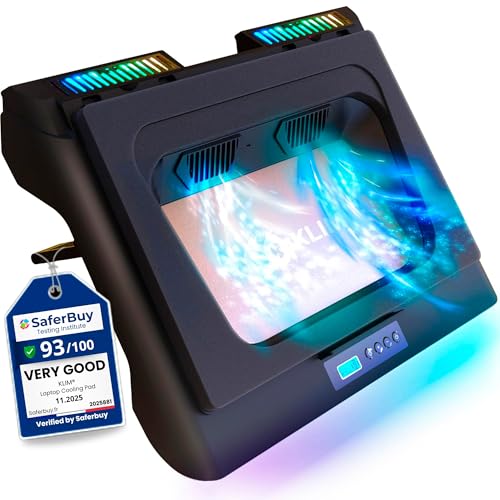
- Two 4300 RPM turbo fans for fast cooling
- Detachable foam seal for higher pressure
- Six speeds, RGB lighting, and extra USB
Best For: Users who want compact sealed-foam cooling with RGB and USB extras
Max-Cooling Choice
IETS GT500 Turbo Fan Cooling Pad with Sealed Foam

- 4200 RPM industrial-grade turbofan for powerful cooling
- Combined sealed foam helps improve fit and airflow
- Infinitely variable speed for tuning noise and performance
Best For: Gamers who want strong cooling on 13 to 17.3-inch laptops
Most Versatile Option
IETS GT300 Turbo Boost Cooler with Adjustable Stand
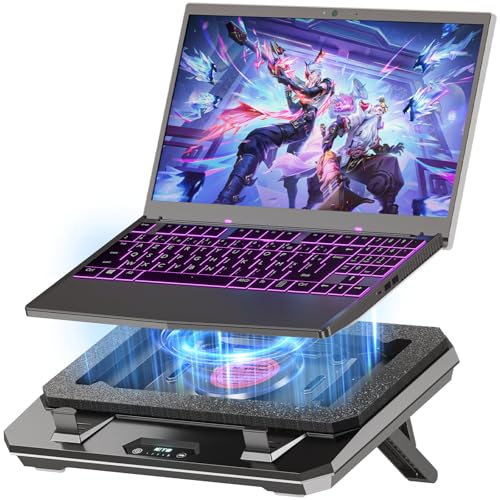
- 4000 RPM turbofan with nozzle and sealed foam
- Five-speed control plus adjustable stand
- USB hub and replaceable filter cotton included
Best For: Feature-seeking users with 10 to 17-inch laptops
Turbo Cooling for Large Laptops
KLIM Everest Plus Gaming Laptop Cooling Pad

- Dual 6300 RPM turbo fans
- Detachable foam seal for pressure
- Fits 11-17.3 inch laptops
Best For: Users who need fast cooling for vented gaming laptops
High-Pressure RGB Cooling
IETS GT600 RGB Laptop Cooling Pad

- 5.5-inch turbo fan with strong pressure
- Magnetic sealed foam airflow lock
- Includes RGB, USB hub, and dust filter
Best For: Performance users who want strong cooling and extra connectivity
Adjustable Sealed-Foam Stand
MEMO FL08 Gaming Laptop Cooler

- Airtight chamber targets up to 20°C lower temps
- HD LCD screen and 7 height settings
- Washable dust filter for cleaner airflow
Best For: Users who want adjustable cooling with monitoring and dust control
Editor’s Pick – llano V12 Gaming Cooling Pad with RGB
If you want a laptop cooling pad with sealed foam chamber for serious gaming or rendering, the llano V12 is built around a large 5.5-inch turbo fan and an airtight pressure chamber. It focuses on strong airflow, dust control, and practical extras like a USB hub, making it a well-rounded pick for heavier 15.6-19 inch laptops.
Best For: Gamers and power users with larger laptops who want strong cooling plus RGB and USB expansion.
Pros:
- 5.5-inch turbo fan with sealed foam for high-pressure cooling
- Claims up to a 44°C drop in 90 seconds for CPU+GPU under heavy load
- Includes a 3-port USB hub and adjustable airflow control
- Dust filter and 3 tilt angles add long-term practicality
Cons:
- More of a desk cooler than a lightweight travel accessory
- RGB lighting may not suit every setup
- Best fit is limited to 15.6-19 inch laptops
Overall, the V12 is the most feature-packed option here if you want cooling performance, desk convenience, and a more premium gaming-style setup. Its sealed foam chamber design and included power adapter make it especially appealing for extended sessions.
High-Airflow Choice – KLIM Mistral Turbo Cooling Pad
The KLIM Mistral is a laptop cooling pad with sealed foam chamber-style sealing from its rubber ring design, aimed at maximizing airflow through the laptop base. With two 4500 RPM turbo fans and adjustable speed settings, it targets users who care more about raw cooling power than quiet operation.
Best For: Gamers who want maximum airflow and don’t mind extra fan noise.
Pros:
- Two 4500 RPM turbo fans deliver very strong airflow
- Rubber seal helps create high pressure for better cooling
- Three fan speed levels let you balance noise and performance
- Includes an extra USB port and customizable lighting
Cons:
- Noisier than average at higher speeds
- Only fits laptops in the 14-17.3 inch range
- Needs underside ventilation openings to work properly
If cooling performance is the priority, the Mistral stands out for its high-powered fan setup and sealed design. It’s a sensible pick for gaming laptops, but best used by buyers who can tolerate some noise.
Value Pick – llano V12 No-RGB Cooling Stand
This laptop cooling pad with sealed foam chamber keeps the llano V12 formula focused on performance, but skips RGB for a cleaner look. It uses a 5.5-inch turbo fan, a memory foam seal, and a 36W power setup to push strong cooling for 15-19 inch laptops.
Best For: Buyers who want llano’s sealed-chamber cooling in a simpler, no-RGB design.
Pros:
- 5.5-inch turbo fan and memory foam seal for strong airflow
- Claims a 44°C drop in 90 seconds under load
- Real-time LED display and touch controls make adjustments easy
- Includes dust filter, 3-port hub, and adjustable height
Cons:
- No RGB lighting if you want a more visual setup
- Still a large cooling stand rather than a compact pad
- Best suited to bigger laptops in the 15-19 inch range
This version makes sense if you want the same core cooling concept as the RGB model but prefer a simpler desktop setup. The combination of sealed foam, dust protection, and touch control gives it a practical edge for everyday gaming or work.
Premium Compact Pick – KLIM Everest Sealed Foam Cooler
The KLIM Everest is a laptop cooling pad with sealed foam chamber designed for fast heat removal in a compact form. Its two 4300 RPM turbo fans and detachable foam seal aim to push air through the laptop base quickly, while RGB lighting and extra USB connectivity add convenience.
Best For: Laptop owners who want fast cooling in a compact, feature-rich pad.
Pros:
- Two 4300 RPM turbo fans deliver strong cooling quickly
- Detachable foam seal helps create high pressure
- Six fan speeds and RGB lighting offer flexible control
- Extra USB port supports peripherals like a mouse or keyboard
Cons:
- Only supports laptops with underside ventilation openings
- Not compatible with some models such as MacBooks without bottom grills
- Smaller than the llano V12 options, so it may feel less workstation-like
The Everest is a strong all-around choice if you want sealed-foam cooling with a smaller footprint and a polished feature set. It balances performance, lighting, and usability well for supported gaming laptops.
Best for Easy Setup – llano V12 Gaming Laptop Cooler with 5.5-inch Turbo Fan
If you want a laptop cooling pad with sealed foam chamber-style airflow control, the llano V12 is built for strong external cooling on larger gaming laptops. Its 5.5-inch turbo fan, dust-filtered design, and adjustable stand make it a practical pick for users who want a cooler that emphasizes airflow, stability, and easy control.
Best For: Gaming and creative laptops from 15 to 19 inches that need aggressive external cooling and an adjustable stand.
Pros:
- 5.5-inch turbo fan is designed for fast cooling, with the brand claiming a 44℃ temperature drop in 90 seconds.
- Built-in dust protection plus an extra dust filter in the box help reduce dust intrusion.
- Touch controls and a real-time LED display make fan-speed adjustment straightforward.
- Adjustable height and double non-slip baffles add comfort and stability during long sessions.
Cons:
- Best suited to larger laptops, so it may be overkill for smaller systems.
- Uses a single external fan, which may not appeal to buyers expecting multi-fan designs.
Overall, the llano V12 focuses on high airflow, dust control, and ergonomic support rather than compactness. It is a strong choice if your priority is a robust cooling pad for sustained gaming or heavy workloads.
Max-Cooling Choice – IETS GT500 Turbo Fan Cooling Pad with Sealed Foam
The IETS GT500 is a laptop cooling pad with sealed foam chamber-style sealing that is designed to push air through the laptop more aggressively. With a 4200 RPM turbofan, infinitely variable speed, and a dust filter, it is aimed at users who want maximum cooling performance for compatible gaming laptops.
Best For: Performance-focused gamers who want strong airflow control on 13 to 17.3-inch laptops.
Pros:
- Industrial-grade 4200 RPM turbofan is built for powerful cooling.
- Combined sealed foam helps adapt the fit for better cooling effect.
- Infinitely variable speed lets you tune output for office, game, or standby use.
- Bottom air intake design is intended to help with rear-exhaust gaming laptops.
Cons:
- Can reach up to 55 dB at the highest speed, so it is not ideal for noise-sensitive users.
- Limited to 13 to 17.3-inch laptops, which narrows compatibility.
In practice, the GT500 is a heavy-duty cooling solution that prioritizes performance over quiet operation. If you need maximum airflow and your laptop fits the size range, it is one of the more specialized options here.
Most Versatile Option – IETS GT300 Turbo Boost Cooler with Adjustable Stand
The IETS GT300 is a laptop cooling pad with sealed foam chamber-style sealing, plus a concentrator nozzle and turbofan to intensify airflow through the laptop. It also adds practical extras like an adjustable stand, USB hub support, and replaceable filter cotton, making it a flexible option for users who want both cooling and convenience.
Best For: Users who want a feature-rich cooler for 10 to 17-inch laptops with adjustable speed and built-in USB expansion.
Pros:
- Industrial-grade 4000 RPM turbofan with nozzle and sealed foam is built for rapid cooling.
- Five-speed wind adjustment helps you balance cooling and energy use.
- Replaceable air filter cotton helps keep dust out of the laptop interior.
- USB hub, backlit keys, and power-off memory add everyday convenience.
Cons:
- Uses a plastic enclosure, which may feel less premium than metal alternatives.
- Cooling focus may be more than needed for casual users or smaller workloads.
For buyers who want a sealed-air style cooling pad with extra usability features, the GT300 stands out as the most versatile option in this group. It combines tuning, filtration, and ergonomics in a single stand.
Turbo Cooling for Large Laptops – KLIM Everest Plus Gaming Laptop Cooling Pad
If you want a laptop cooling pad with sealed foam chamber for a gaming laptop that needs strong airflow, the KLIM Everest Plus is built around dual 6300 RPM turbo fans and a detachable foam seal to help lock in pressure. It is designed for 11-17.3 inch laptops with bottom ventilation, and it focuses on fast heat reduction rather than quiet operation.
Best For: Gaming laptops with underside vents that need fast, high-airflow cooling.
Pros:
- Dual 6300 RPM turbo fans for powerful airflow
- Detachable foam seal helps maximize cooling pressure
- Fits a wide range of 11-17.3 inch laptops
- Backed by a 5-year manufacturer warranty
Cons:
- Not suitable for laptops without bottom ventilation grilles
- Apple MacBook models are specifically not supported
- Bulkier than a basic passive stand
Overall, this is a strong pick if your priority is raw cooling performance and your laptop matches the compatibility requirements. The design is clearly aimed at users who need aggressive airflow and do not mind a larger, more specialized cooler.
High-Pressure RGB Cooling – IETS GT600 RGB Laptop Cooling Pad
The IETS GT600 RGB is a laptop cooling pad with sealed foam chamber design built around a large 5.5-inch turbo fan and strong air pressure. It is made for 14.1-19.3 inch laptops, includes a 3-port USB hub and dust filter, and is aimed at users who want maximum cooling effect with adjustable setup options.
Best For: Performance-focused gaming laptops that need strong sealed-air cooling and extra USB ports.
Pros:
- 5.5-inch turbo fan with high air pressure output
- Magnetic sealed foam helps lock in airflow
- Includes RGB lighting and a 3-port USB hub
- Dust filter and adjustable height support add convenience
Cons:
- Can reach up to 65 dB at the highest speed
- Heavier than many standard laptop stands
- Best cooling performance may come with more noise
This model stands out if you want a sealed, high-pressure cooling solution and are willing to trade some noise for stronger performance. Its feature set is broad, but the main attraction is still aggressive laptop cooling.
Adjustable Sealed-Foam Stand – MEMO FL08 Gaming Laptop Cooler
The MEMO FL08 is a laptop cooling pad with sealed foam chamber airflow and a pressure chamber design meant to reduce heat on 14-18 inch laptops. It uses a 2420 RPM turbofan, includes an HD LCD display, and adds a washable dust filter plus 7-level height adjustment for a more ergonomic setup.
Best For: Gamers and multitaskers who want adjustable cooling, dust protection, and a display.
Pros:
- Airtight pressure chamber is designed to lower temps by up to 20°C
- HD LCD screen for fan speed and performance monitoring
- Detachable, washable dust filter helps maintain airflow
- Seven height settings improve comfort during long sessions
Cons:
- Only one turbofan, so it is not the most aggressive dual-fan design
- Best fit is limited to 14-18 inch laptops
- May be more feature-rich than basic buyers need
If you want a more adjustable sealed-foam cooler with extra usability features, this is the most balanced option here. It combines cooling, dust protection, and ergonomics in one package without leaning as hard into raw fan count.
How We Picked the Best Laptop Cooling Pad with Sealed Foam Chamber
We focused on models built for real cooling rather than basic elevation. Priority went to stronger fan output, effective sealing around the laptop base, adjustable fan control, size compatibility, and useful extras like dust filters or RGB lighting when they did not compromise function.
Quick Comparison
Most options here fall into two camps: high-airflow turbo-fan coolers for maximum heat reduction, and more balanced stands that trade some raw power for quieter operation, broader compatibility, or a lower profile. If your laptop is a large gaming model, lean toward the more aggressively sealed, high-RPM designs. If you want daily comfort and lighter cooling, a mid-range unit may be enough.
Key Buying Factors for a Laptop Cooling Pad with Sealed Foam Chamber
Seal Quality
The seal is what helps force air through the laptop instead of letting it escape around the edges. A better fit usually means better cooling, especially on gaming laptops with side and bottom intakes.
Fan Strength and Control
Look at fan size, RPM range, and whether the speed is adjustable. Higher output helps under load, but variable control is useful if you want to balance noise and cooling for everyday use.
Laptop Size and Intake Layout
Make sure the pad fits your screen size and chassis depth. A Laptop Cooling Pad with Sealed Foam Chamber works best when the foam aligns well with the intake vents and does not block critical areas.
Dust Management and Maintenance
Dust filters and a well-contained airflow path can reduce buildup over time. That can help maintain cooling performance and make cleanup easier.
Noise, Stability, and Extras
Turbo coolers can get loud at full speed, so consider your tolerance for fan noise. A stable stand angle, touch controls, and RGB lighting may improve usability, but cooling performance should come first.
Who Should Buy Which Laptop Cooling Pad with Sealed Foam Chamber?
Choose a more powerful sealed-foam cooler if you game often, run CPU or GPU-heavy apps, or own a large high-wattage laptop. Choose a quieter, more adjustable model if you mainly want better thermals for school, office work, or mixed daily use. If portability matters, pick a lighter design with simpler controls; if performance matters most, prioritize sealing, airflow, and compatibility over everything else.