
Choosing the right cable can make or break an external GPU setup. The best option should deliver stable bandwidth, the right length, and the compatibility your laptop and enclosure need.
In this roundup, we focus on the best Thunderbolt cable for external GPU use in 2026, with picks suited to gaming, workstation performance, and high-resolution displays.
Best 10 Thunderbolt Cable for External GPU Picks for 2026
eGPU Dock Pick
PCIE 3.0 x16 22Gbps eGPU Dock with TB4 Cable

- Includes a 23.6-inch Thunderbolt 4 cable
- Supports Thunderbolt 3/4 and USB4
- Flexible power input options for setup
Best For: An all-in-one eGPU dock bundle for Windows, Linux, and USB4 systems
Premium Cable Choice

- Up to 80Gb/s bi-directional data speed
- 240W power delivery support
- Backward compatible with TB4, TB3, USB4, and USB-C
Best For: High-bandwidth eGPU and dock setups that also need serious charging power
High-Expansion Dock
PELADN S-3 eGPU Dock with Thunderbolt 5 Cable

- Dual Thunderbolt 5 ports with 80Gbps bandwidth
- PCIe 4.0 x4 plus M.2, SD 4.0, and Ethernet
- Supports ATX and SFX power supplies
Best For: Users building a feature-heavy eGPU dock with storage and networking expansion
Best Value Cable
Cable Matters 40Gbps Thunderbolt 4 Cable

- Certified Thunderbolt 4 with 40Gbps speed
- Up to 240W charging support
- Compatible with TB4, TB3, USB4, and USB-C
Best For: A dependable, certified cable for everyday eGPU and dock setups
Compact eGPU Dock
PCIe 3.0 x16 Thunderbolt 4 Dock

- Around 40Gbps performance via 7440 chip
- Works with USB4, TB3, and TB4 systems
- Short 12.5-inch Thunderbolt 4 cable included
Best For: Users wanting a compact, stable eGPU dock for Windows, Linux, or USB4/TB systems
Future-Proof Cable
240W Thunderbolt 5 Right-Angle Cable

- Up to 120Gbps display bandwidth on supported devices
- 240W Power Delivery with data transfer
- Right-angle connector for tighter setups
Best For: High-end eGPU and dock users who want a future-proof right-angle Thunderbolt cable
Feature-Rich Dock
24Gbps Thunderbolt eGPU Dock with Extras

- JHL7540-based dock with around 24Gbps stability
- Includes Ethernet, card readers, DisplayPort, and USB
- 39-inch Thunderbolt 4 cable included
Best For: Users who want an eGPU dock with extra workstation ports and a longer included cable
Editor’s Pick
80Gbps Thunderbolt 5 Cable for Long-Reach eGPU Setups
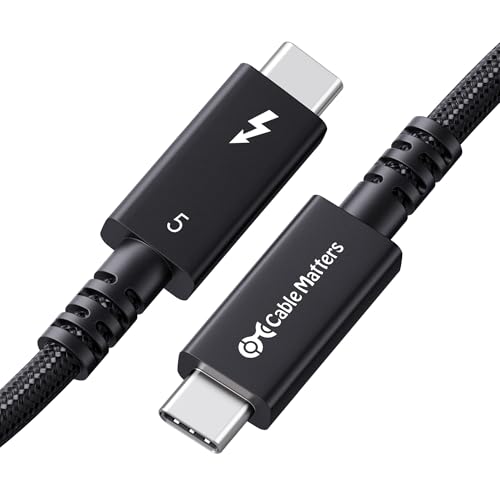
- Active 6.6 ft design for longer Thunderbolt runs
- 80Gbps data with up to 120Gbps boost
- 240W charging and Intel Certified
Best For: Long-reach eGPU setups that need premium Thunderbolt 5 performance
Best Value
40Gbps USB4 Cable for Thunderbolt 4 eGPU Docks
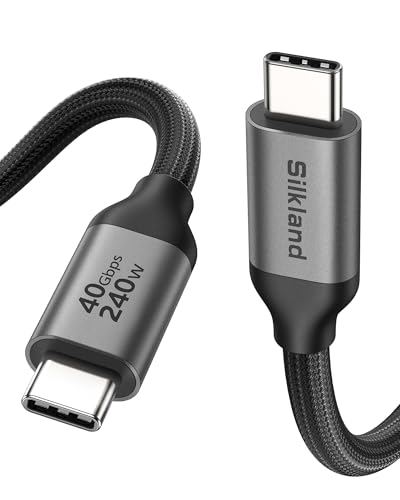
- 40Gbps data with USB4 and Thunderbolt 4/3 support
- 240W charging with E-Marker chip
- 8K/dual-4K video plus MST daisy chain
Best For: Thunderbolt 4 and USB4 eGPU docks with strong all-around value
Compact Pick
1M Thunderbolt 5 Cable for Direct eGPU Links

- Short 3.3 ft cable for tidy desk setups
- 80Gbps data with up to 120Gbps boost
- 240W charging and Thunderbolt certified
Best For: Direct, short-run eGPU connections on a desk
EGPU Dock Pick – PCIE 3.0 x16 22Gbps eGPU Dock with TB4 Cable
If you want a Thunderbolt cable for external GPU use bundled with the dock itself, this OwlTree setup is a practical all-in-one option. It targets Windows 10/11 and Linux systems with Thunderbolt 3/4 or USB4 support, and it focuses on stable 22Gbps performance for graphics work, video editing, AI art, and AAA gaming.
Best For: Buyers who want an eGPU dock package that already includes a Thunderbolt 4 cable and flexible power input options.
Pros:
- Includes a high-quality 23.6-inch Thunderbolt 4 cable in the box
- Supports Thunderbolt 3, Thunderbolt 4, and USB4 connections
- Uses a JHL6340 controller for around 22Gbps transfer speed
- Offers four power input choices: CPU, Molex, PD 3.0, or DC5521
Cons:
- GPU compatibility is limited to AMD or NVIDIA cards with available drivers
- Intel graphics cards are not recommended
- Some USB4 consoles may need a BIOS update
This is a strong choice if you want an eGPU-ready bundle rather than shopping for a cable separately. The included Thunderbolt 4 cable and flexible power inputs make it easier to build a compatible desktop-class graphics setup.
Premium Cable Choice – OWC 1M Thunderbolt 5 Cable
For a Thunderbolt cable for external GPU setups where you want maximum bandwidth and charging headroom, this OWC Thunderbolt 5 cable is the premium pick. It supports up to 80Gb/s bi-directional data speed and is backward compatible with Thunderbolt 4, Thunderbolt 3, USB4, and USB-C devices, making it a versatile cable for docks, eGPUs, and storage.
Best For: Users who want a high-end Thunderbolt 5 cable for eGPU, dock, and display-heavy setups.
Pros:
- Up to 80Gb/s bi-directional data speed
- Up to 120Gb/s for higher display bandwidth needs
- 240W charging support for power-hungry laptops
- Works with Thunderbolt 5, 4, 3, USB4, and USB-C devices
Cons:
- More cable than you need if your gear is only Thunderbolt 3 or 4
- One-meter length may be limiting for some desk layouts
If your priority is speed, compatibility, and strong charging support, this is one of the most capable cable options in the lineup. It is especially appealing for users building around modern Thunderbolt 5 hardware but still needing broad backward compatibility.
High-Expansion Dock – PELADN S-3 eGPU Dock with Thunderbolt 5 Cable
If you need a Thunderbolt cable for external GPU use plus a dock with more expansion, the PELADN S-3 is built for larger setups. It pairs dual Thunderbolt 5 ports with a PCIe 4.0 x4 slot, a PCIe 3.0 M.2 slot, SD 4.0 support, and 2.5G Ethernet, giving you far more than a basic GPU enclosure.
Best For: Power users who want an eGPU dock with storage, networking, and modern Thunderbolt 5 connectivity.
Pros:
- Dual Thunderbolt 5 ports with 80Gbps bidirectional bandwidth
- Supports up to 140W PD on the uplink side
- Includes PCIe 4.0 x4, M.2, SD 4.0, and 2.5G Ethernet
- Compatible with many NVIDIA and AMD cards, including RTX 3050 through 5090
Cons:
- Requires compatible ATX or SFX power supply planning
- Likely more dock than casual users need
- Best suited to Windows 10/11 and Thunderbolt 5/USB4-focused systems
This is the most feature-rich option here, and it makes sense if you want a dock that can handle GPU expansion and extra peripherals in one unit. The included Thunderbolt 5 cable and dual-port design add flexibility for modern workstation builds.
Best Value Cable – Cable Matters 40Gbps Thunderbolt 4 Cable
If you mainly need a dependable Thunderbolt cable for external GPU setups, this Cable Matters Thunderbolt 4 cable is the straightforward choice. It offers certified 40Gbps performance, broad compatibility with Thunderbolt 4, Thunderbolt 3, USB4, and USB-C devices, and up to 240W charging for modern laptops.
Best For: Buyers who want a reliable, certified Thunderbolt 4 cable for eGPU, monitor, and dock use.
Pros:
- Certified Thunderbolt 4 with 40Gbps data transfer
- Supports up to 240W charging with PD 3.1
- Backward compatible with Thunderbolt 3 and USB4
- Can drive one 8K display or two 4K displays
Cons:
- Not as fast as Thunderbolt 5 for maximum bandwidth needs
- 3.3-foot length may be short for some setups
This is the safest all-around cable pick if you want solid performance without moving up to Thunderbolt 5 pricing. Its certified specs and broad device support make it an easy match for many external GPU and dock configurations.
Compact eGPU Dock – PCIe 3.0 x16 Thunderbolt 4 Dock
If you want a Thunderbolt cable for external GPU use with a simple, focused dock, this PCIe 3.0 x16 eGPU kit is built around stable 40Gbps-class connectivity. It works with USB4, Thunderbolt 3, and Thunderbolt 4 systems, and the included short Thunderbolt 4 cable keeps the dock-to-laptop run compact for a cleaner setup.
Best For: Windows, Linux, or USB4/TB3/TB4 users who want a straightforward eGPU dock for graphics work, video editing, AI art, or gaming.
Pros:
- Uses a 7440 chip with around 40Gbps transfer speed for stable operation.
- Compatible with most Windows 10/11 and Linux-based laptops, desktops, and USB4/TB3/TB4 devices.
- Supports NVIDIA and AMD GPUs with available official drivers.
- Offers four power input options: CPU 4+4-pin, Molex, PD 3.0, or DC5521.
Cons:
- Included Thunderbolt 4 cable is only 12.5 inches, so placement is limited.
- Power input and setup flexibility may be more than casual users need.
- Does not include the graphics card itself.
This is a practical pick if you care more about compatibility and stable eGPU operation than flashy extras. The short included cable is convenient for tight desks, but it also means you should plan your layout carefully.
Future-Proof Cable – 240W Thunderbolt 5 Right-Angle Cable
This Thunderbolt cable for external GPU setups is designed for newer high-bandwidth systems that can actually use Thunderbolt 5-class speeds. It supports backward compatibility with Thunderbolt 4/3, USB4, and PCIe devices, while the right-angle connector helps keep a desktop eGPU or dock connection tidy in tight spaces.
Best For: Users building a high-end Thunderbolt 5, USB4, or eGPU setup who want maximum bandwidth headroom plus a space-saving right-angle plug.
Pros:
- Supports up to 120Gbps display bandwidth and 80Gbps bi-directional transfer on compatible devices.
- 240W Power Delivery supports charging and data transfer at the same time.
- Right-angle design can reduce strain and improve cable management.
- Backward compatible with Thunderbolt 4/3, USB4, DisplayPort 2.1, and PCIe devices.
Cons:
- Full speed is only available on devices that support the higher Thunderbolt 5 mode.
- Five-foot length may be longer than needed for some compact desk setups.
- Premium capability may be unnecessary for older eGPU hardware.
For buyers planning ahead, this is the most future-facing cable in the group. It makes the most sense when your dock, laptop, or eGPU enclosure can benefit from the extra bandwidth and you want a cleaner right-angle connection.
Feature-Rich Dock – 24Gbps Thunderbolt eGPU Dock with Extras
If you need a Thunderbolt cable for external GPU use plus extra ports in one dock, this OwlTree model is the most expansion-focused option here. It uses a JHL7540 controller, supports USB4, Thunderbolt 3, and Thunderbolt 4, and includes a standard 39-inch Thunderbolt 4 cable for a more flexible desk layout.
Best For: Windows, Linux, or console users who want an eGPU dock with networking, card readers, and USB expansion alongside graphics support.
Pros:
- JHL7540 controller delivers around 24Gbps with a focus on stability.
- Includes dual Thunderbolt ports for daisy-chaining.
- Built-in RJ45 2.5Gbps Ethernet, UHS-II SD/TF card readers, DisplayPort, and dual USB 3.2 Gen2 ports.
- Flexible power input options include PD, DC, or ATX.
Cons:
- Uses a 24Gbps-class design rather than the higher 40Gbps level.
- Graphics card is not included.
- Power wiring can differ between DC and ATX setups.
This dock is the best choice when you want more than just an eGPU connection. The extra ports and included 39-inch cable make it better suited to a fuller workstation or gaming setup than a bare-bones adapter.
Editor’s Pick – 80Gbps Thunderbolt 5 Cable for Long-Reach eGPU Setups
If you need a Thunderbolt cable for external GPU setups and want extra reach without giving up top-end performance, this 6.6 ft Thunderbolt 5 option is built for that job. It combines 80Gbps data, up to 120Gbps bandwidth boost when supported, and 240W charging, so it fits high-performance laptops, docks, displays, and other demanding accessories.
Best For: Users who want a longer Thunderbolt 5 cable for an eGPU desk setup with strong power delivery and future-proof compatibility.
Pros:
- Active Thunderbolt 5 design helps preserve signal integrity over 6.6 ft.
- Up to 80Gbps data with bandwidth boost up to 120Gbps for video-heavy workflows.
- 240W USB Power Delivery supports powerful laptops and gaming systems.
- Intel Certified and backward compatible with Thunderbolt 4, Thunderbolt 3, and USB4.
Cons:
- Higher-end Thunderbolt 5 capability may be more than basic accessories need.
- Best results depend on the host and display supporting boosted bandwidth modes.
For external GPU users who need a longer cable, this model stands out because it pairs active signal management with full-power charging and broad device support. It is the most practical pick here when your priority is distance, stability, and premium Thunderbolt 5 performance.
Best Value – 40Gbps USB4 Cable for Thunderbolt 4 eGPU Docks
This Thunderbolt cable for external GPU use is a strong value pick if you are working with Thunderbolt 4, USB4, or Thunderbolt 3 gear rather than the newest Thunderbolt 5 ecosystem. It delivers up to 40Gbps data, 240W charging, and support for single 8K or dual 4K displays, plus MST daisy chain support for more flexible workstation setups.
Best For: Buyers who want a feature-rich USB4 cable for Thunderbolt 4 eGPU docks, monitors, and storage.
Pros:
- Up to 40Gbps transfer speed for fast data sync and accessory use.
- 240W PD 3.1 charging with E-Marker chip for safety and stability.
- Supports 8K@60Hz, dual 4K@60Hz, and MST daisy chain setups.
- Broad compatibility with Thunderbolt 4/3, USB4, docks, monitors, and SSDs.
Cons:
- Not a Thunderbolt 5 cable, so it is not aimed at the latest 80Gbps class devices.
- The notes recommend cables below 5 ft for stable docking performance, while this one is 6.6 ft.
If your eGPU setup is built around Thunderbolt 4 or USB4, this cable covers the essentials very well: solid speed, strong charging, and modern display support. It is a practical choice for users who want broad compatibility without moving to Thunderbolt 5 pricing or hardware requirements.
Compact Pick – 1M Thunderbolt 5 Cable for Direct eGPU Links
For a short, direct Thunderbolt cable for external GPU setups, this 3.3 ft Plugable model keeps the run clean and focused. It delivers 80Gbps data, supports up to 120Gbps bandwidth boost, and provides 240W charging, making it a strong match for close-range desktop connections where cable length does not need to be extended.
Best For: Direct eGPU connections on a desk where a short Thunderbolt 5 cable is preferred.
Pros:
- 80Gbps Thunderbolt 5 data with up to 120Gbps bandwidth boost.
- 240W Power Delivery supports laptops, gaming rigs, and power banks.
- Short 1-meter length is ideal for tidy desktop and eGPU placements.
- Thunderbolt, USB-IF, and UL 9990 tested for reliability.
Cons:
- Short length may not suit setups that need more routing distance.
- Thunderbolt 5 features depend on compatible host and devices.
This is the most straightforward option for users who want a short, high-performance link between an eGPU enclosure and a nearby laptop. It favors clean desk layouts and maximum Thunderbolt 5 capability over extra reach.
How We Picked the Best Thunderbolt Cable for External GPU
For a Thunderbolt Cable for External GPU use, performance and reliability matter more than marketing claims. We prioritized certified cables and dock bundles with clearly stated Thunderbolt 4 or Thunderbolt 5 support, strong data-rate ratings, power delivery where useful, and compatibility with common Windows laptop eGPU setups.
Quick Comparison
Shorter 1m cables are often the safest choice for consistency, while 5 to 6.6 ft options give more placement flexibility. Thunderbolt 4 is still a solid baseline for many eGPU users, but Thunderbolt 5 models offer more headroom for bandwidth-intensive workflows and future-proofing.
Key Buying Factors for Thunderbolt Cable for External GPU
Certification and Standard
Look for Intel-certified or clearly Thunderbolt-certified cables whenever possible. That helps reduce the risk of unstable connections, reduced speeds, or display issues.
Bandwidth and Length
For eGPU use, the cable should match the dock’s link speed without adding unnecessary signal loss. Keep in mind that longer cables are more convenient, but shorter high-quality cables are often the safer pick for maximum stability.
Display and Power Support
If your setup also drives a monitor or charges a laptop through the same cable, check display resolution support and wattage. Features like 240W charging and high refresh-rate video support are useful, but they should not distract from the core eGPU requirement: a stable data link.
Dock Compatibility
Many buyers search for a Thunderbolt Cable for External GPU after choosing a dock or enclosure. Make sure the cable matches the dock’s required generation, connector type, and performance expectations. A faster cable will not improve a slower dock, and a mismatched cable can limit the whole setup.
Who Should Buy Which Thunderbolt Cable for External GPU?
Choose Thunderbolt 4 if you want broad compatibility, simpler buying decisions, and proven performance for most eGPU setups. Choose Thunderbolt 5 if you want the most future-ready option, especially for high-bandwidth docks and multi-display workflows.
If your setup is portable or shared across devices, a certified 1m cable is usually the cleanest choice. If your desk layout needs extra reach, pick a well-rated longer cable from a trusted brand and avoid generic options with vague specifications.