
Need more PCIe expansion without opening your computer? A Thunderbolt PCIe expansion chassis lets you connect pro cards externally for capture, audio, networking, storage, and more.
Below, we’ve focused on the most useful 2026 options for creators, editors, and workstation users who want the right balance of compatibility, speed, and slot layout.
Best 10 Thunderbolt PCIe Expansion Chassis Picks for 2026
Editor’s Choice
StarTech TB31PCIEX16 Thunderbolt 3 PCIe Chassis

- Single PCIe 3.0 x16 slot
- 40Gbps Thunderbolt 3 with cable included
- Driverless macOS and Windows support
Best For: General-purpose external PCIe expansion for capture, networking, or NVMe cards
Compact Pick
Sonnet Echo Express SE1 Thunderbolt 3 Chassis

- Compact 1-slot PCIe 3.0 x8 design
- Up to 2750 MB/s PCIe bandwidth
- Daisy chains via second Thunderbolt 3 port
Best For: Space-saving external PCIe expansion for professional single-card workflows
Quiet Value Pick
Maskedfish MK-Q1L PCIe Thunderbolt 3/4 Dock

- PCIe 3.0 x16 slot for expansion cards
- Silent passive aluminum enclosure
- Compatible with Thunderbolt 3/4 and USB4
Best For: Silent, flexible external PCIe expansion for non-GPU cards
GPU Expansion Pick
OWC Mercury Helios FX Thunderbolt 3 Chassis

- Built for PCIe graphics cards
- Thunderbolt 3 external expansion
- Aluminum desktop enclosure
Best For: External GPU-oriented Thunderbolt 3 expansion
Compact 40Gbps PCIe Enclosure
PCIe 3.0 x16 Dock for Thunderbolt 3/4 & USB4

- One PCIe 3.0 x16 slot with 40Gbps Thunderbolt bandwidth
- Silent all-aluminum design with passive cooling
- Driverless support for Windows, Linux, and macOS
Best For: Quiet expansion for capture, networking, and NVMe cards
Ultra-Compact Low-Profile Chassis
Sonnet Echo Express SEL Thunderbolt 3 PCIe Expansion

- Thunderbolt 3 chassis with up to 2750 MB/s PCIe bandwidth
- Supports one low-profile PCIe card in a compact enclosure
- Includes two Thunderbolt 3 ports plus cable and ThunderLok
Best For: Low-profile PCIe users who want a compact premium chassis
Full-Length Single-Slot Enclosure
Thunderbolt 3 PCIe x16 Dock for DeckLink Cards

- Single PCIe 3.0 x16 slot over Thunderbolt 3/4
- Fits larger cards up to 205mm x 28mm x 121mm
- Passive aluminum enclosure with driverless host support
Best For: Users who need more space for longer capture or PCIe cards
Three-Slot Mac Expansion
Sonnet Echo Express SEIIIe Thunderbolt 3 Edition

- Three PCIe 3.0 slots for multiple cards
- 40Gbps Thunderbolt 3 with up to 2750 MB/s bandwidth
- Supports full-height, half-length+ cards up to 7.75 inches
Best For: Mac users needing multi-card Thunderbolt 3 expansion
Silent Single-Card Expansion
VIKINYEE VK-G2 Thunderbolt 4/3 USB4 PCIe Enclosure
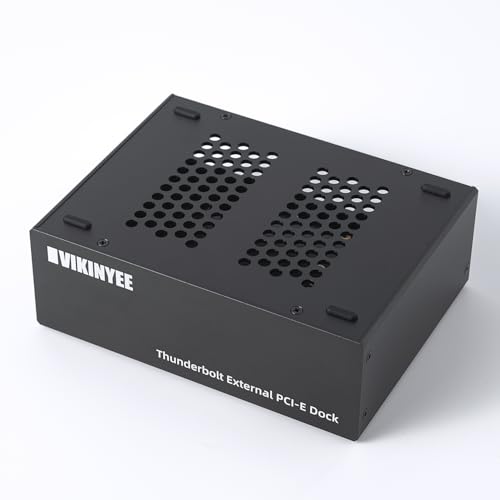
- Single PCIe 3.0 x4 slot for one card
- Passive aluminum design for 0dB cooling
- Compatible with Thunderbolt 3/4, USB4, Windows, macOS, and Linux
Best For: Quiet single-card expansion for laptops and mini PCs
Thunderbolt 5 Performance
Sonnet Echo SE I T5 PCIe Card Expansion Chassis

- Thunderbolt 5 with up to 6000 MB/s bi-directional bandwidth
- Supports full-height PCIe 4.0 x8 cards
- Auxiliary PCIe power plus daisy-chaining Thunderbolt port
Best For: Studio and pro workflows needing one high-performance PCIe card
Editor’s Choice – StarTech TB31PCIEX16 Thunderbolt 3 PCIe Chassis
If you need a practical Thunderbolt PCIe expansion chassis for adding capture, networking, or storage cards to a laptop or desktop, the StarTech TB31PCIEX16 is built around straightforward compatibility and useful power delivery. Its single PCIe 3.0 x16 slot, 40Gbps Thunderbolt 3 connection, and driverless operation make it a solid all-around external expansion box for non-GPU cards.
Best For: Users who want a general-purpose Thunderbolt 3 PCIe enclosure for single-width expansion cards like capture, fiber, Ethernet, or NVMe.
Pros:
- One external PCIe 3.0 x16 slot for single-width cards
- 40Gbps Thunderbolt 3 support with included cable
- Toolless aluminum design with built-in fan for active cooling
- Driverless compatibility with macOS and Windows
Cons:
- Does not support GPU graphics cards
- Limited to single-width cards up to 8 inches long
- Only one PCIe slot, so no multi-card expansion
For buyers who want a well-rounded Thunderbolt PCIe expansion chassis with broad card support and included accessories, this StarTech model is an easy fit. It is especially useful when you need external PCIe access without the complexity of a GPU-focused enclosure.
Compact Pick – Sonnet Echo Express SE1 Thunderbolt 3 Chassis
The Sonnet Echo Express SE1 is a compact Thunderbolt PCIe expansion chassis designed for users who want full-performance external PCIe card support in a small desktop footprint. With a single PCIe 3.0 x8 slot and 40Gbps Thunderbolt 3 connectivity, it is aimed at practical workflows where space is tight but card performance still matters.
Best For: Professionals who need a compact Thunderbolt 3 PCIe enclosure for a full-height, half-length single card.
Pros:
- One PCIe 3.0 x8 slot for full-height, half-length cards
- 40Gbps Thunderbolt 3 interface with up to 2750 MB/s PCIe bandwidth
- Small, lightweight aluminum design for desktop use
- Second Thunderbolt 3 port supports daisy chaining and display options
Cons:
- Not intended for GPU use
- Supports only one PCIe card plus one daughter card
- Card length is limited to 7.75 inches
This is a strong choice when you want a space-saving chassis for professional PCIe cards without giving up Thunderbolt 3 performance. It is especially appealing for editing, audio, and data workflows that benefit from a compact external expansion box.
Quiet Value Pick – Maskedfish MK-Q1L PCIe Thunderbolt 3/4 Dock
The Maskedfish MK-Q1L is a Thunderbolt PCIe expansion chassis for users who want a quiet, fanless aluminum enclosure and broad host compatibility. It brings a PCIe 3.0 x16 slot to Thunderbolt 3, Thunderbolt 4, or USB4 systems, making it a flexible option for cards like capture devices, NVMe adapters, and 10G networking hardware.
Best For: Buyers looking for a silent, plug-and-play PCIe enclosure for laptops or desktops with Thunderbolt 3/4 or USB4.
Pros:
- PCIe 3.0 x16 slot with 40Gbps Thunderbolt 3-class speed
- Works with Thunderbolt 3, Thunderbolt 4, and USB4 hosts
- Passive cooling in a durable aluminum chassis
- Driverless plug-and-play support for Windows, Linux, and macOS
Cons:
- Does not support external graphics cards
- 36W power delivery may limit some higher-demand cards
- Supports cards only up to 205x28x142mm
If you want a quiet Thunderbolt PCIe expansion chassis with wide host compatibility, this model stands out for its no-fan design and simple setup. It is a practical pick for non-GPU expansion where silence and flexibility are priorities.
GPU Expansion Pick – OWC Mercury Helios FX Thunderbolt 3 Chassis
OWC Mercury Helios FX, External Expansion Chassis with Thunderbolt 3 for PCIe Graphics Cards
Check Price On AmazonThe OWC Mercury Helios FX is a Thunderbolt PCIe expansion chassis built specifically for PCIe graphics cards, making it a different kind of external enclosure than the more general-purpose card docks. If your goal is to add a GPU over Thunderbolt 3, this model is the one in the group focused on that use case.
Best For: Users who need a Thunderbolt 3 expansion chassis specifically for PCIe graphics cards.
Pros:
- Designed for PCIe graphics cards
- Thunderbolt 3 connection for external expansion
- Aluminum desktop enclosure
- Air cooling with a single internal bay
Cons:
- Focused on graphics cards rather than general PCIe expansion
- Only one internal bay
- Less suited to non-GPU card workflows than the other enclosures here
For GPU-focused buyers, this OWC chassis is the clearest fit in the roundup because its design is centered on graphics-card expansion. If that is your main requirement, it is the most purpose-built option in this group.
Compact 40Gbps PCIe Enclosure – PCIe 3.0 x16 Dock for Thunderbolt 3/4 & USB4
If you need a Thunderbolt PCIe expansion chassis for capture cards, fast networking, or NVMe add-ons, this compact aluminum enclosure gives you a single PCIe 3.0 x16 slot over a 40Gbps Thunderbolt connection. It is designed for laptops and desktops with Thunderbolt 3/4 or USB4, and it keeps things simple with driverless host-side operation and passive cooling.
Best For: Users who want a quiet, no-fuss Thunderbolt PCIe expansion chassis for low-power PCIe cards such as DeckLink capture cards, fiber/ethernet adapters, and NVMe solutions.
Pros:
- One PCIe 3.0 x16 slot with up to 40Gbps Thunderbolt bandwidth
- All-aluminum chassis with passive, silent cooling
- Driverless compatibility with Windows, Linux, and macOS
- Supports a range of card types including capture, NVMe, FireWire, and networking cards
Cons:
- Does not support GPU cards
- Included power is limited to 12V 3A / 36W through the PCIe slot
- Only supports cards up to 163mm x 28mm x 115mm
This is a practical choice if your priority is stable expansion rather than maximum flexibility. The tradeoff is clear: it favors compact, compatible PCIe cards over larger or power-hungry hardware.
Ultra-Compact Low-Profile Chassis – Sonnet Echo Express SEL Thunderbolt 3 PCIe Expansion
Sonnet Echo Express SEL Thunderbolt 3-to-PCIe Expansion Chassis (1 Low Profile Slot)
Check Price On AmazonThe Sonnet Echo Express SEL is a Thunderbolt PCIe expansion chassis built for users who need full-speed access to a low-profile PCIe card without adding much desk clutter. It connects over Thunderbolt 3, delivers up to 2750 MB/s of PCIe bandwidth, and includes two Thunderbolt 3 ports for daisy-chaining or display connectivity.
Best For: Mac and Windows users who need a compact Thunderbolt PCIe expansion chassis for low-profile cards and want a premium, tidy external setup.
Pros:
- Thunderbolt 3 interface with 40Gbps connectivity and up to 2750 MB/s bandwidth
- Small footprint while still supporting high-performance low-profile PCIe cards
- Two Thunderbolt 3 ports for daisy-chaining and display support
- Includes a Thunderbolt cable and ThunderLok connector retainer
Cons:
- Only supports one low-profile PCIe slot
- Not intended for full-height expansion cards
- Priced as a premium branded enclosure rather than a budget option
This chassis stands out when space is tight but performance still matters. If your card fits the low-profile format, the Echo Express SEL offers a polished and capable external expansion path.
Full-Length Single-Slot Enclosure – Thunderbolt 3 PCIe x16 Dock for DeckLink Cards
If you need a Thunderbolt PCIe expansion chassis that can handle larger cards, this external dock provides a single PCIe 3.0 x16 slot and supports PCIe cards up to 205mm x 28mm x 121mm. It runs over Thunderbolt 3 or Thunderbolt 4, offers up to 40Gbps bandwidth, and is positioned for DeckLink capture cards, NVMe drives, and other compatible PCIe add-ons.
Best For: Buyers who need a roomier Thunderbolt PCIe expansion chassis for full-length compatible cards such as DeckLink capture hardware and similar PCIe accessories.
Pros:
- One external PCIe 3.0 x16 slot with up to 40Gbps Thunderbolt bandwidth
- Supports larger PCIe cards up to 205mm x 28mm x 121mm
- All-aluminum case with passive, silent cooling
- Driverless host compatibility across Windows, Linux, and macOS
Cons:
- Does not support GPU cards
- Provides only 36W through the PCIe slot
- Installed PCIe cards may still need their own device drivers
Compared with smaller enclosures, this model gives you more room for longer hardware while keeping the same simple single-slot design. It is best viewed as a practical expansion dock for specialized PCIe cards rather than a general-purpose external PCIe tower.
Three-Slot Mac Expansion – Sonnet Echo Express SEIIIe Thunderbolt 3 Edition
Sonnet Echo Express SEIIIe Thunderbolt 3 Edition (3-Slot PCIe Card Expansion Chassis)
Check Price On AmazonIf you need a Thunderbolt PCIe expansion chassis for a Mac setup that has to run multiple add-in cards at once, the Sonnet Echo Express SEIIIe is built for that job. It offers three PCIe 3.0 slots over a 40Gbps Thunderbolt 3 connection, making it a practical choice for users who need to combine capture, networking, or storage cards in one enclosure.
Best For: Mac users who want a three-slot Thunderbolt 3 PCIe chassis for multi-card workflows.
Pros:
- Three PCIe 3.0 slots let you use multiple high-performance cards at the same time
- 40Gbps Thunderbolt 3 interface with up to 2750 MB/s of PCIe bandwidth
- Two Thunderbolt 3 ports, with one reserved for computer connection
- Supports full-height, half-length+ cards up to 7.75 inches long
Cons:
- Designed for Thunderbolt 3 Macs, so compatibility needs to be checked carefully
- Form factor is limited to half-length+ PCIe cards
This is a strong pick when you want a straightforward, three-slot external expansion box rather than a single-card adapter. Its bandwidth and port layout make it useful for demanding desktop workflows, especially where card flexibility matters.
Silent Single-Card Expansion – VIKINYEE VK-G2 Thunderbolt 4/3 USB4 PCIe Enclosure
The VIKINYEE VK-G2 is a compact Thunderbolt PCIe expansion chassis for users who only need one PCIe 3.0 x4 card but still want 40Gbps performance. It is aimed at capture, 10GbE, and storage workflows, and its passive aluminum design makes it a smart fit for quiet editing bays, recording spaces, and other noise-sensitive setups.
Best For: Users who want a silent, single-card Thunderbolt 4/3 or USB4 PCIe enclosure for pro I/O tasks.
Pros:
- Supports a PCIe 3.0 x4 card up to 145mm long
- Works with Thunderbolt 3/4 and USB4 systems on Windows, macOS, and Linux
- 100% passive, 0dB aluminum cooling for silent operation
- Includes a DP 1.4 port and a second Thunderbolt port for daisy-chaining
Cons:
- Only supports one PCIe card
- Card length is limited to 145mm
- Provides 30W to the installed PCIe card, so very power-hungry cards may not be ideal
If your workflow centers on a single specialized card, this enclosure keeps things simple and quiet without sacrificing modern connectivity. It is a practical fit for laptop and mini PC users who need external PCIe expansion without adding fan noise.
Thunderbolt 5 Performance – Sonnet Echo SE I T5 PCIe Card Expansion Chassis
For users looking at the newest generation of Thunderbolt PCIe expansion chassis, the Sonnet Echo SE I T5 is built around Thunderbolt 5 and external PCIe 4.0 card support. It is a single-card desktop enclosure with up to 6000 MB/s bi-directional PCIe bandwidth, making it a strong option for pro audio, video, storage, and networking cards that can benefit from extra throughput.
Best For: Professionals who want a Thunderbolt 5 external PCIe enclosure for one high-performance card.
Pros:
- Thunderbolt 5 connection with up to 6000 MB/s bi-directional PCIe bandwidth
- Supports half-length+ full-height PCIe 4.0 x8 cards
- Includes auxiliary PCIe power for power-hungry cards
- Second Thunderbolt port supports daisy-chaining and provides 15W to peripherals
Cons:
- Only supports one PCIe card
- Best suited to desktop-style workflows rather than portable use
This chassis stands out if you want a modern external expansion option with Thunderbolt 5 headroom and broad card compatibility. Its compact aluminum build and quiet cooling also make it suitable for studios and on-set setups where performance and noise both matter.
How We Picked These Thunderbolt PCIe Expansion Chassis
We prioritized real-world compatibility, Thunderbolt generation support, enclosure size, card-slot configuration, and practical use cases like video capture, GPU workflows, and pro I/O. We also looked for builds that make setup easier on laptops and compact desktops, since that’s where a Thunderbolt PCIe Expansion Chassis is most valuable.
Quick Comparison
Some models are built for one full-height card, others for low-profile cards or multiple-slot expansion. That difference matters more than raw speed for most buyers. If you need a capture card, a single-slot enclosure may be enough; if you’re adding a GPU or a multi-card setup, look for larger internal clearance and stronger power delivery.
Key Buying Factors for Thunderbolt PCIe Expansion Chassis
Card Size and Slot Count
Start with the card you already own or plan to buy. Check whether the enclosure supports full-height, low-profile, single-width, or multi-slot cards. A Thunderbolt PCIe Expansion Chassis that fits the wrong form factor is useless, even if the connection speed is excellent.
Thunderbolt and USB4 Compatibility
Match the enclosure’s connection standard to your computer. Thunderbolt 3 units often work well with Thunderbolt 4 and USB4 hosts, but not every feature is guaranteed across platforms. For newer systems, Thunderbolt 4, USB4, and Thunderbolt 5 options may offer better longevity.
Power and Cooling
Power delivery matters if you’re running demanding cards or leaving the chassis on for long sessions. Good ventilation, active cooling, and a stable power supply help maintain performance and reliability, especially with capture cards and graphics hardware.
Host System and Software Support
Confirm macOS, Windows, or Linux support for both the enclosure and the PCIe card itself. Some pro video and audio workflows depend more on driver support than on the enclosure brand.
Who Should Buy Which Thunderbolt PCIe Expansion Chassis?
If you want a simple setup for one card, choose a compact single-slot enclosure. If you need flexibility for studio work or expansion-heavy projects, a larger multi-slot model is a better fit. Creators running capture cards should favor compatibility and stable power, while users adding GPU or high-bandwidth accessories should look for the strongest thermal design and newest connection standard available.
In short, the best Thunderbolt PCIe Expansion Chassis is the one that matches your card, your computer, and your workflow today—with enough headroom to stay useful tomorrow.