
If you want cleaner digital audio from your PC, TV, or console, computer speakers with optical input are an easy upgrade. They can deliver a simple one-cable connection and avoid the noise issues that sometimes come with analog setups.
Below, we’ve narrowed the field to 10 strong options for different desks, budgets, and sound preferences, from compact bookshelf-style speakers to more powerful 2.1 systems.
Best 10 Computer Speakers with Optical Input Picks for 2026
Premium Power
Logitech Z625 THX 2.1 Speaker System
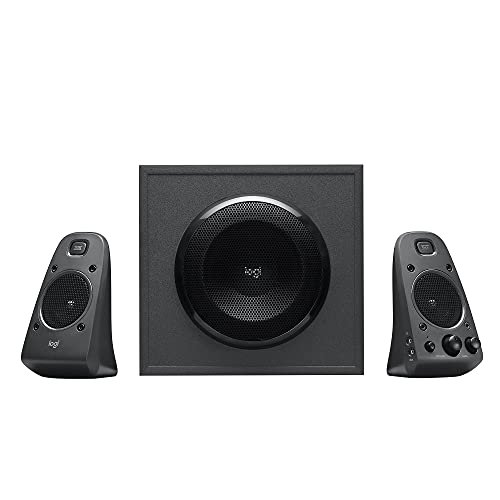
- 200W RMS / 400W peak with strong bass
- Optical, 3.5mm, and RCA inputs
- THX-certified 2.1 desktop and TV audio
Best For: Users who want loud, bass-heavy speakers with optical input and multiple source options
Versatile Bookshelf Pick
Saiyin Bluetooth Optical Bookshelf Speakers

- Optical, coaxial, aux, RCA, and Bluetooth
- Remote switches inputs and volume
- Good for PC, TV, and turntable setups
Best For: People who want a flexible bookshelf speaker pair for desktop and home entertainment
Compact Desktop Upgrade
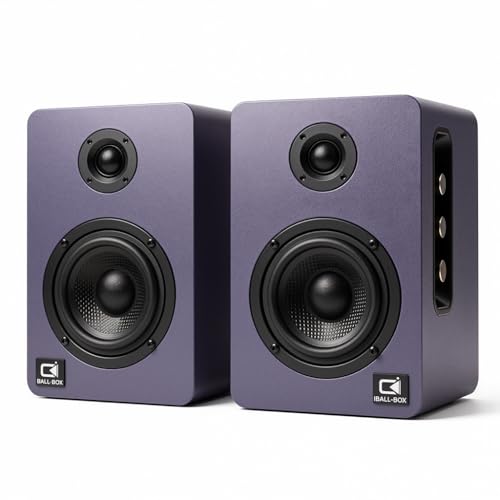
- 60W powered 2.0 stereo sound
- Optical, USB-C, AUX, and Bluetooth
- Front bass and treble controls
Best For: Desktop users who want a compact, feature-rich speaker upgrade with optical input
Classic Studio Style
Edifier R1280DB Powered Bookshelf Speakers
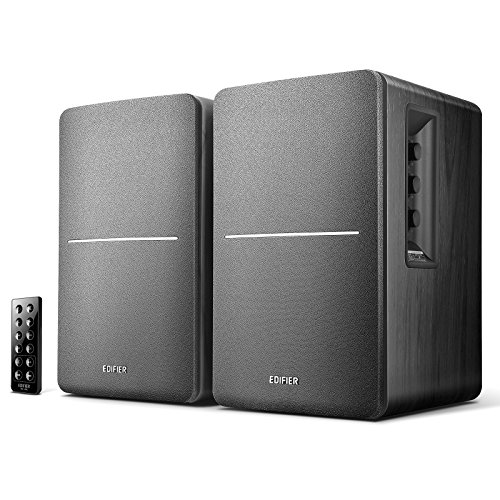
- Optical, coaxial, dual RCA, and Bluetooth
- Remote plus side-panel bass/treble controls
- 4-inch driver with wooden enclosure
Best For: Users wanting a reliable, well-known bookshelf speaker set for PC and TV use
Desktop Studio Pick
H2 Bookshelf Speakers, 60W Stereo with Optical/USB-C
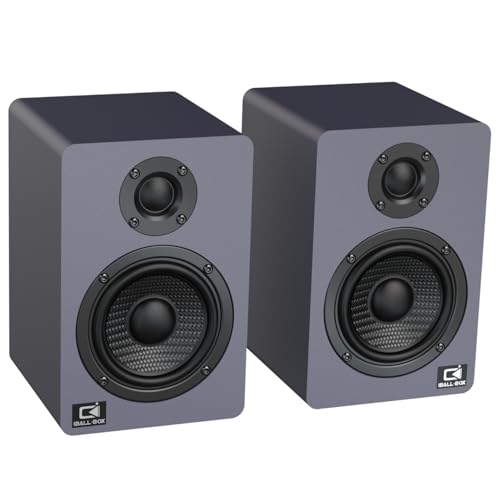
- 60W RMS with DSP and digital amplification
- Optical, USB-C, AUX, and Bluetooth 5.3 inputs
- Carbon-fiber woofer and silk-dome tweeter
Best For: PC, gaming, and music setups that need flexible wired and wireless input options
Value Optical Set
BESTISAN 60W Powered Desktop Speakers
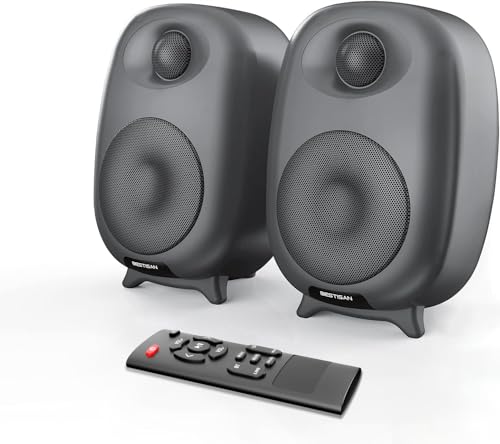
- Optical and line-in inputs with included cables
- Bluetooth 5.0 plus remote-controlled EQ modes
- 60W continuous power with clear treble and bass
Best For: Desktop or TV users who want optical audio and easy preset tuning
Best Overall Bookshelf
Edifier R1280DBs with Optical and Sub Out
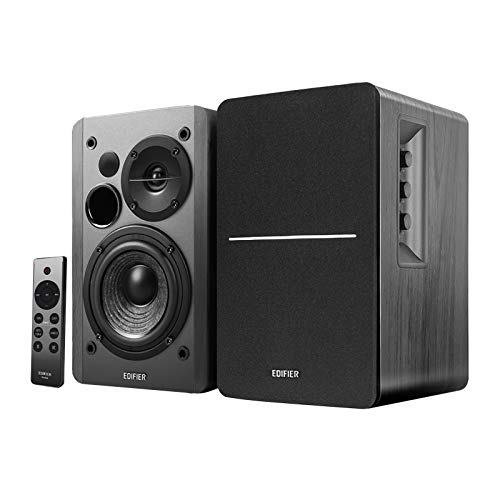
- Optical and coaxial inputs for lossless wired audio
- Subwoofer line out with auto crossover support
- Bluetooth 5.0 and side-panel tone controls
Best For: Balanced desktop and TV listening with easy subwoofer expansion
Optical-Ready Everyday Pick
Powered Bookshelf Speakers for TV, PC & Bluetooth

- Optical and TV-ARC inputs for flexible wired use
- Powered design needs no receiver or amplifier
- Bluetooth 5.3 for laptops, phones, and tablets
Best For: People who want a simple all-in-one speaker set for a desk or TV
Feature-Rich Budget Option
100W Optical Bookshelf Speakers with Light Effects

- Optical, ARC, RCA, Bluetooth 5.2, USB, and sub out
- 100W max power with 3-inch bass drivers
- Compact design with remote and light effects
Best For: Shoppers who want many inputs and a compact desktop speaker pair
Hi-Fi Desk Stereo Choice
Powered Bookshelf Speakers with Optical Input

- Optical, RCA, and Bluetooth connectivity
- Bass and treble controls for tuning sound
- Includes remote, optical cable, and hookup wire
Best For: Desk users who want optical input plus easy sound adjustment
Premium Power – Logitech Z625 THX 2.1 Speaker System
If you want computer speakers with optical input that can also pull double duty for TV or gaming, the Logitech Z625 is built around sheer output and flexible hookups. Its 2.1 layout, THX certification, and support for optical, 3.5mm, and RCA inputs make it easy to use with multiple devices at once.
Best For: Desktop listeners who want strong bass, high output, and simple switching between a PC, console, and TV.
Pros:
- 200W RMS / 400W peak output with thundering bass
- Supports optical, 3.5mm, and RCA inputs simultaneously
- Controls, headphone jack, and aux jack are on the right satellite
- THX-certified sound adds a more cinematic feel
Cons:
- Bulky 2.1 system takes more desk and floor space
- No wireless connectivity listed
The Z625 is a strong pick if volume, bass, and easy multi-device connectivity matter more than compact size. It stands out as a straightforward upgrade for a desk or media setup.
Versatile Bookshelf Pick – Saiyin Bluetooth Optical Bookshelf Speakers
For buyers comparing computer speakers with optical input, the Saiyin powered bookshelf speakers offer a flexible all-in-one setup with Bluetooth, optical, coaxial, aux, and RCA support. They also include a remote for switching inputs and adjusting volume, which makes them practical for a desk, TV, or turntable setup.
Best For: Users who want bookshelf speakers that can handle a PC, TV, and record player from one compact pair.
Pros:
- Optical and coaxial inputs plus aux and RCA connections
- Remote control can switch inputs and mute/unmute
- Works with PCs, TVs, and turntables with the right output
- Active/passive bookshelf design avoids needing a separate preamp for many setups
Cons:
- Turntables need Bluetooth transmitter/output or a LINE OUT connection
- Source must output PCM/stereo/non-surround signal to avoid issues
This is a good fit if you want one speaker pair to cover multiple listening sources without overcomplicating the setup. The feature mix leans practical rather than flashy, which is exactly what many desktop users need.
Compact Desktop Upgrade – Harmony H1 60W Desk Speakers
If your priority is computer speakers with optical input for a desk or monitor setup, the Harmony H1 keeps things compact while still offering 60W of powered stereo sound. It adds USB-C, optical, AUX, and Bluetooth support, plus front-panel bass and treble controls for quick tuning.
Best For: Laptop, PC, and monitor users who want a small powered speaker set with modern wired and wireless inputs.
Pros:
- 60W powered 2.0 stereo system for desk use
- Supports optical, USB-C DAC, 3.5mm AUX, and Bluetooth
- Front controls adjust master volume, bass, and treble
- Compact size fits neatly on a workstation
Cons:
- Not designed for deep bass like a larger 2.1 system
- Only two audio channels, so no subwoofer included
The H1 makes sense if you want a straightforward desktop upgrade with optical input and easy tone control. It focuses on clarity and convenience rather than room-filling output.
Classic Studio Style – Edifier R1280DB Powered Bookshelf Speakers
The Edifier R1280DB is a classic choice among computer speakers with optical input because it combines Bluetooth with optical, coaxial, and dual RCA connectivity. With a 4-inch bass driver, silk dome tweeter, and on-board tone controls, it suits everyday desktop listening and TV use.
Best For: Buyers who want a proven bookshelf speaker pair for a PC, laptop, or TV with easy input switching.
Pros:
- Optical and coaxial inputs for lossless digital connections
- Bluetooth adds wireless convenience for phones and tablets
- Remote control plus side-panel bass and treble knobs
- Wooden enclosure and front bass reflex port help with resonance and punch
Cons:
- 42W RMS output is moderate rather than high power
- Requires corded power and uses a bookshelf form factor
This model is a dependable all-rounder if you want broad compatibility without a complicated setup. It remains popular because it balances everyday convenience, tuning control, and optical input support very well.
Desktop Studio Pick – H2 Bookshelf Speakers, 60W Stereo with Optical/USB-C
If you want computer speakers with optical input that can do more than basic desktop audio, the H2 Bookshelf Speakers are built for versatility. The built-in DSP chip and digital amplifier are designed to keep sound clean at 60W RMS, while the carbon-fiber woofer, silk-dome tweeter, and MDF cabinet aim for fuller, more controlled sound on a desk or shelf.
Best For: PC users, gamers, and music listeners who want a compact bookshelf-style speaker with optical, USB-C, and Bluetooth options.
Pros:
- Optical, USB-C, AUX, and Bluetooth 5.3 connectivity make it easy to switch between devices.
- DSP processing and 60W RMS output are geared toward clear desktop playback.
- Carbon-fiber woofer, silk tweeter, and rear port support stronger bass and detailed highs.
- On-speaker bass and treble knobs let you tune the sound to your setup.
Cons:
- Requires AC power, so it is not a portable speaker.
- Best suited to desktop or bookshelf placement rather than ultra-small setups.
Overall, the H2 is a strong pick if you want one powered pair that covers gaming, media, and music playback without sacrificing wired optical connectivity. The control set and tuning options make it especially useful if you like adjusting sound rather than leaving it flat.
Value Optical Set – BESTISAN 60W Powered Desktop Speakers
For shoppers comparing computer speakers with optical input, the BESTISAN 60W powered speaker set offers a straightforward mix of wired and wireless connectivity. It supports optical and line-in connections with included cables, and it adds Bluetooth 5.0 plus remote-controlled EQ modes for movie, music, and dialogue playback.
Best For: Desktop, TV, and gaming setups that need optical input, simple controls, and easy sound-mode switching.
Pros:
- Optical and line-in wired inputs are included, along with Bluetooth 5.0.
- Three EQ modes help tailor playback for movies, music, or dialogue.
- 60W continuous power and a silk-dome tweeter/full-range driver layout support clear sound.
- Remote control makes source switching and basic tuning easy from across the room.
Cons:
- Bluetooth use requires the speakers to be connected to power first.
- Two-piece bookshelf design takes more space than compact computer speakers.
In practice, the BESTISAN set is a practical all-rounder if you want optical input without paying for extra features you may not use. The EQ presets and included cables make it especially convenient for a simple desk or TV audio upgrade.
Best Overall Bookshelf – Edifier R1280DBs with Optical and Sub Out
If you need computer speakers with optical input and want a proven bookshelf-style option, the Edifier R1280DBs is a strong candidate. It combines Bluetooth 5.0, optical and coaxial inputs, and a subwoofer line out, giving you a flexible 2.0 setup that can grow with your desk or TV system.
Best For: Buyers who want a balanced powered speaker pair for computers, TVs, and mixed media use with room to add a subwoofer later.
Pros:
- Optical and coaxial inputs provide a lossless wired connection for computers and TVs.
- Sub out with auto crossover support makes it easy to add a subwoofer later.
- Bluetooth 5.0 adds convenient wireless playback from phones, tablets, and laptops.
- Side-panel bass, treble, and volume controls offer direct sound shaping.
Cons:
- At 42W RMS, it is less powerful than some larger desktop alternatives.
- Plastic cabinet construction may not feel as premium as wood designs.
The R1280DBs stands out because it covers the core needs most shoppers want: optical input, easy switching, and enough tuning control to fit a desktop or living-room setup. If you want a flexible powered pair with subwoofer upgrade potential, this is the most rounded choice here.
Optical-Ready Everyday Pick – Powered Bookshelf Speakers for TV, PC & Bluetooth
If you want computer speakers with optical input that can also handle a TV, phone, or record-player setup, the RIOWOIS powered bookshelf speakers are built for flexible everyday use. They run without a receiver or amplifier and offer optical, TV-ARC, AUX, and Bluetooth 5.3 connections, so they fit well in a simple desktop or media-room setup.
Best For: Users who want one powered speaker set for a computer desk, TV, and wireless streaming.
Pros:
- Optical and TV-ARC inputs add easy TV and PC integration.
- No receiver or amplifier required, which keeps setup simple.
- Bluetooth 5.3 supports wireless playback from laptops and mobile devices.
- Remote control can switch inputs and adjust volume from the couch or desk.
Cons:
- Optical cable and ARC cable are not included.
- Turntable Bluetooth use requires a turntable with Bluetooth transmitter/output.
- Not compatible with Dolby, so source setup matters.
Overall, this is a practical choice if you want a powered speaker pair that covers optical audio without extra gear. It is especially appealing for mixed-use setups where computer, TV, and Bluetooth convenience all matter.
Feature-Rich Budget Option – 100W Optical Bookshelf Speakers with Light Effects
For shoppers comparing computer speakers with optical input, the BESTISAN active bookshelf speakers stand out for their strong feature set and built-in visual effects. They include ARC and optical inputs for TV use, plus RCA, Bluetooth 5.2, USB flash-drive playback, and subwoofer output for a more expandable desktop or entertainment setup.
Best For: Buyers who want lots of inputs and a compact speaker pair with a more decorative look.
Pros:
- Optical and ARC inputs make TV and computer connections straightforward.
- 100W max output with 3-inch bass drivers and 1.25-inch tweeters.
- SUB out gives you the option to add a subwoofer later.
- Remote and onboard buttons make day-to-day control easy.
Cons:
- USB playback works only with U flash drives, not USB cable connections.
- Plastic enclosure may feel less premium than MDF-built alternatives.
- Light effects are a design bonus, but not everyone will want them.
This is a strong pick if you want optical connectivity and more than just basic desktop audio. The extra inputs and compact footprint make it useful for PC, TV, and casual music listening.
Hi-Fi Desk Stereo Choice – Powered Bookshelf Speakers with Optical Input
The Pyle PBKSR40 is a straightforward option for anyone shopping for computer speakers with optical input and a more traditional bookshelf-monitor style. It combines optical and RCA connectivity with Bluetooth compatibility, a built-in digital amplifier, and bass/treble adjustment, making it easy to tailor for a desk, TV, or small home-entertainment setup.
Best For: Listeners who want a compact powered speaker set with optical audio and tone controls.
Pros:
- Optical input plus RCA and Bluetooth give you flexible source options.
- Bass and treble adjustment help fine-tune the sound.
- Includes a remote, optical cable, and connection wire in the box.
- Compact 4-inch woofer design suits desks and shelves well.
Cons:
- Maximum output is 60 watts, so it is not the most powerful option here.
- Battery-powered operation is listed, but battery life is short at about 2 hours.
- Sound profile may be better suited to nearfield use than larger rooms.
As a practical desktop or small-room pick, this Pyle set covers the basics well and adds optical support without overcomplicating setup. It is a sensible choice if you value adjustability and included accessories over flashy extras.
How We Picked the Best Computer Speakers with Optical Input
We focused on Computer Speakers with Optical Input that offer a good mix of sound quality, ease of setup, and everyday value. Priority went to models with solid build quality, useful control options, and enough output for a desk, bedroom, or small living room.
We also looked for practical extras such as Bluetooth, RCA, USB-C, subwoofer output, and tone controls, since these features can make a speaker set more flexible across devices.
Quick Comparison
The main difference between these speakers is not just power, but how you plan to use them. Compact desktop models are better for close-range listening, while larger 2.0 and 2.1 systems are a better fit if you want fuller bass, louder playback, or TV-friendly performance.
If you care most about simple TV audio, optical input and easy volume control matter most. If you also listen to music from a phone or laptop, Bluetooth and multiple inputs can be just as important.
Key Buying Factors for Computer Speakers with Optical Input
Sound Signature
Look for the balance you prefer: neutral sound for work and dialogue, warmer tuning for music, or stronger bass for gaming and movies. Driver size, cabinet design, and whether a subwoofer is included all affect the final result.
Inputs and Connectivity
Optical is the headline feature, but the best setups also include RCA, AUX, USB-C, or Bluetooth. More options mean fewer adapters and easier switching between a PC, monitor, TV, and turntable.
Power and Room Size
For a small desk, moderate output is usually enough. For a larger room or TV setup, choose a louder set with more headroom so the sound stays clear at higher volumes.
Controls and Convenience
Bass and treble adjustment can be a big plus if you want to fine-tune dialogue, music, or game audio. Remote control support and front-panel access also improve day-to-day usability.
Who Should Buy Which Computer Speakers with Optical Input?
If you want the simplest TV or monitor upgrade, choose a straightforward pair of Computer Speakers with Optical Input and easy controls. If you want fuller entertainment sound, consider a 2.1 system with a separate subwoofer or sub-out support. If you need one speaker set for multiple devices, prioritize models with Bluetooth plus optical and RCA so you can switch sources without hassle.
In short, the best pick depends on your desk size, listening habits, and whether you value clarity, bass, or flexibility most. Focus on the connection options and room fit first, then narrow by sound preferences.