
Office chatter, nearby calls, and keyboard noise can make it hard to hear and be heard. The right computer headset can improve call clarity without becoming uncomfortable halfway through the workday.
These 10 options span straightforward USB headsets and wireless models built for more freedom at your desk. The buying guide below explains which features matter most in a noisy office—and which claims deserve a closer look.
Best 10 Computer Headset for Noisy Office Picks for 2026
Best for Wireless Focus

- Hybrid ANC plus microphone ENC
- USB-A dongle and Bluetooth connectivity
- Flip-to-mute boom; up to 35 hours of talk
Best For: Wireless PC calls with listening-side noise reduction
Best for Flexible Wired Connections
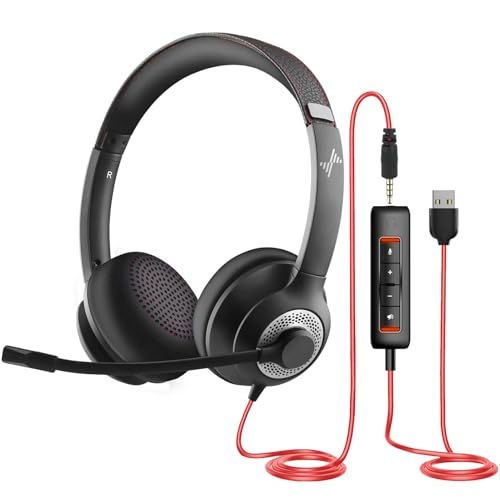
- Directional, reversible boom microphone
- USB controls and 3.5 mm connection
- Nine-foot stated cable length
Best For: Stationary calls across USB and 3.5 mm devices
Best for Teams Calls

- Teams certified with dual noise-cancelling mics
- USB-C and USB-A connectivity
- Flip-to-mute and on-headset controls
Best For: Wired Microsoft Teams calls
Best for Bluetooth Mobility

- Dual beamforming noise-cancelling mics
- Up to 30 m stated wireless range
- Up to 16 hours of stated talk time
Best For: Moving between computer and phone calls
Simple Wired Pick

- Plug-and-play USB-A
- Rotating noise-canceling mic
- In-line volume and mute
Best For: Desk-based calls with simple controls
Flexible Wireless Pick

- 2.4 GHz, Bluetooth, or wired
- AI-ENC boom microphone
- Up to 45 hours of talk time
Best For: Multi-device calls and wireless mobility
Lightweight Desk Pick
Lenovo USB-A Stereo Headset Gen 2
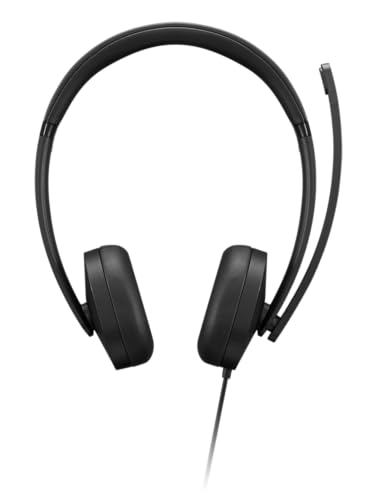
- Lightweight 140 g design
- In-line call and mute controls
- Software-enhanced mic noise cancellation
Best For: Long desk sessions with USB-A
Flexible USB Pick
Lenovo 115 Wired Stereo Headset
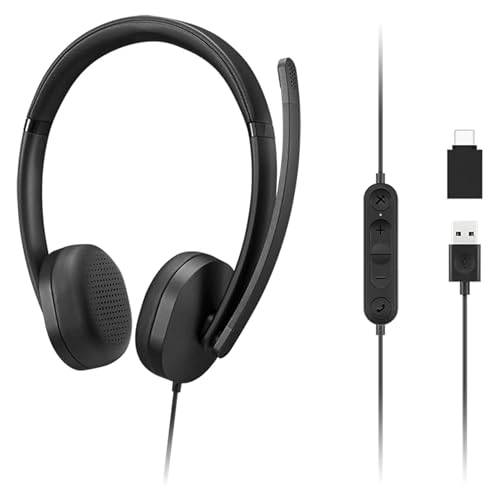
- USB-A with included USB-C adapter
- In-line call, mute, and volume controls
- Over-ear memory-foam cups
Best For: Desk workers using both USB-A and USB-C computers
Busy-Office Call Pick

- Three-mic call noise reduction
- 360-degree busy-status light
- USB-A with in-line controls
Best For: Call-heavy USB-A desks where busy status helps prevent interruptions
Wireless Mobility Pick

- Bluetooth 5.2 or included USB dongle
- Up to 65 hours of claimed battery life
- Rotatable mic and one-tap mute
Best For: Mobile callers who prefer wireless freedom and long battery life
Best for Wireless Focus – M112 ANC & ENC Work Headset
If you need a computer headset for noisy office calls, the M112 combines adjustable active noise cancellation for what you hear with environmental noise cancellation at the microphone for what others hear.
Best For: Workers who want wireless PC calls, less audible office noise, and a physical flip-to-mute boom.
Pros:
- Hybrid ANC offers three modes, while microphone ENC targets background noise on calls.
- Included USB-A dongle provides plug-and-play computer connectivity; Bluetooth supports a second device.
- Flip-to-mute boom and up to 35 hours of stated talk time suit long meeting days.
Cons:
- The dongle is not compatible with landlines, desk phones, or VoIP phones.
- Wireless use requires charging; the stated full charge takes two hours.
This is the strongest fit here if you want both listening-side ANC and microphone noise reduction. Check that your computer can use the supplied USB-A dongle before buying.
Best for Flexible Wired Connections – JIAMQISHI USB/3.5mm Headset
For a computer headset for noisy office conversations without battery management, this wired on-ear model offers a directional noise-cancelling boom microphone and both USB and 3.5 mm connection options.
Best For: Desk-based callers who want a wired headset that can connect to computers and devices with a compatible 3.5 mm jack.
Pros:
- Unidirectional boom mic can rotate for wear on either side.
- USB inline controls provide microphone mute, speaker mute, and volume adjustment.
- Adjustable headband, breathable memory-foam earpads, and a stated nine-foot cable support desk use.
Cons:
- Wired design limits movement away from the connected device.
- The supplied description emphasizes microphone noise cancellation, not verified listening-side ANC performance.
Choose it for connection flexibility and accessible call controls rather than isolation from office chatter in your own ears.
Best for Teams Calls – Yealink UH37 USB-C/A
The Yealink UH37 is a wired computer headset for noisy office calls when Microsoft Teams integration matters. Its dual noise-cancelling microphones target clearer speech, while the supplied USB-C and USB-A connectivity accommodates different computer ports.
Best For: Teams users who prefer a wired headset with dedicated call controls and a flip-to-mute boom.
Pros:
- Microsoft Teams certified, with dual noise-cancelling microphones.
- Connects through USB-C or USB-A.
- On-headset call and volume controls plus flip-to-mute offer quick access during meetings.
Cons:
- Wired connection limits how far you can move from your device.
- The notes do not establish effective active noise cancellation for the listener; microphone noise reduction is the clearer claim.
Its main advantage is a straightforward Teams-focused calling setup, not a documented ability to block surrounding conversations from reaching your ears.
Best for Bluetooth Mobility – Logitech Zone 301
If your computer headset for noisy office work needs to travel between your desk and phone, the Bluetooth Zone 301 offers up to 30 m (98 ft) of stated range and dual beamforming microphones designed to reduce background noise on calls.
Best For: Workers who prioritize wireless movement and switching between computer and phone.
Pros:
- Dual beamforming microphones target background noise in shared workspaces.
- Stated range reaches up to 30 m (98 ft), with computer-to-phone switching.
- Up to 16 hours of stated talk time; a five-minute charge can add up to one hour of talk time.
Cons:
- No active noise cancellation is specified for reducing what the wearer hears.
- Bluetooth operation depends on compatible device connectivity and battery charge.
The Zone 301 makes sense for callers who move around, but its noise-reduction emphasis is on your transmitted voice rather than shutting out a loud office for you.
Simple Wired Pick – Logitech H390 USB-A Headset
If you need a computer headset for noisy office calls without managing a battery or pairing, the Logitech H390 is a straightforward USB-A option. Its rotating noise-canceling microphone is designed to reduce background sound picked up on calls.
Best For: Desk-based callers who want plug-and-play setup and easy mute access.
Pros:
- Plug-and-play USB-A connection requires no software installation.
- In-line volume and mute controls are easy to reach.
- Adjustable headband, padded ear cushions, and a 6.23-foot cable suit longer desk sessions.
Cons:
- Wired USB-A connection limits device flexibility.
- Microphone noise reduction does not mean the earcups block office noise for the wearer.
The H390 makes sense when clear, convenient calls matter more than wireless freedom. Its noise-canceling feature addresses what colleagues hear, not necessarily the distractions you hear around you.
Flexible Wireless Pick – AOC Triple-Mode Work Headset
For a computer headset for noisy office calls that can move between devices, this AOC model offers 2.4 GHz dongle, Bluetooth, and 3.5 mm wired connections. Its AI-ENC boom microphone is intended to filter ambient noise from your voice.
Best For: Call-heavy users who want wireless mobility and multiple connection options.
Pros:
- Three connection modes accommodate computers and mobile devices.
- Rotating boom mic uses environmental noise cancellation for calls.
- Rated for up to 45 hours of talk time, with charging while in use.
- Memory-foam ear pads and a 5.6-ounce listed weight support extended wear.
Cons:
- Wireless use requires charging.
- Microphone noise cancellation should not be mistaken for active noise cancellation for the listener.
Choose this one if switching connections and moving around matter. The advertised noise filtering targets outgoing speech; the supplied details do not establish how much surrounding office noise its earcups will keep out.
Lightweight Desk Pick – Lenovo USB-A Stereo Headset Gen 2
The Lenovo USB-A Stereo Headset Gen 2 is a practical computer headset for noisy office calling if you prefer a light wired design. Its noise-canceling enhancement works through Lenovo Accessories and Device Manager software, an important setup detail if microphone clarity is your priority.
Best For: Desk workers who want a lightweight USB-A headset with call controls.
Pros:
- Listed at 140 g for lighter wear.
- In-line control box provides call, volume, and mute access.
- Replaceable earcups and a double-sided boom mic add practical flexibility.
- Listed compatibility includes Teams, Zoom, Google Meet, Slack, and Webex.
Cons:
- Enhanced noise cancellation depends on Lenovo software.
- Wired USB-A connection is less flexible than a wireless headset.
This is the desk-focused choice when weight and accessible controls take priority. Check that you can use Lenovo’s software before counting on its enhanced noise-canceling feature.
Flexible USB Pick – Lenovo 115 Wired Stereo Headset
The Lenovo 115 is a practical computer headset for noisy office calls when you want a wired connection and the flexibility to use USB-A or USB-C. Its over-ear memory-foam cups and in-line controls are designed for long work sessions.
Best For: Desk workers switching between USB-A and USB-C computers.
Pros:
- USB-A connection with an included USB-C adapter.
- In-line volume, mute, and call controls with LED indicators.
- Over-ear memory-foam cups; Lenovo Accessories Device Manager supports advanced noise-canceling settings.
Cons:
- Wired connection limits movement away from your desk.
- Some advanced settings depend on Lenovo’s device-manager software.
Choose this if port flexibility and accessible controls matter most. The supplied details do not establish how much surrounding office sound the earcups block.
Busy-Office Call Pick – Blucalm UCH30 USB Headset
The Blucalm UCH30 targets a key need in a computer headset for noisy office calls: helping people on the other end hear your voice. Its three-microphone array provides environmental noise cancellation, while a visible busylight signals when you are occupied.
Best For: USB-A desk setups where clear calls and visible busy status are priorities.
Pros:
- Three-microphone array designed to reduce background noise in calls.
- 360-degree busylight shows busy status; incoming-call flashing is supported for Teams.
- Plug-and-play USB-A connection and in-line mute, volume, and Teams call controls.
Cons:
- USB-A only, with no USB-C connection listed.
- On-ear cups are not described as actively canceling noise for the wearer.
This is the most call-focused option here if coworkers frequently interrupt or your microphone picks up office chatter. The maker’s noise-reduction percentage is a claim, not a guarantee for every workspace.
Wireless Mobility Pick – LEVN LE-HS013 Sup Headset
If you need a computer headset for noisy office work but do not want to stay tethered to your desk, this LEVN model offers Bluetooth 5.2 and an included USB dongle. Its microphone noise cancellation is intended to keep your voice clearer amid background activity.
Best For: Workers who move around during calls and want long battery life.
Pros:
- Bluetooth or included USB-dongle connection with a stated range of up to 49 feet.
- Up to 65 hours of claimed battery life, plus a charging base.
- Mute button, adjustable headband, and microphone that rotates for use on either side.
Cons:
- Supports only one connected device at a time.
- Microphone noise cancellation does not establish active noise cancellation for what you hear.
Pick this for wireless freedom and fewer charging breaks, not on the assumption that it will silence the office around you. The stated battery life, range, and noise reduction may vary in use.
How We Picked the Best Computer Headset for Noisy Office
We focused on headsets suited to computer-based calls, including wired USB models and wireless options with work-focused microphones. Our comparison weighs connection type, stated microphone noise reduction, controls, wearing style, and practical considerations such as battery management. Product names and specifications alone cannot establish real-world call quality, so treat noise-cancellation claims as features to verify through current listings, compatibility details, and user feedback—not guarantees of silence.
Quick Comparison: Wired or Wireless?
Choose wired USB if you want a simple desk setup without charging. The Logitech H390, Yealink UH37, JIAMQISHI USB headset, and the listed Lenovo models are worth comparing for connector fit, controls, and wearing style. Choose wireless if you frequently stand, move between desks, or dislike a cable; compare the Logitech Zone 301, AOC model, and other listed wireless options for connection method and charging needs. A headset that includes a USB dongle may be easier to use on a work PC than Bluetooth alone, but check what is actually included.
What Matters in a Computer Headset for Noisy Office Calls
Microphone Noise Reduction Versus Headphone ANC
A noise-reducing microphone aims to keep background sound out of your outgoing voice. Active noise cancellation (ANC), when present in the earcups, primarily reduces what you hear. Labels such as ENC or AI noise canceling may describe different implementations, so prioritize voice samples or credible call-quality feedback over acronyms.
Fit, Isolation, and All-Day Comfort
On-ear designs can feel less enclosed, while over-ear cups may provide more passive isolation; comfort depends on clamp force, earcup size, and heat as much as headset weight. If you take calls for hours, look for adjustable fit and replaceable wear parts where available. Stereo sound can help you focus, but consider whether you need to hear colleagues or office announcements.
Connections and Call Controls
Check whether your computer offers USB-A, USB-C, Bluetooth, or supports an included wireless dongle. Adapters can help, but confirming compatibility before purchase is simpler. A reachable mute button or flip-to-mute boom is useful when interruptions happen; verify whether the control works with your calling app. For wireless models, consider charging habits and whether you can keep working during a low-battery day.
Who Should Buy Which Computer Headset for Noisy Office?
For a fixed workstation, start with a wired USB headset and spend time checking microphone feedback rather than paying for mobility you will not use. If you move around during calls, shortlist wireless models and confirm their connection options. If your priority is hearing less office noise, seek evidence of effective earcup isolation or headphone ANC—not just a noise-canceling mic. For shared equipment or long shifts, favor comfortable, easy-to-clean designs with replaceable parts where offered. The best Computer Headset for Noisy Office use is the one that fits your computer, your call routine, and the kind of noise you need to manage.