
Finding the right DisplayPort cable tester can save time, reduce guesswork, and help you sort bad cables from connection issues fast.
This roundup highlights practical options for testing continuity, pin integrity, and cable faults, plus a few multi-purpose testers worth considering for broader bench work.
Best 10 DisplayPort Cable Tester Picks for 2026
DP Cable Diagnostic Tool
NOYAFA NF-633 DisplayPort Cable Tester

- Supports DP, Mini DP, and mixed cable types
- Checks pin 1-19, shield, and pin 20
- Uses master and remote LED indicators
Best For: DP and Mini DP cable testing up to 15 m
HDMI Repair Board

- Checks HDMI continuity and line configuration
- Uses 19+1 indicator lights for pin mapping
- Built for connector repair and bench testing
Best For: DIY HDMI cable repair and continuity checks
High-Speed DP Cable
StarTech 6ft DisplayPort 2.1 DP40 Cable

- VESA-certified DP 2.1 cable with 40Gbps support
- Handles 8K 60Hz and 4K 144Hz setups
- Includes latching connectors and shielding
Best For: Upgrading high-bandwidth DisplayPort connections
Compact HDMI Test Board
Treedix HDMI Cable Tester Board

- Finds shorts, opens, and cross connections
- Supports HDMI Type A, Mini, and Micro
- Offers battery or 3-12V external power
Best For: Portable HDMI cable troubleshooting and repair
Certified high-bandwidth cable
StarTech DP80 3ft 8K/16K Cable
- VESA-certified DP 2.1 DP80 cable
- Supports 16K 60Hz with DSC and 4K 240Hz
- Latching connectors and shielded construction
Best For: Short-run high-resolution DisplayPort connections
Compact HDMI signal tester
Parts Express HDMI Signal Tester

- Tests HDMI and DVI cable signal status
- Helps diagnose sparkles, color shift, and missing picture
- Compact and portable for field use
Best For: Basic HDMI cable troubleshooting
Multi-format cable diagnostic tool
Palmer Multi-Wire Cable Tester

- Tests 11 connector types for audio, video, and data
- Includes automated and manual modes with LED indicators
- Compact steel housing for bench or field use
Best For: Mixed-format cable testing in pro AV and data setups
Dual-Use Bench Tester

- Tests HDMI and RJ45 cables
- Scans up to 19 HDMI wires
- Main unit stores the remote
Best For: Users who need a simple portable tester for HDMI and RJ45 cables
Pro Event Rack Tester
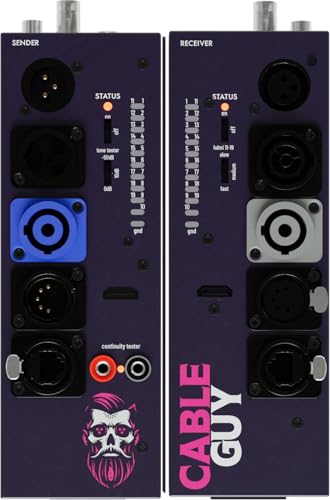
- Tests HDMI and many pro cable types
- Two-piece design supports through-wall testing
- Steel housing suits heavy use
Best For: Installers and technicians needing one rugged tester for mixed cable formats
Fast Scan Utility Tester

- Fast scan and full display modes
- Checks up to 19 wires
- Auto shut-down saves power
Best For: Quick HDMI and RJ45 troubleshooting with two easy test modes
DP Cable Diagnostic Tool – NOYAFA NF-633 DisplayPort Cable Tester
If you need a DisplayPort cable tester for troubleshooting DP and Mini DisplayPort runs, the NOYAFA NF-633 is built around wire-map and continuity checks. It supports DisplayPort-to-DisplayPort, DisplayPort-to-Mini DisplayPort, and Mini DisplayPort-to-Mini DisplayPort cables, with LED indication for pin-by-pin verification and shielding detection.
Best For: Technicians and DIY users checking DisplayPort and Mini DisplayPort cable wiring up to 15 m.
Pros:
- Tests DP-to-DP, DP-to-Mini DP, and Mini DP-to-Mini DP cables
- Pin 1-19 wire map, shielding detection, and pin 20 detection
- Sweep and continuity test modes for more detailed checks
- Master and remote units include LED indication for easier reading
Cons:
- Requires a 9V battery, which is not included
- Maximum tested cable length is limited to 15 m
For basic to intermediate DisplayPort cable diagnostics, this tester focuses on the essentials: continuity, shielding, and pin verification. It is a practical fit if you want a dedicated DP cable tester rather than a general-purpose multimeter setup.
HDMI Repair Board – daier HDMI Cable Tester Board
This HDMI cable tester board is aimed at repair work, not DisplayPort use, but it can still be useful if you are building out a cable-testing bench alongside a DisplayPort cable tester. It checks HDMI continuity and line configuration with 19+1 indicator lights that show the status of each pin during probing.
Best For: DIY HDMI connector repair and continuity checking on a simple board-style tester.
Pros:
- Designed for HDMI cable mapping and continuity checks
- 19+1 lights correspond to the HDMI pin layout
- Useful when repairing or replacing HDMI connectors
- Compact board format for bench-style testing
Cons:
- It is an HDMI tester, not a DisplayPort cable tester
- Requires manual probing and recording of light status
If your priority is DisplayPort testing, this is not the right tool. It belongs more in an HDMI repair kit, but the straightforward indicator layout may appeal to users who want a basic continuity board for cable work.
High-Speed DP Cable – StarTech 6ft DisplayPort 2.1 DP40 Cable
This is not a DisplayPort cable tester, but a VESA-certified DisplayPort 2.1 cable for high-bandwidth setups. If you are pairing a DisplayPort cable tester with a replacement cable, this StarTech model targets 8K 60Hz and other high-refresh workloads with DP40 40Gbps support and latching connectors.
Best For: Replacing or upgrading a DP cable for 8K displays, docking stations, and high-refresh systems.
Pros:
- VESA-certified DP 2.1 cable with DP40 40Gbps support
- Supports 8K 60Hz with DSC and 4K 144Hz
- Latching connectors help prevent accidental disconnects
- Built with shielding, strain reliefs, and a flexible TPE jacket
Cons:
- It does not test cables or diagnose wiring faults
- Only 6 feet long, so it may not suit longer runs
As a premium replacement cable, this StarTech model makes sense when you want verified performance rather than diagnostic tools. It is a strong companion piece to a DisplayPort cable tester, especially for high-resolution displays and workstation setups.
Compact HDMI Test Board – Treedix HDMI Cable Tester Board
The Treedix board is a compact cable tester for HDMI troubleshooting, and it is useful to compare against a dedicated DisplayPort cable tester if you work across both standards. It checks for short circuits, open circuits, and disorder/cross connections, while the 20 LED indicators show pin status for standard, Mini, and Micro HDMI cables.
Best For: Portable HDMI cable checks and repair work across Type A, Mini Type C, and Micro Type D cables.
Pros:
- Detects shorts, opens, disorder, and cross connections
- Supports HDMI Type A, Mini Type C, and Micro Type D
- 20 LED indicators provide per-pin status
- Battery or external 3-12V power options add flexibility
Cons:
- It is designed for HDMI, not DisplayPort cables
- Requires either a battery or external power source to operate
For HDMI work, this is a practical little board with broad connector support and easy-to-read indicators. If your main need is a DisplayPort cable tester, though, this belongs in a separate HDMI repair toolkit rather than as a direct substitute.
Certified high-bandwidth cable – StarTech DP80 3ft 8K/16K Cable
If you need a displayport cable tester alternative for checking a high-bandwidth setup, this StarTech cable is built for dependable DP 2.1 signal delivery rather than diagnostics. It’s a VESA-certified DP80 cable with UHBR20 support, making it a strong choice for 16K and 8K display links, high-refresh 4K, and modern docking-station setups.
Best For: Users connecting DP 2.1 GPUs, UHD docks, and high-resolution monitors who want certified performance.
Pros:
- VESA-certified DP 2.1 cable with DP80 bandwidth up to 80Gbps.
- Supports 16K 60Hz with DSC, 8K 85Hz, and 4K 240Hz.
- Latching connectors help prevent accidental disconnects.
- Flexible TPE jacket and shielded coaxial wire suit tight routing and EMI-sensitive setups.
Cons:
- At 3 feet, the cable is best for short runs only.
- It is a cable, not an actual diagnostic tester.
For a performance-focused DisplayPort connection, this model makes sense when you care more about clean, certified signal transport than cable troubleshooting. It’s especially practical for high-end monitors, MST daisy chains, and workstation use.
Compact HDMI signal tester – Parts Express HDMI Signal Tester
If you’re shopping for a displayport cable tester, this Parts Express unit is worth a look for HDMI and DVI signal troubleshooting. It plugs into DVI-F and HDMI-F connectors and helps identify issues like color shift, sparkles, or a missing picture by showing the status of each HDMI signal component.
Best For: Quick testing of HDMI cables and basic signal faults at either end of a system.
Pros:
- Compact, portable design is easy to carry between jobs.
- Displays the status of each HDMI signal component.
- Can be used at the source or display end of the system.
- Helps diagnose color shift, sparkle, and no-picture problems.
Cons:
- Designed for HDMI and DVI, not DisplayPort.
- Limited to cable testing rather than broader multi-format diagnostics.
This is a practical tester for installers and home users who mainly work with HDMI chains. If your troubleshooting is focused on HDMI signal integrity, it offers a simple, purpose-built check.
Multi-format cable diagnostic tool – Palmer Multi-Wire Cable Tester
For buyers comparing a displayport cable tester with a broader bench tool, the Palmer AHMCTXL V2 is a multi-wire tester that covers a wide range of connector types. It’s designed for audio, video, and data cables, with automated and manual test modes plus LED indicators to help verify continuity across supported formats.
Best For: Technicians who need one tester for multiple cable types, including audio and data lines.
Pros:
- Supports 11 connector types, including XLR, TRS, USB, RJ-45, and MIDI.
- Offers both automated and manual test modes.
- LED indicators provide clear status feedback.
- Compact steel housing is built for regular use.
Cons:
- Not specifically listed as a DisplayPort tester.
- Requires two AA batteries, which adds a small ongoing cost.
This is a strong all-around diagnostic option if you work across many cable standards and want one tool instead of several. It’s less specialized than a dedicated video tester, but much more versatile for mixed-format troubleshooting.
Dual-Use Bench Tester – HDMI/RJ45 Cable Checker
If you need a practical DisplayPort cable tester alternative for HDMI and network leads, this compact HDMI/RJ45 checker is built for quick continuity checks. It scans up to 19 wires on HDMI cables and helps identify shorts, opens, and miswires, making it useful for fast troubleshooting in home or small AV setups.
Best For: Checking HDMI Type A and Mini Type C cables plus RJ45 network cables when you want a simple battery-powered tester.
Pros:
- Tests HDMI 1.2V/1.3V/1.4V/2.0V cables and RJ45 network cables.
- Can scan up to 19 wires to spot short circuits, open circuits, or wrong order.
- Main and remote units store together for easier portability.
- Can run on a 1.5V AAA battery or phone USB charger power supply.
Cons:
- Does not support DisplayPort cables specifically.
- Battery and charger are not included.
- Focused on continuity-style testing rather than advanced diagnostics.
This is a straightforward cable tester for users who mainly need fast go/no-go checks on HDMI and RJ45 lines. If your workflow centers on those connectors, it offers a simple and portable way to confirm wiring problems.
Pro Event Rack Tester – Multi-Format Cable Checker
For buyers looking for a DisplayPort cable tester substitute in a broader pro-audio toolkit, this multi-function cable tester covers HDMI along with several common stage and install formats. Its two-piece layout and LED continuity feedback make it a practical choice when you need quick cable verification across mixed equipment.
Best For: Technicians and installers who want one rugged tester for HDMI, RJ45, XLR, TRS, RCA, BNC, and powerCON cables.
Pros:
- Supports HDMI, RJ45, XLR, TRS, RCA, BNC, and powerCON families.
- LED indicators give fast continuity feedback for working or mismatched cables.
- Sender and receiver can separate for through-wall testing.
- Steel housing is built for heavy use in professional environments.
Cons:
- Does not list DisplayPort support.
- Requires 2x 9V batteries, which are not included.
- Bulkier than a simple pocket tester at 1.06 kilograms.
This model makes sense if you want a single rugged tester for multiple cable types rather than a dedicated DisplayPort unit. The broad connector support and through-wall setup are especially helpful for install and rental work.
Fast Scan Utility Tester – HDMI/RJ45 Continuity Checker
If you want a practical DisplayPort cable tester alternative for the HDMI side of your setup, this HDMI/RJ45 utility tester is made for quick fault-finding. It supports fast scan and full display modes, and it can test up to 19 wires to help catch shorts, opens, and wiring errors before they become system problems.
Best For: Fast troubleshooting of HDMI Type A and RJ45 cables when you want simple corded operation and two test modes.
Pros:
- Tests HDMI 1.1/1.2/1.3/1.4/2.0 and RJ45 cables.
- Offers fast scan mode and full display mode for different test needs.
- Checks up to 19 wires for short circuit, open circuit, or wrong order.
- Auto shut-down after 10 minutes helps conserve power.
Cons:
- Does not support DisplayPort connectors.
- Corded electric power may be less convenient than battery-only units.
- Limited to HDMI Type A and RJ45 compatibility.
For users who want a no-frills cable tester with useful test modes, this model keeps things simple and efficient. It is best suited to HDMI and Ethernet checks rather than specialty video formats.
How We Picked the Best DisplayPort Cable Tester
We focused on tools that are useful for real-world cable troubleshooting, with attention to test coverage, indicator clarity, build quality, and how easy they are to use in a repair or bench setting. Because the list includes both dedicated DisplayPort testers and broader multi-format cable testers, we prioritized flexibility, accuracy, and value for technicians, hobbyists, and IT users.
Quick Comparison
For straightforward DisplayPort checks, dedicated testers are the best fit when you want fast pass/fail results on wire mapping, opens, shorts, and crossed conductors. Multi-function units make more sense if you also test HDMI, RJ45, audio, or lighting cables. If your work centers on modern high-bandwidth video setups, cable certification matters for the cable itself, but a DisplayPort Cable Tester still helps confirm basic continuity before you blame the source, display, or adapter.
Key Buying Factors for a DisplayPort Cable Tester
Test Coverage
Look for support for the specific conductors and signal paths used in DisplayPort cables. At minimum, a useful tester should identify opens, shorts, and miswires. More advanced units may also help verify power or detect internal wiring faults.
Indicator Readability
LED labels, clear channel numbering, and simple pass/fail logic make troubleshooting faster. If you work in low-light racks or busy repair spaces, a tester with obvious status feedback is easier to trust at a glance.
Connector Compatibility
Some testers are purpose-built for DisplayPort, while others are adapter-friendly or designed as general cable checkers. Make sure the tool matches the cable type you use most often, especially if you regularly handle HDMI, network, or mixed AV installs.
Portability and Power
Compact, battery-powered testers are handy for field use, while bench-oriented tools can offer more visibility and convenience for frequent diagnostics. If you only need occasional checks, a simple portable unit is usually enough.
Who Should Buy Which DisplayPort Cable Tester?
If you mainly troubleshoot DisplayPort monitor links, a dedicated DisplayPort Cable Tester is the most efficient choice. If you handle a wider range of AV and data cabling, a multi-function tester can be better value. DIY users and repair techs may prefer simple LED board-style testers, while service teams should look for rugged, easy-to-read tools that speed up repetitive cable validation.
In short, choose the narrowest tool that still covers your real workflow. That balance usually delivers the best mix of speed, clarity, and cost.