
If your laptop struggles with 4K timelines, GPU effects, or accelerated exports, the right external GPU enclosure can make a noticeable difference. It gives you desktop-class graphics performance without replacing your main machine.
Below, we focus on practical options for editors who want better real-world performance, stable connectivity, and a setup that fits their workflow.
Best 10 External GPU Enclosure for Video Editing Picks for 2026
Open-Frame AI/Editing Dock
Thunderbolt 3/4 eGPU Enclosure

- Thunderbolt 3/4 and USB4 compatibility
- 85W PD charging with open-frame airflow
- Supports NVIDIA and AMD cards on Windows/Linux
Best For: Editors who want a flexible eGPU dock with charging and AI-ready positioning
Pro Editing Workhorse

- Thunderbolt 3 eGPU chassis for editing acceleration
- 750W PSU supports demanding compatible GPUs
- Adds USB ports and Gigabit Ethernet on 750ex
Best For: Editors who want a mature Thunderbolt 3 enclosure with extra ports
Compact TB4 Hub Dock

- Thunderbolt 3/4 and USB4 compatibility
- 750W PSU with 85W PD and hub ports
- Certified JHL7440 controller with daisy chain support
Best For: Laptop editors who want a compact eGPU dock with extra connectivity
High-Bandwidth OCuLink Dock
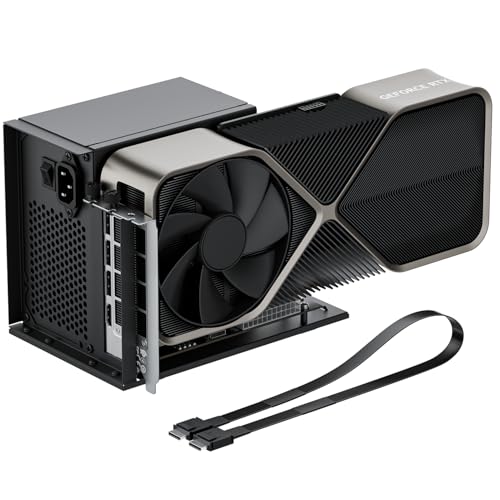
- OCuLink PCIe 4.0 x4 connection at 64Gbps
- Fits large GPUs like RTX 4090 and RX 7900 XTX
- Detachable dock with flexible shielded cable
Best For: Users with OCuLink desktops or mini PCs who want maximum link bandwidth
Premium Thunderbolt 5 Pick
Breakaway Box 850 T5 eGPU Enclosure

- 80 Gbps Thunderbolt 5 support
- 850W power for high-end GPUs
- Built-in USB, Thunderbolt, and 5GbE ports
Best For: Windows 11 video editors who want top-tier eGPU performance and extra connectivity
Compact Cross-Platform Pick

- Thunderbolt 3/4 and USB4 compatible
- 85W PD charging with hub ports
- Works with Windows, Linux, and macOS
Best For: Users who want a small, flexible eGPU dock for editing across multiple devices
Open-Frame Budget-Friendly Pick

- 40Gbps USB4 and Thunderbolt 4 support
- Open design fits larger GPUs
- Windows, Linux, and macOS compatible
Best For: Editors who already own a GPU and PSU and want a flexible open-frame dock
NVMe M.2 Performance Dock
NVMe M.2 eGPU Dock for PCIe 5.0 Laptops

- NVMe M.2 to PCIe x16 design with 128Gbps bandwidth
- Includes a 50cm flexible riser cable
- Supports full-size GPUs and auto/forced start modes
Best For: NVMe M.2-equipped laptops and mini PCs for high-bandwidth GPU expansion
Thunderbolt Creative Dock
Certified Thunderbolt 3/4 eGPU Dock for Creative Work

- Works with Thunderbolt 3/4 and USB4 devices
- Certified JHL7440 controller for workstation use
- Includes 85W PD charging and USB-A hub features
Best For: Creators with Thunderbolt or USB4 laptops needing an easy external GPU dock
Compact Editing Dock
Compact Thunderbolt/USB4 eGPU Dock for Editing

- Compact 320g enclosure with PCIe 16X slot
- Supports Thunderbolt 3/4 and USB4 devices
- Notes call out video editing and 3D rendering use
Best For: Editors wanting a smaller Thunderbolt or USB4 eGPU dock
Open-Frame AI/Editing Dock – Thunderbolt 3/4 eGPU Enclosure
If you want an external GPU enclosure for video editing that also stays flexible for AI work, this Thunderbolt 3/4 and USB4 dock is built around wide compatibility and stable PCIe 4.0 x16 operation. It supports NVIDIA and AMD cards, adds 85W PD charging, and uses an open-frame aluminum design that prioritizes airflow and long-card clearance.
Best For: Editors who also want an AI-ready eGPU dock with strong charging and broad laptop/NUC compatibility.
Pros:
- Compatible with Thunderbolt 4/3 and USB4 systems, including laptops, NUCs, and handhelds
- 85W PD charging can power supported devices with a single cable
- Open-frame aluminum build leaves graphics card length unrestricted and improves airflow
- Supports Windows 10/11 and Linux, with select macOS support noted
Cons:
- Non-Thunderbolt/USB4 Type-C ports are not supported
- Mac support is limited to select models, so it is not universal
- AI-related TinyGPU/Tinygrad use is described for development, not gaming or 3D rendering
This is a practical pick if your editing workflow needs a modern external GPU enclosure with decent charging and room for high-end cards, but it is best suited to Thunderbolt or USB4 hosts only.
Pro Editing Workhorse – Sonnet Breakaway Box 750ex
The Sonnet eGPU Breakaway Box 750ex is a straightforward external GPU enclosure for video editing when your priority is acceleration over extras. It connects over Thunderbolt 3, supports Mac and Windows, and is specifically aimed at reducing editing, rendering, color grading, animation, and effects task times.
Best For: Editors who want a proven Thunderbolt 3 eGPU chassis with strong power delivery and extra peripheral ports.
Pros:
- Designed to speed up editing, rendering, color grading, animation, and special effects
- 750W power supply supports higher-power compatible GPUs
- 750ex model adds four USB Type-A ports and Gigabit Ethernet
- Compatible with Mac and Windows over Thunderbolt 3
Cons:
- M1 Macs are not compatible with GPUs, so this is not an option for those systems
- Thunderbolt 3 only, so it is not the most current connection standard
- Bulkier than compact docks because it is built around a full 750W chassis
If you want a no-nonsense eGPU enclosure for editing workloads, the 750ex stands out for its power supply, accessory ports, and clear focus on application acceleration.
Compact TB4 Hub Dock – ORARA 750W eGPU Enclosure
This ORARA external GPU enclosure for video editing is aimed at users who want a compact Thunderbolt 3/4 or USB4 dock with a built-in 750W PSU. It supports NVIDIA and AMD cards, includes 85W PD, and adds a hub-style layout with USB and daisy-chain connectivity for a cleaner editing setup.
Best For: Editors using a Thunderbolt 4/3 or USB4 laptop who want a compact eGPU dock with extra hub features.
Pros:
- Compatible with Thunderbolt 4/3 and USB4 hosts
- Built-in 750W PSU and 85W PD for strong power support
- Includes a 10Gbps USB-A port plus daisy-chain support
- Uses a certified JHL7440 controller for stable expansion
Cons:
- Not compatible with Thunderbolt 1/2 or generic USB-C ports
- Does not support three-slot graphics cards
- Windows 11 is required according to the notes, and MacBook M1/M2/M3/M4 support is excluded
For editing setups that need a compact dock with extra I/O, this enclosure offers a strong mix of power delivery and practicality, as long as your host system and GPU size match the requirements.
High-Bandwidth OCuLink Dock – OwlTree PCIe 4.0 eGPU
If your editing workstation supports OCuLink, this external GPU enclosure for video editing offers a higher-bandwidth PCIe 4.0 x4 connection and a simple dock-style layout. It is designed for desktops and GPU laptop or mini PC setups, with a detachable design and standard ATX PSU compatibility.
Best For: Desktop and mini PC users with OCuLink who want a high-bandwidth eGPU dock for heavy GPU workloads.
Pros:
- PCIe 4.0 x4 connection rated at 64Gbps
- Supports large cards such as RTX 4090-class and RX 7900 XTX-class models
- Includes a flexible 50cm OCuLink cable with shielding and EMI protection
- Detachable dock design with LED status indicators and gold-plated contacts
Cons:
- OCuLink does not support hot plugging
- Requires the system to be powered off before unplugging the cable
- Compatible with standard ATX power supplies only, and the GPU/PSU are not included
This is the most bandwidth-focused option in the group, making it attractive when your machine already has OCuLink and you want a direct, performance-minded external GPU path.
Premium Thunderbolt 5 Pick – Breakaway Box 850 T5 eGPU Enclosure
If you want an external GPU enclosure for video editing that can keep up with demanding timelines, the Sonnet Breakaway Box 850 T5 is built for serious acceleration. Its 80 Gbps Thunderbolt 5 connection, 850W power supply, and support for triple-wide cards make it a strong fit for editing, rendering, color grading, animation, and visual effects on Windows 11 systems.
Best For: Windows 11 editors and creators who want maximum eGPU performance and built-in dock connectivity.
Pros:
- 80 Gbps Thunderbolt 5 bandwidth for near-desktop GPU performance
- 850W PSU supports power-hungry modern graphics cards
- Fits triple-wide NVIDIA and AMD GPUs
- Includes a Thunderbolt 5 port, three 10 Gbps USB-A ports, and 5GbE
Cons:
- Designed for Windows 11 use
- Larger and heavier than mini eGPU docks
This is the most full-featured option in the group for high-end creative work, especially if you want both GPU acceleration and extra dock-style connectivity in one enclosure.
Compact Cross-Platform Pick – ANQ-L336 Mini eGPU Enclosure
The ANQ-L336 is a compact external GPU enclosure for video editing if you need a flexible dock that works across Windows, Linux, and macOS. With Thunderbolt 3/4 and USB4 support, an officially certified JHL7440 controller, and 85W PD charging, it is aimed at laptops, mini PCs, and even handhelds like the ROG Ally X and MSI Claw 8.
Best For: Creators who need a small, versatile eGPU dock for laptops, mini PCs, or handhelds.
Pros:
- Compatible with Thunderbolt 3, Thunderbolt 4, and USB4 devices
- 85W PD fast charging can power supported devices while connected
- Supports NVIDIA and AMD GPUs, including latest AMD 9000 series
- Includes hub-style extras like USB-A and Thunderbolt ports
Cons:
- PSU is not included
- NVIDIA RTX 50-series support is limited
For editors who value portability and broad compatibility over maximum enclosure size, this model offers a practical balance of performance and convenience.
Open-Frame Budget-Friendly Pick – RIITOP 40Gbps USB4 eGPU Dock
The RIITOP 40Gbps eGPU enclosure is a straightforward external GPU dock for video editing when you want an open design and broad card compatibility. It supports Thunderbolt 4 and USB4 full-function ports, works with Windows, Linux, and macOS, and is positioned for editing, rendering, AI computing, and gaming workloads.
Best For: Users who want an open-frame USB4/TB4 eGPU dock with wide GPU compatibility.
Pros:
- Supports USB4 and Thunderbolt 4 connections at 40Gbps
- Open design with no graphics card size restrictions
- Compatible with Windows, Linux, and macOS
- Supports current NVIDIA RTX 50/40 series and AMD RX 7000 GPUs
Cons:
- Graphics card and power supply are not included
- Requires a full-function TB4 or USB4 port to work
- Mac support is AMD-only for graphics cards
This is a sensible pick if you already have a PSU and GPU and want a simple dock that can handle modern editing workloads without enclosure-size limits.
NVMe M.2 Performance Dock – NVMe M.2 eGPU Dock for PCIe 5.0 Laptops
If you want an external GPU enclosure for video editing and your system has an NVMe M.2 slot, this dock turns that connection into a PCIe x16 graphics setup. It’s built for laptops, NUCs, and mini PCs, and its PCIe 5.0 x4 link with up to 128Gbps bandwidth is aimed at users who want as much headroom as possible from an M.2-based eGPU path.
Best For: Editors using an NVMe M.2-equipped laptop, NUC, or mini PC who want a high-bandwidth external GPU connection.
Pros:
- Supports NVMe M.2 protocol with PCIe 5.0 x4 and up to 128Gbps bandwidth.
- Comes with a 50cm flexible riser cable designed to reduce port stress.
- Supports full-size graphics cards with no length restriction listed.
- Includes LED indicators plus auto start and forced start modes.
Cons:
- Not compatible with M.2 SATA, WiFi, or WWAN slots.
- Graphics card and ATX power supply are not included.
- Requires an ATX power supply above 500W and power-off installation only.
This is a specialized pick for users who specifically have the right NVMe M.2 slot and want a direct external GPU enclosure rather than a Thunderbolt solution. For video editing, the appeal is the high-bandwidth M.2 link and support for newer PCIe 5.0 cards, but setup is more demanding than plug-and-play dock options.
Thunderbolt Creative Dock – Certified Thunderbolt 3/4 eGPU Dock for Creative Work
This external GPU enclosure for video editing is aimed at Thunderbolt 3, Thunderbolt 4, and USB4 devices, so it fits the kind of laptop-based workflow many editors rely on. With the officially certified JHL7440 controller and support for NVIDIA and AMD cards, it’s positioned as a straightforward dock for boosting timeline playback, effects work, and other graphics-heavy tasks.
Best For: Laptop and USB4 users who want a Thunderbolt-based eGPU dock for creative workloads.
Pros:
- Compatible with Thunderbolt 3, Thunderbolt 4, and USB4 devices.
- Uses the officially certified JHL7440 controller.
- Supports NVIDIA RTX 50 Series and AMD RX 7000 Series GPUs.
- Includes a TB4 port with 40Gbps data, 85W PD charging, USB-A, and daisy-chain support.
Cons:
- Requires a Thunderbolt 3/4 or USB4 port to work.
- ATX power supply and graphics card are not included.
- Setup notes warn against inserting the CPU cable into the PCIe 8-pin port.
For most video editors, this is the most familiar type of eGPU enclosure because it works through Thunderbolt or USB4 rather than a specialized internal slot. The charging, hub features, and broad device support make it practical, but you’ll need to confirm port compatibility before buying.
Compact Editing Dock – Compact Thunderbolt/USB4 eGPU Dock for Editing
If you need an external GPU enclosure for video editing but want a smaller dock, this mini unit focuses on Thunderbolt 3/4 and USB4 connectivity in a compact 320g design. It expands a computer into a PCIe 16X slot and is specifically described as useful for video editing, 3D rendering, and large games, making it a flexible pick for lighter setups.
Best For: Users who want a compact Thunderbolt/USB4 eGPU dock for editing and general graphics expansion.
Pros:
- Supports Thunderbolt 3, Thunderbolt 4, and USB4 interfaces.
- Compact 320g enclosure with PCIe 16X slot expansion.
- Described as suitable for video editing and 3D rendering.
- Can power the dock with a 12V DC adapter or PD spoofing cable.
Cons:
- Uses a 12V DC power setup rather than a full built-in PSU.
- Compatibility and use cases are broad, but the notes don’t list a controller chip.
- Graphics card, storage, and other accessories are not included.
This is a good choice if space matters and you want a more minimal eGPU dock for editing workloads. It’s less of a full-featured desktop-style enclosure and more of a compact expansion base, so buyers should match it to their power and portability needs.
How We Picked the Best External GPU Enclosure for Video Editing
For video editing, the best enclosure is not just the one with the highest wattage. We prioritized Thunderbolt 3/4 and USB4 compatibility, stable PCIe bandwidth, enough power delivery for demanding GPUs, and enclosure designs that suit editing workstations rather than gaming-only setups. Cooling, card clearance, and host compatibility also matter because long editing sessions are less forgiving than short benchmark runs.
Quick Comparison
Most buyers will choose between compact 40Gbps models and higher-bandwidth, newer designs such as Thunderbolt 5 or OCuLink-based options. A 40Gbps External GPU Enclosure for Video Editing is usually the easiest fit for modern laptops, while higher-bandwidth setups can help reduce bottlenecks with powerful cards and heavy effects workloads. If you need a simple, reliable desktop replacement dock, look for strong power delivery and broad OS support. If you want maximum throughput, focus on the interface first and the enclosure second.
Key Buying Factors for an External GPU Enclosure for Video Editing
Connection Type and Bandwidth
Thunderbolt 3, Thunderbolt 4, USB4, Thunderbolt 5, and OCuLink do not perform the same. For most editors, Thunderbolt 4 or USB4 is the sweet spot for compatibility. Thunderbolt 5 and OCuLink can offer more headroom, which may be worthwhile if you use high-end GPUs or want to minimize bandwidth limits in demanding projects.
Power Supply and GPU Support
Check both the enclosure wattage and the GPU power requirements. A stronger PSU gives you more flexibility for modern NVIDIA or AMD cards, especially if you work with long renders or GPU-accelerated codecs. Also confirm the physical GPU length, thickness, and connector support before buying.
Editing Workflow Compatibility
Some software benefits more than others from an External GPU Enclosure for Video Editing. Adobe Premiere Pro, DaVinci Resolve, and After Effects can all use GPU acceleration, but your gains depend on your laptop CPU, storage speed, and whether your display is connected through the enclosure or directly to the GPU.
Portability, Noise, and Cooling
If you move between studio and office, compact enclosures may be more appealing. If your setup stays put, larger chassis often provide better cooling and easier GPU installation. Quiet fans and a solid thermal design matter during long export sessions.
Who Should Buy Which External GPU Enclosure for Video Editing?
Choose a compact 40Gbps enclosure if you want a dependable, broadly compatible upgrade for a thin-and-light laptop. Pick a higher-power desktop-style box if you use a large GPU and want more headroom for effects-heavy editing. Go with Thunderbolt 5 or OCuLink-based options if you are building a performance-first workstation and your laptop or host system supports the connection.
For most creators, the best choice is the enclosure that balances compatibility, power, and cooling with the GPU you already own or plan to buy.