
Choosing an external GPU enclosure for AI workloads comes down to bandwidth, compatibility, power delivery, and cooling. The right dock can turn a laptop or small-form-factor system into a much more capable local AI machine.
Below, we focus on enclosures that make sense for modern GPUs, faster data paths, and practical day-to-day use—not just gaming.
Best 10 External GPU Enclosure for AI Workloads Picks for 2026
AI-First Secure Dock
Plugable TBT5-AI External GPU Enclosure

- Thunderbolt 5, 80Gbps, with PCIe x16 and 4 lanes of PCIe 4.0
- 850W PSU included with up to 600W for the GPU
- Built for local AI tools like Ollama, LM Studio, and llama.cpp
Best For: Windows 11 users building a private local AI eGPU setup
Entry-Level Expansion Dock
PUSOKEI USB4 External GPU Dock

- USB4/Thunderbolt support with PCIe 3.0 x4 transfer speed
- Offers PD 60W charging, Ethernet, and an M.2 NVMe slot
- Works with DC, ATX, or SFX power supplies
Best For: Budget-minded builders who are comfortable assembling their own eGPU setup
Premium All-Purpose eGPU
Razer Core X V2 Thunderbolt 5 Enclosure

- Thunderbolt 5 support with up to 80Gbps bandwidth
- Fits NVIDIA and AMD desktop GPUs up to 4 slots wide
- Includes active cooling and tool-free install support
Best For: Windows users who want a premium eGPU enclosure for powerful desktop GPUs
Dual-Mode Expansion Dock
MINISFORUM DEG2 USB4 V2 eGPU Dock

- USB4 V2 and OCuLink dual-mode connectivity
- Includes an M.2 NVMe slot for local model storage
- Supports ATX/SFX PSUs and standard desktop GPUs
Best For: Power users who want a flexible dock with both GPU expansion and onboard storage
PCIe Expansion Flexibility
LICAEVEY PCIe 16X Expansion Dock

- USB4 / Thunderbolt 3/4 PCIe 16X dock
- Supports GPU, X4 SSD, sound card, 10G NIC
- Hot-swappable for flexible hardware changes
Best For: Flexible expansion with GPU and PCIe peripherals
OCuLink Performance Dock
RIITOP OCuLink eGPU Dock 64Gbps

- OCuLink SFF-8612 external GPU dock
- Supports PCIe 4.0 x16 GPUs and modern RTX/RX cards
- Open design with no GPU size limits
Best For: OCuLink-equipped systems for AI and rendering
Thunderbolt AI Dock
GODLIY Thunderbolt 3/4 eGPU Enclosure

- Thunderbolt 3/4 and USB4 eGPU dock
- Certified JHL7440 controller with 40Gbps link
- Supports AI, rendering, and modern NVIDIA/AMD GPUs
Best For: Thunderbolt or USB4 systems needing broad eGPU support
OCuLink Performance Pick
OCuLink eGPU Dock for Mini PCs and Laptops
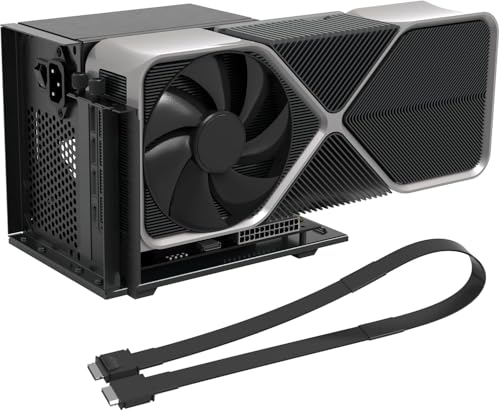
- PCIe 4.0 x4 / 64Gbps OCuLink connection
- Supports AMD, Intel, and NVIDIA GPUs
- Includes cable, LED indicators, and auto/forced start
Best For: Mini PCs and laptops with OCuLink that need a direct external GPU setup for AI and graphics work
Thunderbolt AI Workhorse
Thunderbolt 3/4 and USB4 eGPU Dock

- 40Gbps dock with certified JHL7440 controller
- 85W PD charging plus USB-A and daisy-chain ports
- Supports NVIDIA and AMD GPUs for AI and rendering
Best For: Thunderbolt 3/4 or USB4 laptops, NUCs, and handhelds that need an eGPU dock with charging
USB4 Value Builder
USB4/Thunderbolt 4 eGPU Dock for Open Builds

- 40Gbps USB4/TB4 connection for external GPU use
- Open design fits large PCIe 4.0 x16 graphics cards
- Works with Windows, Linux, and Mac OS AMD setups
Best For: Windows, Linux, or compatible Mac users who want an open-frame USB4 eGPU dock for large GPUs
AI-First Secure Dock – Plugable TBT5-AI External GPU Enclosure
If you want an external GPU enclosure for AI workloads, the Plugable TBT5-AI is built around a secure, offline workflow rather than just raw graphics expansion. Its Thunderbolt 5 connection, 850W included PSU, and support for Windows 11 make it a strong fit for running local models with tools like Ollama, LM Studio, Foundry Local, NVIDIA NIM, and llama.cpp.
Best For: Windows 11 users who want a Thunderbolt 5 eGPU enclosure for private, local AI inference with their own GPU.
Pros:
- 80Gbps Thunderbolt 5 bandwidth with a PCIe x16 slot and 4 lanes of PCIe 4.0
- 850W 80+ Gold PSU with up to 600W dedicated to the GPU
- Includes 96W host charging, 2.5Gbps Ethernet, and USB-A/USB-C downstream ports
- Supports large NVIDIA and AMD cards up to 346 x 170 x 77 mm and 3.5 slots wide
Cons:
- GPU is not included
- Windows 11 only; not compatible with macOS, Linux, or ChromeOS
- USB4 systems must explicitly support eGPU
For buyers focused on local model hosting and data staying on-prem, this is the most purpose-built enclosure in the group. The included power supply and AI-oriented software compatibility make it easier to build a serious offline workstation around a desktop GPU.
Entry-Level Expansion Dock – PUSOKEI USB4 External GPU Dock
This external GPU enclosure for AI workloads is more of a flexible dock than a polished turnkey system, but it gives you the core pieces needed to test a local GPU setup. With Thunderbolt/USB4 connectivity, support for PCIe x16 cards, and multiple power-supply options, it can be a practical entry point if you are comfortable handling your own installation and compatibility checks.
Best For: Tinkerers who want a low-cost dock for experimenting with an external GPU and local inference hardware.
Pros:
- 40Gbps USB4/Thunderbolt connectivity with PCIe 3.0 x4 transfer speed
- Supports PD 60W charging plus RJ45 Ethernet and 2 TB3 ports
- Includes an M.2 NVMe SSD slot for added expansion
- Supports DC, ATX, and SFX power supply options
Cons:
- Installation may require extra driver and hardware compatibility work
- Power supply is not included
- Product details are limited and less polished than premium enclosures
If you want a straightforward way to explore external GPU acceleration without paying for a premium enclosure, this dock covers the basics. It is best approached as an enthusiast build platform rather than a ready-made AI workstation solution.
Premium All-Purpose eGPU – Razer Core X V2 Thunderbolt 5 Enclosure
For an external GPU enclosure for AI workloads that also leans hard into premium build quality, the Razer Core X V2 is the most refined general-purpose option here. It supports modern Windows 11 laptops and devices over Thunderbolt 4, Thunderbolt 5, or USB4, and its PCIe 4.0-ready design makes it a solid fit when you want a high-end desktop GPU attached to a portable system.
Best For: Users who want a polished, high-bandwidth enclosure for creative work, gaming, or local GPU acceleration on Windows devices.
Pros:
- Up to 80Gbps via Thunderbolt 5 with broad TB4/TB5/USB4 compatibility
- Fits desktop NVIDIA and AMD cards up to 4 slots wide
- Includes a 120 mm cooling fan with adjustable performance behavior
- Tool-free GPU install and support for swapping the ATX PSU
Cons:
- GPU and power supply are sold separately
- Not compatible with Mac devices using M1 or later chips
- Less AI-specific than purpose-built local model enclosures
This is the strongest pick if you want a premium enclosure that can handle demanding GPU workloads without extra fuss. It is not specialized for local AI software, but it gives you the connectivity and chassis quality needed for a serious desktop-class GPU setup.
Dual-Mode Expansion Dock – MINISFORUM DEG2 USB4 V2 eGPU Dock
The MINISFORUM DEG2 is an external GPU enclosure for AI workloads that stands out for its dual-mode design. It supports both USB4 V2 and OCuLink, offers 80Gbps and 64Gbps transfer paths respectively, and adds an M.2 NVMe slot for keeping AI models or project files close to the dock.
Best For: Power users who want a flexible dock with fast connectivity, onboard storage, and a switchable workflow.
Pros:
- Dual-link USB4 V2 and OCuLink support with up to 80Gbps bandwidth
- Hardware switch for docking mode or pure GPU performance mode
- Built-in M.2 2280 NVMe slot for storing models and project files
- Supports ATX and SFX power supplies and standard desktop GPUs
Cons:
- Single-cable workflow depends on compatible host hardware
- Details on included accessories are limited
- Less focused on turnkey AI software support than some alternatives
For AI users who want storage and GPU expansion in one modular dock, the DEG2 has a lot going for it. The switchable mode design makes it especially appealing if you move between general docking and heavier inference or rendering tasks.
PCIe Expansion Flexibility – LICAEVEY PCIe 16X Expansion Dock
If you need an external GPU enclosure for AI workloads and also want room for add-in cards beyond graphics, this LICAEVEY dock is built around a PCIe 16X slot over USB4 or Thunderbolt 3/4. It is aimed at users who want to add desktop-class expansion to a laptop, mini PC, or handheld system, with support for graphics cards plus PCIe X4 SSDs, sound cards, and 10G NICs.
Best For: Users who want a flexible Thunderbolt/USB4 expansion dock for a GPU plus other PCIe peripherals.
Pros:
- Provides an external PCIe 16X slot for desktop graphics cards over USB4 or Thunderbolt 3/4.
- Also supports PCIe X4 SSDs, sound cards, and 10G NICs for broader expansion use.
- Hot-swappable design adds convenience when changing hardware configurations.
- Can help weaker-GPU systems handle graphics-heavy tasks like video editing and 3D rendering.
Cons:
- DMA cards are not supported.
- Compatibility is limited to systems with USB4 or Thunderbolt 3/4 interfaces.
- Advanced AI users may prefer a more purpose-built eGPU platform if they only need GPU support.
This is a practical pick if you want a single enclosure that does more than just host a graphics card. The broad PCIe compatibility and hot-swap support make it useful for mixed workstation-style setups, though buyers focused purely on AI acceleration may want to compare it against more GPU-centric docks.
OCuLink Performance Dock – RIITOP OCuLink eGPU Dock 64Gbps
For an external GPU enclosure for AI workloads, this RIITOP OCuLink dock is built for systems that already have an OCuLink SFF-8612 port and want direct PCIe 4.0 x16 graphics-card support. It is positioned for thin-and-light laptops, mini PCs, NUCs, and older rigs, and the notes specifically call out high-performance graphics for AI computing, rendering, video editing, and gaming.
Best For: Systems with OCuLink ports that need a direct-connect eGPU dock for AI and graphics-heavy work.
Pros:
- Uses OCuLink SFF-8612 for a high-bandwidth external GPU connection.
- Supports PCIe 4.0 x16 graphics cards and modern NVIDIA RTX 50 series and AMD RX 7000 series GPUs.
- Open design has no graphics-card size restrictions.
- Compatible with Windows 10/11, Linux, and macOS with AMD cards.
Cons:
- Requires an available OCuLink SFF-8612 port on the host device.
- Does not support hot-plugging; power must be off before connecting or disconnecting the cable.
- Graphics card and power supply are not included.
This is the most direct match here for users who already have OCuLink hardware and want to push GPU performance for AI or rendering. The tradeoff is simple: it is fast and flexible on card size, but it is not the easiest plug-and-play option and depends on a compatible host port.
Thunderbolt AI Dock – GODLIY Thunderbolt 3/4 eGPU Enclosure
This Thunderbolt 3/4 and USB4 eGPU dock is a straightforward external GPU enclosure for AI workloads when you want workstation-style GPU expansion from a laptop, NUC, or gaming handheld. The certified JHL7440 controller, 40Gbps connection, and support for current NVIDIA and AMD cards make it a practical way to add desktop graphics for training, inference, rendering, and gaming.
Best For: Thunderbolt 3/4 or USB4 devices that need a versatile eGPU dock for AI and creative work.
Pros:
- Officially certified JHL7440 controller for workstation-grade eGPU use.
- Supports Thunderbolt 3/4 and USB4 devices, including laptops, NUCs, and gaming rigs.
- Includes a 40Gbps TB4 port, 85W PD charging, USB-A, and daisy-chain support.
- Works with the latest NVIDIA RTX 50 series and AMD RX 7000 series cards.
Cons:
- ATX power supply and graphics card are not included.
- Requires a Thunderbolt 3/4 or USB4 port to function.
- Must follow the power-cable instructions carefully to avoid protection shutdown.
This is a solid general-purpose eGPU enclosure if your priority is broad compatibility and a clean Thunderbolt setup. It is especially appealing for buyers who want GPU acceleration for AI without needing an OCuLink host, though the system still depends on sourcing your own power supply and GPU.
OCuLink Performance Pick – OCuLink eGPU Dock for Mini PCs and Laptops
If you want an external GPU enclosure for AI workloads with as little interface overhead as possible, this OCuLink dock is built around PCIe 4.0 x4 bandwidth and native PCIe passthrough. It is aimed at mini PCs, laptops, and other compact systems that can use OCuLink to get closer to full-size desktop graphics performance for rendering, gaming, and AI tasks.
Best For: Mini PCs and laptops with OCuLink who want a direct PCIe-style external GPU setup for AI and heavy graphics work.
Pros:
- PCIe 4.0 x4 / 64Gbps connection for higher bandwidth than Thunderbolt-based docks.
- Supports AMD, Intel, and NVIDIA cards, including professional and gaming GPUs.
- Open-frame design fits many GPU sizes and includes a side bracket for GPU and ATX PSU stability.
- Includes OCuLink cable, LED indicators, and auto-start or forced-start modes.
Cons:
- GPU and power supply are not included.
- Hot-plugging is not supported; connect or disconnect only with the computer powered off.
- Requires ATX power and a PSU sized about 40% above full GPU load.
For compatible systems, this is the most direct-feeling option in the group because it uses OCuLink instead of a USB4 or Thunderbolt bridge. That makes it a strong fit when your priority is bandwidth and latency for AI workloads rather than maximum convenience.
Thunderbolt AI Workhorse – Thunderbolt 3/4 and USB4 eGPU Dock
This external GPU enclosure for AI workloads is a practical Thunderbolt 3/4 and USB4 dock for users who need broad device compatibility and a built-in charging hub. With a certified JHL7440 controller and 40Gbps bandwidth, it is positioned for gaming, AI training and inference, 3D rendering, and other GPU-accelerated jobs on laptops and handhelds.
Best For: Thunderbolt 3/4 or USB4 laptops, NUCs, and handhelds that need an eGPU dock with charging support.
Pros:
- Works with Thunderbolt 3, Thunderbolt 4, and USB4 devices.
- Officially certified JHL7440 controller for workstation-grade use.
- Includes 85W PD charging, plus USB-A and daisy-chain ports.
- Supports current NVIDIA and AMD GPU families for gaming and creative workloads.
Cons:
- Requires a compatible TB3/TB4/USB4 port to function.
- Package does not include the graphics card or ATX power supply.
- There is a warning not to insert the CPU cable into the PCIe-8PIN port.
If your priority is an easier all-around setup rather than the lowest-latency interface, this dock makes sense. The combination of charging, hub ports, and wide compatibility is especially useful for portable systems that also need a practical external GPU path for AI work.
USB4 Value Builder – USB4/Thunderbolt 4 eGPU Dock for Open Builds
For buyers comparing an external GPU enclosure for AI workloads, this RIITOP dock focuses on straightforward USB4/TB4 compatibility and an open design that leaves room for large cards. It is aimed at thin-and-light laptops, gaming rigs, and NUCs that have a full-function 40Gbps USB4 or Thunderbolt 4 port and need a flexible path to GPU acceleration for AI, rendering, editing, and gaming.
Best For: Windows, Linux, or compatible Mac setups that want an open-frame USB4 eGPU dock for large GPUs.
Pros:
- Supports Thunderbolt 4 and full-function 40Gbps USB4 connections.
- Open design has no restrictions on graphics card size.
- Compatible with Windows 10/11, Linux, and Mac OS, with AMD support on Mac OS.
- Includes USB4 cable and fixing hardware for the GPU and power supply.
Cons:
- Requires a full-function Thunderbolt 4 or USB4 port.
- Power supply and graphics card are not included.
- Mac OS support is limited to AMD graphics cards, not NVIDIA.
This is a good fit if you want a simple open-frame enclosure and broad desktop-OS compatibility. It does not add charging or extra hub features, but it keeps the focus on putting a large PCIe 4.0 x16 GPU to work through a common 40Gbps port.
How We Picked the Best External GPU Enclosure for AI Workloads
For this roundup, we prioritized enclosures that suit real AI use cases: stable high-bandwidth connections, support for current NVIDIA and AMD cards, enough PSU headroom for power-hungry GPUs, and sensible laptop charging or accessory expansion where available. We also considered whether each External GPU Enclosure for AI Workloads is likely to work well with Windows 11, USB4, Thunderbolt 3/4/5, or OCuLink systems.
Quick Comparison
The fastest options are generally the newer Thunderbolt 5 and OCuLink-based docks, which can reduce bottlenecks compared with older 40Gbps designs. Thunderbolt 3/4 and USB4 models remain more affordable and broadly compatible, but they are usually better for lighter local inference, smaller models, or workflows where portability matters more than maximum throughput.
Key Buying Factors for External GPU Enclosure for AI Workloads
Connection Type and Bandwidth
Bandwidth is one of the biggest determinants of AI performance. OCuLink and Thunderbolt 5 offer stronger headroom than older Thunderbolt 3/4 or 40Gbps USB4 options, especially when moving large datasets or working with memory-sensitive models. If you train or fine-tune locally, prioritize the fastest interface your host device supports.
Power Delivery and PSU Capacity
AI-oriented builds often need more than a basic graphics dock. Look for an enclosure with a capable built-in PSU or clear support for high-wattage cards, plus enough laptop charging power if you want a cleaner single-cable setup. Underpowered enclosures can limit GPU boost behavior or create instability under sustained loads.
Physical Fit and Expansion
Check card length, thickness, and cooler clearance before buying. Some enclosures are compact and best for single-slot or narrower cards, while others are open enough for larger triple-fan GPUs. Extra features such as M.2 storage, Ethernet, or USB hubs can also be useful for an AI workstation, but they should not come at the expense of GPU compatibility.
Thermals and Noise
Sustained AI tasks run longer than typical gaming sessions, so cooling matters. Prefer designs with good airflow, a stable frame, and enough room for the GPU to breathe. Quiet operation is nice, but thermal stability is more important for long training runs and repeated inference jobs.
Who Should Buy Which External GPU Enclosure for AI Workloads?
If you want the strongest performance and your device supports it, choose a Thunderbolt 5 or OCuLink-based model. If you need broad compatibility and simpler setup, a Thunderbolt 3/4 or USB4 enclosure is the safer choice. Creators and developers who also want docking features should look for higher-power options with charging and ports, while budget-conscious buyers can start with a simpler enclosure and pair it with a midrange GPU for local inference.
In short, the best External GPU Enclosure for AI Workloads is the one that matches your host connection, power needs, and GPU size without creating bottlenecks you cannot use around.