
Choosing the right display can make CAD work faster, cleaner, and less fatiguing. The best monitor for CAD workstation use should give you sharp text, accurate lines, and enough screen space to manage toolbars without crowding the drawing area.
In this roundup, we focused on practical screens that suit real drafting, modeling, and review workflows, from ultra-wide layouts to color-accurate 27-inch options.
Best 10 Monitor for CAD Workstation Picks for 2026
Ultra-Wide Productivity Pick
Dell UltraSharp 49-inch Curved Ultrawide
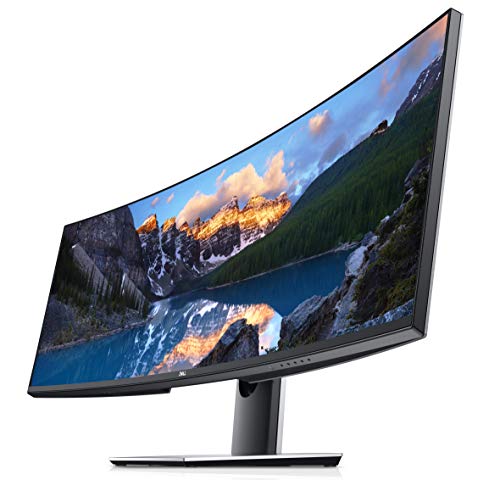
- 49-inch 32:9 panel with 5120 x 1440 resolution
- IPS viewing angles suit detailed workspace use
- USB-C, DisplayPort, HDMI, and USB 3.0 support
Best For: Engineers and designers who want a single ultra-wide CAD workspace
Balanced QHD Office Choice

- 27-inch IPS panel with 2560 x 1440 resolution
- ZeroFlicker and Low Blue Light for comfort
- Height adjustment and VESA mounting support
Best For: Users who want a dependable QHD monitor for CAD and office work
Budget 1080p Workhorse
Dell E2318Hx 23-inch IPS Full HD
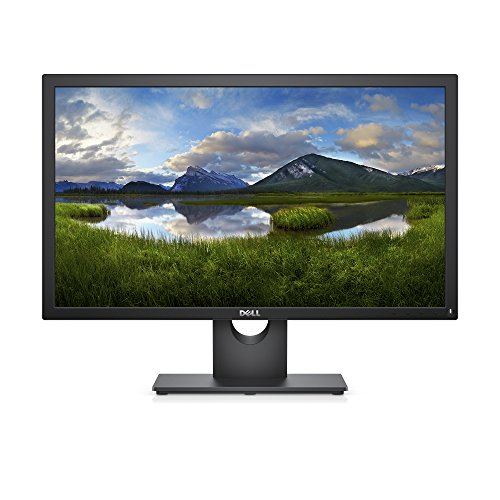
- 23-inch IPS panel with 1920 x 1080 resolution
- Flicker-free and comfort view features for eye comfort
- HDMI and VGA inputs support older and newer PCs
Best For: Budget users needing a dependable secondary CAD monitor
High-Refresh USB-C Value Pick
BenQ GW2490C 24-inch USB-C IPS

- USB-C connectivity simplifies single-cable setups
- 144 Hz refresh rate feels smoother than standard monitors
- IPS eye-care features help with long work sessions
Best For: Compact mixed-use setups that value USB-C and eye comfort
Budget 27-inch Basics
Acer G276HL Kbix 27" Full HD Monitor

- 27-inch Full HD VA panel
- HDMI, VGA, and VESA 100 x 100
- 4ms response and 60Hz refresh
Best For: Affordable CAD and general workstation use
High-Detail QHD Pick
KTC 27 Inch 1440p 200Hz Monitor

- 2560 x 1440 QHD resolution
- Fast IPS with 131% sRGB and HDR400
- Height, swivel, tilt, and pivot adjustments
Best For: Sharper CAD work with ergonomic flexibility
Comfort-Focused Business Monitor

- 1800R curved 27-inch VA panel
- Eye Saver Mode and Flicker-Free
- HDMI, VGA, and VESA compatibility
Best For: Comfortable office use and light CAD tasks
4K Value Pick
Acer Nitro 27-Inch UHD IPS Monitor

- 27-inch 4K UHD resolution for sharp CAD detail
- IPS panel with 99% sRGB and matte finish
- DisplayPort 1.2, dual HDMI 2.0, VESA mount support
Best For: CAD users who want a sharper 4K workspace at a practical price
Budget Adjustable Option
LG 27MP450 27-Inch IPS Monitor

- 27-inch IPS display with 1080p resolution
- Height and tilt adjustment for easier ergonomics
- DisplayPort, HDMI, and D-Sub connectivity
Best For: Budget-conscious CAD users who value ergonomics and simple setup
Workspace Expander
Amazon Basics 27-Inch IPS Monitor

- 27-inch IPS panel with 1920 x 1080 resolution
- HDMI, DisplayPort, and VGA inputs
- Adjustable stand plus VESA 100 x 100 compatibility
Best For: Everyday CAD and office users who want a simple, budget-friendly monitor
Ultra-Wide Productivity Pick – Dell UltraSharp 49-inch Curved Ultrawide
If you’re shopping for a monitor for CAD workstation use, this 49-inch Dell UltraSharp gives you an expansive 32:9 canvas with 5120 x 1440 resolution. The curved IPS panel and 178-degree viewing angle help keep large drawings, timelines, and reference windows visible without constant switching.
Best For: Designers and engineers who want one ultra-wide display for side-by-side CAD work, multitasking, and long project timelines.
Pros:
- Huge 49-inch 32:9 screen with 5120 x 1440 native resolution
- IPS technology and 178-degree viewing angle for consistent image quality
- USB-C, DisplayPort, HDMI, and USB 3.0 connectivity for flexible workstation setups
- Curved design can make wide layouts feel easier to scan
Cons:
- 60 Hz refresh rate is standard, not targeted at fast motion work
- Very large footprint may be too much for smaller desks
- Listed response time is not especially fast for motion-heavy use
This is a strong fit when CAD work benefits from maximum horizontal space and clean multi-window organization. It is less about speed and more about giving you a broad, detailed workspace for complex projects.
Balanced QHD Office Choice – BenQ GW2765HT 27-inch IPS QHD
For a monitor for CAD workstation setups that need a practical mix of size, clarity, and comfort, the BenQ GW2765HT offers a 27-inch WQHD IPS panel at 2560 x 1440. Its 178-degree viewing angle, low blue light features, and flicker-free design make it well suited to long sessions with drawings, spreadsheets, and general office work.
Best For: Buyers who want a dependable 27-inch QHD monitor for everyday CAD, drafting, and office productivity.
Pros:
- 2560 x 1440 WQHD resolution gives more workspace than 1080p models
- IPS panel with 178-degree viewing angle for consistent visuals
- ZeroFlicker and Low Blue Light features support extended viewing comfort
- Height adjustment and VESA support help with ergonomic placement
Cons:
- 60 Hz refresh rate is basic for a modern display
- Only one HDMI port is listed in the specs
- Built-in speakers are included, but they are not the main selling point
This monitor makes sense if you want solid QHD sharpness without paying for ultra-wide or high-refresh extras. It’s a straightforward workstation option focused on comfort and everyday productivity.
Budget 1080p Workhorse – Dell E2318Hx 23-inch IPS Full HD
If you need a monitor for CAD workstation basics on a tighter budget, the Dell E2318Hx keeps things simple with a 23-inch Full HD IPS panel. It offers wide viewing angles, flicker-free comfort features, and HDMI/VGA connectivity for older or current office PCs.
Best For: Budget-minded users who need a reliable secondary CAD display or a simple office monitor.
Pros:
- IPS technology with 178-degree viewing angles for stable color and readability
- Flicker-free screen and comfort view feature help reduce eye strain
- HDMI and VGA support makes it easy to connect to many PCs
- VESA mount compatibility adds placement flexibility
Cons:
- 1920 x 1080 resolution is modest for detailed CAD work
- 23-inch size gives less screen real estate than larger workstation displays
- 60 Hz refresh rate and 5 ms response time are basic
This is a practical pick when price and reliability matter more than resolution density. For serious drafting, it is better as a secondary screen than a primary design display.
High-Refresh USB-C Value Pick – BenQ GW2490C 24-inch USB-C IPS
For a monitor for CAD workstation use that also feels modern and flexible, the BenQ GW2490C brings a 24-inch IPS panel, USB-C connectivity, and a 144Hz refresh rate. While its 1080p resolution is modest, the smooth scrolling and eye-care features can make long work sessions and general multitasking feel more comfortable.
Best For: Users who want a compact USB-C monitor for mixed office, study, and light workstation use.
Pros:
- USB-C single-cable connection helps reduce desk clutter
- 144 Hz refresh rate is smoother than standard office monitors
- IPS panel with 178-degree viewing angle supports consistent visuals
- Low Blue Light, Flicker-Free, and Visual Optimizer features aid comfort
Cons:
- 1920 x 1080 resolution is not as detailed as QHD options
- 24-inch screen is smaller than many dedicated CAD displays
- Only one HDMI port is listed in the specs
This is a good fit if you want modern connectivity and smooth responsiveness in a compact package. It is better for general workstation duties than for users who prioritize maximum drawing space.
Budget 27-inch Basics – Acer G276HL Kbix 27" Full HD Monitor
Acer G276HL Kbix 27" Full HD (1920 x 1080) VA Zero Frame Monitor (HDMI & VGA Ports)
Check Price On AmazonIf you need a monitor for CAD workstation tasks on a tighter budget, the Acer G276HL Kbix gives you a 27-inch Full HD canvas with a clean zero-frame look. It’s a straightforward option for 2D drafting, general office work, and secondary workstation use, with HDMI and VGA connectivity plus VESA mounting for flexible setups.
Best For: Budget-minded CAD users who want a simple 27-inch display for drafting and everyday workstation tasks.
Pros:
- 27-inch 1920 x 1080 VA panel provides a roomy workspace.
- VESA 100 x 100 mount support makes arm or wall mounting easy.
- HDMI and VGA inputs help it fit older and newer systems.
- 4ms response time and 60Hz refresh are fine for routine use.
Cons:
- 1080p resolution is lower than many CAD-focused users prefer.
- VA panel and 60Hz spec are basic compared with higher-end options.
- Limited to one HDMI port and one VGA port.
As a monitor for CAD workstation use, this Acer makes the most sense when price and screen size matter more than fine-detail sharpness. It’s functional, mountable, and easy to connect, but it’s best suited to lighter design workloads rather than precision-heavy work.
High-Detail QHD Pick – KTC 27 Inch 1440p 200Hz Monitor
For a monitor for CAD workstation setups where detail matters, the KTC 27-inch QHD model stands out with 2560 x 1440 resolution and a fast IPS panel. The higher pixel density, strong brightness, and ergonomic stand make it a practical choice for users who spend long hours comparing drawings, layouts, and model views.
Best For: CAD users who want a sharper 1440p screen with adjustable ergonomics and modern connectivity.
Pros:
- 2560 x 1440 resolution gives more room and detail than 1080p.
- Fast IPS panel with 131% sRGB and HDR400 for vivid visuals.
- Fully adjustable stand with pivot, swivel, tilt, and height changes.
- DisplayPort and HDMI connectivity support flexible workstation setups.
Cons:
- Gaming-focused specs like 200Hz may be more than CAD users need.
- White finish may not fit every professional workspace.
- Built-in speakers are included, but audio is not its main strength.
This is the strongest all-around option here if you want sharper text and more usable space for CAD work. The 1440p resolution and ergonomic stand are the real advantages, while the high refresh rate is simply extra value on top.
Comfort-Focused Business Monitor – Samsung CF390 27" Curved FHD
If you want a monitor for CAD workstation use that leans toward comfort and general business productivity, the Samsung CF390 offers a 27-inch curved VA panel with a 1800R curve. It combines Full HD resolution, strong contrast, and eye-comfort features in a simple business-friendly design.
Best For: Business and office CAD users who value viewing comfort and a curved screen over maximum resolution.
Pros:
- 1800R curved 27-inch VA screen is designed for comfortable viewing.
- Eye Saver Mode and Flicker-Free technology help reduce eye strain.
- HDMI and VGA ports support modern and legacy devices.
- VESA mount compatibility makes it easy to place on an arm or wall.
Cons:
- 1920 x 1080 resolution is modest for detailed CAD work.
- 250 cd/m² brightness is lower than some competing displays.
- 60Hz refresh rate is basic for professional graphics use.
For CAD users who spend long hours at a desk, this Samsung is more about comfort than raw workspace density. The curved VA panel and eye-care features are appealing, but the Full HD resolution makes it better for general design tasks than precision-heavy drafting.
4K Value Pick – Acer Nitro 27-Inch UHD IPS Monitor
If you want a monitor for CAD workstation use with lots of space for toolbars, a 27-inch 4K IPS panel is a strong fit. This Acer Nitro gives you 3840 x 2160 resolution, 99% sRGB coverage, and a matte finish, which makes fine lines, model details, and interface text easier to work with at a desk.
Best For: CAD users who want 4K detail on a 27-inch screen without moving to a premium professional display.
Pros:
- 4K UHD resolution helps keep drawings, palettes, and annotations crisp.
- IPS panel and 99% sRGB support provide solid color consistency.
- DisplayPort 1.2 plus two HDMI 2.0 inputs add flexible connectivity.
- VESA mount support and tilt adjustment make it easy to set up.
Cons:
- 60Hz refresh rate is fine for CAD, but not aimed at high-speed use.
- Built-in speakers are basic at 2W per speaker.
- 27 inches may feel compact if you rely on very large multi-window layouts.
For a CAD workstation, this model is mainly about clarity and usable screen real estate. The 4K resolution is the headline feature, while the IPS panel and multiple video inputs make it a practical desktop upgrade.
Budget Adjustable Option – LG 27MP450 27-Inch IPS Monitor
This LG monitor is a straightforward monitor for CAD workstation setups that need reliable IPS viewing and an adjustable stand. Its 27-inch 1080p panel is not as detailed as 4K, but it still offers a roomy desktop layout, 75Hz refresh, and multiple inputs for a flexible work setup.
Best For: Buyers who want a dependable, budget-friendly CAD monitor with ergonomic adjustments and broad connectivity.
Pros:
- IPS panel gives consistent viewing angles for design work.
- Height and tilt adjustment help with ergonomic positioning.
- DisplayPort, HDMI, and D-Sub inputs support older and newer systems.
- Reader Mode and Flicker Safe are useful for long work sessions.
Cons:
- 1920 x 1080 resolution is less detailed than a 4K CAD display.
- 5ms response time is adequate, but not especially fast.
- Single HDMI port limits multi-device convenience.
If your CAD work is mostly drafting, reviewing, or general office design tasks, this LG gets the basics right. It trades top-end resolution for comfort, flexibility, and a clean 27-inch workspace.
Workspace Expander – Amazon Basics 27-Inch IPS Monitor
The Amazon Basics 27-inch IPS display is a practical monitor for CAD workstation use when you want a simple, affordable screen with solid connectivity. It offers 1920 x 1080 resolution, 75Hz refresh, and an adjustable stand, making it better suited to general design work and multi-purpose office use than high-detail drafting.
Best For: Users who want an affordable 27-inch CAD monitor for everyday design work and general productivity.
Pros:
- IPS panel provides accurate viewing from different angles.
- Includes HDMI, DisplayPort, and VGA input options.
- Adjustable stand and VESA compatibility simplify desktop setup.
- Built-in speakers add convenience for basic workspace use.
Cons:
- 1080p resolution is less suitable for dense CAD detail than 4K.
- Basic feature set is more office-oriented than professional design-focused.
- Built-in audio is unlikely to matter for serious workstation users.
This is the most utilitarian option in the group: easy to connect, easy to position, and good enough for everyday workstation tasks. If your priority is value and flexibility over maximum detail, it fits that role well.
How We Picked the Best Monitor for CAD Workstation
We prioritized factors that matter most in CAD environments: resolution, screen size, panel quality, ergonomic adjustability, and connectivity. A good Monitor for CAD Workstation use should help you see fine geometry clearly, reduce scrolling, and stay comfortable during long sessions.
We also considered models that offer strong value for office and engineering workflows, not just gaming or general home use.
Quick Comparison
For maximum workspace, ultra-wide and larger 27-inch-or-bigger displays are the best fit. For crisp linework and detailed drafting, higher resolutions such as QHD and 4K generally outperform basic Full HD panels. IPS panels are usually the safest choice for consistent viewing angles and better overall clarity.
Key Buying Factors for a Monitor for CAD Workstation
Resolution and Pixel Density
CAD benefits from higher pixel density because it makes dimensions, grids, and annotations easier to read. A 27-inch QHD display is a strong minimum for many users, while 4K is better if you need maximum detail or frequently zoom into complex drawings.
Screen Size and Layout
Large screens and ultra-wide formats can reduce the need for multiple monitors. They are especially useful if you keep reference drawings, palettes, and spreadsheets open at the same time.
Panel Type and Color Consistency
IPS panels are typically preferred for a Monitor for CAD Workstation work because they maintain consistent image quality across wider viewing angles. That matters when you move between design, review, and presentation tasks.
Ergonomics and Connectivity
Look for height, tilt, and swivel adjustment so the screen can be positioned correctly for long sessions. USB-C, DisplayPort, HDMI, and VESA compatibility can also make setup easier, especially in professional offices.
Who Should Buy Which Monitor for CAD Workstation?
If you want the most workspace, choose an ultra-wide or larger-format display. If you need the cleanest detail for drafting and review, prioritize QHD or 4K on a 27-inch IPS screen. If your work is mostly basic 2D CAD or secondary office use, a solid Full HD monitor may be enough and can save money.
For mixed-use buyers, the best choice is usually a balanced IPS model with good ergonomics, dependable connectivity, and enough resolution to keep drawings sharp without overwhelming your budget.