
If you want handheld-PC gaming to feel more like a desktop setup, the right external GPU enclosure can make a huge difference. It can unlock smoother frame rates, better image quality, and more flexibility when you dock at home.
Below, we focus on practical options for different connection standards, power needs, and upgrade paths so you can choose a setup that fits your device and your budget.
Best 10 External GPU Enclosure for Handheld PC Picks for 2026
Compact USB4 Pick

- Works with USB4, TB3, and TB4 devices
- 85W PD charging for handheld use
- Supports NVIDIA and AMD desktop GPUs
Best For: USB4 handheld owners who want a compact dock with charging
Premium TB5 Chassis

- Thunderbolt 5-ready with up to 80Gbps bandwidth
- Fits desktop GPUs up to 4 slots wide
- Includes 140W PD and active cooling
Best For: Users who want a premium Thunderbolt 5 enclosure for big GPUs
All-in-One GPU Dock
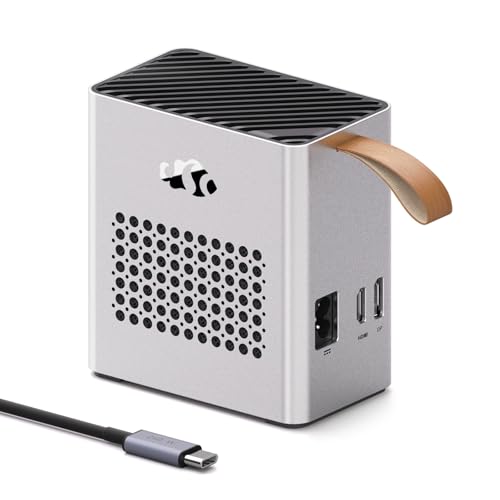
- Integrated RX 7600M XT GPU with 8GB GDDR6
- USB4 and OCuLink connectivity
- Built-in 240W PSU plus 65W PD charging
Best For: Buyers who want a self-contained eGPU with no separate parts
High-Bandwidth OCuLink Dock

- PCIe 4.0 x4 64Gbps OCuLink link
- Includes flexible 50cm SFF-8611 cable
- Fits large GPUs; uses ATX PSU only
Best For: Handheld PC or mini PC owners with OCuLink and an ATX power supply
Portable Thunderbolt eGPU Kit
Compact TB3/TB4 USB4 eGPU Enclosure

- Complete kit with 240W PSU and carrying case
- Works with Thunderbolt 3/4 and USB4 devices
- Compact aluminum chassis for portability
Best For: Handheld PC users who want a bundled Thunderbolt/USB4 eGPU solution
Open-Frame OCuLink GPU Dock
Flexible PCIe 4.0 x4 OCuLink Dock
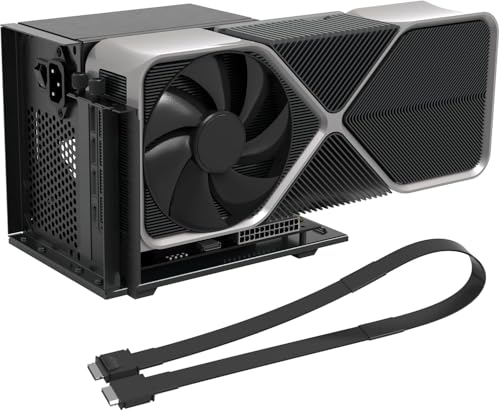
- Native OCuLink to PCIe x16 conversion
- Includes shielded 50cm flexible cable
- Auto-start, LEDs, and open-frame layout
Best For: OCuLink handheld PC owners who want a stable open-frame GPU dock
OCuLink-First Dock

- OCuLink 4i PCIe 4.0 x4 dock
- Supports ATX and SFX PSUs
- Fits RTX 4090 and RX 7900 XTX
Best For: Handheld PC users with OCuLink who want a direct desktop-GPU dock
High-Bandwidth Dock Kit

- 64Gbps PCIe 4.0 x4 OCuLink link
- Includes 50cm shielded cable
- ATX PSU support with stable bracket
Best For: Users who want an included-cable OCuLink dock for a handheld PC or mini PC
Compact USB4 Pick – ANQ-L336 Mini eGPU Enclosure
If you want an external GPU enclosure for handheld PC use without jumping to a huge desktop-style chassis, the ANQ-L336 is built around USB4, Thunderbolt 3/4, and Thunderbolt 4 compatibility. It’s aimed at devices like the ROG Ally X and MSI Claw 8, and it adds 85W PD plus a small hub-style port selection for a cleaner single-cable setup.
Best For: USB4 handheld owners who want a compact eGPU dock with charging and flexible PSU options.
Pros:
- Compatible with USB4, TB3, and TB4 hosts, including handhelds like ROG Ally X and MSI Claw 8
- Supports NVIDIA and AMD GPUs, with strong AMD support including the latest 9000 series
- Provides 85W PD fast charging and can enable ROG Ally X 30W Turbo Mode through the connection
- Includes a 10Gbps USB-A port plus two Thunderbolt 4 ports for added versatility
Cons:
- PSU is not included, so you’ll need to supply your own ATX, SFX, FLEX, or DC 12V power source
- NVIDIA RTX 50-series support is described as limited
- Best suited to USB4/TB systems, so non-compatible handhelds are not a fit
The ANQ-L336 is a practical choice if you want a smaller, more flexible dock for a portable gaming setup. Its main appeal is the mix of handheld-friendly charging, broad GPU support, and multiple power supply options.
High-Power OCuLink Dock – AOOSTAR AG02 eGPU Dock
The AOOSTAR AG02 is an external GPU enclosure for handheld PC and mini PC users who want a high-power dock with a built-in PSU. It combines OCuLink and USB4 connectivity with a PCIe x16 slot, making it a more desktop-like option for compatible Windows systems that can take advantage of PCIe 4.0 x4 bandwidth.
Best For: Windows handheld and mini PC users who want a powered OCuLink dock with room for a full desktop GPU.
Pros:
- Built-in 800W server-grade PSU with up to 600W GPU power output
- Offers both OCuLink and USB4 connectivity for flexible host support
- Includes PCIe x16 slot and 3 x 8-pin GPU power connectors for desktop cards
- Supports a wide range of Windows 11 hosts when compatibility requirements are met
Cons:
- OCuLink does not support hot-plugging, so the host must be powered off before connecting or disconnecting
- Compatibility is specifically not recommended for several devices and GPU combinations listed in the notes
- GPU is not included, and some high-end cards may need extra adapter hardware
This dock is best viewed as a power-first eGPU platform rather than a simple plug-and-play accessory. If your handheld supports OCuLink or compatible USB4 and you want a built-in PSU, the AG02 is a strong candidate.
Premium TB5 Chassis – Razer Core X V2
The Razer Core X V2 is a premium external GPU enclosure for handheld PC users who want a larger, more traditional graphics chassis with modern connectivity. It supports Windows 11 devices over Thunderbolt 4, Thunderbolt 5, and USB4, and its 4-slot design leaves room for full-size NVIDIA or AMD desktop cards.
Best For: Users who want a premium Thunderbolt 5-ready enclosure with room for large desktop GPUs.
Pros:
- Supports Thunderbolt 4, Thunderbolt 5, and USB4 devices on Windows 11
- Fits desktop GPUs up to 4 slots wide
- Includes a 120 mm cooling fan and vented steel chassis for airflow
- Uses PCIe 4.0 support and includes 140W PD via USB-C
Cons:
- Graphics card and power supply are sold separately
- Mac devices with M1 or later chips do not support eGPUs
- Larger chassis means it is less portable than compact handheld-focused enclosures
If you want a high-end enclosure that can grow with your GPU upgrades, this is the most premium-feeling option in the group. It’s especially appealing if your handheld or laptop is part of a broader Windows setup and you value stronger cooling and 4-slot GPU support.
All-in-One GPU Dock – Nimo RX 7600M XT eGPU
The Nimo dock is an external GPU enclosure for handheld PC and laptop users who want an all-in-one solution instead of buying a separate card and PSU. It comes with an integrated AMD Radeon RX 7600M XT, plus USB4 and OCuLink connectivity, so it’s designed to deliver portable desktop-class graphics with a single compact unit.
Best For: Buyers who want a self-contained eGPU with the graphics card and power supply already built in.
Pros:
- Pre-installed AMD Radeon RX 7600M XT GPU with 8GB GDDR6
- Supports USB4 up to 80Gbps and OCuLink for high-bandwidth connections
- Built-in 240W PSU keeps the setup compact and simpler to manage
- Offers 65W PD charging and can drive up to 2 displays simultaneously
Cons:
- GPU is fixed, so you can’t swap in a different desktop card
- Best performance depends on having a compatible USB4 or OCuLink host
- Designed for horizontal operation, which may limit placement options
This is the easiest route if you want an eGPU-style performance boost without piecing together your own enclosure, card, and PSU. The tradeoff is less upgrade flexibility, but the plug-and-play approach will appeal to many handheld users.
High-Bandwidth OCuLink Dock – PCIe 4.0 x4 OCuLink eGPU Dock
If you want an external GPU enclosure for handheld PC or mini PC setups with native OCuLink support, this OwlTree dock is built around PCIe 4.0 x4 64Gbps bandwidth and a full-size PCIe x16 slot. It ships as a detachable enclosure dock with the OCuLink cable included, while relying on a standard ATX power supply for the graphics card.
Best For: Users who already have an ATX PSU and want a high-bandwidth OCuLink eGPU dock for handheld PCs, laptops, or mini PCs.
Pros:
- PCIe 4.0 x4 64Gbps OCuLink connection for low-latency external GPU use
- Includes a 50cm flexible SFF-8611 cable with shielding and EMI suppression
- Detachable design and multi-status LED indicators improve portability and monitoring
- Open compatibility for large cards, including RTX 4090 and RX 7900 XTX class GPUs
Cons:
- GPU and power supply are not included
- Requires a standard ATX power supply only
- Hot plugging is not supported, so the system must be powered off before disconnecting
This is a practical choice if your device already supports OCuLink and you want the raw bandwidth of a wired PCIe solution rather than a Thunderbolt enclosure. The tradeoff is that it is more of a bare dock than a complete plug-and-play kit.
Portable Thunderbolt eGPU Kit – Compact TB3/TB4 USB4 eGPU Enclosure
If you need an external GPU enclosure for handheld PC use over Thunderbolt or USB4, this compact kit is aimed at people who want a complete setup in one box. It includes the enclosure, 240W power supply, Thunderbolt 4 cable, PCIe power cable, and a carrying case, so you can connect one cable and add desktop-class graphics.
Best For: Handheld PC and laptop users with Thunderbolt 3/4 or USB4 who want a compact, all-in-one eGPU kit.
Pros:
- Complete package includes enclosure, 240W PSU, cable, power lead, and carrying case
- Supports Thunderbolt 3/4 and USB4 with PCIe 3.0 x16 transfer mode
- Compact aluminum chassis is designed for portability and protection
- Supports many NVIDIA and AMD cards within the stated size limits
Cons:
- Only works with devices that support Thunderbolt 3/4 or USB4 protocols
- Graphics card is not included
- Size limits cap compatibility at 205mm long, 150mm high, and 55mm wide cards
This enclosure is a strong fit if you want a simpler, bundled path into external graphics rather than piecing together parts separately. Just make sure your handheld PC actually supports the required Thunderbolt or USB4 standard before buying.
Open-Frame OCuLink GPU Dock – Flexible PCIe 4.0 x4 OCuLink Dock
For a handheld PC or mini PC that supports OCuLink, this external GPU enclosure uses a PCIe 4.0 x4 64Gbps link to adapt an OCuLink connection into a PCIe x16 GPU dock. The open-frame design, included 50cm flexible cable, and ATX power support make it a straightforward option for adding a discrete graphics card to a compact system.
Best For: Users with OCuLink-enabled handheld PCs or mini PCs who want a stable, open-frame external GPU dock.
Pros:
- PCIe 4.0 x4 64Gbps bandwidth with native OCuLink passthrough
- Supports AMD, Intel, and NVIDIA cards for gaming and professional use
- Includes a 19.7-inch flexible, shielded SFF-8611 cable
- LED indicators plus auto-start and forced-start modes add convenience
Cons:
- GPU and power supply are not included
- Only supports ATX power, and PSU wattage should be about 40% higher than full GPU load
- Hot-plugging is not supported and drivers must be installed on first use
This dock leans toward users who want maximum bandwidth and a more flexible physical layout than a closed enclosure. It is best suited to buyers who are comfortable assembling the GPU and PSU themselves and following the setup requirements carefully.
OCuLink-First Dock – DEG1 eGPU Dock for RTX 4090
If you want an external GPU enclosure for handheld PC use, the MINISFORUM DEG1 is a straightforward OCuLink-only dock built for PCIe 4.0 x4 bandwidth. It’s aimed at users who already have an OCuLink-equipped handheld PC or mini PC and want a simple way to connect a full-size desktop GPU and standard ATX or SFX power supply.
Best For: Handheld PC owners with OCuLink who want a direct, no-Thunderbolt eGPU dock.
Pros:
- Supports OCuLink 4i with PCIe 4.0 x4 up link and PCIe x16 down link
- Works with ATX and SFX standard power supplies for flexible setup options
- Compatible with large GPUs like RTX 4090 and AMD RX 7900 XTX
- Compact dock design for a clean external GPU enclosure setup
Cons:
- Only supports OCuLink and does not support Thunderbolt
- OCuLink does not support hot plugging, so power off before connecting
- Power supply is not included
This is a practical pick if your handheld PC already has OCuLink and you want a focused, no-frills eGPU path. Just remember it’s a dock rather than a complete kit, so you’ll need to supply the PSU and GPU yourself.
High-Bandwidth Dock Kit – PCIe 4.0 x4 OCuLink eGPU Dock
This external GPU enclosure for handheld PC setups is built around OCuLink to PCIe x16 conversion and a PCIe 4.0 x4, 64Gbps link. It’s a good fit if you want a dock that prioritizes bandwidth and includes the OCuLink cable, while still letting you pair it with your own ATX power supply and graphics card.
Best For: Handheld PC and mini PC users who want a high-bandwidth OCuLink eGPU dock with included cable.
Pros:
- PCIe 4.0 x4 64Gbps bandwidth for desktop-grade GPU expansion
- Includes a 50cm shielded SFF-8611 OCuLink cable
- Supports mainstream NVIDIA and AMD cards, including RTX 4090 and RX 7900
- Open-frame design with side bracket for stable GPU and PSU mounting
Cons:
- Graphics card and power supply are not included
- Only works with ATX power supplies
- Do not hot-plug any cables; setup must be done with power off
This dock stands out if you want an OCuLink-based enclosure with strong connectivity and an included cable right in the box. It’s especially useful for users who want a stable, desktop-like external GPU setup without relying on Thunderbolt.
Compact OCuLink Dock – DEG1 OCuLink External GPU Station
If you’re shopping for an external GPU enclosure for handheld PC use and already have OCuLink, the MINISFORUM DEG1 keeps things compact and focused. It supports PCIe 4.0 x4 over OCuLink and is designed to work with standard ATX or SFX power supplies, making it a simple dock for pairing a handheld PC with a full-size desktop GPU.
Best For: Handheld PC owners who want a compact OCuLink eGPU dock with ATX or SFX PSU support.
Pros:
- OCuLink-only design with PCIe 4.0 x4 up link and PCIe x16 down link
- Supports ATX and SFX standard power supplies
- Compatible with high-end GPUs like RTX 4090 and AMD RX 7900 XTX
- Compact footprint with LED force-power-on button
Cons:
- Does not support Thunderbolt
- OCuLink does not support hot plugging
- Follow-start function only works with MINISFORUM Mini PCs using original wires
This is a clean, no-nonsense eGPU dock for users who want OCuLink performance in a small chassis-friendly format. It’s a strong fit if you already know your handheld PC uses OCuLink and you want broad PSU flexibility.
How We Picked the Best External GPU Enclosure for Handheld PC
We focused on enclosures and docks that make sense for real-world handheld use: strong port compatibility, sensible power delivery, broad GPU support, and clear upgrade potential. For an External GPU Enclosure for Handheld PC setups, the connection standard matters as much as the enclosure itself, so we weighed Thunderbolt, USB4, and OCuLink options carefully.
Quick Comparison
Thunderbolt 3/4 and USB4 models are usually the easiest to use because they work with more laptops and handhelds. OCuLink docks generally offer more direct bandwidth and can be a better fit for performance-first users, but they require compatible hardware. Larger docks with ATX or SFX power support are best for high-end desktop GPUs, while compact units are better for travel-friendly builds.
Key Buying Factors for an External GPU Enclosure for Handheld PC
Connection Type
Start with your handheld’s available port. USB4 and Thunderbolt are the most convenient if you want broad compatibility. OCuLink can deliver excellent performance, but only if your device supports it natively or through the right adapter path.
Power Supply and GPU Size
Check whether the enclosure includes a PSU or expects you to provide one. High-end cards like RTX 4090-class or RX 7900 XTX-class GPUs need more physical space and stronger power delivery, so enclosure clearance and wattage are critical.
Performance Vs. Portability
Compact enclosures are easier to carry and set up, but larger dock-style units often provide better thermal headroom and more power flexibility. If your handheld stays docked most of the time, a bigger enclosure is usually the smarter long-term choice.
Compatibility and Future Upgrades
Look for support across Windows 11, Linux, or macOS only if you actually need it. For most buyers, the key question is whether the enclosure supports current handhelds now and leaves room for a stronger GPU later.
Who Should Buy Which External GPU Enclosure for Handheld PC?
If you want the simplest plug-and-play experience, choose a Thunderbolt 4 or USB4 model. If your priority is the best possible bandwidth for a compatible device, an OCuLink-based dock is worth a closer look. If you plan to run a full-size desktop GPU and want maximum flexibility, pick a larger dock with external PSU support. For a compact, travel-friendly External GPU Enclosure for Handheld PC gaming, choose a smaller unit that still supports adequate power and cooling.