
If you spend long hours in front of a screen, a monitor with ambient light sensor can make a real difference. These displays automatically adjust brightness to match your room, helping reduce eye strain while keeping text and images comfortable to view.
In this roundup, we focused on practical models for productivity, office use, and everyday home setups, plus a few alternatives that add similar comfort features and better all-day viewing.
Best 10 Monitor with Ambient Light Sensor Picks for 2026
Smart Comfort Pick
ViewSonic VG2748A-2K 27" QHD IPS Monitor

- Auto-dimming and wellness reminders
- 27-inch QHD IPS at 100Hz
- Ergonomic stand with multiple adjustments
Best For: home office productivity with comfort features
Budget Office Choice
LG 22BR410-B 22" FHD VA Monitor

- Compact 21.45-inch Full HD VA panel
- Reader Mode and Flicker-Free support
- 100Hz refresh with adjustable stand
Best For: compact office setups on a budget
Adaptive Eye-Care Pick
BenQ GW2790Q 27" QHD IPS Monitor
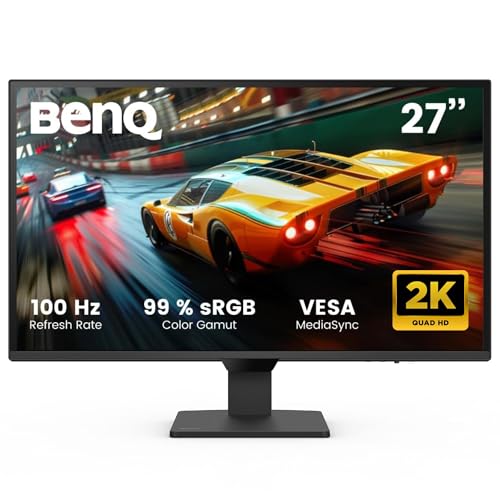
- Brightness Intelligence adapts to ambient light
- 27-inch QHD IPS with 100Hz refresh
- Coding and ePaper modes for reading comfort
Best For: reading, coding, and office work with adaptive brightness
Desk Lighting Add-On
Quntis Curved Monitor Light Bar 15 RGB

- Light sensor auto-adjusts brightness
- Fits 34-inch+ curved and flat screens
- Glare-free desk lighting with RGB modes
Best For: large curved monitor setups that need task lighting
Curved Light Bar
Quntis 34" Dual-Arm Monitor Lamp
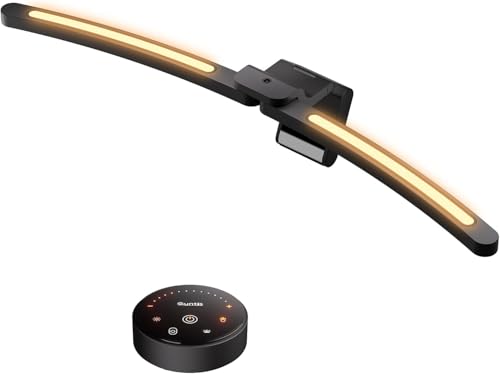
- Dual pivoting bars fit 1000R-3000R curved ultrawides
- Front/back lighting plus high CRI help reduce glare
- Auto-dimming sensor adjusts to ambient light automatically
Best For: Curved ultrawide users who want glare-free, hands-free lighting
Productivity Hub
BenQ GW2790QT 27" QHD USB-C Monitor

- QHD IPS panel with 99% sRGB for sharper work detail
- USB-C delivers video, audio, and up to 65W charging
- Brightness Intelligence Gen2 and ergonomic stand for comfort
Best For: Home office users who want one-cable docking and eye-care features
Adaptive Brightness Office Pick

- Brightness Intelligence Technology helps adjust display performance.
- 24-inch IPS panel with matte anti-glare finish.
- 100Hz refresh rate with FreeSync for smoother motion.
Best For: Desk work, school, and casual gaming on a compact screen.
USB-C Productivity Pick
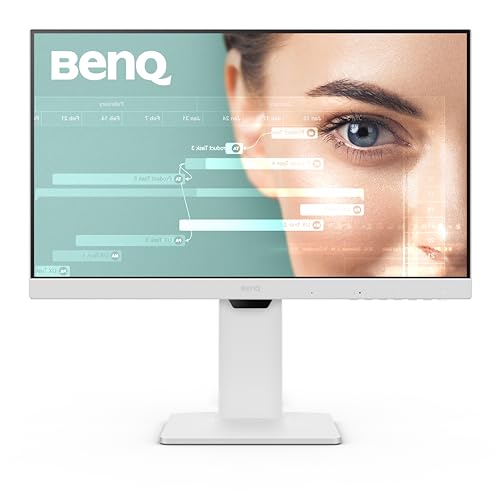
- Brightness Intelligence for adaptive display tuning.
- USB-C with 60W power delivery and USB hub.
- Built-in noise-cancelling microphone for calls.
Best For: Remote work and laptop users who want a cleaner desk setup.
Large-Screen Comfort Pick

- Brightness Intelligence Technology for adaptive brightness.
- 27-inch IPS panel gives more screen space.
- Height, tilt, and swivel adjustments for comfort.
Best For: Anyone who wants a bigger everyday monitor with comfort-first features.
Smart Comfort Pick – ViewSonic VG2748A-2K 27" QHD IPS Monitor
If you want a monitor with ambient light sensor features for a work-focused setup, the ViewSonic VG2748A-2K leans into comfort and productivity. Its 27-inch QHD IPS panel, 100Hz refresh rate, and intelligent sensing modes are aimed at smoother day-to-day use, while the ergonomic stand helps you dial in a better position for long sessions.
Best For: Home office users who want an ergonomic 27-inch QHD monitor with auto-dimming and wellness reminders.
Pros:
- Seven smart modes include auto dimming, privacy alerts, posture check, and break reminders.
- 27-inch 2560 x 1440 IPS panel with 100Hz refresh rate for a smooth productivity setup.
- Advanced ergonomic stand supports tilt, swivel, rotate, and height adjustment.
- Flexible connectivity includes HDMI, DisplayPort, mini DP, and USB hub support.
Cons:
- Designed more for productivity than gaming-focused performance.
- Brightness is listed at 350, which may be modest for very bright rooms.
Overall, this ViewSonic is the most feature-rich option here if you value ambient light-aware comfort and workplace-friendly tools over flashier extras. It combines useful sensing features with solid display specs and broad connectivity.
Budget Office Choice – LG 22BR410-B 22" FHD VA Monitor
The LG 22BR410-B is a straightforward monitor for office use, especially if you want a compact screen and simple eye-comfort features. While it is not a monitor with ambient light sensor, it does include Flicker Safe and Reader Mode, plus a 100Hz VA panel that keeps everyday scrolling and document work reasonably smooth.
Best For: Budget-minded office buyers who want a compact 22-inch monitor with basic eye-comfort features.
Pros:
- 21.45-inch Full HD VA display keeps the footprint compact.
- Reader Mode and Flicker-Free support more comfortable office viewing.
- 100Hz refresh rate and 5 ms response time add a bit of smoothness.
- Adjustable stand gives you some flexibility for desk setup.
Cons:
- No ambient light sensor or advanced sensing features listed.
- Single HDMI input limits connectivity.
- Best suited to office use rather than more demanding multitasking setups.
As a practical small-screen pick, this LG keeps things simple and affordable. It stands out for eye-comfort basics and a compact size, but it does not offer the adaptive brightness tools found on more advanced models.
Adaptive Eye-Care Pick – BenQ GW2790Q 27" QHD IPS Monitor
If you are looking for a monitor with ambient light sensor behavior built into the display experience, the BenQ GW2790Q is built around that idea. Its Brightness Intelligence Tech automatically adjusts brightness based on content and ambient light conditions, and the 27-inch QHD IPS panel adds a sharp, practical workspace for long reading and office sessions.
Best For: Buyers who want automatic brightness adjustment and eye-care modes for reading, coding, and office work.
Pros:
- Brightness Intelligence Tech adapts brightness using ambient light conditions.
- 27-inch 2560 x 1440 IPS panel with 100Hz refresh rate.
- Coding Mode and ePaper Mode are useful for long reading sessions.
- Low Blue Light Plus and Flicker-Free features support eye comfort.
Cons:
- Brightness is listed at 250 nits, which may feel limited in brighter rooms.
- Only one HDMI port is listed.
- More office-focused than feature-heavy for gaming setups.
Among these options, the BenQ is the clearest fit if your priority is adaptive brightness management. It combines ambient-light-aware behavior with practical eye-care modes and a clean 27-inch QHD workspace.
Desk Lighting Add-On – Quntis Curved Monitor Light Bar 15 RGB
This Quntis light bar is not a monitor itself, but it pairs well with a monitor with ambient light sensor setup when you want better desk lighting without screen glare. It is designed for large curved or ultrawide screens, adds automatic brightness adjustment through a built-in light sensor, and includes RGB backlighting for a more customizable workspace.
Best For: Users with large curved monitors who want glare-free desk lighting with automatic brightness control.
Pros:
- Built-in light sensor automatically adjusts brightness to ambient changes.
- Designed for 34-inch+ curved monitors and large flat screens.
- Asymmetrical optical design aims light at the desk, not the screen.
- Stepless brightness and color temperature adjustment plus RGB backlight modes.
Cons:
- Requires a compatible monitor setup; it is not a standalone display.
- Best suited to larger screens, especially curved models over 34 inches.
- RGB features may be unnecessary for users who only want basic task lighting.
If you already have a large monitor, this is a strong add-on for reducing glare and matching desk lighting to room conditions. The sensor-based auto adjustment and curved-monitor fit make it especially useful for extended work or gaming sessions.
Smart Desk Display – LG 27U511SA-W 27-Inch Smart FHD IPS Monitor
If you want a monitor with ambient light sensor features in a broader sense of adaptive comfort, this LG smart monitor focuses on easy viewing and flexible everyday use. The 27-inch IPS panel, 100Hz refresh rate, and Reader Mode/Flicker Safe tools make it a practical pick for work, streaming, and light gaming in changing room conditions.
Best For: Home office users who also want a streaming-friendly monitor with built-in speakers and simple connectivity.
Pros:
- 100Hz IPS Full HD display for smooth motion and wide viewing angles
- Built-in webOS with access to major streaming apps and LG Channels
- AirPlay 2 and HomeKit support for easy casting from Apple devices
- Two HDMI ports, two USB ports, built-in speakers, and remote control support
Cons:
- Full HD resolution may be limiting for users who prefer sharper 27-inch text and detail
- Brightness and contrast are solid, but not aimed at premium creator-grade use
- Smart features may be more than needed if you only want a basic work monitor
The LG 27U511SA-W stands out as an all-in-one desk display for mixed productivity and entertainment. It is strongest when you value convenience, streaming, and a comfortable IPS panel over higher-end resolution or specialized calibration.
Curved Light Bar – Quntis 34" Dual-Arm Monitor Lamp
If you’re building a monitor with ambient light sensor style setup around a curved ultrawide screen, this Quntis light bar is designed to keep the desk evenly lit without adding glare. Its dual pivoting bars, front and back lighting, and auto-dimming sensor make it useful for long work sessions, gaming, and late-night screen time.
Best For: Curved ultrawide monitor owners who want glare control and automatic brightness adjustment.
Pros:
- Dual independent light bars fit 1000R to 3000R curved and ultrawide monitors
- Front light and backlight help reduce screen glare and reflections
- Auto-dimming sensor adjusts brightness based on ambient light
- High RA98 CRI and over 1400 lux center brightness support clear, natural-looking illumination
Cons:
- Designed specifically for curved ultrawide setups, so it is less universal than a standard desk lamp
- Requires AAA batteries for the remote
- May be overkill if you only need basic task lighting
The Quntis curved monitor light bar is a strong fit when desk space is tight and glare control matters. It is especially appealing if you want automatic lighting changes without constantly adjusting settings by hand.
Productivity Hub – BenQ GW2790QT 27" QHD USB-C Monitor
If you want a monitor with ambient light sensor-style convenience built into the display itself, this BenQ productivity monitor centers on Brightness Intelligence Gen2 and eye-care features. The 27-inch QHD IPS panel, USB-C docking, and integrated audio make it a practical hub for a clean home office or multi-device workstation.
Best For: Professionals who want one-cable USB-C connectivity, ergonomic adjustment, and built-in audio tools.
Pros:
- QHD IPS panel with 99% sRGB for sharper workspace detail and solid color coverage
- USB-C with up to 65W charging simplifies laptop connections
- Brightness Intelligence Gen2 and eye-care tech support more comfortable viewing
- Built-in noise-cancelling microphone, speakers, USB hub, and daisy chain support
Cons:
- 75Hz refresh rate is modest compared with faster monitors
- Flat productivity design is less suited to users wanting a gaming-focused look
- External speakers or a dedicated mic may still be preferred by some users
The BenQ GW2790QT is a strong choice if you want a tidy desk and a feature-rich work monitor. Its combination of USB-C power delivery, ergonomic flexibility, and brightness management makes it especially useful for daily productivity.
Adaptive Brightness Office Pick – 24" 100Hz IPS FHD Monitor
If you want a monitor with ambient light sensor-style brightness adjustment for everyday work, the BenQ GW2490T is built around comfort and focus. Its Brightness Intelligence Technology automatically optimizes display performance, while the 24-inch IPS panel, anti-glare finish, and 100Hz refresh rate help keep text, windows, and motion looking smooth.
Best For: Desk work, school, and light gaming on a compact 24-inch screen with easy ergonomic adjustment.
Pros:
- Brightness Intelligence Technology helps adapt display output for changing lighting conditions.
- 24-inch IPS panel with matte anti-glare finish is practical for long work sessions.
- 100Hz refresh rate and FreeSync add smoother motion for everyday use and casual gaming.
- Height and tilt adjustment make it easier to set up comfortably.
Cons:
- 1080p resolution is fine for 24 inches, but not as sharp as higher-resolution models.
- Built-in speakers are included, but the notes do not suggest premium audio performance.
This is a well-rounded pick if you want a straightforward 24-inch monitor with automatic brightness tuning and a strong comfort-first feature set. It keeps the setup simple while covering the basics that matter for work, study, and occasional play.
USB-C Productivity Pick – 24" White Office Monitor
The BenQ GW2486TC is a monitor with ambient light sensor-style adaptive brightness features aimed at productive desk setups. It combines Brightness Intelligence with a 24-inch IPS FHD panel, USB-C connectivity, and a built-in noise-cancelling microphone, making it a practical choice for modern office use and connected workflows.
Best For: Remote work, USB-C laptop setups, and tidy desks that benefit from hub-style connectivity.
Pros:
- Brightness Intelligence helps optimize the picture for work and play.
- USB-C with 60W power delivery simplifies single-cable laptop setups.
- Built-in USB hub and cable management help keep the desk organized.
- Noise-cancelling microphone adds convenience for calls when used over USB-C.
Cons:
- Renewed listing means buyers should pay attention to the 90-day limited warranty.
- 24-inch 1080p resolution is practical, but not ideal if you want extra workspace.
Overall, this model stands out for users who want adaptive brightness plus office-friendly connectivity in one package. The USB-C, hub, and microphone features make it more than just a display, especially for a streamlined work-from-laptop setup.
Large-Screen Comfort Pick – 27" 100Hz IPS Monitor
If you want a monitor with ambient light sensor-like adaptive brightness behavior on a larger screen, the BenQ GW2790T is a strong fit for everyday productivity. It pairs Brightness Intelligence Technology with a 27-inch IPS panel, anti-glare matte finish, and 100Hz refresh rate, giving you a comfortable view for work, learning, and casual gaming.
Best For: Users who want a bigger 27-inch monitor with comfort-focused features and simple desktop versatility.
Pros:
- Brightness Intelligence Technology helps optimize the picture for work and play.
- 27-inch IPS panel provides a larger workspace than 24-inch alternatives.
- 100Hz refresh rate and FreeSync support smoother motion.
- Height adjustment, tilt, and 20-degree swivel improve setup flexibility.
Cons:
- 1080p resolution on a 27-inch screen is less sharp than higher-resolution monitors.
- It has only one HDMI port, which may limit multi-device flexibility.
This is a sensible choice if you value eye-comfort features and a larger viewing area over pixel density. It focuses on making everyday computing easier without adding complexity.
How We Picked the Best Monitor with Ambient Light Sensor
We prioritized models that combine automatic or adaptive brightness with the features most buyers actually need: sharp panel quality, reliable ergonomics, eye-comfort tools, and sensible port selection. Because not every option in this group uses a true ambient light sensor, we also included closely related displays and accessories that improve viewing comfort in similar ways.
Quick Comparison
The best fit depends on your space and workload. A Monitor with Ambient Light Sensor is ideal if you work in changing light conditions and want the screen to adjust on its own. Productivity-focused 27-inch QHD models suit multitasking and text clarity, while 24-inch 1080p screens are better for smaller desks and simpler office use. Smart monitors and light bars may appeal if you want flexibility beyond a standard display.
Key Buying Factors for a Monitor with Ambient Light Sensor
Brightness Automation and Stability
Look for adaptive brightness that responds smoothly, not in distracting jumps. The best systems keep the screen readable without constantly changing tone or intensity.
Panel Size and Resolution
27-inch QHD models usually offer the best balance of workspace and sharpness. If you mainly browse, write, or manage spreadsheets, a 24-inch Full HD display can still be a smart value.
Eye-Comfort Features
Anti-glare coating, low blue light modes, and flicker reduction matter just as much as automatic brightness. These features help during long work sessions and evening use.
Ergonomics and Connectivity
Height adjustment, tilt, and VESA support improve posture and desk flexibility. USB hubs, DisplayPort, HDMI, and built-in speakers can also simplify a home office setup.
Room and Usage Match
If your lighting changes throughout the day, automatic brightness is especially useful. For fixed lighting, a strong eye-care monitor or a quality monitor light bar may be enough to improve comfort.
Who Should Buy Which Monitor with Ambient Light Sensor?
Choose a Monitor with Ambient Light Sensor if you want the most hands-off comfort and regularly move between bright and dim environments. Pick a QHD productivity monitor if clarity and multitasking matter most. Go with a 24-inch 1080p model if you want a smaller, more affordable office display. If your monitor itself lacks sensing features, a premium light bar can still improve perceived brightness and reduce harsh desk lighting.
For most buyers, the best choice is the one that balances screen size, eye comfort, and desk setup rather than chasing the most features on paper.