
Rear-connector motherboards are changing how clean and simple PC builds can look. By moving cable connections to the back of the board, these cases help reduce front-side clutter and make airflow planning easier.
Below, we focus on the best options for builders who want a PC case with rear connector motherboard support, from compact airflow-first picks to feature-rich mid-towers.
Best 10 PC Case with Rear Connector Motherboard Support Picks for 2026
FRAME Modular Flex

- Supports ASUS BTF, MSI Zero, and Gigabyte Stealth
- 3 pre-installed RS ARGB fans
- Modular FRAME system with InfiniRail fan mounting
Best For: Builders who want a modular mid-tower with clean-cable motherboard support
Compact Back-Connector Build
- Supports ASUS and MSI backward-facing m-ATX boards
- Up to 410mm GPU clearance
- 360mm radiator support top or front
Best For: Compact builders using backward-facing m-ATX boards
Full-Size Zero-Cable Ready

- Supports ASUS BTF, Gigabyte Project Stealth, and MSI Project Zero
- 3 pre-installed RS PWM fans
- Modular FRAME design with InfiniRail mounting
Best For: ATX builders who want a reverse-connector compatible case with airflow
Glass Showcase Hidden-Connector

- Compatible with hidden-connector ASUS and MSI boards
- Includes 4 pre-installed ARGB fans
- Dual tempered glass with 360mm radiator support
Best For: Showcase builders who want hidden-connector motherboard compatibility
Micro-ATX Airflow Pick
NZXT H3 Flow Back-Connect Case

- Back-connect motherboard support
- Includes 1 rear 120mm fan
- Fits full-size GPUs with mesh airflow
Best For: Micro-ATX builders wanting a compact airflow case with rear connectors.
Showcase BTF Option
ASUS A31 Hidden-Connector Mid-Tower

- BTF hidden connector design
- Dual tempered glass frameless look
- Supports 360mm AIO cooling
Best For: ATX builders who want a polished, hidden-cable showcase case.
Fan-Loaded Rear-Connector Pick
Antec Flux Rear Back-Connect Case

- Supports back-connect motherboards
- Includes 5 PWM fans pre-installed
- Top supports up to 360mm radiator
Best For: ATX builders wanting rear-connect support and strong out-of-box cooling.
Airflow-First Back-Connect Option

- Back-connect ready layout for cleaner cable routing
- 4 pre-installed ARGB PWM fans with hub included
- Supports up to 12 fans and a 360mm radiator
Best For: Builders wanting airflow, RGB, and tidy cable management
Compact High-Airflow Pick

- Two 120mm fans included for immediate airflow
- Supports 360mm front and 240mm top radiators
- Cable management channels, hooks, and straps included
Best For: Airflow-focused builds that do not need rear-connector support
Clean-Cable Back-Connect Build
- Supports ASUS and MSI back-connect motherboards
- 40mm cable management depth for cleaner routing
- 4 pre-installed fans with support for up to 11 total
Best For: ASUS or MSI back-connect builds that want tidy airflow
FRAME Modular Flex – CORSAIR 4000D RS ARGB
If you want a PC case with rear connector motherboard support and room to grow, the CORSAIR 4000D RS ARGB FRAME is built around flexibility. It supports ASUS BTF, MSI Zero, and Gigabyte Stealth boards, while also adding high-airflow front intake, modular expansion options, and pre-installed ARGB fans for an easy starter build.
Best For: Builders who want a modular mid-tower with clean-cable motherboard support and strong airflow.
Pros:
- Compatible with ASUS BTF, MSI Zero, and Gigabyte Stealth reverse-connector layouts
- Includes 3 pre-installed CORSAIR RS ARGB PWM fans
- InfiniRail system adds flexible front and roof fan placement
- FRAME modular design allows future upgrades to case parts
Cons:
- Mid-tower size may be more case than compact builders need
- Feature set is geared more toward customization than simplicity
The 4000D RS ARGB stands out if you care about both neat cable routing and long-term upgrade paths. It gives you the rear-connector motherboard support you want, plus the airflow and modularity to adapt the build later.
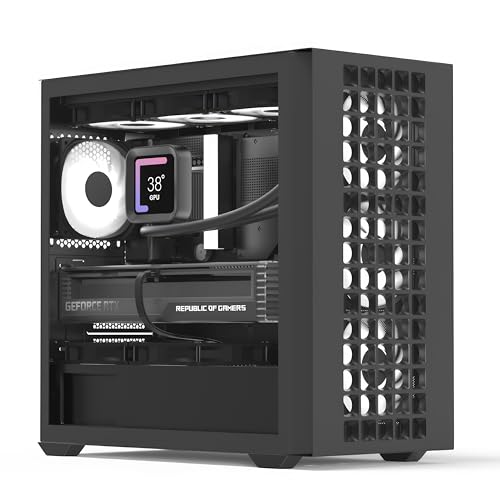
Compact Back-Connector Build – AeroCool D302A Mini Tower
The AeroCool D302A is a compact PC case with rear connector motherboard support for ASUS and MSI m-ATX boards, making it a practical choice when you want cleaner cable management in a smaller footprint. It pairs that layout with mesh airflow, broad cooling support, and enough GPU clearance for larger components.
Best For: Compact builders using backward-facing m-ATX boards who still need strong cooling and GPU room.
Pros:
- Supports ASUS and MSI m-ATX motherboards with backward-facing connectors
- Mini tower design keeps the footprint smaller
- Supports up to 410mm GPUs without a front radiator installed
- Top or front radiator support up to 360mm
Cons:
- Mini-tower format may limit overall expansion compared with larger cases
- Best fit is specifically m-ATX and mini-ITX builds
For a smaller build that still prioritizes cable cleanup and modern cooling options, the D302A hits a useful balance. Its rear-connector motherboard support is the main draw, but the airflow-focused front panel and radiator support make it more than just a compact shell.
Full-Size Zero-Cable Ready – CORSAIR 4000D RS Frame
The CORSAIR 4000D RS Frame is a strong pick if you need a PC case with rear connector motherboard support in a full-size mid-tower. It is compatible with ASUS BTF, Gigabyte Project Stealth, and MSI Project Zero boards, while also providing high-airflow design, modular construction, and flexible fan mounting.
Best For: ATX builders who want a reverse-connector compatible case with airflow and upgrade flexibility.
Pros:
- Compatible with ASUS BTF, Gigabyte Project Stealth, and MSI Project Zero
- Includes 3 pre-installed RS PWM fans
- InfiniRail system allows flexible fan placement
- FRAME modular design supports future case customization
Cons:
- Built for ATX, so it is not the most compact option
- Emphasis on modularity may be more than casual builders need
This case makes sense if you want a cleaner-looking ATX build without giving up cooling or expansion-friendly layout choices. Its reverse-connector motherboard support is a major advantage, and the rest of the chassis is designed to keep pace with performance-oriented builds.
Glass Showcase Hidden-Connector – Thermaltake View 380 TG ARGB
The Thermaltake View 380 TG ARGB is aimed at builders who want a PC case with rear connector motherboard support and a display-style look. It works with hidden-connector motherboards from ASUS and MSI, and it comes with four pre-installed ARGB fans plus dual tempered glass panels for a clean, showpiece build.
Best For: Showcase builders who want hidden-connector motherboard compatibility with included RGB cooling.
Pros:
- Compatible with hidden-connector motherboards from ASUS and MSI
- Includes 4 pre-installed 120mm ARGB Lite fans
- Dual tempered glass panels create a premium display look
- Supports up to a 360mm radiator and 415mm VGA length
Cons:
- Mid-tower dual-chamber layout is larger and less minimal than basic cases
- Partial motherboard compatibility limits the hidden-connector support scope
If your goal is a neat, modern-looking build with easy visibility, the View 380 TG ARGB delivers both style and relevant motherboard support. It is especially appealing for users who want the rear-connector advantage without sacrificing a glass-heavy showcase design.
Micro-ATX Airflow Pick – NZXT H3 Flow Back-Connect Case
If you want a PC case with rear connector motherboard support in a compact layout, the NZXT H3 Flow is built around a space-saving micro-ATX design with strong airflow. It includes a rear 120mm fan, mesh-focused ventilation, and room for full-sized GPUs, so it suits builders who want a cleaner layout without giving up cooling flexibility.
Best For: Micro-ATX builders who want back-connect motherboard support, strong airflow, and space for a full-size GPU.
Pros:
- Supports back-connect motherboards in a compact micro-ATX chassis.
- Includes a pre-installed rear F120Q fan for immediate exhaust airflow.
- Mesh panels and PSU shroud are designed to maximize airflow and filter dust.
- Fits large GPUs and supports multiple radiator and fan configurations.
Cons:
- Micro-ATX size may be limiting for users who want a larger build platform.
- Only one rear fan is included out of the box.
The H3 Flow is a practical choice if your priority is airflow-first cooling in a smaller case with rear connector motherboard support. It balances compatibility, GPU clearance, and expansion options well for a tidy modern build.
Showcase BTF Option – ASUS A31 Hidden-Connector Mid-Tower
The ASUS A31 is a strong pick if you want a PC case with rear connector motherboard support and a cleaner showcase-style build. Its BTF hidden connector design keeps modular cables concealed behind the motherboard, while the dual tempered glass, frameless layout, and angled base make it easy to build something that looks polished on a desk.
Best For: ATX builders who want hidden connectors, tempered glass, and a clean display-focused layout.
Pros:
- BTF hidden connector design helps create a clutter-free interior.
- Dual-sided tempered glass and frameless styling highlight the build.
- Supports 360mm AIO cooling and mainstream high-end GPUs.
- Angled base is designed to improve airflow and viewing angle.
Cons:
- Best suited to ATX builds, so it may be larger than needed for smaller systems.
- Focuses on visual presentation, which may not appeal to purely utilitarian builds.
Overall, the A31 is aimed at builders who want a clean cable-free look without sacrificing broad compatibility. If rear connector support and aesthetics matter as much as airflow-ready hardware support, it is an easy case to consider.
Fan-Loaded Rear-Connector Pick – Antec Flux Rear Back-Connect Case
The Antec Flux Rear is a compelling PC case with rear connector motherboard support if you want a build that comes ready for cooling. It uses Antec’s F-LUX platform, a front PSU chamber, and five pre-installed PWM fans, giving it a cooling-forward layout that should appeal to builders planning a high-airflow ATX system with clean cable routing.
Best For: ATX builders who want back-connect motherboard support and a case that already includes a full fan setup.
Pros:
- Widely supports back-connect motherboards on the market.
- Comes with 5 pre-installed PWM fans for strong out-of-box airflow.
- Top panel supports up to a 360mm radiator.
- Wood-style accents and tempered glass add a premium finish.
Cons:
- ATX mid-tower size may be more case than minimal builders need.
- Feature set is focused on cooling and presentation, which can add complexity.
If you want a rear-connector-friendly case that already has serious airflow hardware installed, the Flux Rear stands out. Its combination of fan count, radiator support, and back-connect compatibility makes it especially practical for performance-minded builds.
Airflow-First Back-Connect Option – SAMA S41 Mid Tower PC Case
If you want a PC case with rear connector motherboard support and you also care about cooling headroom, the SAMA S41 is built to cover both. It pairs a mesh-front airflow design with four pre-installed 120mm ARGB PWM fans, plus support for up to 12 fans and a 360mm top radiator, making it a practical pick for high-performance builds.
Best For: Builders who want a well-ventilated mid-tower with back-connect readiness, modern USB-C, and easy-to-manage RGB cooling.
Pros:
- Back-connect ready for cleaner cable routing.
- Includes 4 pre-installed ARGB PWM fans and a built-in PWM/ARGB hub.
- Supports up to 12 fans and a 360mm top radiator.
- Fits ATX, Micro-ATX, and Mini-ITX builds with USB 3.2 Gen2x2 Type-C.
Cons:
- Only motherboard size compatibility is listed; no brand-specific rear-connector support details are provided.
- Large cooling support may be more than basic builds need.
Overall, the S41 is a strong choice if your priority is airflow, modern connectivity, and a case that is already set up for tidy cable management. It offers a lot of cooling hardware out of the box without giving up the back-connect-friendly layout.
Compact High-Airflow Pick – NZXT H5 Flow 2024
The NZXT H5 Flow 2024 is a compact mid-tower for buyers who want strong airflow and straightforward cooling support in a clean, manageable layout. It includes two 120mm fans, perforated panels for intake, and room for a 360mm front radiator or 240mm top radiator, but it is not positioned as a PC case with rear connector motherboard support.
Best For: Airflow-focused ATX or Micro-ATX builds that prioritize cooling and cable management over rear-connector compatibility.
Pros:
- Two 120mm fans included for out-of-the-box cooling.
- Strong airflow design with ultra-fine mesh on the top, front, and side.
- Supports up to a 360mm front radiator and 240mm top radiator.
- Seamless cable management with channels, hooks, and straps.
Cons:
- No rear-connector or back-connect motherboard support is listed.
- Not as fan-expansion focused as some larger airflow cases.
For users focused on thermal performance and clean cable routing, the H5 Flow is a dependable mainstream choice. It is especially appealing if you want a compact case with solid radiator support, but rear-connector motherboard support is not one of its stated features.
Clean-Cable Back-Connect Build – APNX C1-R Mid-Tower Case
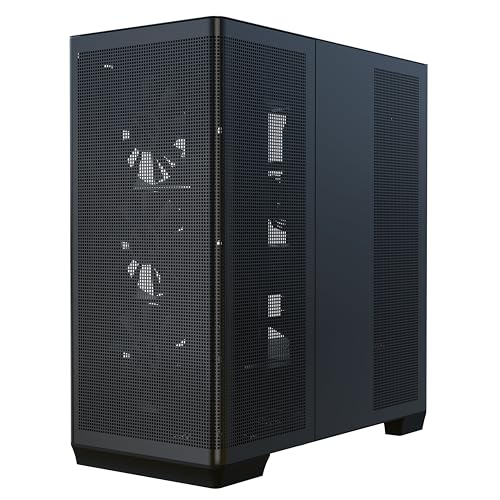
If you are shopping for a PC case with rear connector motherboard support, the APNX C1-R is the most direct match in this group. It supports ASUS and MSI back-connect motherboards, adds 40mm of internal cable management depth, and pairs that with four pre-installed fans and room for up to 11 fans total.
Best For: Builders using ASUS or MSI back-connect motherboards who want a tidy, high-airflow mid-tower.
Pros:
- Supports ASUS and MSI motherboards with backward-facing connectors.
- 40mm internal cable management depth helps keep wiring out of sight.
- Comes with 4 pre-installed 120mm fans and supports up to 11 fan slots.
- Fits up to 360mm radiators and GPUs up to 395mm.
Cons:
- Back-connect support is limited to ASUS and MSI boards in the supplied notes.
- ATX motherboard support is listed, so it may not suit smaller form factors as broadly as some alternatives.
As a back-connect-focused case, the C1-R is built around cleaner cable routing without sacrificing airflow or component clearance. It stands out for users who want a premium-looking tempered glass case that is specifically aligned with rear-connector builds.
How We Picked the Best PC Case with Rear Connector Motherboard Support
We focused on cases that clearly support back-connect or hidden-connector motherboards, with enough internal clearance for modern GPUs, liquid coolers, and cable routing behind the tray. We also favored strong airflow designs, included fans, and practical front I/O such as USB-C.
Quick Comparison
For most buyers, the main decision is size. Mid-towers usually offer the widest compatibility and easiest building experience, while compact mATX cases are better if you want a smaller footprint. If you are building around a PC Case with Rear Connector Motherboard Support, make sure the case matches your board size first, then check radiator and GPU clearance.
Key Buying Factors for PC Case with Rear Connector Motherboard Support
Motherboard Compatibility
Not every ATX or micro-ATX case supports every rear-connector layout. Check whether the case is designed for ASUS BTF, MSI Project Zero, or other back-connect standards, and confirm support for your exact board size.
Cable-Routing Space
Rear-connector systems shift more cabling to the back side, so extra depth behind the motherboard tray matters. Look for cases with generous cable channels, tie-down points, and removable panels.
Airflow and Fan Layout
Because clean fronts often pair well with mesh panels, airflow can be excellent in this category. Prioritize cases with strong front intake, at least one rear exhaust, and enough fan mounts to balance CPU and GPU heat.
GPU, Cooler, and Radiator Clearance
Large graphics cards and 240mm to 360mm AIOs are common in these builds. Always verify GPU length, radiator thickness, and top/front clearance before buying.
Build Convenience
Tool-less panels, preinstalled fans, and roomy interiors can save time, especially if you are building a high-end system for the first time.
Who Should Buy Which PC Case with Rear Connector Motherboard Support?
Choose a larger mid-tower if you want the easiest build, the most upgrade room, and support for big GPUs or 360mm cooling. Choose a compact micro-ATX or mini-tower if you want a smaller desktop footprint and are happy to work within tighter space limits. If you are specifically buying a PC Case with Rear Connector Motherboard Support for a showcase build, look for tempered glass, hidden cable paths, and good ARGB integration. If your priority is value, a case with included fans and solid mesh airflow usually delivers the best overall balance.