
A PC case with front display can turn a standard build into a true showcase, adding live system info, animation, or a premium visual focal point.
In this roundup, we focus on options that balance looks, compatibility, cooling, and everyday usability so you can choose with confidence.
Best 10 PC Case with Front Display Picks for 2026
Premium LCD Showcase
HYTE Y70 Touch Infinite Snow White

- 14.9-inch 2.5K LCD touchscreen
- Panoramic glass dual-chamber design
- Supports up to 10 fans
Best For: High-end showcase builds with a large integrated front display
LCD Upgrade Module
Thermaltake Tower LCD Panel Kit

- 3.9-inch customizable LCD display
- Works with TT RGB Plus 2.0
- Fits select Tower 300/600 and Ceres 330 cases
Best For: Compatible Thermaltake owners who want a display add-on
Value RGB Showcase

- 7 pre-installed PWM ARGB fans
- 270-degree dual tempered glass
- Supports GPUs up to 400 mm
Best For: Budget-minded builders wanting a flashy glass showcase
Front Showcase Stage
Cooler Master MasterFrame 360 Stage LCD
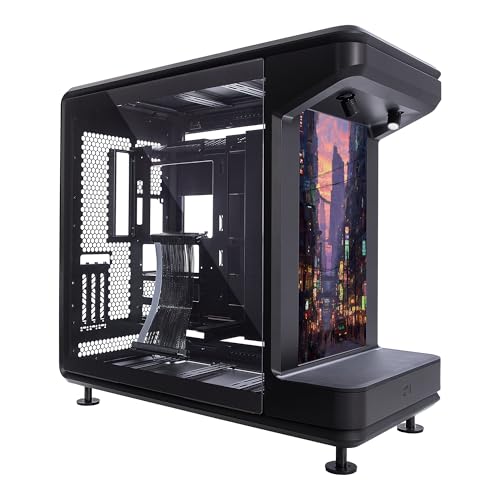
- Front-facing LCD with two display modes
- Open-frame showcase design
- Supports GPUs up to 430 mm
Best For: Showcase builders who want a display-first front panel
LCD Screen Tower

- 9.16-inch LCD with 1920x480 resolution
- Themes, video, and screen mirroring support
- 8 fan mounts and up to 420mm GPU clearance
Best For: Showpiece builders who want a large programmable front screen
ARGB Fan Showcase

- 4 pre-installed PWM ARGB fans included
- Integrated 26-LED ARGB strip with sync support
- Fits GPUs up to 420mm and 360mm radiators
Best For: Builders who want airflow, lighting, and a front visual accent
Emotion View Mid-Tower

- Customizable front display styling
- Supports 400mm GPUs and 360mm radiators
- Magnetic dust filters on top and bottom
Best For: White-build fans who want a customizable display look
Glass Showcase Pick

- 4 pre-installed ARGB PWM fans
- Three tempered glass panels for a panoramic look
- Supports up to 420mm GPUs and Type-C I/O
Best For: Builders wanting a glass showcase case with strong airflow and modern ports
Temp Monitor Full Tower

- Built-in CPU/GPU temperature display
- 6 included PWM fans, up to 12 total
- Supports 420mm + 360mm radiators
Best For: High-end users who want a premium full-tower with front temperature monitoring
LCD Display Pick

- Built-in LCD smart display on the front
- 270° panoramic tempered glass design
- Supports 400mm GPUs and 360mm radiators
Best For: Anyone who wants a real front display on a showcase gaming case
Premium LCD Showcase – HYTE Y70 Touch Infinite Snow White
If you want a PC case with front display that feels like a centerpiece, the HYTE Y70 Touch Infinite is built for exactly that role. Its 14.9-inch integrated 2.5K LCD touchscreen, panoramic glass panels, and vertical GPU layout make it a strong fit for showpiece builds while still offering serious cooling and hardware support.
Best For: High-end builders who want a luxurious front display case with major visual impact.
Pros:
- 14.9-inch integrated LCD touchscreen with 2.5K resolution, 60Hz refresh rate, and 10-point multi-touch
- Panoramic 3-piece glass design with a modern dual-chamber layout
- Included PCIe 4.0 riser cable for clean vertical GPU mounting
- Supports up to 10 fans and multiple radiator placements for strong cooling potential
Cons:
- Premium showcase design is likely more expensive than a standard airflow case
- Best suited to ATX builds and high-end graphics cards, not compact systems
- The large front display may be more than needed if you only want basic case functionality
Overall, this is one of the most visually striking options in the PC case with front display category. It combines display customization, vertical GPU presentation, and broad cooling support into a build focused on aesthetics and performance.
LCD Upgrade Module – Thermaltake Tower LCD Panel Kit
If you already own a compatible Tower 300/600 or Ceres 330, this LCD panel kit adds a front display without replacing the whole case. The 3.9-inch screen works with TT RGB Plus 2.0, giving you a simple way to personalize the front of your build and add performance-monitoring or custom visuals.
Best For: Owners of compatible Thermaltake cases who want a front display upgrade kit.
Pros:
- 3.9-inch LCD display adds front-panel visual customization
- Supports TT RGB Plus 2.0 for personalization
- Compatible with Tower 300 / 600 Series and Ceres 330 Hydrangea Blue
- Backed by a 3-year warranty
Cons:
- Not a standalone case, so it only works with specific compatible models
- Mini-ITX-only compatibility limits system flexibility
- Much smaller display than full showcase cases
This is a niche but practical choice if you specifically need a front display solution for an existing Thermaltake setup. It is less of a full case purchase and more of a targeted visual upgrade.
Value RGB Showcase – MUSETEX K2 ARGB Gaming Case
For buyers who want a PC case with front display-style visual appeal on a tighter budget, the MUSETEX K2 leans hard into presentation. It does not include an LCD, but its 270-degree panoramic dual tempered glass and seven pre-installed ARGB fans create a strong showcase look for a modern gaming build.
Best For: Builders who want a visually flashy glass case with lots of pre-installed cooling.
Pros:
- 7 pre-installed PWM ARGB fans, expandable to 10 total
- 270-degree panoramic dual tempered glass for a wide hardware view
- Supports GPUs up to 400 mm and top radiators up to 360 mm
- Includes a Type-C front I/O panel
Cons:
- No actual LCD front display
- Large airflow-focused layout may not suit minimalist builds
- PSU length support is tighter when the hard drive cage is installed
The K2 is a strong choice if your real goal is a display-heavy case with lots of RGB presence rather than a built-in screen. It offers solid component compatibility and cooling while keeping the price-to-feature ratio attractive.
Front Showcase Stage – Cooler Master MasterFrame 360 Stage LCD
If you want a true PC case with front display functionality, the Cooler Master MasterFrame 360 Stage LCD is built around that idea. Its front-facing stage LCD can run as an extended display or play custom JPG and MP4 content, making it a strong option for showcase systems that still need broad hardware support and serious cooling.
Best For: Enthusiasts who want a front display case with open-frame styling and flexible screen modes.
Pros:
- Front-facing stage LCD supports extended display mode and custom playback mode
- Open-frame design offers excellent visibility for themed builds and collectibles
- Supports GPUs up to 430 mm and radiators up to 360 mm
- Can handle up to twelve 120 mm fans for strong cooling expansion
Cons:
- Full-tower open design takes up more desk or floor space
- More specialized than a standard mid-tower case
- Best suited to builders who want a showcase setup rather than a hidden system
Among front-display cases, this one stands out for mixing screen functionality with an open stage-style chassis. It is especially appealing if you want your PC to act like a display piece as much as a working machine.
LCD Screen Tower – Thermalright A70 Vision White
If you want a PC case with front display that leans hard into visual flair, the Thermalright A70 Vision White is built around its 9.16-inch LCD screen. The panel supports customizable themes, image/video playback, and screen mirroring through TRCC software, while the panoramic glass layout keeps the rest of the build on display.
Best For: Builders who want a showpiece case with a large programmable screen and strong cooling flexibility.
Pros:
- 9.16-inch magnetic LCD with 1920×480 resolution
- Supports themes, image/video display, and screen mirroring
- Eight 120mm fan mounting positions and support for GPUs up to 420mm
- Front I/O includes USB Type-C 3.0 plus USB-A and audio
Cons:
- LCD screen adds complexity compared with a standard case
- Large full-tower footprint may not suit smaller setups
Overall, this is the most screen-focused option in the group and a strong fit if the display is part of the build identity. The tradeoff is size, but the airflow layout and GPU support make it more than just a visual piece.
ARGB Fan Showcase – Lian Li Vector V100RX
The Lian Li Vector V100RX is a practical PC case with front display-style styling thanks to its integrated LED and display platform, plus an ARGB-focused front presentation. It ships with four pre-installed PWM ARGB fans, a side I/O USB-C port, and support for high-end hardware, making it a balanced pick for builders who want lighting and convenience together.
Best For: Users who want a clean, modern mid-tower with strong included airflow and a front-facing visual accent.
Pros:
- Includes 4 pre-installed PWM 120mm ARGB fans
- Integrated 26-LED ARGB strip with motherboard sync support
- Supports GPUs up to 420mm and top radiators up to 360mm
- Tool-less side panels and side I/O USB-C for easier access
Cons:
- Display is a platform/lighting feature, not a full LCD screen
- Black styling may not suit buyers looking for a lighter aesthetic
This case is a strong choice if you want an eye-catching front presence without giving up airflow or compatibility. It is less display-centric than a true screen case, but the included fans and clean layout make it a solid everyday build option.
Emotion View Mid-Tower – 1STPLAYER SP7-EV White
If you are shopping for a PC case with front display styling in a cleaner white mid-tower format, the 1STPLAYER SP7-EV focuses on presentation. Its Emotion View design lets you customize the display to fit your style or mood, while the tempered glass side panel keeps the rest of the build visible.
Best For: Builders who want a white case with a customizable front display look and broad cooling support.
Pros:
- Front display panel with customizable Emotion View design
- Supports ATX, M-ATX, and ITX motherboards
- Fits 400mm graphics cards and 360mm radiators
- Magnetic dust filters on the top and bottom for easier maintenance
Cons:
- Front display is presentation-focused rather than an LCD spec panel
- White finish may require more frequent cleaning to stay pristine
This is a good fit if you want the visual impact of a front display without moving to a larger, screen-heavy chassis. It offers useful hardware support and a tidy white aesthetic, making it a versatile pick for mainstream gaming builds.
Glass Showcase Pick – RUIX OV303 ARGB Mid-Tower
If you want a PC case with front display-style visibility through glass rather than an actual screen, the RUIX OV303 is built around a panoramic look with three tempered glass panels. It also adds 4 pre-installed 120mm ARGB PWM fans, so you get a strong out-of-box start for a gaming build that still needs solid airflow and modern front I/O.
Best For: Builders who want a glass-heavy showcase case with included fans, Type-C, and room for larger parts.
Pros:
- 4 pre-installed 120mm ARGB PWM fans help simplify the initial cooling setup
- Front and side tempered glass create a more dimensional showcase look
- Supports up to 420mm GPUs and a 360mm AIO, giving it strong hardware flexibility
- Includes USB 3.0 and Type-C ports plus a built-in GPU support bracket
Cons:
- The front display effect is visual glass, not an LCD smart screen
- Large glass panels may not suit buyers prioritizing a fully closed airflow design
- Mid-tower sizing may be more than needed for compact builds
This is a good fit if you want a case that looks premium on a desk while still offering practical cooling, dust filtration, and modern connectivity. The built-in GPU support bracket is a useful bonus for heavier graphics cards.
Temp Monitor Full Tower – Antec Flux Pro E-ATX
The Antec Flux Pro is a full-tower PC case with front display appeal thanks to its built-in CPU/GPU temperature display, making it easier to monitor a high-end system at a glance. It also mixes wood, metal, and glass for a premium look, while the included 6 PWM fans and multi-directional vent design make it a serious airflow-oriented choice.
Best For: High-end builders who want a large PC case with a temperature display, lots of cooling options, and a premium finish.
Pros:
- Built-in CPU/GPU dual temperature display adds useful front-panel monitoring
- Includes 6 PWM fans and supports up to 12 fans total
- Supports both 420mm and 360mm radiators for flexible liquid-cooling setups
- Premium materials and an iShift 90° PSU mount help it stand out
Cons:
- Full-tower size and 29-pound weight make it a big, heavy case
- More case than many mid-range or compact builds need
- Temperature display is practical, but not a full LCD customization screen
Overall, this case is aimed at users building an expansive, feature-rich system where cooling and monitoring matter as much as appearance. Its scale and premium design make the most sense in a high-end desktop setup.
LCD Display Pick – RAIDMAX i803 LCD Mid Tower
If your search for a PC case with front display means you want a real screen up front, the RAIDMAX i803 is the clearest fit here. It combines panoramic tempered glass with a built-in LCD smart display for system monitoring, logos, or custom content, while still giving you the basics you need for a modern gaming build.
Best For: Builders who want an LCD front display case for a showcase gaming PC or streaming rig.
Pros:
- Built-in LCD smart display can show monitoring data or personalized content
- Panoramic tempered glass design delivers a strong 270° showcase effect
- Pre-installed ARGB fans provide lighting out of the box
- Supports up to 400mm GPUs and 360mm liquid cooling
Cons:
- At 12 pounds, it is lighter than full-tower options but still not a compact case
- LCD features add appeal, but the case is still primarily a mid-tower chassis
- Case-only packaging means you still need to supply all core components
This is the strongest pick for buyers who specifically want a front display, not just a glass-front aesthetic. It balances visual features with practical support for common ATX builds and high-end cooling parts.
How We Picked the Best PC Case with Front Display
We focused on cases and display-equipped chassis that offer a practical mix of design, airflow, component support, and installation ease. The best picks also needed usable front or integrated display features, not just flashy styling.
We gave extra weight to GPU clearance, radiator support, fan layout, cable routing, and build flexibility, since those factors matter just as much as the screen itself.
Quick Comparison
If you want the most premium visual experience, look at full-integrated display cases and dual-chamber showcase designs. If you want better value, consider models with simpler front display panels or strong airflow cases that add display flair without overcomplicating the build.
For high-end gaming rigs, check whether the case supports large graphics cards and 360mm or larger cooling. For simpler upgrades, make sure the display is supported by software you are comfortable using.
Key Buying Factors for a PC Case with Front Display
Display Type and Purpose
Some cases use an LCD touchscreen, while others use a basic panel for system info or visual customization. Decide whether you want a functional readout, interactive control, or mainly a cosmetic centerpiece.
Airflow and Thermal Design
A display should not come at the cost of cooling. Look for mesh intake paths, multiple fan mounts, and radiator support that match your CPU and GPU heat output.
Compatibility and Space
Check motherboard size, GPU length, PSU clearance, and cooler height before buying. A PC Case with Front Display often has a more specialized layout, so fit matters more than usual.
Software and Setup
Many display features rely on companion software. Make sure the interface is stable, regularly updated, and simple enough for your comfort level.
Build Quality and Accessibility
Tool-less panels, dust filtration, and good cable management can save time and improve long-term maintenance. Premium materials can also make a visible difference on a display-focused build.
Who Should Buy Which PC Case with Front Display?
Choose a premium LCD model if you want the most attention-grabbing build and are willing to pay for it. Choose a high-airflow model with display elements if cooling and upgrade flexibility matter most. Choose a simpler display-panel case if you want a visual upgrade without adding too much complexity.
For first-time builders, a well-ventilated case with straightforward layout and broad component support is usually the safest choice. For enthusiasts, a more advanced PC Case with Front Display can be the centerpiece of a themed setup or performance showcase.