
If you need a graphics card with dual HDMI ports, the right pick depends on more than just the number of outputs. Power draw, form factor, driver support, and monitor compatibility all matter.
Below, we focus on practical options for multi-monitor desks, compact PCs, and light gaming setups so you can choose a card that fits your build and your display goals.
Best 10 Graphics Card with Dual HDMI Ports Picks for 2026
VR Ready Dual HDMI Gaming Pick
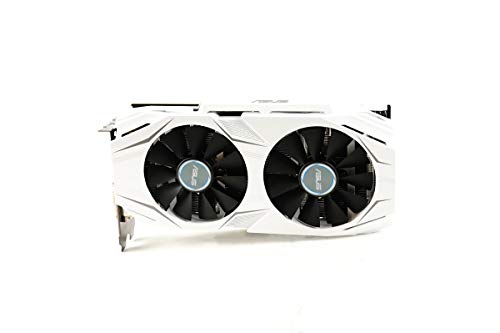
- Dual HDMI 2.0 ports for headset and monitor
- 6GB GDDR5 with 1809 MHz boost clock
- Dual-fan cooling and GPU Tweak II tools
Best For: VR-capable gaming builds needing dual HDMI output
Compact Office Multidisplay Card
NVIDIA NVS 510 2GB Low Profile
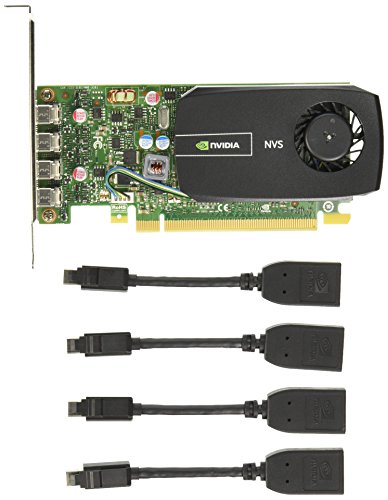
- Quad-display support for multitasking
- Low-profile, 35W desktop design
- Mini DisplayPort connectivity for professional setups
Best For: Low-power office systems needing multiple monitors
Dual-HDMI Gaming Pick
ASUS GTX 1060 3GB Dual-Fan OC Edition

- Dual HDMI 2.0 ports for multi-display use
- Dual-fan cooling helps keep noise down
- 1809 MHz boost clock with GPU Tweak II
Best For: Gamers who need dual HDMI and a simple dual-display setup
Quad-Monitor Value Pick
GT 740 4GB Low Profile 4x HDMI

- Four HDMI ports for quad-monitor setups
- Low-profile design with both bracket types
- Silent cooling for office and HTPC use
Best For: Multi-monitor offices, signage, and quiet home theater PCs
Compact Performance Pick
ASUS GTX 1660 Super Phoenix 6GB
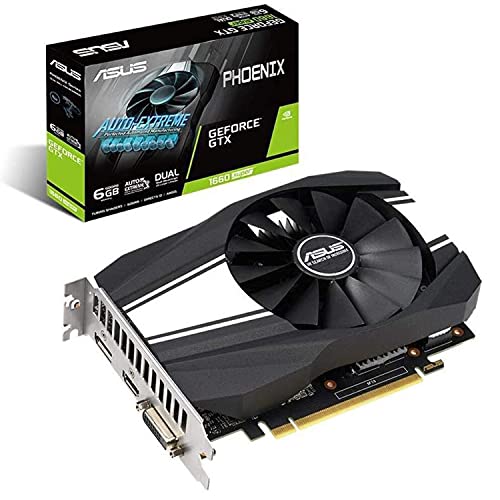
- 6GB GDDR6 with 1408 CUDA cores
- Compact card supports up to 3 monitors
- Phoenix fan and 3-year warranty
Best For: Small-form-factor gaming builds needing flexible display outputs
Budget Multi-Display Pick
QTHREE GT 730 4GB Low-Profile 2x HDMI

- 2x HDMI plus DisplayPort and VGA
- Supports up to 4 monitors
- Low-profile, 30W design
Best For: Older desktops needing affordable dual-HDMI display expansion
Gaming Upgrade Pick
ASUS Dual RTX 3050 6GB OC with HDMI 2.1

- Ampere-based RTX 3050 performance
- HDMI 2.1 plus DisplayPort 1.4a
- 2-slot dual-fan cooling
Best For: Gamers wanting stronger performance and HDMI 2.1 support
Small-Form-Factor Value Pick

- Low-profile card for compact PCs
- HDMI 2.0b plus DisplayPort
- 4GB memory with 4K UHD support
Best For: Small desktops needing a compact, low-power video card
VR Ready Dual HDMI Gaming Pick – ASUS GTX 1060 6GB Dual-Fan OC
If you want a graphics card with dual HDMI ports for a VR-capable setup, this ASUS GTX 1060 is built around that use case. It pairs 6GB of GDDR5 memory with a dual-fan cooler, making it a practical option for gaming rigs that need headset-plus-monitor connectivity and quieter operation.
Best For: Gamers and VR users who want dual HDMI output, solid 1080p/4K support, and a quieter dual-fan card.
Pros:
- Dual HDMI 2.0 ports let you connect a headset and monitor at the same time.
- Dual-fan cooling is designed for quieter gameplay and better airflow.
- 6GB GDDR5 memory and 1809 MHz boost clock support gaming performance.
- GPU Tweak II adds monitoring, game boosting, and streaming tools.
Cons:
- Renewed item, so condition may vary compared with brand-new cards.
- Limited to a 90-day warranty per the supplied details.
Overall, this is the most gaming-focused option here if dual HDMI connectivity is a priority. It combines modern-enough output flexibility with features aimed at smoother, quieter desktop use.
Compact Office Multidisplay Card – NVIDIA NVS 510 2GB Low Profile
This graphics card with dual HDMI ports is not a fit for HDMI specifically, but it is a strong multiscreen office choice if you can use Mini DisplayPort connections. The NVIDIA NVS 510 is built for low-power desktop workflows, quad-display setups, and professional productivity rather than gaming.
Best For: Office and professional desktop users who need a low-profile, low-power multi-display card.
Pros:
- Quad-display support helps with multitasking and productivity.
- Low-profile design works well in compact desktop cases.
- 35W maximum power consumption keeps power needs low.
- Mosaic technology and H.264 encoding support professional display setups.
Cons:
- Uses Mini DisplayPort output, not dual HDMI.
- 2GB DDR3 memory is modest by today’s standards.
For buyers who care more about dependable multi-monitor use than gaming or HDMI-heavy setups, this card still makes sense. It is purpose-built for efficient desktop deployment and quiet, low-profile installation.
Budget Dual HDMI Upgrade – Radeon HD 6570 1GB Low Profile
If you need a graphics card with dual HDMI ports for an older PC, this Radeon HD 6570 is a straightforward budget upgrade. It is aimed at basic screen expansion, office work, and light daily tasks, with low power draw and a low-profile design that suits small cases.
Best For: Budget desktop upgrades for office work, basic multimedia, and small form factor PCs.
Pros:
- Two HDMI outputs support multi-screen setups.
- 60W power use means no external power supply is required.
- Low-profile form factor fits compact cases.
- Designed for simple tasks like coding, video editing, and daily use.
Cons:
- Only 1GB of GDDR3 memory and a 64-bit bus.
- Driver support is limited to older Windows versions and older APIs.
- Maximum resolution is capped at 1920 x 1080.
This is a practical pick when price and compatibility matter more than performance. It is best viewed as a simple display upgrade for older hardware, not a modern gaming solution.
Silent Multi-Display Choice – ASUS GT 730 4x HDMI
For shoppers comparing a graphics card with dual HDMI ports, this ASUS GT 730 goes even further with four HDMI outputs. It is a low-profile, passive-cooled card designed for quiet home theater PCs and simple multi-monitor productivity, not demanding graphics work.
Best For: Silent home theater PCs and compact desktops that need multiple HDMI displays.
Pros:
- Four HDMI ports provide flexible multi-display connectivity.
- Passive cooling keeps operation silent.
- Single-slot, low-profile design fits small cases.
- 2GB GDDR5 memory offers more performance than built-in graphics.
Cons:
- Not intended for gaming or heavy graphics workloads.
- Limited to 1920 x 1080 maximum display resolution in the supplied details.
If your priority is quiet operation and easy HDMI-based display expansion, this card is a strong fit. Its practical strengths are flexibility, silence, and compact installation rather than raw speed.
Dual-HDMI Gaming Pick – ASUS GTX 1060 3GB Dual-Fan OC Edition
If you want a graphics card with dual HDMI ports for a straightforward dual-display or headset-plus-monitor setup, this ASUS GeForce GTX 1060 3GB is built around that use case. It pairs 3GB GDDR5 memory with an 1809 MHz boost clock in OC mode, plus dual-fan cooling for quieter operation.
Best For: Gamers and desktop users who want dual HDMI 2.0 outputs and dependable 1080p-focused performance.
Pros:
- Dual HDMI 2.0 ports for connecting a headset and monitors at the same time
- Dual-fan cooling for improved airflow and quieter gameplay
- 1809 MHz boost clock in OC mode
- GPU Tweak II software for performance monitoring and streaming tools
Cons:
- 3GB VRAM is modest for heavier modern gaming workloads
- Older GTX 1060 class card compared with newer options
Overall, this card makes sense if dual HDMI connectivity matters more than chasing top-tier gaming specs. It offers a practical mix of output flexibility, cooling, and included tuning software backed by a 3-year warranty.
Quad-Monitor Value Pick – GT 740 4GB Low Profile 4x HDMI
This graphics card with dual HDMI ports goes well beyond that, giving you four HDMI outputs for a quad-monitor desktop setup. With 4GB GDDR5 memory, a low-profile design, and silent cooling, it is aimed at practical office and home theater installations rather than demanding gaming.
Best For: Offices, digital signage, and HTPC setups that need multiple HDMI displays from one card.
Pros:
- Four HDMI ports support up to a quad-monitor configuration
- 4GB GDDR5 memory for everyday graphics tasks
- Low-profile form factor with both half-height and full-height brackets included
- Silent cooling suits quiet environments
Cons:
- Built for basic graphics and playback, not gaming-focused performance
- 90-day warranty is shorter than many premium cards
If your priority is connecting several HDMI monitors with minimal fuss, this card is a very direct fit. Its compact design and quiet operation make it especially practical for workstations and living-room PCs.
Compact Performance Pick – ASUS GTX 1660 Super Phoenix 6GB
If you need a graphics card with dual HDMI ports in a compact gaming build, this ASUS GeForce GTX 1660 Super stands out for offering HDMI 2.0b alongside DisplayPort and DVI-D. It uses 6GB of GDDR6 memory, a short-form-factor design, and a Phoenix double-ball-bearing fan for cooling.
Best For: Small gaming PCs and general desktop builds that need flexible monitor connections and stronger midrange performance.
Pros:
- Supports up to 3 monitors with HDMI 2.0b, DisplayPort 1.4, and DVI-D
- 6GB GDDR6 memory and 1408 CUDA cores
- Short form factor suits tighter cases
- Double-ball-bearing fan is designed for better airflow and longer lifespan
Cons:
- Only one fan, so cooling headroom is more limited than dual-fan cards
- Does not provide dual HDMI specifically, since one output is DisplayPort and one is DVI-D
This is the most performance-oriented option in the group if your build can use mixed display outputs instead of strict dual HDMI. It balances compact size, modern memory, and a solid feature set for everyday gaming and multi-monitor use.
Budget Multi-Display Pick – QTHREE GT 730 4GB Low-Profile 2x HDMI
If you want a graphics card with dual HDMI ports for office work, basic multimedia, or adding extra displays to an older PC, the QTHREE GeForce GT 730 is a straightforward budget option. It offers 2x HDMI, plus DisplayPort and VGA, and supports up to 4 monitors for simple productivity setups. The low-profile design and plug-and-play installation make it especially appealing for compact systems.
Best For: Upgrading an older desktop for dual-HDMI multi-monitor use without spending much.
Pros:
- 2x HDMI output plus DisplayPort and VGA for flexible monitor connections
- Supports up to 4 displays for basic productivity setups
- Low-profile design fits small cases and ITX chassis
- 30W low power draw with no external power supply needed
Cons:
- GT 730 performance is aimed at office work and light multimedia, not gaming
- Uses DDR3 memory, which is modest by modern standards
- Requires a PCI Express x8 slot and a 300W or greater power supply
This is a practical choice if your priority is simple display expansion rather than performance. The dual HDMI ports and compact form factor make it well suited to older PCs and small builds.
Gaming Upgrade Pick – ASUS Dual RTX 3050 6GB OC with HDMI 2.1
If you’re shopping for a graphics card with dual HDMI ports, note that this ASUS Dual RTX 3050 provides a single HDMI 2.1 output plus DisplayPort 1.4a rather than dual HDMI. Even so, it stands out as the strongest performance option here for gaming and modern desktop use, with Ampere architecture, 2nd-gen RT cores, and 3rd-gen Tensor cores. Its 2-slot design and axial-tech cooling also make it easier to fit into many systems.
Best For: Users who want better gaming performance and can work with one HDMI output.
Pros:
- RTX 3050 architecture delivers modern gaming features and improved efficiency
- HDMI 2.1 and DisplayPort 1.4a support up to 4K resolution
- 2-slot design improves compatibility in smaller chassis
- Dual-fan axial-tech cooling and steel bracket add build quality
Cons:
- Only one HDMI output, so it is not a true dual-HDMI card
- Higher-end gaming card may be more than needed for basic office use
- Requires PCIe 4.0 x16 desktop compatibility
For buyers who value performance first, this is the most capable card in the group. Just be aware that it does not match the dual-HDMI keyword requirement if that is your top priority.
Small-Form-Factor Value Pick – MSI GT 1030 4GB LP with HDMI
If you’re specifically looking for a graphics card with dual HDMI ports, the MSI GT 1030 is not that type of card because it includes one HDMI 2.0b output and one DisplayPort. Still, it is a compact low-profile option for basic desktop use, light gaming, and 4K UHD display support. For simple systems that only need one HDMI connection, it offers a tidy, low-power upgrade path.
Best For: Compact PCs that need a low-profile card with HDMI and 4K support.
Pros:
- Low-profile design is ideal for smaller desktop builds
- HDMI 2.0b and DisplayPort give you two modern display outputs
- 4GB memory and 4K UHD support for everyday use
- Single-fan card with a simple, lightweight layout
Cons:
- Only one HDMI port, so it does not meet the dual-HDMI requirement
- DDR4 and GT 1030 performance are best suited to basic tasks
- Not intended for demanding gaming or heavy creative workloads
This card makes sense when small size and easy display connectivity matter more than raw speed. It is a sensible pick for compact PCs, but not the best match if two HDMI ports are essential.
How We Picked the Best Graphics Card with Dual HDMI Ports
We prioritized cards that make dual-monitor HDMI connectivity easy, while also considering overall value, current availability, size constraints, and intended use. That means some picks are better for basic office work or digital signage, while others are more suitable for casual gaming or newer systems.
We also looked at key buyer concerns such as low-profile designs, passive or quiet cooling, and power requirements. For a Graphics Card with Dual HDMI Ports, those details often matter just as much as raw performance.
Quick Comparison
Use the card tier as a shortcut: older entry-level models are best for display expansion and simple productivity, midrange GeForce options are better for smoother multitasking and light gaming, and newer cards are the safest bet if you want stronger driver support and more headroom for modern displays.
Key Buying Factors for a Graphics Card with Dual HDMI Ports
Monitor Resolution and Refresh Rate
Match the card to your display needs. Dual HDMI output is only helpful if the GPU can comfortably drive your target resolution, whether that is 1080p office use or a higher-resolution mixed setup.
Power and Cooling
Low-power cards are ideal for compact desktops and small power supplies. If your case is tight or quiet operation matters, look closely at passive cooling, single-slot designs, and wattage ratings.
Physical Fit
Many dual-HDMI models are aimed at small-form-factor PCs. Check bracket height, slot width, and length before buying, especially if you need a low-profile card.
Driver Support and Operating System Compatibility
Older GPUs can still work well for display output, but newer operating systems and apps may benefit from more recent drivers. If you plan to game, stream, or use modern productivity software, a newer architecture is usually the safer choice.
Port Mix and Adapter Needs
Not every Graphics Card with Dual HDMI Ports is limited to HDMI alone. Some include DisplayPort or DVI, which can give you flexibility if one of your monitors needs an adapter.
Who Should Buy Which Graphics Card with Dual HDMI Ports?
If you mainly need extra displays for work, a low-power dual-HDMI card is usually enough. If you want a balance of productivity and occasional gaming, step up to a GTX- or RTX-based option. If your priority is a compact office PC or HTPC, a low-profile or passive-cooled card is often the best fit.
For buyers shopping by practicality rather than specs, the best choice is the one that matches your monitor count, case size, and power supply first. That approach will help you avoid compatibility headaches and get the most value from your upgrade.