
If you need a graphics card for four-monitor workstation use, the right pick is less about raw gaming speed and more about dependable multi-display output, driver stability, and physical fit.
Below, we focus on cards that can realistically drive four screens for productivity, trading, content creation, and office workflows without unnecessary overkill.
Best 10 Graphics Card for Four-Monitor Workstation Picks for 2026
Low-Profile Quad HDMI Value Pick
GTX 750 4GB Quad HDMI Low Profile

- Four native HDMI 2.0 outputs
- Low-profile, dual-slot design
- No extra power connector required
Best For: Compact office and ITX multi-monitor setups
Budget 4-Screen Office Card

- Four HDMI outputs for four monitors
- No external power connector needed
- Cooling fan for airflow and stability
Best For: Budget office workstations and light multi-display use
Professional Compact Workstation Pick
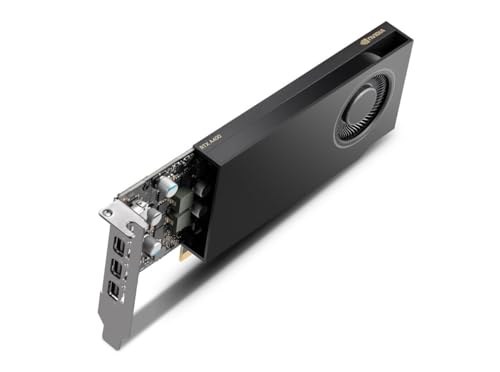
- Four Mini DisplayPort 1.4a outputs
- Single-slot, low-profile design
- Up to 5120 x 2880 @ 60 Hz
Best For: Compact professional workstations and multi-display productivity
Professional Quad-Display Workhorse

- 4 Mini DisplayPort outputs support 4 monitors
- Low-profile PCIe 3.0 x16 fit for compact desktops
- 4GB GDDR5 memory with up to 7680x4320 resolution
Best For: compact professional workstations needing four-display support
Budget Multi-Display Option

- 4 outputs: 2 HDMI, DP, and VGA for up to 4 monitors
- Low-profile, compact design for small cases
- 30W low power draw with no external power needed
Best For: older PCs that need affordable basic four-monitor support
Efficient Four-Display Adapter

- Four Mini DisplayPort outputs support up to four displays
- 50W bus-powered design with no larger PSU required
- Includes short and full-height brackets plus adapters
Best For: small workstations needing efficient four-monitor output
Entry-Level Quad-Display Pick
Glorto GT 730 4G Low Profile for SFF PCs

- Supports NVIDIA Surround for 4-screen output.
- 2x HDMI plus VGA/DP gives flexible display hookups.
- Low-profile brackets suit SFF and HTPC builds.
Best For: Budget users needing four screens in a compact PC
Four-HDMI Budget Option
- Four HDMI ports make multi-monitor setup simple.
- No external power connector needed.
- 50W slot-powered design keeps installation easy.
Best For: HDMI-based office or trading desks needing four displays
Quiet Quad-Monitor Choice
GT 740 4GB GDDR5 with 4 HDMI Ports

- Four HDMI outputs are ready for quad-monitor use.
- 4GB GDDR5 memory suits everyday multitasking.
- Silent fan and included brackets simplify setup.
Best For: Quiet office or HTPC builds with four HDMI monitors
Low-Profile Quad HDMI Value Pick – GTX 750 4GB Quad HDMI Low Profile
If you need a graphics card for four-monitor workstation setups without adding extra power cabling, this GTX 750 is built for simple multi-display expansion. Its four native HDMI 2.0 outputs, low-profile frame, and bus-powered design make it a straightforward fit for compact office towers, ITX systems, and signage-style displays.
Best For: Compact workstations, office multi-monitor setups, and space-limited PCs that need four HDMI outputs.
Pros:
- Four native HDMI 2.0 ports for a 4-screen setup
- Low-profile, dual-slot design fits smaller cases
- Does not require an additional power connector
- Supports 4K at 60Hz on two screens and 8K stitching use cases
Cons:
- HDMI-only output limits display connectivity flexibility
- Geared more toward productivity and signage than heavy graphics work
- Low-power design means modest performance headroom
For buyers who want an easy-install four-monitor workstation card in a compact footprint, this model focuses on practicality over extras. The combination of four HDMI ports and no external power requirement makes it appealing for straightforward desktop upgrades.
Budget 4-Screen Office Card – RX 560 4G 4HDMI
This Radeon RX 560 is aimed at users who want a graphics card for four-monitor workstation use with simple installation and low power draw. With four HDMI ports, a 60W maximum power rating, and no external power connector, it suits office desks, stock-monitoring setups, and everyday multi-display productivity.
Best For: Budget-conscious four-monitor office setups, light gaming, and stable productivity displays.
Pros:
- Four HDMI ports support a four-screen workspace
- No external power connector needed
- 60W maximum power makes it easy to deploy
- Includes a cooling fan for quieter, cooler operation
Cons:
- HDMI-only output may not suit mixed-display setups
- Entry-level RX 560 performance is best for office and light use
- Full-height size may be less convenient in smaller cases
As a practical multi-monitor GPU, this RX 560 is focused on stability, low power usage, and easy setup. It makes the most sense when your priority is running four displays reliably rather than chasing higher-end graphics performance.
Professional Compact Workstation Pick – PNY RTX A400 4GB Low Profile
For buyers seeking a graphics card for four-monitor workstation use in a professional environment, the PNY RTX A400 stands out for its compact design and high-resolution display support. Its single-slot, low-profile form factor, four Mini DisplayPort 1.4a outputs, and 50W power rating make it a strong fit for business desktops and space-conscious workstations.
Best For: Professional workstations, compact business PCs, and multi-display productivity with Mini DisplayPort monitors.
Pros:
- Four Mini DisplayPort 1.4a outputs for multi-monitor setups
- Low-profile, single-slot card fits compact systems
- Supports up to 5120 x 2880 at 60 Hz per output
- Low 50W power draw supports efficient workstation use
Cons:
- Mini DisplayPort outputs may require adapters for HDMI displays
- PCIe x4 interface is narrower than full x16 cards
- 4GB memory is best suited to professional productivity, not heavy gaming
This is the most workstation-focused option in the group, especially if you need clean multi-display output for business software, editing, or visualization. It is best chosen when display quality, compact size, and efficiency matter more than raw gaming performance.
Quiet Multi-Monitor Basic Pick – GT 730 4GB 4× HDMI Silent
If your goal is a graphics card for four-monitor workstation or home-office use with minimal noise, this GT 730 is built around simplicity. It offers four HDMI outputs, silent operation, and 4K support, making it suitable for business desktops, HTPCs, and quiet environments where low distraction matters.
Best For: Silent office PCs, home theater setups, and basic multi-monitor business use.
Pros:
- Four HDMI outputs support a basic four-display setup
- Silent cooling design for quiet environments
- Supports 4K display output
- Compact card size suits smaller desktop builds
Cons:
- PCIe 2.0 x8 interface is older than modern workstation cards
- Best for light workloads rather than demanding graphics tasks
- HDMI-only output limits monitor connection options
This GT 730 makes sense when the priority is quiet, straightforward multi-monitor output rather than performance. It is a practical fit for business desktops and media-focused systems where silent operation is a major advantage.
Professional Quad-Display Workhorse – HP Radeon Pro WX 3200 4GB
If you need a graphics card for four-monitor workstation setups, the HP Radeon Pro WX 3200 is built for exactly that kind of professional desktop use. With four Mini DisplayPort outputs, 4GB of GDDR5 memory, and a low-profile PCIe 3.0 x16 design, it fits well into compact systems while still supporting ultra-high resolutions up to 7680×4320.
Best For: Professionals who want a low-profile, four-output workstation card for office, design, or productivity rigs.
Pros:
- Supports up to 4 monitors through 4 Mini DisplayPort outputs
- Low-profile PCIe 3.0 x16 design suits compact desktop builds
- 4GB GDDR5 memory and 1GHz GPU clock speed for professional workloads
- Maximum resolution listed at 7680×4320
Cons:
- Mini DisplayPort-only outputs may require adapters for other display types
- Not aimed at gaming or heavy graphics workloads
Overall, this is a straightforward workstation option when stability, compact size, and four-display support matter more than raw performance. It is especially appealing if your monitors already use Mini DisplayPort or if you are comfortable using adapters.
Budget Multi-Display Option – QTHREE GT 730 4GB Low Profile
The QTHREE GeForce GT 730 is a budget-friendly graphics card for four-monitor workstation setups when your needs are mostly office work, light multimedia, and basic multi-display productivity. It offers 4GB of DDR3 memory, a low-profile design for small cases, and four outputs including 2 HDMI ports, DisplayPort, and VGA.
Best For: Cost-conscious users upgrading an older PC for basic four-screen productivity.
Pros:
- Supports up to 4 monitors with 2x HDMI, DisplayPort, and VGA outputs
- Low-profile design works well in compact ITX and small form factor systems
- 30W low power draw with no external power connector needed
- Supports Windows 11 and DirectX 12 per the product notes
Cons:
- DDR3 memory and GT 730-class performance are limited to light workloads
- Requires a PCIe x8 slot and at least a 300W power supply
This card makes sense when the main goal is adding multiple displays without spending much or upgrading the whole system. It is not a performance card, but it does cover the essentials for an older office PC.
Efficient Four-Display Adapter – VisionTek Radeon RX 550 4M
VisionTek AMD Radeon RX 550 Graphic Card 2 GB GDDR5 Small Form Factor and Full Height - 901466
Check Price On AmazonThe VisionTek Radeon RX 550 4M is a practical graphics card for four-monitor workstation setups, especially if you want low power use and better display flexibility. It has four Mini DisplayPort outputs, supports up to four displays at 4K resolution, and uses 2GB of GDDR5 memory with a 50W bus-powered design.
Best For: Small form factor workstations that need four-display support with low power requirements.
Pros:
- Four Mini DisplayPort outputs support up to four displays
- 50W bus-powered design avoids needing a larger power supply
- Low-profile SFF card includes both short and full-height brackets
- Includes adapters for DP and DVI-D connections
Cons:
- 2GB VRAM is modest for demanding graphics workloads
- Other connection types may require active adapters
For workstation users focused on efficiency and easy installation, this model is a strong fit. Its included brackets and adapters make it especially convenient for mixed desktop environments where display compatibility matters.
Entry-Level Quad-Display Pick – Glorto GT 730 4G Low Profile for SFF PCs
If you need a graphics card for four-monitor workstation use without stepping up to a high-power GPU, the Glorto GeForce GT 730 is built around simple multi-display output. It supports NVIDIA Surround for 4 screens via dual HDMI plus VGA/DP, and its low-profile bracket makes it a better fit for small form factor and HTPC builds.
Best For: Budget-conscious office or HTPC users who need four-screen support in a compact PC.
Pros:
- Supports NVIDIA Surround for 4-screen output.
- Includes 2x HDMI plus VGA/DP connectivity.
- Low-profile design with half-height brackets included.
- Compatible with Windows 11 and supports automatic driver installation.
Cons:
- Uses DDR3 memory and a 64-bit bus, so it is entry-level by design.
- PCIe 2.0 x8 interface is older than current mainstream cards.
- Maximum resolutions vary by port and are lower than modern productivity GPUs.
This is a practical pick when the priority is fitting four displays into a compact system, not maximizing performance. It makes the most sense for basic workstation duties, HTPC setups, and older PCs that need reliable multi-monitor output.
Four-HDMI Budget Option – RX 560 2G with 4 HDMI Outputs
For a graphics card for four-monitor workstation setups that rely on HDMI-only displays, this Radeon RX 560 stands out with four HDMI ports built in. It is an entry-level discrete card aimed at office expansion, light everyday use, and low-demand multitasking, while its PCIe x16 design and 50W slot-powered operation keep installation straightforward.
Best For: Office or trading-desk setups that need four HDMI monitors without external power.
Pros:
- Four HDMI ports support a straightforward 4-monitor setup.
- Does not require an external power connector.
- Rated at a maximum of 50W from the PCIe slot.
- Includes a cooling fan and solid-state capacitors for stable operation.
Cons:
- 2GB memory limits it to entry-level workloads.
- Resolution support is not as high as newer workstation-class cards.
- Full-height bracket size may not suit every compact case.
This card is mainly about simplicity: four HDMI outputs, low power draw, and broad Windows support. If your workstation needs stable multi-display output more than raw graphics performance, it is an easy-fit choice.
Quiet Quad-Monitor Choice – GT 740 4GB GDDR5 with 4 HDMI Ports
If you want a graphics card for four-monitor workstation use with a cleaner output layout, this GT 740 packs four HDMI ports into a low-profile, quiet design. Its 4GB GDDR5 memory, silent fan, and included low-profile and full-height brackets make it especially convenient for office systems, digital signage, and compact home theater PCs.
Best For: Quiet desktop setups that need four HDMI monitors and easy installation.
Pros:
- Four HDMI ports support quad-monitor configurations directly.
- 4GB GDDR5 memory is better suited to everyday multitasking than basic DDR3 cards.
- Silent cooling helps keep noise down in office or HTPC environments.
- Low-profile and standard brackets are included for flexible installation.
Cons:
- Designed for everyday multimedia and office tasks, not heavy graphics work.
- Maximum listed resolution is 1920 x 1080, which may be limiting for some users.
- Warranty coverage is short at 90 days.
For buyers who care more about quiet operation and easy four-display setup than peak performance, this model is a strong fit. It keeps the focus on practical multi-monitor use while staying compact and simple to install.
How We Picked the Best Graphics Card for Four-Monitor Workstation
For a four-monitor setup, the best options are the ones that can run multiple displays reliably, fit the case, and match the resolution and refresh rate you actually need. We prioritized cards with proven quad-display support, sensible power requirements, and options suited to small-form-factor and workstation builds.
We also weighed port variety, driver support, and whether the card makes more sense for basic business use or more demanding professional software.
Quick Comparison
Entry-level models are usually the cheapest route if you only need office apps, web work, and light video playback across four screens. Professional cards tend to offer better driver support, cleaner multi-monitor handling, and stronger compatibility in business environments. Low-profile cards are the safest choice for compact PCs, while full-height models may suit standard desktops with more airflow and expansion room.
Key Buying Factors for a Graphics Card for Four-Monitor Workstation
Display Outputs
Check that the card has enough physical outputs for your setup and that they match your monitors. Mini DisplayPort, HDMI, and DisplayPort are the most common options here. If your monitors use mixed connections, budget for adapters.
Resolution and Refresh Rate
Four-monitor support is not just about quantity. If you plan to use 1440p or 4K panels, verify the card can handle the combined load smoothly. For productivity work, 1080p or 1440p is often the sweet spot.
Form Factor and Cooling
Many buyers searching for a Graphics Card for Four-Monitor Workstation builds are using compact office PCs or older desktops. Low-profile, single-slot, or quiet-cooling designs can matter more than benchmark numbers in these systems.
Power and Compatibility
Some cards draw very little power and are easy upgrades; others may need more capable power supplies. Always confirm PCIe slot compatibility, case clearance, and whether your system supports the card’s display standards and driver package.
Who Should Buy Which Graphics Card for Four-Monitor Workstation?
If you mainly want a stable office or trading setup, look for the simplest quad-output card with strong compatibility and low power demand. If you rely on professional software or want better long-term driver support, a workstation-class GPU is usually worth the extra cost. If your PC is small, prioritize low-profile designs first, then choose the best port layout for your monitors.
In short, the best Graphics Card for Four-Monitor Workstation use is the one that fits your case, supports your displays natively, and stays dependable under daily multitasking.