
Choosing a NAS with expandable storage is all about balancing today’s capacity with tomorrow’s growth. The best options make it easy to start small, add drives or NVMe cache later, and keep your files protected as your needs change.
In this roundup, we focused on models that offer practical upgrade paths, strong connectivity, and sensible features for home and small business users who want room to expand.
Best 10 NAS with Expandable Storage Picks for 2026
Enterprise 8-Bay Powerhouse

- 8 bays plus 2 M.2 NVMe slots
- Dual 10GbE with link aggregation
- Intel i5-1235U and 8GB DDR5 RAM
Best For: advanced users needing maximum growth and speed
Compact Backup Hub

- 2-bay diskless NAS for central storage
- Automated backups for many device types
- Basic surveillance and file sharing
Best For: small homes or offices needing simple backup and sharing
Modular Performance NAS

- 5 bays with up to 174TB capacity
- RAM expandable to 96GB with multiple slots
- 10GbE, 5GbE, USB4, and OCuLink
Best For: power users wanting flexible upgrades and fast I/O
Scale-Up Private Cloud

- 2 bays with expansion to 140TB
- DX525 adds 5 more drive bays
- RAID, snapshots, and surveillance support
Best For: buyers who want to start small and expand later
UGREEN Beginner-Friendly Choice

- Up to 128TB capacity across four bays
- 8GB RAM, 2.5GbE, and 4K HDMI
- NFC setup and AI photo album features
Best For: Beginners building a private cloud with easy setup
ACEMAGIC Expandable Office Hub
N3A 4-Bay NAS with 2 M.2 Slots

- Up to 136TB with 4 HDD bays and 2 M.2 slots
- Dual 2.5G + 1G LAN for flexible networking
- Supports Windows 11 Pro, TrueNAS, and Unraid
Best For: Power users who want maximum expansion and OS flexibility
Hybrid 6-Bay NAS
Compact Unraid Storage with 4x NVMe
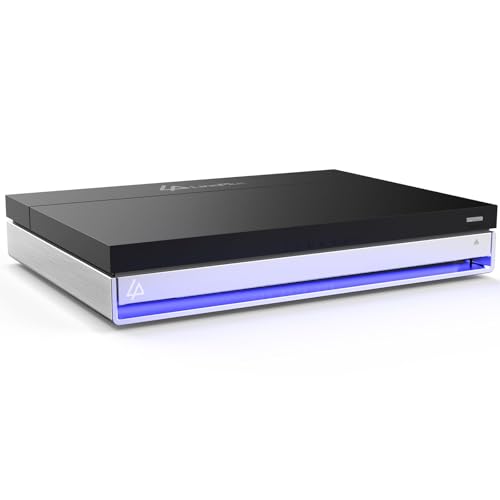
- 2 SATA bays plus 4 M.2 NVMe slots
- Includes Unraid Starter License
- 16GB RAM, Intel N5105, and 2.5GbE
Best For: Home labs and media servers needing mixed-drive expansion
High-Speed 4-Bay Expansion NAS
Dual 10GbE Storage for Heavy Workloads

- Up to 144TB capacity with 4 bays
- Dual 10GbE plus 2 M.2 NVMe slots
- Supports surveillance and Docker workflows
Best For: Creators and office teams needing fast, scalable storage
4-Bay Expandable NAS
10GbE Plus Built-In SSD Storage

- 4 bays with up to 144TB capacity
- Intel Pentium Gold 8505 with DDR5 RAM
- 1x 10GbE, 1x 2.5GbE, and 2 M.2 slots
Best For: Small offices and home users wanting balanced expansion
Enterprise 8-Bay Powerhouse – UGREEN DXP8800 Plus NAS
If you want a NAS with expandable storage that also delivers serious network and CPU headroom, the UGREEN NAS DXP8800 Plus is built for heavy-duty home labs and business workloads. Its 8 bays, dual M.2 slots, and support for multiple RAID levels give you plenty of room to grow while keeping performance high.
Best For: Businesses and advanced users who need very large capacity, fast networking, and future expansion.
Pros:
- 8-bay design with support for up to 272TB and 2 M.2 NVMe slots
- Dual 10GbE ports with link aggregation for up to 2500MB/s transfers
- Intel Core i5-1235U 10-core CPU and 8GB DDR5 RAM for demanding tasks
- Supports JBOD, Basic, RAID0, RAID1, RAID5, RAID6, and RAID10
Cons:
- Drives are not included
- Wired Ethernet only; no Wi-Fi support
- Top performance depends on your router, drives, and file sizes
This model stands out when storage growth and throughput matter more than simplicity. If you need a feature-rich expandable NAS for shared files, backups, or virtualization, it offers a lot of headroom.
Compact Backup Hub – Synology DS223
The Synology DS223 is a straightforward NAS with expandable storage in the sense that it centralizes files, backup jobs, and basic surveillance into one 2-bay device. It is aimed at users who want an easy home or office storage hub without the complexity of larger multi-bay systems.
Best For: Home and office users who want simple file consolidation, backup, and basic camera monitoring.
Pros:
- 2-bay diskless NAS for centralized storage
- Supports automated backups for Macs, PCs, mobile devices, cloud, and external drives
- Includes file collaboration and DIY surveillance features
- Backed by a 2-year warranty and software updates
Cons:
- Only two drive bays, so expansion is limited compared with larger NAS units
- Drives are not included
- Designed for practicality rather than high-end performance
If your priority is dependable everyday storage instead of maximum scalability, the DS223 is easy to understand and easy to live with. It fits well as a central backup and sharing hub for smaller setups.
Modular Performance NAS – MINISFORUM N5 Air
The MINISFORUM N5 Air is a NAS with expandable storage for users who want desktop-class flexibility along with strong hardware. With five HDD bays, multiple M.2 slots, upgradeable memory, and extra expansion options, it is built for people who expect their storage system to evolve over time.
Best For: Power users who want a highly expandable NAS with fast networking, modular upgrades, and multimedia output.
Pros:
- 5-bay design with up to 174TB storage capacity
- Dual DDR5 RAM slots expandable to 96GB
- 1x 10GbE, 1x 5GbE, and dual USB4 ports for fast connectivity
- Includes 3 M.2 slots, OCuLink, and support for RAID0, RAID1, RAID5, and RAIDZ1
Cons:
- Drives are not included
- Some customization depends on your preferred SSD and system disk setup
- More advanced than a basic plug-and-play NAS
This is a strong fit if you want storage expansion plus hardware flexibility in one box. The combination of bays, memory headroom, and multiple high-speed interfaces makes it appealing for serious multi-purpose use.
Scale-Up Private Cloud – Synology DS725+
The Synology DS725+ is a NAS with expandable storage for users who want to start small and grow later. It begins as a 2-bay private cloud, then adds capacity through the DX525 expansion unit, making it a practical choice when you want a simple setup now and more room later.
Best For: Home and small business users who want easy expansion without moving to a larger chassis.
Pros:
- Starts with 2 bays and expands to up to 140TB with DX525
- Supports RAID redundancy, backups, and snapshot technology
- Handles multi-site surveillance and up to 30 IP cameras
- Includes a 3-year warranty
Cons:
- Expansion requires a separate DX525 unit
- Only two bays in the base unit
- Drives are not included
The DS725+ is a sensible scale-up option if you value Synology’s ecosystem and want room to grow. It offers a clear upgrade path without forcing you into an oversized NAS on day one.
AOOSTAR 4-Bay Performance Pick – Ryzen 7 5825U NAS Mini PC
If you want a NAS with expandable storage that also behaves like a capable mini PC, the AOOSTAR WTR PRO is built around that idea. It combines a Ryzen 7 5825U, four 3.5-inch SATA bays, and two M.2 NVMe slots, giving you a flexible base for a DIY NAS, soft routing, or a low-power 24/7 home setup.
Best For: Buyers who want a compact, configurable NAS platform with strong CPU headroom and multiple expansion paths.
Pros:
- 4-bay design with support for up to 4 x 22TB SATA drives
- Two M.2 2280 NVMe slots add extra storage expansion
- Ryzen 7 5825U offers 8 cores and 16 threads for heavier workloads
- 2.5G dual LAN and 4K output support make it versatile for network and media use
Cons:
- Diskless and memory-free, so you must supply RAM and storage
- More of a DIY platform than a turnkey NAS appliance
- Best suited to users comfortable with building and configuring their own system
Overall, this is the most flexible option in the group if you value expansion and performance over simplicity. It is especially appealing for users who want to grow storage over time while keeping the option to use the system like a small workstation.
UGREEN Beginner-Friendly Choice – DH4300 Plus 4-Bay NAS
The UGREEN NAS DH4300 Plus is a practical NAS with expandable storage for users who want a simpler path into private cloud storage. Its 4-bay design supports up to 128TB, and the included 8GB LPDDR4X RAM plus 2.5GbE networking give it enough hardware for home media, remote access, and everyday backups.
Best For: Beginners who want a straightforward 4-bay NAS for home storage, photo management, and remote access.
Pros:
- Supports up to 128TB across four bays
- Beginner-friendly setup with NFC and guided instructions
- AI photo album tools help organize and search images
- 2.5GbE and 4K HDMI add useful everyday performance features
Cons:
- Diskless, so drives must be purchased separately
- Does not support virtual machines
- Storage capacity claims depend on RAID 0 and compatible drives
For users moving from cloud storage or external drives, this NAS keeps the learning curve relatively low while still offering serious capacity. It is a strong fit if you want a secure home storage system without the complexity of a more advanced server platform.
ACEMAGIC Expandable Office Hub – N3A 4-Bay NAS with 2 M.2 Slots
The ACEMAGIC NAS N3A is a NAS with expandable storage aimed at users who want a balance of capacity, networking, and flexibility. With four HDD bays, two M.2 NVMe slots, and support for up to 136TB, it is designed for large media libraries, backups, and custom NAS builds at home or in a small office.
Best For: Users who want a highly expandable NAS for backups, media storage, and custom operating systems.
Pros:
- Up to 136TB total storage with 4 HDD bays and 2 M.2 slots
- Dual 2.5G plus 1G LAN supports faster transfers and link aggregation
- Includes 8GB DDR4 RAM and a pre-installed 128GB PCIe 3.0 SSD
- Supports Windows 11 Pro, TrueNAS, Unraid, and other OS options
Cons:
- Diskless for the main drives, so storage must be added separately
- More advanced than a basic plug-and-play enclosure
- Capacity and performance depend on the OS and drives you choose
This model stands out if you want room to scale and the freedom to tailor the software stack. It is a strong choice for buyers who want one device that can serve as a NAS, media server, or light office system.
Hybrid 6-Bay NAS – Compact Unraid Storage with 4x NVMe
If you want a NAS with expandable storage that can grow with your workload, the LincStation N1 takes a flexible hybrid approach. It combines 2.5" SATA bays with four M.2 NVMe slots, so you can mix high-capacity drives and fast SSD storage for apps, cache, VMs, and media tasks. With the included Unraid starter license, it is aimed at users who want easy expansion without the limits of a traditional fixed-RAID setup.
Best For: Home lab users, media servers, and backup setups that need mixed-drive flexibility.
Pros:
- Hybrid design with 2 SATA bays and 4 M.2 NVMe slots for flexible expansion
- Intel N5105, 16GB RAM, and 128GB ROM support Plex/Jellyfin, Docker, and backups
- Includes Unraid Starter License for mixed-drive storage and drive-failure protection
- 2.5GbE, HDMI 2.0, USB-C, and dual USB 3.2 Gen2 ports add useful connectivity
Cons:
- Diskless system, so storage drives must be purchased separately
- Only two bays accept 2.5" SATA drives, so larger HDD-focused arrays are limited
- Best fit is for users comfortable with Unraid-style storage planning
Overall, the N1 stands out if you want expandable storage in a compact NAS that prioritizes mix-and-match flexibility over a conventional all-HDD layout. It is especially practical for users who want SSD acceleration for apps and cache while still keeping room for cost-effective bulk storage.
High-Speed 4-Bay Expansion NAS – Dual 10GbE Storage for Heavy Workloads
The UGREEN DXP4800 GT is a NAS with expandable storage built for fast transfers, multi-user access, and local media or surveillance workflows. Its 4-bay design can scale up to 144TB, and it adds two M.2 NVMe slots plus support for up to two U.2 NVMe-compatible bays, giving you more options as your storage needs increase. With dual 10GbE networking, it is aimed at users who care about speed as much as capacity.
Best For: Small teams, creators, and smart-home users who need fast, expandable local storage.
Pros:
- 4 drive bays with support for up to 144TB total capacity
- Dual 10GbE ports deliver high-speed transfer potential for demanding workflows
- Two M.2 NVMe slots and U.2-compatible support add storage expansion options
- Built-in Surveillance Center and USB/SD import features improve day-to-day usability
Cons:
- Diskless, so drives are not included
- Best performance depends on compatible networking and drive choices
- Feature set may be more than casual backup users need
For buyers focused on speed and capacity growth, the DXP4800 GT is one of the more capable expandable-storage NAS choices here. It pairs strong networking with flexible storage options, making it a good fit for larger libraries, collaboration, and locally stored surveillance footage.
4-Bay Expandable NAS – 10GbE Plus Built-In SSD Storage
The UGREEN DXP4800 Plus is a practical NAS with expandable storage for users who want a strong balance of speed, simplicity, and room to grow. It combines a 4-bay chassis with a built-in 128GB SSD and two M.2 NVMe slots, while the Intel Pentium Gold 8505 and 8GB DDR5 RAM are positioned for smooth multitasking, Docker, and virtual machine use. If you want a central storage system that can also handle backups, media, and remote access, this model is built for that role.
Best For: Small offices and home users who want a fast, flexible NAS with easy expansion.
Pros:
- 4-bay design with up to 144TB capacity supports long-term growth
- Intel Pentium Gold 8505, 8GB DDR5 RAM, and built-in SSD help daily responsiveness
- 1x 10GbE, 1x 2.5GbE, and 10Gbps USB ports support fast transfers
- UGREEN NAS app, Docker, and VM support make it versatile for more than storage alone
Cons:
- Drives are not included
- Only one 10GbE port, so networking headroom is lower than dual-10GbE models
- Advanced features may be more than basic backup users need
As an expandable-storage NAS, the DXP4800 Plus focuses on giving you a capable all-around platform without overcomplicating setup. It is a strong choice if you want faster networking than standard 2.5GbE models and a design that can grow with your file library over time.
How We Picked These NAS with Expandable Storage Models
We prioritized systems that offer clear upgrade flexibility, useful performance headroom, and features that matter in real-world use: multi-bay layouts, NVMe support, faster Ethernet, and enough RAM options to stay useful as workloads grow. We also favored models that fit different buyer types, from simple backup hubs to more advanced private-cloud and media setups.
Quick Comparison
At a high level, 2-bay systems are the simplest entry point and usually the most affordable, while 4-bay, 5-bay, 6-bay, and 8-bay models give you more room for storage expansion and better long-term flexibility. If speed matters, look closely at 10GbE and dual 10GbE options; if local responsiveness is a priority, NVMe slots can help with caching or all-flash tiers.
Key Buying Factors for NAS with Expandable Storage
Drive Bays and Growth Path
More bays generally mean more usable capacity and easier expansion without replacing existing drives. If you expect your data to grow steadily, a 4-bay or larger system is often the sweet spot.
NVMe and Cache Support
Some NAS with Expandable Storage include M.2 NVMe slots for cache, app storage, or even faster storage pools. That can improve responsiveness for file indexing, photo libraries, and frequently accessed projects.
Memory and CPU Headroom
Expandable RAM and stronger processors matter if you plan to run backups, remote access, indexing, virtualization, or multiple users at once. A stronger CPU and more memory can extend the useful life of the NAS.
Networking and Remote Access
Fast Ethernet is a major differentiator. For larger media libraries or heavier file transfers, 2.5GbE or 10GbE can make a noticeable difference. Also consider how well the operating system handles remote access, permissions, and mobile access.
Who Should Buy Which NAS with Expandable Storage?
If you want a straightforward backup hub for a home office, a compact 2-bay system is usually enough. If you need more room for photos, video, or growing business files, a 4-bay NAS offers a strong balance of cost and expandability. Power users, creators, and small teams should look at 5-bay and larger models, especially if they want faster networking, multiple NVMe slots, or more memory ceiling for future upgrades.
In short, the best NAS with Expandable Storage is the one that matches your current needs without boxing you in later. Choose the smallest system that still leaves you enough room to grow, and pay close attention to bays, expansion options, and network speed.