
Choosing a Logitech flight sim controller comes down to how you fly, what platform you use, and how much realism you want. Some setups are best for airliners and general aviation, while others suit fast jets, space sims, or mixed-cockpit control.
In this roundup, we focus on the most practical options for different budgets and sim styles, so you can build a setup that feels natural, precise, and easy to use over long sessions.
Best 9 Logitech Flight Sim Controller Picks for 2026
Best for Serious Yoke Flying
Logitech G PRO Flight Yoke System

- Realistic yoke controls for authentic aircraft-style input
- Stainless steel shaft for smooth, accurate handling
- 75 programmable controls plus throttle quadrant
Best For: Sim pilots who want a realistic yoke-and-throttle setup for general aviation and training-style flying.
Best for Xbox Flight Sim
Thrustmaster T-Flight Hotas One MSFS 2024

- Official MSFS 2024 licensing
- Detachable throttle for flexible setups
- 10-bit precision with 14 buttons
Best For: Xbox Series X|S and PC sim pilots who want an easy, officially licensed HOTAS setup.
Best Rudder Pedals
Logitech G Pro Flight Rudder Pedals

- Smooth self-centering rudder action
- Adjustable tension for different aircraft feels
- Differential toe brakes for runway control
Best For: PC flight sim pilots who want realistic rudder and brake control from a dedicated pedal set.
Best for Easy Setup

- 12 programmable buttons and 5 axes
- Detachable throttle for flexible desk or cockpit layouts
- Adjustable resistance and plug-and-play startup
Best For: Beginners and casual sim pilots who want an easy-to-use PC HOTAS with customizable controls.
Best Radio Stack Control
Logitech G Pro Flight Radio Panel

- Fast twin-dial frequency tuning
- Real-time LED radio readouts
- Standby-to-active switching
Best For: Sim pilots who want a dedicated radio panel for faster frequency control.
Best Dual Stick Space Sim

- Hall effect sensors help reduce drift and improve precision
- 32 buttons give you plenty of mapped controls
- Ambidextrous design works for left- or right-handed pilots
Best For: Space sim players who want precise dual-stick control and lots of programmable inputs.
Best for Serious Flight Sim Setup
Logitech G PRO Flight Yoke System

- Realistic yoke for authentic flight control feel
- Separate throttle quadrant adds cockpit-style setup
- 54+ programmable controls keep key functions nearby
Best For: Sim pilots who want a realistic yoke-and-throttle setup with lots of programmable controls.
Best for Immersive Cockpit Control
Logitech G Saitek X52 Pro Flight Control System

- Split throttle and stick for a realistic sim layout
- LCD display and illuminated buttons add cockpit-style usability
- Adjustable grip and precision centering improve comfort and control
Best For: PC flight sim players who want a feature-rich HOTAS with strong immersion and customization.
Best for High-Precision Space Sims
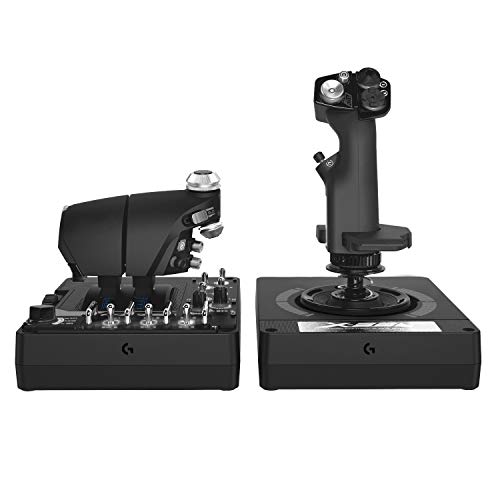
- Accurate 16-bit sensors for smooth control
- Adjustable 4-spring tension system
- 189 programmable controls with twin throttles
Best For: Sim pilots who want a feature-packed HOTAS for space combat, VR flying, and fine control.
Best for Serious Yoke Flying – Logitech G PRO Flight Yoke System
If you want a more authentic desktop setup, this logitech flight sim controller focuses on yoke-style handling, programmable inputs, and a sturdy feel that suits both new sim pilots and seasoned flyers. The steel shaft and included throttle quadrant make it a practical step up from basic gamepads or entry-level sticks.
Best For: Sim pilots who want a realistic yoke-and-throttle setup with enough controls for general aviation and training-style flying.
Pros:
- Realistic yoke controls help build muscle memory for actual aircraft-style inputs
- Stainless steel shaft delivers smooth, accurate pitch and roll movement
- 75 programmable controls give you strong customization for flight sims
- Desk clamp mounting helps keep the unit stable during longer sessions
Cons:
- Renewed condition may not appeal to buyers who want brand-new hardware
- Primarily suited to yoke-based aircraft, not every sim style or genre
This logitech flight sim controller is a solid pick if you care more about realistic control feel than compact form factor. It is especially useful for pilots who want a dependable yoke, a functional throttle quadrant, and enough buttons to reduce keyboard dependence.
Best for Xbox Flight Sim – Thrustmaster T-Flight Hotas One MSFS 2024
If you want a plug-and-play logitech flight sim controller alternative for Xbox and PC, this Thrustmaster bundle is built around Microsoft Flight Simulator 2024 compatibility and straightforward setup. The detachable throttle, dual rudder options, and solid button layout make it a practical pick for casual flyers who still want more control than a basic gamepad.
Best For: Xbox Series X|S and PC players who want an officially licensed flight stick and throttle for Microsoft Flight Simulator 2024.
Pros:
- Official Microsoft Flight Simulator 2024 licensing with Xbox and PC compatibility
- Detachable throttle and dual rudder control for flexible cockpit setups
- 10-bit precision, 14 buttons, and a multidirectional hat switch
- Expandable with compatible Thrustmaster rudder pedals
Cons:
- Not as full-featured as higher-end HOTAS systems
- Rudder pedals are sold separately
- Best suited to entry-level and midrange sim setups
This is a sensible buy if you want a dependable, officially supported flight stick without overcomplicating your setup. For shoppers comparing a logitech flight sim controller, it stands out for console-friendly compatibility and an easy learning curve.
Best Rudder Pedals – Logitech G Pro Flight Rudder Pedals
If you want a more complete logitech flight sim controller setup, these rudder pedals are a practical upgrade for adding foot-based yaw and braking control. They give you smoother ground handling, more precise coordinated turns, and a more immersive feel than stick-only flying.
Best For: Sim pilots who want realistic rudder and toe-brake control for desktop flight sims, especially alongside a Logitech/Saitek yoke.
Pros:
- Self-centering pedals deliver smooth, accurate rudder input
- Adjustable tension lets you tune the feel for light aircraft or jets
- Differential toe brakes add better runway and taxi control
- Non-slip foot rests help keep the pedals stable during use
Cons:
- Not a full standalone controller for flying without other hardware
- USB-only design is best suited to PC flight sim setups
For simmers building out a more realistic logitech flight sim controller cockpit, these pedals make a noticeable difference in control fidelity. They’re especially appealing if you care about proper rudder feel and independent toe braking more than extra buttons or flashy features.
Best for Easy Setup – Thrustmaster T-Flight Hotas X
If you want a straightforward logitech flight sim controller alternative that’s ready to fly right out of the box, the Thrustmaster T-Flight Hotas X is a practical pick. It combines a comfortable HOTAS layout, customizable controls, and a detachable throttle without demanding a complicated setup.
Best For: Beginners and casual sim pilots who want an affordable, plug-and-play HOTAS with enough customization for both civilian flying and combat games.
Pros:
- 12 programmable buttons and 5 axes let you tailor controls to your favorite flight sims.
- Detachable throttle offers flexible desk layouts and a more immersive cockpit feel.
- Adjustable stick resistance helps you fine-tune the handling to your preference.
- Preconfigured profiles make it easy to start flying quickly.
Cons:
- Not as premium or feature-rich as higher-end HOTAS systems.
- PC compatibility only, so console users will need a different option.
For buyers comparing a logitech flight sim controller with a simple HOTAS setup, this model stands out for convenience and value rather than cutting-edge realism. It’s a solid choice if you want easy setup, decent precision, and enough flexibility to grow with your sim library.
Best Radio Stack Control – Logitech G Pro Flight Radio Panel
If you want a focused logitech flight sim controller for managing radio frequencies without digging through on-screen menus, the Logitech G USB G Pro Flight Radio Panel is a practical add-on. It gives you physical dials, standby-to-active switching, and real-time LED readouts for a more cockpit-like workflow in supported sims.
Best For: Sim pilots who want a dedicated, hardware radio stack for faster frequency changes and cleaner cockpit management.
Pros:
- Twin concentric dials make frequency selection faster and more precise.
- Standby switch lets you flip frequencies to active with one press.
- LED displays update in real time in supported simulators.
- Useful for reducing reliance on on-screen radio panels.
Cons:
- Only covers radio stack functions, so it is not a full flight control setup.
- Best experience depends on simulator compatibility and software support.
This is a smart pick if your logitech flight sim controller setup needs a dedicated radio module rather than another yoke or throttle accessory. It shines most for players who value quick cockpit adjustments and a more realistic workflow.
Best Dual Stick Space Sim – Thrustmaster T16000M FCS Duo
If you want a more immersive logitech flight sim controller alternative for space combat, the Thrustmaster T16000M FCS Space Sim Duo focuses on precision, hand comfort, and full dual-stick control. Its hall effect sensors help keep inputs accurate over time, while the ambidextrous design and 32 buttons make it easy to map complex commands without reaching for the keyboard.
Best For: Space sim players who want a dual-stick setup with excellent precision, lots of inputs, and left- or right-hand flexibility.
Pros:
- Hall effect sensors for smooth, drift-resistant control
- 32 programmable buttons across both sticks
- Ambidextrous, modular design for left- or right-hand use
- Weighted bases and palm rests improve stability during long sessions
Cons:
- Dual-stick layout is better for space sims than traditional flight sims
- TARGET software adds flexibility, but also a bit of setup work
This is a strong pick if you want a logitech flight sim controller-style upgrade for spaceflight rather than a simple entry-level stick. The Duo’s accuracy and button count make it especially appealing for players who value control depth over a more basic all-in-one flight setup.
Best for Serious Flight Sim Setup – Logitech G PRO Flight Yoke System
If you want a more realistic logitech flight sim controller for home cockpit practice, the Logitech G PRO Flight Yoke System gives you a proper yoke-and-throttle layout with plenty of programmable inputs. It is aimed at simmers who want to build muscle memory and keep key aircraft functions close at hand.
Best For: New and intermediate flight sim pilots who want a more authentic yoke experience with a separate throttle quadrant.
Pros:
- Realistic yoke design helps with muscle memory and aircraft-style control.
- Includes a separate throttle quadrant for more complete sim cockpit control.
- 54+ programmable controls reduce the need to use the keyboard mid-flight.
- Steel shaft and desk clamps help keep inputs smooth and stable.
Cons:
- Requires desk space and a more permanent setup than a compact controller.
- Some advanced features depend on optional software setup.
For buyers who want a dedicated logitech flight sim controller rather than a basic gamepad, this setup stands out for realism and control density. It is a strong fit if you fly often and want hardware that feels closer to a real cockpit.
Best for Immersive Cockpit Control – Logitech G Saitek X52 Pro Flight Control System
If you want a logitech flight sim controller that feels closer to a real cockpit setup, the X52 Pro is built around a separate throttle and stick, an LCD multi-function display, and plenty of illuminated buttons for in-flight control. It’s a strong choice for PC sim pilots who want more depth than a basic joystick without jumping to a full HOTAS rig.
Best For: Flight sim players who want a feature-rich PC controller with a split throttle, programmable inputs, and a more realistic setup.
Pros:
- Separate throttle and stick for a more authentic simulation layout
- LCD display and illuminated buttons improve visibility and control
- Adjustable handle fit and contoured grip support long sessions
- Precision centering and resistance-adjustable throttle help with fine control
Cons:
- Requires two USB ports, which may be limiting on some setups
- Software setup adds extra steps for full customization
- PC-only design means it won’t suit console users
Overall, the X52 Pro stands out as a capable logitech flight sim controller for pilots who value immersion, programmability, and a more complete control experience. It’s especially appealing if you want tactile detail and cockpit-style features without moving to a much more expensive pro-level system.
Best for High-Precision Space Sims – Logitech G X56 HOTAS
If you want a logitech flight sim controller built for deep customization and precise stick feel, the Logitech G X56 HOTAS is a strong match. Its twin-throttle layout, adjustable spring tension, and 16-bit sensors make it a practical choice for flight and space sim players who want more control than a basic joystick can offer.
Best For: Sim pilots who want a feature-packed HOTAS for space combat, VR flying, and fine control.
Pros:
- 16-bit hall-effect sensors for accurate, smooth stick input
- Advanced 4-spring system lets you tune stick resistance
- Mini analog sticks and 189 programmable controls add deep customization
- RGB lighting and twin throttles suit a full sim setup
Cons:
- Requires two USB ports, which can be limiting on some PCs
- More complex than simpler entry-level controllers
For players who want a logitech flight sim controller with serious tuning options and a more immersive cockpit feel, the X56 stands out as a flexible upgrade. It is especially appealing if you fly often in space sims or VR and want control surfaces that stay close at hand.
How We Picked These Logitech Flight Sim Controller Options
We prioritized control style, platform compatibility, build quality, programmability, and value for different types of sim pilots. The goal was to cover the main control formats buyers actually choose between: yoke systems, HOTAS setups, rudder pedals, and cockpit add-ons. We also looked for products that make sense as either a full starter rig or a targeted upgrade to an existing setup.
Quick Comparison
Yoke systems are usually the best fit for civil aviation and training-style flying. HOTAS controllers work better for combat jets, helicopters, and space sims. Rudder pedals add the most realism to coordinated turns and ground handling, while panels and modules improve immersion and reduce keyboard dependence. If you want one Logitech Flight Sim Controller that can anchor a full desk setup, choose based on your primary sim genre first, not just button count.
Key Buying Factors for a Logitech Flight Sim Controller
Control Type
Match the controller to the aircraft you fly most. Yokes feel more authentic for GA and airliners. Sticks and throttles are better for high-agility aircraft. If you fly both, a modular ecosystem may be the most flexible choice.
Programmability
More programmable buttons, hats, and switches can reduce the need for keyboard shortcuts. This matters most in complex sims where you manage trim, flaps, view controls, autopilot, radio functions, and engine systems from the hardware.
Precision and Resistance
Smooth axis response and adjustable tension can improve control accuracy, especially for takeoff, landing, and formation flying. Hall effect components and well-tuned springs are worth prioritizing if you want long-term consistency.
Platform Support
Check whether the controller supports PC only or also works with Xbox. Some sim pilots need console compatibility, while others want maximum software flexibility on PC.
Expandability
If you plan to grow your setup over time, look for add-on compatibility with pedals, panels, throttles, or stick modules. A good entry-level controller should leave room for upgrades instead of forcing a full replacement later.
Who Should Buy Which Logitech Flight Sim Controller?
If you want the most realistic civilian flying feel, start with a yoke-based setup and add rudder pedals. If you fly military aircraft, space sims, or want a more compact desk footprint, a HOTAS or dual-stick setup will usually be the better fit. If you already own your main control device, add-ons like a radio panel can improve immersion and workflow without changing your core hardware.
For most buyers, the best choice is the one that matches your sim genre, desk space, and upgrade plans. A well-chosen Logitech Flight Sim Controller should feel intuitive from day one and support your setup as your skills and simulator library grow.