
A mini PC can make a Kubernetes home lab easier to run without dedicating a full-size desktop to the job. The right choice depends less on flashy specs than on how many workloads you plan to run, how much memory they need, and whether you want one capable host or several efficient nodes.
These 10 options span Ryzen-powered systems, compact Intel-based machines, and server-oriented designs. Use the product sections to compare configurations, then check the buying factors below before choosing your setup.
Best 10 Mini PC for Kubernetes Picks for 2026
Balanced Cluster Node

- 8-core, 16-thread processor
- 16GB memory and 1TB SSD
- Second M.2 slot for storage
Best For: General-purpose homelab node
Memory-Focused Workhorse

- Listed 8-core, 16-thread CPU
- Advertised 24GB onboard LPDDR5
- Two M.2 storage slots
Best For: Container-heavy single-node labs
Network-and-Storage Builder

- Dual 2.5GbE networking
- Dual SATA and PCIe x4 expansion
- 16GB LPDDR5; 64GB eMMC
Best For: Storage-oriented homelab nodes
Best Ready-to-Run Node

- 8 cores, 16 threads, and 32GB RAM
- RAM supports expansion to 64GB
- Single 2.5GbE LAN port
Best For: A RAM-ready home-lab node
Best Dual-Network Lab Pick
GMKtec G11 Ryzen Embedded R2514

- Two 2.5GbE Ethernet ports
- 16GB dual-channel DDR4 installed
- Two M.2 2280 SSD slots
Best For: Network-focused container labs
Best Storage Expansion Pick
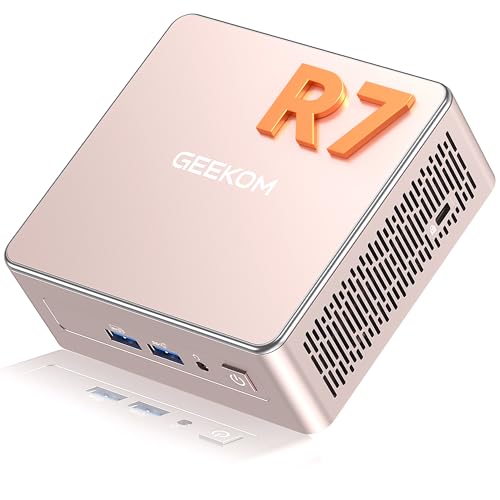
- Ryzen 7 7730U with 16GB installed RAM
- RAM upgradeable to 64GB
- Extra M.2 slot and 2.5-inch drive bay
Best For: Storage-expandable home labs
Best Expandable Compute Node

- Quad-core Ryzen 5 3500U
- 16GB RAM; supports up to 64GB
- 1TB SSD, dual M.2 slots, 2.5GbE
Best For: Expandable single-node Kubernetes labs
Best NAS-Oriented Option

- Four-core Intel N95 and 12GB LPDDR5
- Six M.2 NVMe slots; 64GB eMMC listed
- Dual Intel i226v 2.5GbE ports
Best For: Compact Kubernetes and NAS experiments
Balanced Cluster Node – KAMRUI E3B Ryzen 7 7730U
If you want a mini pc for kubernetes with room to run several services, the KAMRUI E3B combines an 8-core, 16-thread Ryzen 7 7730U with 16GB of memory and a 1TB SSD. Its compact chassis is suited to a desk or homelab shelf.
Best For: A general-purpose Kubernetes lab node that also needs generous local storage.
Pros:
- 8 cores and 16 threads provide capacity for multiple small workloads.
- Included 1TB SSD and a second M.2 slot offer storage flexibility.
- Ethernet and Wake-on-LAN are useful for a wired homelab setup.
Cons:
- 16GB of LPDDR4X memory may constrain larger clusters or memory-heavy workloads.
- The supplied notes conflict on Ethernet speed, so confirm the port specification before buying.
This is a practical all-rounder if CPU threads and local storage matter most. Check its networking specification if faster-than-Gigabit Ethernet is part of your plan.
Entry-Level Lab Pick – KAMRUI Essenx E2
The KAMRUI Essenx E2 is a potential mini pc for kubernetes when you are building a modest learning lab rather than a dense production-style cluster. The listing title specifies a Ryzen 5 3500U, 16GB of expandable DDR4 memory, and a 256GB M.2 SSD, though its accompanying notes describe a different KAMRUI P2 configuration.
Best For: Buyers seeking a small starter node who can verify the exact configuration before ordering.
Pros:
- The title lists a 4-core, 8-thread processor for lightweight lab workloads.
- Listed 16GB DDR4 memory is described as expandable.
- Compact format and listed HDMI and DisplayPort outputs allow it to double as a desktop.
Cons:
- Listed 256GB storage leaves less room for images and persistent data than larger-SSD options.
- The title and supplied bullets disagree on the model, processor, memory, storage, and display support; verify the actual unit’s specifications.
Consider this one for experiments with a small number of services, but resolve the listing discrepancies before making it part of a planned cluster.
Memory-Focused Workhorse – ACEMAGIC K1 Ryzen 7 7735HS
For a mini pc for kubernetes that needs more memory headroom out of the box, the ACEMAGIC K1 lists a Ryzen 7 7735HS with 8 cores and 16 threads, plus 24GB of onboard LPDDR5 and a 512GB SSD. Its compact case and included VESA bracket give you flexible placement options.
Best For: A single homelab node running several containers or light virtual machines.
Pros:
- 8-core, 16-thread processor suits concurrent lab workloads.
- Listed 24GB LPDDR5 provides more initial memory than the 16GB models here.
- Two M.2 slots allow additional SSD storage.
Cons:
- Onboard memory is not described as expandable.
- The supplied specifications conflict on installed RAM and processor details; confirm the configuration before purchase.
The K1 is attractive for memory-conscious labs, provided the seller confirms that the shipped unit matches the advertised 7735HS and 24GB configuration.
Network-and-Storage Builder – ZimaBoard 2 1664
The ZimaBoard 2 1664 takes a server-board approach to a mini pc for kubernetes. Its quad-core Intel N150, 16GB LPDDR5, dual 2.5GbE ports, and native SATA connections make it especially relevant when your homelab node also needs wired networking and attached storage.
Best For: A compact, always-on homelab node with direct drives or network expansion.
Pros:
- Dual 2.5GbE ports support flexible wired network connections.
- Dual SATA ports and a PCIe 3.0 x4 slot enable storage and hardware expansion.
- Listed support for Debian and Ubuntu Server offers familiar Linux installation options.
Cons:
- Its quad-core processor offers fewer cores and threads than the Ryzen 7 options here.
- Included 64GB eMMC is modest for container images and persistent data; plan additional storage as needed.
Choose this board for its server-oriented ports rather than maximum compute. It is a particularly sensible candidate when external drives or an expansion card are central to the build.
Best Ready-to-Run Node – GEEKOM A7 Ryzen 7 7730U
If you want a mini pc for kubernetes with useful memory headroom out of the box, the GEEKOM A7 pairs an eight-core, 16-thread Ryzen 7 7730U with 32GB RAM and a 500GB PCIe Gen4 SSD. Its listed 15W processor TDP makes it worth considering for an always-on home lab, though actual system power use will vary.
Best For: A small Kubernetes lab that needs to run several services without an immediate RAM upgrade.
Pros:
- 32GB installed RAM, with support for up to 64GB.
- Eight cores and 16 threads provide room for concurrent workloads.
- 2.5GbE LAN and Wi-Fi 6E offer flexible connectivity.
Cons:
- Only one LAN port is listed, limiting built-in network separation.
- The included 500GB SSD may fill quickly with images and persistent data.
The A7 is the stronger out-of-box choice here when RAM matters more than multiple Ethernet ports. Plan storage around your workloads, and treat the 15W figure as processor TDP rather than measured wall power.
Best Dual-Network Lab Pick – GMKtec G11 Ryzen Embedded R2514
The GMKtec G11 is a mini pc for kubernetes buyers who also want to experiment with networking. Its Ryzen Embedded R2514, 16GB dual-channel DDR4, two 2.5GbE ports, and two M.2 2280 SSD slots make it a flexible starting point for a compact container and network lab.
Best For: Home-lab users who want a Kubernetes node alongside separate network interfaces for routing or lab isolation.
Pros:
- Dual 2.5GbE ports allow distinct wired network connections.
- Two M.2 2280 SSD slots provide storage flexibility.
- Listed as compatible with Ubuntu and Linux.
Cons:
- 16GB installed RAM leaves less initial headroom than the 32GB A7.
- The supplied notes do not specify a RAM upgrade limit.
Choose the G11 for its network and storage layout rather than its graphics claims. If you expect many pods or virtual machines, confirm your memory needs before buying.
Best Storage Expansion Pick – GEEKOM A5 2027 Edition
For a mini pc for kubernetes that can grow into more local storage, the GEEKOM A5 2027 Edition starts with a Ryzen 7 7730U, 16GB RAM, and a 500GB NVMe SSD. Its additional M.2 2242 slot and 2.5-inch drive bay give you more ways to add capacity for lab data.
Best For: A small Kubernetes lab where expandable local storage matters more than maximum installed RAM on day one.
Pros:
- Eight-core, 16-thread Ryzen 7 7730U processor.
- Dual-slot RAM supports upgrades to 64GB.
- Extra M.2 2242 slot and 2.5-inch drive bay supplement the included NVMe SSD.
Cons:
- 16GB installed RAM may require an upgrade for heavier workloads.
- The supplied notes do not specify its Ethernet configuration.
The A5 makes sense if you expect to add drives as your lab grows. Before planning a network-heavy setup, verify its wired networking specifications separately.
Best Expandable Compute Node – GMKtec G10 Ryzen 5 3500U
If you need a mini pc for kubernetes with room to grow, the GMKtec G10 pairs a quad-core Ryzen 5 3500U with 16GB of installed DDR4 and a 1TB SSD. Its stated support for up to 64GB of RAM makes it appealing for a small lab running several workloads.
Best For: A compact Kubernetes lab that prioritizes memory expansion and local SSD capacity.
Pros:
- 16GB RAM and 1TB SSD included.
- Supports up to 64GB RAM and has two M.2 2280 PCIe 3.0 slots.
- 2.5GbE port provides wired networking for a lab node.
Cons:
- Only one Ethernet port is specified.
- Additional RAM and SSDs are not included.
The G10 is the flexible compute-first pick here: its upgrade options are useful as your cluster grows, though you will need to supply any expanded storage or memory yourself.
Best Storage-Heavy Lab Node – Beelink ME Mini N150
The Beelink ME Mini N150 is a mini pc for kubernetes buyers who also want substantial local storage. It combines a four-core, four-thread Intel N150, 12GB LPDDR5, 64GB eMMC, and an included 2TB SSD with six M.2 PCIe 3.0 SSD slots.
Best For: A small Kubernetes lab that doubles as a storage or networking testbed.
Pros:
- Includes a 2TB SSD alongside 64GB eMMC.
- Six M.2 slots support considerable SSD expansion.
- Dual 2.5GbE ports suit segmented network experiments.
- Wake-on-LAN, PXE, and BIOS power-on settings aid remote management.
Cons:
- 12GB of listed LPDDR5 may constrain memory-hungry workloads.
- Additional SSDs are needed to use the extra slots.
Choose this model when fast wired connections and multiple local SSDs matter more than a large installed memory pool. Its storage flexibility is the standout feature for a compact lab.
Best NAS-Oriented Option – Beelink ME Mini N95
For a mini pc for kubernetes that can also serve as a storage-focused lab machine, this Beelink ME Mini offers a four-core Intel N95, 12GB LPDDR5, and six M.2 NVMe SSD slots. Its dual Intel i226v 2.5GbE ports are useful for testing separate network connections.
Best For: A compact Kubernetes and NAS experiment where SSD expansion and dual Ethernet matter.
Pros:
- Six M.2 NVMe slots support 2230, 2242, and 2280 drives.
- Dual 2.5GbE ports provide two wired network connections.
- Wake-on-LAN, RTC wake, and auto power-on support unattended use.
Cons:
- Memory is listed at 12GB maximum, limiting expansion for larger workloads.
- The supplied notes list 64GB eMMC but do not specify an included NVMe SSD.
This is the NAS-leaning choice rather than a memory-upgrade pick. Budget for NVMe drives if your lab needs substantial local storage, and keep its 12GB memory ceiling in mind.
How We Picked the Best Mini PC for Kubernetes
We considered the listed CPU, memory, storage, networking, and expansion options through the lens of a small Kubernetes lab. A useful node needs enough RAM for its operating system and workloads, reliable storage for containers and cluster data, and practical connectivity. We also included different form factors: general-purpose mini desktops, lower-power machines suited to multiple nodes, and server-oriented options with extra networking or expansion appeal. Listed configurations can vary by seller, so verify the exact ports, upgrade options, and installed storage before buying.
Quick Comparison
For a single, relatively capable host, the Ryzen 7 models from KAMRUI, ACEMAGIC, and GEEKOM are the natural starting point; compare their memory and storage configurations rather than relying on CPU names alone. The Ryzen 5 3500U systems from KAMRUI and GMKtec offer a middle ground for lighter workloads. The GMKtec G11, ZimaBoard 2, and Intel-based Beelink ME models are worth considering when you favor compact, lower-power or server-oriented hardware. In particular, the listed dual 2.5GbE ports on the Intel N150 Beelink ME may matter more to a network-focused lab than extra display outputs.
Key Buying Factors for a Mini PC for Kubernetes
Memory Before Core Counts
Kubernetes itself needs resources, and databases, monitoring tools, and development services add up quickly. A 16GB configuration is a reasonable starting point for a modest lab; 24GB or 32GB gives you more room to experiment on one host. Check whether RAM is replaceable: soldered memory makes the initial capacity especially important.
Storage and Networking
Prefer an SSD with enough space for container images, persistent volumes, and logs. A small boot drive can work if you have a clear plan for additional storage, but check the number and type of expansion slots first. Wired Ethernet is the practical default for cluster nodes. Dual LAN can simplify network experiments, though a single port is sufficient for many home labs.
Software Compatibility and Day-To-Day Use
All 10 selections use x86 hardware, but confirm Linux support for the specific network and storage components you intend to use. If a system ships with Windows, account for any Linux installation or virtualization setup. Also consider idle power, cooling noise, and physical access to ports if the machine will run continuously.
Who Should Buy Which Mini PC for Kubernetes?
Choose a higher-memory Ryzen 7 configuration if you want one Mini PC for Kubernetes development, several services, or local virtual machines. Pick a 16GB Ryzen 5 system for a smaller learning environment when its price makes sense. Consider the ZimaBoard 2 or a Beelink ME if your priority is a compact home-server setup, storage, or networking flexibility; check each model’s exact expansion limits. For a multi-node cluster, a few modest machines can teach you more about scheduling and node failures than one powerful box—but budget for a switch, cables, and the added power draw.