
Game development can punish storage hard: large source assets, frequent builds, engine caches, and constant read/write activity all add up. A good NVMe SSD helps keep your workflow responsive when projects grow.
Below, we focus on fast, dependable options that make sense for real development work, from affordable Gen4 drives to top-tier high-end picks.
Best 10 NVMe SSD for Game Development Picks for 2026
Elite Gen4 Performance

- Up to 7,450 MB/s read speed
- More than 55% better random performance than 980 PRO
- 2TB Gen4 drive with strong power efficiency
Best For: High-end game development and heavy workstation use
Budget Gen4 Pick

- Up to 6,000 MB/s read speed
- Low power, PCIe 4.0 x4 NVMe design
- M.2 2280 drive with capacities up to 4TB
Best For: Affordable everyday game development storage
Heatsink Gaming Workhorse

- Up to 7,300 MB/s read speed
- Includes heatsink for thermal support
- WD_BLACK Dashboard with Game Mode 2.0
Best For: Fast game dev builds with better thermal control
Efficient New-Gen Hybrid

- Up to 7,250 MB/s read speed
- TurboWrite 2.0 and efficient nickel-coated controller
- PCIe 4.0 x4 and PCIe 5.0 x2 compatibility
Best For: Mixed desktop and laptop game development
Budget-Friendly Gen4 Upgrade for Builders
Crucial P310 1TB PCIe 4.0 NVMe

- Up to 7,100MB/s read speed
- 1TB capacity for games and dev files
- Works with laptops, desktops, and select handhelds
Best For: Indie developers and everyday users needing a flexible Gen4 upgrade
High-Capacity Workhorse for Large Projects
Predator GM7000 2TB DRAM Cache

- Up to 7,400MB/s read and 6,700MB/s write
- 2TB capacity for bigger projects and libraries
- DRAM cache, TLC NAND, and heat spreader for stability
Best For: Developers needing more space and steady Gen4 speed for larger workflows
PCIe 5.0 Speed Leader for Heavy Workloads

- Up to 14,700MB/s read speed
- Strong random performance for multitasking and loads
- Thermal control and 5nm controller improve efficiency
Best For: Advanced creators and developers with PCIe 5.0 systems
High-Speed Portable Pick
WD_BLACK SN7100 2TB for Gaming Laptops

- Up to 7,250 MB/s read speed
- 2TB capacity for large projects
- Up to 100% more power efficient
Best For: Portable developers using laptops or handheld gaming devices
Cool-Running Creator Pick
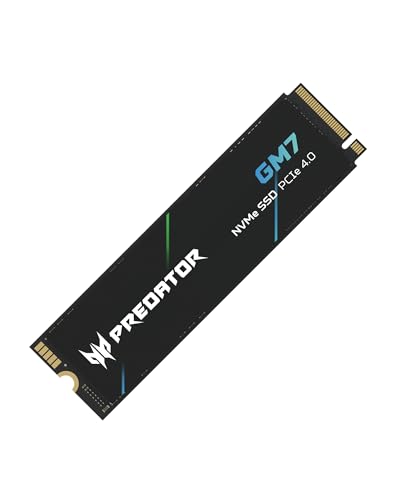
- Up to 7,400 MB/s read speed
- HMB and SLC cache support
- Thermal throttling helps manage heat
Best For: Creators and developers who want fast storage with heat control
Heatsink Bundle Pick

- Up to 7,350 MB/s read speed
- Includes heatsink and install tools
- 5-year limited warranty
Best For: Users who want an easy-install SSD bundle for PC or PS5 expansion
Elite Gen4 Performance – Samsung 990 PRO 2TB
If you want an NVMe SSD for game development that can also handle heavy workstation tasks, the Samsung 990 PRO 2TB is built for top-end PCIe 4.0 performance. Its 7,450 MB/s read speeds and strong power efficiency make it a practical pick for large project files, fast asset loading, and responsive day-to-day work.
Best For: Developers who want flagship Gen4 speed for game engines, builds, and large asset libraries.
Pros:
- Up to 7,450 MB/s read and 6,900 MB/s write speeds.
- More than 55% improvement in random performance over the 980 PRO.
- Improved power efficiency, with up to 50% better performance per watt than the 980 PRO.
- 2TB capacity gives plenty of space for saves, projects, and media.
Cons:
- Premium performance may be more than you need for lighter development workloads.
- No heatsink is mentioned in the supplied notes.
For fast iteration in game dev, this drive stands out for speed, efficiency, and strong random performance. It is a solid choice when you want storage that keeps up with large project builds and frequent file transfers.
Budget Gen4 Pick – Kingston NV3 1TB
Kingston NV3 1TB M.2 2280 NVMe SSD | PCIe 4.0 Gen 4x4 | Up to 6000 MB/s | SNV3S/1000G
Check Price On AmazonThe Kingston NV3 1TB is a straightforward NVMe SSD for game development if you want PCIe 4.0 speed without stepping into a premium price class. With up to 6,000 MB/s read performance and low power storage, it fits smaller project drives, scratch space, or a lean development build.
Best For: Budget-minded developers who need a fast, simple Gen4 drive for everyday project work.
Pros:
- Up to 6,000 MB/s read speed on PCIe 4.0 x4.
- Low power storage design.
- Compact M.2 2280 form factor for desktop and laptop use.
- Available in capacities up to 4TB.
Cons:
- 1TB capacity may feel limited for large game dev libraries.
- Performance is lower than the fastest Gen4 options in this roundup.
- 3-year warranty is shorter than some higher-end alternatives.
This is a sensible pick when your priority is value and decent Gen4 throughput rather than flagship speeds. It works best for developers who can keep their active projects organized within a smaller, efficient storage setup.
Heatsink Gaming Workhorse – WD_BLACK SN850X 1TB
The WD_BLACK SN850X 1TB is a strong NVMe SSD for game development when you want very fast load times and included thermal help. Its up to 7,300 MB/s read speed, heatsink option, and gaming-focused features make it a practical fit for demanding PCs and workstations.
Best For: Developers who want high-speed Gen4 storage with thermal management for long work sessions.
Pros:
- Up to 7,300 MB/s read and 6,300 MB/s write speeds.
- Heatsink version helps maintain peak performance during intense sessions.
- WD_BLACK Dashboard adds drive monitoring and Game Mode 2.0.
- Up to 8TB capacity options for larger libraries.
Cons:
- 1TB capacity may be tight for large engine installs and assets.
- Heatsink version is more specialized than a basic bare drive.
For game development, this drive is appealing because it combines top-tier Gen4 speed with features aimed at sustaining performance. If you work with large projects and want extra thermal headroom, it is an easy one to recommend.
Efficient New-Gen Hybrid – Samsung 990 EVO Plus 2TB
The Samsung 990 EVO Plus 2TB is a smart NVMe SSD for game development if you want strong speed with a focus on efficiency. With up to 7,250 MB/s read performance, TurboWrite 2.0, and compatibility with PCIe 4.0 x4 and PCIe 5.0 x2, it is well suited to moving large files and working through daily tasks.
Best For: Developers who want a power-efficient, high-speed 2TB drive for mixed PC and laptop workflows.
Pros:
- Up to 7,250 MB/s read and 6,300 MB/s write speeds.
- Intelligent TurboWrite 2.0 helps with large-file performance.
- Nickel-coated controller is designed for better thermal and power efficiency.
- Compatible with PCIe 4.0 x4 and PCIe 5.0 x2 systems.
Cons:
- It is not the absolute fastest option in Samsung’s lineup.
- The notes do not mention a heatsink.
This is a well-balanced choice for game dev users who care about speed, battery life, and modern platform compatibility. It should be especially appealing if you split time between a desktop and a laptop.
Budget-Friendly Gen4 Upgrade for Builders – Crucial P310 1TB PCIe 4.0 NVMe
If you want an NVMe SSD for game development that keeps load times and everyday multitasking snappy without going overboard, the Crucial P310 1TB is a practical Gen4 pick. Its up to 7,100MB/s read speed and broad compatibility make it a straightforward upgrade for laptops, desktops, and select handheld gaming systems.
Best For: Indie developers, students, and general PC users who want a reliable 1TB Gen4 drive for faster project loads and game installs.
Pros:
- Up to 7,100MB/s read and 6,000MB/s write speeds for quick game loads and faster bootups
- 1TB capacity gives room for AAA games, apps, media, and development files
- Works with laptops, desktops, and select gaming handhelds, plus PCIe Gen3 backward compatibility
- Includes Acronis Data Recovery software and a 5-year limited warranty
Cons:
- Standard Gen4 performance, so it is not aimed at top-tier workstation workloads
- 1TB may feel limited if you keep large asset libraries or many active builds on one drive
Overall, the P310 is a sensible value-first choice when you need a dependable NVMe SSD for game development, faster app launches, and flexible compatibility. It is better suited to practical everyday production than extreme performance chasing.
High-Capacity Workhorse for Large Projects – Predator GM7000 2TB DRAM Cache
For an NVMe SSD for game development that balances speed, capacity, and endurance, the Predator GM7000 2TB is built for heavier project folders and larger game libraries. It uses PCIe Gen4 speeds up to 7,400MB/s read and 6,700MB/s write, plus DRAM cache and TLC NAND for consistent performance during long sessions.
Best For: Developers who want a roomy 2TB drive for active game projects, build files, and frequent data transfers.
Pros:
- Up to 7,400MB/s read and 6,700MB/s write speeds for strong Gen4 performance
- 2TB capacity leaves more room for projects, libraries, and working assets
- DRAM cache and 3D NAND TLC support reliability and endurance
- Heat spreader and power management features help with cooling and efficiency
Cons:
- Still a PCIe Gen4 drive, so it does not reach Gen5-level headline speeds
- Its performance focus may be more than casual users need
The GM7000 is a strong pick when your development workflow needs more space than a 1TB drive and steady performance under load. It offers a good blend of speed, cooling, and durability for building and testing games.
PCIe 5.0 Speed Leader for Heavy Workloads – Samsung 9100 PRO 1TB Gen5
If you need a top-end NVMe SSD for game development and other demanding creative work, the Samsung 9100 PRO brings PCIe 5.0 performance to the table. With up to 14,700MB/s sequential read speed and strong random performance, it is aimed at fast game loads, large file handling, and multitasking-heavy workflows.
Best For: Advanced users, creators, and developers who want cutting-edge Gen5 speed for demanding projects and fast asset access.
Pros:
- Up to 14,700MB/s read and 13,300MB/s write speeds for extreme Gen5 performance
- High random IOPS support fast game loads and responsive multitasking
- Thermal control and a 5nm controller improve efficiency and help sustain performance
- Works with laptops and desktops, and supports up to 8TB if you scale up later
Cons:
- Requires PCIe 5.0 support to take full advantage of its speed
- 1TB version may be small for large source trees, assets, and build archives
The 9100 PRO is the premium option here, especially if your system and workflow can actually use Gen5 bandwidth. For serious development and content creation, it delivers impressive headroom and fast responsiveness.
High-Speed Portable Pick – WD_BLACK SN7100 2TB for Gaming Laptops
If you want an NVMe SSD for game development that also keeps up with heavy gaming workloads, the WD_BLACK SN7100 2TB is built around PCIe Gen4 speeds and strong efficiency. With up to 7,250 MB/s read and 6,900 MB/s write performance, it suits large project files, engine assets, and quick build transfers, especially on laptops and handheld gaming devices.
Best For: Developers who want a fast, power-efficient 2TB drive for laptops, handhelds, and gaming-focused work.
Pros:
- Up to 7,250 MB/s read and 6,900 MB/s write speeds for fast project loading and transfers.
- Next-gen TLC 3D NAND and PCIe Gen4 design aimed at performance-focused use.
- Up to 100% more power efficiency than the previous generation, helpful for portable systems.
- Available in 2TB capacity for storing larger games and development assets.
Cons:
- WD_BLACK Dashboard is Windows only.
- Positioned mainly for laptops and handheld gaming devices rather than workstation-focused builds.
- No included heatsink is listed in the supplied details.
The SN7100 is a strong fit if your development workflow needs speed, capacity, and better battery-friendly efficiency in a portable system. It is especially appealing when you want one drive to handle both game development tasks and everyday gaming.
Cool-Running Creator Pick – Acer Predator GM7 1TB NVMe
For a compact NVMe SSD for game development, the Acer Predator GM7 1TB focuses on high sequential speed and thermal control. Its PCIe 4.0 Gen4 interface and NVMe 2.0 support deliver up to 7,400 MB/s read and 6,500 MB/s write performance, while HMB and SLC cache help with responsive loading and file transfers.
Best For: Developers who want a fast 1TB drive with strong cooling-minded features for laptops, desktops, or PS5 storage.
Pros:
- Up to 7,400 MB/s read speed and 6,500 MB/s write speed for quick builds and asset handling.
- HMB and SLC cache are included to support performance in everyday use.
- Thermal throttling and power management are designed to help control heat.
- 5-year warranty adds long-term coverage.
Cons:
- 1TB capacity may feel limited for very large project libraries.
- Details list the drive as TLC NAND, but no heatsink is mentioned.
- Biwin Intelligence software is tied to Predator storage management.
This is a practical pick if you value fast response and better temperature control more than maximum capacity. It fits well in a development PC or laptop that also doubles as a gaming or PS5 storage setup.
Heatsink Bundle Pick – SIX X7400 1TB for PS5 and PC
If you need an NVMe SSD for game development that comes ready for expansion use, the SIX X7400 1TB offers PCIe Gen4x4 performance up to 7,350 MB/s read speed. It is marketed for laptop, desktop, and PS5 storage expansion, and the included heatsink and installation tools make it easier to get up and running.
Best For: Builders who want a ready-to-install 1TB SSD bundle for gaming, creative work, and PS5 expansion.
Pros:
- Up to 7,350 MB/s read speed for fast bootups, transfers, and game loads.
- Includes a heatsink plus installation accessories such as a screw and screwdriver kit.
- Compatible with laptop, desktop, and PS5 expansion use according to the supplied details.
- 5-year limited warranty provides extra peace of mind.
Cons:
- 1TB capacity may be restrictive for larger development libraries.
- Less established brand recognition than some mainstream SSD makers.
- Only read speed is highlighted in the notes; no separate write figure is provided there.
The X7400 stands out if convenience matters as much as speed, especially when you want included cooling hardware and a simpler install. It is a solid option for smaller development setups and console expansion projects.
How We Picked the Best NVMe SSD for Game Development
We prioritized sustained real-world performance, not just peak benchmark numbers. For an NVMe SSD for Game Development, that means strong random performance, good write consistency, solid endurance, and reliable thermals under long build sessions.
We also considered capacity options, value, compatibility with common M.2 2280 slots, and whether the drive is a sensible fit for active projects, large libraries, and engine installations.
Quick Comparison: Which Drives Fit Which Workflows?
Fast Gen4 drives are the sweet spot for most developers. They offer excellent speed for compiling, asset streaming, and loading large scenes without the cost and heat of the latest Gen5 flagships. Gen5 models are worth considering only if you regularly move massive files or want the highest possible storage performance and your system can cool it properly.
For many teams, a 1TB drive is a practical start, but 2TB is often the better long-term choice if you keep multiple projects, source control clones, SDKs, and art assets on the same disk.
Key Buying Factors for an NVMe SSD for Game Development
Sustained Write Performance
Builds, imports, light baking, and exporting assets can hammer an SSD for minutes at a time. Look for drives that maintain speed after cache runs out, not just those with impressive short bursts.
Capacity and Headroom
Game projects expand quickly. A larger drive reduces housekeeping and helps avoid slowdowns caused by a nearly full SSD. If possible, aim for 2TB as your main working drive.
Thermals and Heatsinks
Hot SSDs can throttle during long sessions. Heatsinks or strong motherboard cooling matter more in compact systems and in high-performance Gen4/Gen5 setups.
DRAM Vs. DRAM-Less Designs
DRAM-equipped drives often handle heavy, mixed workloads better, while HMB-based models can still be perfectly fine for lighter or budget-conscious setups. For a busy dev workstation, DRAM is a useful advantage.
Endurance and Reliability
Check TBW ratings and warranty terms if you move large asset libraries often. A dependable controller and NAND configuration matter more than headline speed alone.
Who Should Buy Which NVMe SSD for Game Development?
If you want the best balance for most developers, choose a strong Gen4 SSD with 2TB capacity. If you are building on a budget or need a secondary project drive, a good 1TB Gen4 model can still deliver excellent results. If your workflow includes huge datasets, frequent bulk transfers, or cutting-edge hardware, a premium Gen5 option may be worthwhile.
In short, the best NVMe SSD for Game Development is the one that matches your project size, workload intensity, and cooling setup—not just the fastest drive on the spec sheet.