
MUNBYN Receipt Printer ITPP047 review buyers usually want one thing: a dependable POS printer that works across common desktop systems without turning setup into a project.
This model is built around that exact use case.
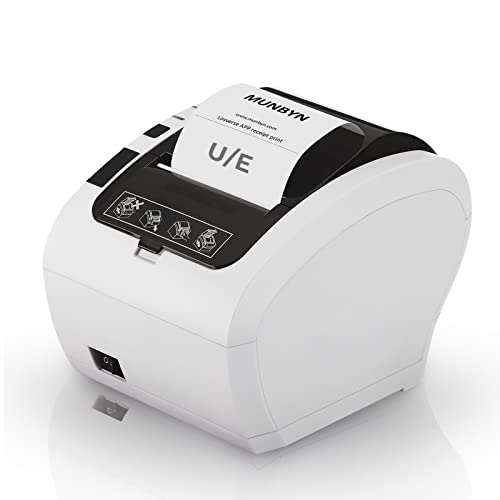
ITPP047 Review Summary
The MUNBYN Receipt Printer ITPP047 is best for retail and service businesses that need a compact thermal receipt printer with straightforward wired connectivity, broad desktop OS support, and a few practical installation touches.
If your checkout setup lives on Windows, Mac, Linux, or Chromebook and you need a USB or Ethernet receipt printer that can sit on a counter or mount on a wall, this is a sensible shortlist candidate.
Its biggest appeal is not novelty.
It is the combination of high-speed thermal printing, automatic cutting, wall-mount support, and ESC/POS compatibility in a form factor aimed at regular receipt workflows.
That makes it appealing for shops, cafes, counters, and mobile or back-office setups where every minute spent wrestling with peripherals is wasted time.
It is not for everyone.
The listing is explicit about what it will not do: no iOS support, no iPhone or iPad support, no DoorDash support, and no Square support.
That means the ITPP047 is a practical printer for the right desktop POS stack, not a universal plug-anywhere receipt device.
Buyers who can work within those boundaries get a focused tool that seems designed to be installed once and used daily.
Review Scorecard
| Category | Score | Why it earns that score |
|---|---|---|
| Print Speed | 9/10 | The listing claims 230 mm/sec and 40+ receipts per minute, which is strong for busy checkout lines. |
| Compatibility | 7/10 | Support covers Windows, Mac, Linux, and Chromebook, but app/platform exclusions narrow the field. |
| Setup Convenience | 8/10 | Driver guidance, USB drive resources, and ESC/POS support should reduce install friction. |
| Physical Design | 8/10 | Wall-mount holes and a compact receipt-printer format help it fit tight counters. |
| Business Fit | 8/10 | Clear retail and hospitality use cases make it easy to map to common receipt workflows. |
| Flexibility | 6/10 | USB or Ethernet is useful, but lack of mobile support limits deployment options. |
Key Features and Specifications of ITPP047
The ITPP047 is a thermal receipt printer with a business-first feature set.
According to the listing, it prints at 230 mm/sec and can handle 40+ receipts per minute, which is the kind of throughput that matters when a line is moving and receipts cannot become a bottleneck.
The printer includes an automatic paper cutter, which is a real operational convenience in a busy environment.
Instead of tearing receipts manually or dealing with uneven edges, the cut is handled at the printer.
That helps keep receipts orderly and can reduce small annoyances that add up during a long shift.
Connectivity is intentionally simple: USB or Ethernet.
That is useful for many fixed POS stations because it keeps the printer anchored to a stable system rather than depending on wireless behavior.
The listing also says it works with Windows, Mac, Linux, and Chromebook when used with ESC/POS commands.
A few hardware and deployment details stand out:
- Wall-hanging design with two hanging holes on the bottom
- ENERGY STAR certified according to the listing
- USB flash drive included with the driver, user manual, SDK, tools, and how-to videos
- Intended for retail stores, grocery stores, clothing stores, supermarkets, cafes, ticket points, food trucks, banks, restaurants, and similar receipt-based businesses
The inclusion of setup resources on a USB drive is especially helpful for less technical buyers.
It suggests MUNBYN expects this printer to be installed in real business environments where a bundled driver package and direct instructions matter more than flashy software.
The compatibility notes are equally important because they define the product’s actual scope.
The listing says it cannot work with Square, does not support DoorDash, and does not support iOS devices such as iPhone and iPad.
That is not a flaw if your environment does not depend on those platforms, but it is a crucial buying filter.
Pros and Cons of ITPP047
Pros
- Fast thermal output for high-volume receipt workflows
- Automatic cutter improves receipt handling and presentation
- Broad desktop OS support across Windows, Mac, Linux, and Chromebook
- USB and Ethernet give you wired deployment options
- Wall-mount support can free up counter space
- Included setup media may make initial installation easier
Cons
- No iOS support
- No Square support
- No DoorDash support
- Wired-only connections may be limiting for some modern setups
- Compatibility depends on ESC/POS support and the user’s existing POS stack
The biggest upside is that the printer seems to be engineered around operational practicality rather than broad consumer convenience.
The biggest downside is the reverse: if your workflow depends on mobile devices or specific software ecosystems, this is not the right fit.
Who Should Buy ITPP047?
This printer makes sense for buyers who need a dependable receipt printer for a fixed checkout station and already know their software environment is compatible.
It is a good fit for:
- Small retailers
- Cafes and restaurants with desktop POS systems
- Grocers and specialty food counters
- Clothing and gift shops
- Ticketing or service desks
- Any business that wants a receipt printer with wall mount flexibility and wired stability
It is also a reasonable choice if you want a printer that should be easy to explain to staff: power it, connect it over USB or Ethernet, load paper, and print receipts with minimal fuss.
Who should skip it?
Buyers who need iPhone or iPad support, Square compatibility, or DoorDash integration should not try to force this model into a setup it does not claim to serve.
Mobile-first businesses and mixed-device teams will likely be better off with a different printer line that explicitly supports those workflows.
Receipt Printing Fit and Setup
Fixed-Counter Deployment
The ITPP047 is shaped for a stable checkout station rather than a portable or ad hoc setup.
USB and Ethernet both favor permanent placement, and the wall-mount holes reinforce that this printer is meant to live in a defined spot and keep working there.
Desktop OS Compatibility
Support for Windows, Mac, Linux, and Chromebook is a meaningful advantage for mixed-IT environments.
It gives small businesses a wider range of host machines, especially when older receipt hardware is locked to one operating system and becomes difficult to replace.
Installation Resources
The included USB drive with drivers, manuals, SDK, tools, and how-to videos is one of the more practical details in the listing.
For a receipt printer, documentation quality often matters more than buyers expect, especially when a POS workflow has to be restored quickly.
Workflow Limits
The limitation list is short but decisive.
If your business depends on Square, DoorDash, or iOS devices, the ITPP047 is not an adaptable compromise.
Its value comes from doing a narrower set of tasks well, not from trying to be a universal printer for every app and platform.
Alternatives to ITPP047
If you want to compare this printer against other Amazon-available receipt printer lines, the most sensible alternatives are usually:
- Epson thermal receipt printers
- Star Micronics receipt printers
- Bixolon receipt printers
- Rongta receipt printers
Those brands are worth checking if you need a different software match, a different connection profile, or a broader ecosystem of POS integrations.
Compare them against the ITPP047 on connectivity, platform support, and the specific checkout software you already use.
Is ITPP047 Worth It?
Yes, if your setup matches the printer’s intended lane.
The MUNBYN Receipt Printer ITPP047 looks worthwhile for businesses that need fast thermal receipt output, automatic cutting, wired stability, and desktop OS compatibility in a compact unit.
It is especially attractive if you value wall-mount flexibility and prefer a printer that comes with explicit setup resources.
It is less attractive if you need mobile-device support or rely on software platforms the listing excludes.
In short: worth it for fixed POS users, not worth forcing into incompatible workflows.