
A useful remote-work gift can make a home desk more comfortable, organized, or ready for calls. These picks range from small workspace additions to larger equipment upgrades, with practical details to help match each one to the recipient.
Gift Ideas for Remote Workers
1. XPPen Magic Note Pad Digital Notebook
A Dedicated Meeting Notes Hub
XPPen Magic Note Pad Digital Notebook

- Android tablet with a 10.95-inch anti-glare LCD and three display modes.
- The included X3 Pro Pencil 2 supports pressure-sensitive writing and annotations.
- XPPen Notes supports handwriting conversion, audio recording, and PDF editing.
Best For: Remote workers who take handwritten meeting notes or mark up PDFs.
2. Mount-It! 32-Inch Standing Desk Converter
A Sit-Stand Desk Upgrade
Mount-It! 32-Inch Standing Desk Converter
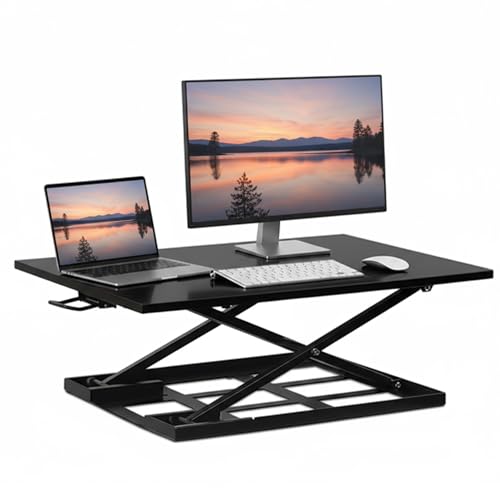
- Converts an existing tabletop into a height-adjustable workstation.
- Gas-spring lift adjusts from 2.5 to 16.9 inches.
- Arrives preassembled and has a 32-by-22-inch surface.
Best For: Someone who wants to alternate between sitting and standing at their current desk.
3. INNOCN 34-Inch Ultrawide Monitor
A Wider View for Work
INNOCN 34-Inch Ultrawide Monitor

- 34-inch, 21:9 screen with 3440-by-1440 resolution.
- Picture-in-picture and picture-by-picture modes can display two devices.
- Stand offers height adjustment and tilt; inputs include HDMI and DisplayPort.
Best For: A multitasker who compares documents, edits video, or works across windows.
4. Cleer Audio Enduro ANC Headphones
A Quieter Call and Focus Setup
Cleer Audio Enduro ANC Headphones

- Over-ear wireless headphones include active noise cancellation.
- Bluetooth multipoint supports switching between connected devices.
- Built-in microphones support hands-free calls.
Best For: A remote worker who takes calls or focuses in a noisy home.
5. Anker Prime 14-in-1 Docking Station
A More Connected Desk
Anker Prime 14-in-1 Docking Station

- Provides 14-in-1 connectivity, including dual HDMI display outputs.
- Offers up to 160W total output and data transfer speeds up to 10Gbps.
- Supports USB-C, USB4, and Thunderbolt; check laptop and operating-system compatibility.
Best For: Someone who connects a compatible laptop to displays and desk peripherals.
6. SOLAKAKA KI99 Pro Mechanical Keyboard
A Quieter Typing Companion
SOLAKAKA KI99 Pro Mechanical Keyboard

- Compact 96% layout includes a control knob for volume, media, and lighting.
- Connects by Bluetooth, 2.4GHz wireless, or USB-C.
- Quiet switches, hot-swappable keys, and RGB lighting are listed features.
Best For: A frequent typist who wants a compact keyboard with quieter switches.
7. TRALT Mesh Ergonomic Office Chair
A Home Office Seat Upgrade
TRALT Mesh Ergonomic Office Chair
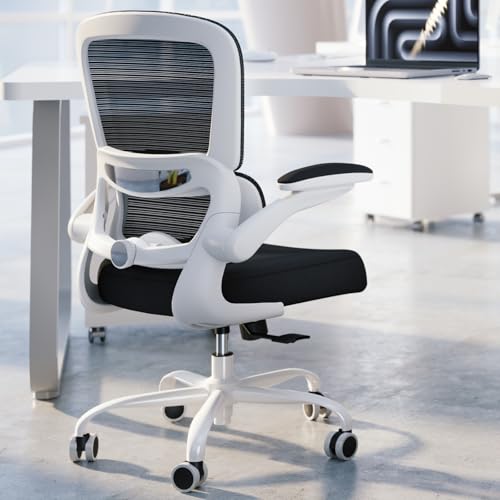
- Mesh backrest and adjustable lumbar support are designed for desk use.
- Seat height adjusts from 17.7 to 21.7 inches.
- The listing describes a 19.7-inch-wide seat and assembly required.
Best For: Someone setting up a dedicated home office chair.
8. EMEET NOVA 4K Webcam
A Camera for Video Meetings

- Webcam supports up to 4K at 30fps; its default resolution is 1080p.
- PDAF autofocus and two built-in microphones are included.
- USB-A connection and a privacy cover support a simple desk setup.
Best For: Someone who joins frequent video meetings and wants a standalone webcam.
9. Quntis Curved Monitor Light Bar
A Clearer-Lit Desk
Quntis Curved Monitor Light Bar

- Designed for 34-inch-and-larger curved screens or large flat monitors.
- Front light offers adjustable brightness and color temperature from 3000K to 6500K.
- RGB backlight modes and a foldable dual-light design add lighting options.
Best For: A remote worker with a large monitor who wants adjustable desk lighting.
10. FIFINE AmpliGame AM8 USB/XLR Microphone
A Clearer Voice for Calls
FIFINE AmpliGame AM8 USB/XLR Microphone

- Dynamic microphone offers USB and XLR connection options.
- USB mode includes tap-to-mute, a headphone jack, and gain control.
- RGB lighting and function keys are available in USB mode.
Best For: Someone who records updates, presents online, or wants a dedicated desk mic.
11. ComfiLife Memory Foam Under-Desk Footrest
A Cushioned Place for Feet
ComfiLife Memory Foam Under-Desk Footrest

- Memory foam cushion offers adjustable height for desk seating.
- Removable cover is machine washable, according to the listing.
- Can also be used beneath the knees or flipped as a rocker.
Best For: Someone who would appreciate extra foot support while seated at a desk.
12. ProtoArc EM11 NL Vertical Mouse
A Different Mouse Position
ProtoArc EM11 NL Vertical Mouse

- Vertical design supports a more upright hand position.
- Connects to up to three devices using Bluetooth or a USB-A receiver.
- Designed for small to medium hands; the listing recommends checking hand size.
Best For: A right-handed computer user curious about a vertical mouse.
13. LOXP Adjustable 360-Degree Laptop Stand
A Flexible Laptop Riser
LOXP Adjustable 360-Degree Laptop Stand

- Height and angle adjust to position a laptop screen for viewing.
- 360-degree rotating base and foldable design support flexible setups.
- Fits laptops from 10 to 16 inches, according to the listing.
Best For: Someone who uses a laptop at a desk and wants to raise or rotate its screen.
Choosing a Gift for a Remote Worker
Start with the recipient’s workday and the setup they already use. Someone who spends hours in calls may appreciate a webcam, headphones, or microphone; a person who switches between documents and spreadsheets may get more use from a wide monitor or docking station. For comfort-focused gifts, consider a chair, footrest, standing desk converter, or adjustable laptop stand. These gifts solve different problems, so a small clue—frequent video calls, a crowded desk, or a laptop perched low—can help narrow the choice.
Think about the size and permanence of the gift, too. A monitor or chair is a substantial addition and needs room. A keyboard, mouse, notebook tablet, or footrest is easier to fit into an existing workspace. If you’re unsure what they need, choose something that complements their current setup rather than replacing a central piece of equipment.
Match the Budget to the Upgrade
Remote-work gifts span a wide range of costs. Smaller accessories such as a footrest, mouse, laptop stand, or light bar can improve a desk without rebuilding it. Headphones, a keyboard, webcam, microphone, or docking station offer a more focused upgrade. Larger purchases such as a monitor, chair, or standing desk converter have a bigger footprint and may call for more planning.
A higher price does not automatically make a better gift. Consider how often the recipient would use the item and whether it addresses a real friction point. For example, a docking station can simplify a desk with several peripherals, while headphones may be more valuable to someone working around household noise. Set a budget first, then compare the features that matter for that person’s routine.
Check Compatibility and Personalization
Before buying computer accessories, check the recipient’s devices and ports. The Anker dock lists USB-C, USB4, and Thunderbolt support, plus specific operating-system limits and display behavior. The webcam connects through USB-A. The vertical mouse pairs through Bluetooth or a USB-A receiver, and its listing says it is designed for small to medium hands. The monitor light bar is intended for large screens, especially curved displays 34 inches and above, while the laptop stand fits machines from 10 to 16 inches.
Personalization can mean choosing a gift around habits rather than adding a name or festive design. A quieter keyboard may suit someone sharing a room; adjustable lighting may fit someone who works after dark. A note-taking tablet can suit a person who thinks best by hand, while an ultrawide display may help a worker who keeps several windows visible. If the item changes the way they work, a quick conversation about their setup can prevent a mismatch.
Plan Timing and Last-Minute Choices
Order early for larger or compatibility-sensitive gifts so there is time to confirm desk space, device support, and preferred size. A chair and desk converter need room; a monitor needs a place on the desk and compatible connections. For gifts being given close to Christmas, choose an accessory that fits an already-known setup, such as a footrest or mouse, rather than guessing about a major hardware change.
If timing is tight, focus on a clear use case and check current delivery details with the retailer before placing an order. Product availability and delivery dates can change, so avoid assuming a specific arrival date. For a gift that needs setup, include a simple card explaining why you chose it and offer to help connect or position it. A practical Christmas gift for a remote worker feels personal when it reflects how they actually spend their workday.