
Gaming gifts can improve a setup in useful ways, whether the recipient plays on a PC or console, streams, or simply wants a tidier desk. Consider what they already use and which small upgrade would make game time more comfortable or convenient.
11 Christmas Gift Ideas for Gamers
1. Nylavee 2.1 Computer Speakers with Subwoofer
A Desk Audio Upgrade
Nylavee 2.1 Computer Speakers with Subwoofer

- 2.1 desktop speaker system includes a dedicated subwoofer.
- Connects by USB, AUX, or Bluetooth 5.4.
- RGB lighting offers eight modes and four brightness levels.
Best For: PC gamers who sometimes prefer speakers to a headset.
2. FIFINE H9 Wired Gaming Headset
For Team Chat Sessions
FIFINE H9 Wired Gaming Headset

- Over-ear wired headset has 3.5mm and USB connections.
- Detachable boom microphone supports multiplayer voice chat.
- USB control box adjusts headphone and microphone volume and mute.
Best For: Multiplayer gamers who want a headset with a detachable mic.
3. FIFINE AmpliGame A6V USB Gaming Microphone
A Simple Streaming Starter
FIFINE AmpliGame A6V USB Gaming Microphone

- USB desktop microphone includes a tripod stand, shock mount, and pop filter.
- Tap-to-mute button and gain knob are built in.
- Gradient RGB lighting cycles through seven colors.
Best For: Gamers setting up voice chat, recording, or streaming at a desk.
4. YEELIGHT Monitor Light Bar with Remote
A Brighter Desk Setup
YEELIGHT Monitor Light Bar with Remote
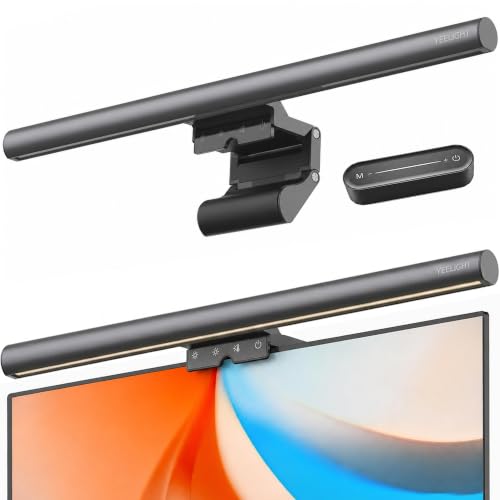
- Monitor-mounted bar has stepless brightness and color temperature adjustment.
- Remote control adjusts brightness and color temperature.
- Clip is designed for flat and curved monitors 0.3 to 1.1 inches thick.
Best For: PC gamers who want adjustable desk lighting without a lamp base.
5. Redragon K617 60% Mechanical Gaming Keyboard
Compact Keyboard for Mouse Space
Redragon K617 60% Mechanical Gaming Keyboard

- 61-key, 60% layout leaves more desk room for mouse movement.
- Hot-swap socket supports 3-pin and 5-pin switches.
- RGB backlighting includes up to 20 preset modes.
Best For: PC gamers who like compact keyboards and switch customization.
6. NEWDERY Dual PS5 Controller Charging Station
A Tidy Controller Dock
NEWDERY Dual PS5 Controller Charging Station

- Charges two compatible PS5 or DualSense Edge controllers at once.
- LED indicators show charging and standby status.
- Includes a 3.3-foot Type-C charging cable.
Best For: PS5 players who keep two controllers in rotation.
7. Guermok USB 3.0 HDMI Capture Card
For Recording Gameplay
Guermok USB 3.0 HDMI Capture Card

- Captures HDMI input for recording or streaming through capture software.
- Supports output up to 1080p at 60fps or 2K at 30Hz.
- Package includes a USB 3.0 to USB-C adapter.
Best For: Gamers who want to record or stream console or PC gameplay.
8. Redragon M612 Wired RGB Gaming Mouse
Custom Controls for PC Play
Redragon M612 Wired RGB Gaming Mouse

- Wired optical mouse has 11 programmable buttons.
- Five DPI levels are available, with software options up to 8000 DPI.
- RGB backlighting has five modes.
Best For: PC players who want programmable controls and adjustable sensitivity.
9. Large Extended Gaming Mouse Pad
More Room for Keyboard and Mouse
Large Extended Gaming Mouse Pad

- 31.5-by-15.7-inch surface fits a keyboard and mouse.
- Non-slip rubber base and stitched edges.
- Waterproof coating is described as easy to clean.
Best For: PC gamers who want a shared surface for keyboard and mouse.
10. DUMOS Ergonomic Gaming Chair
A Bigger Comfort Upgrade

- Chair has adjustable height, rocking mode, and flip-up armrests.
- PU leather seat includes a high-density memory foam cushion.
- Assembly tools and instructions are included.
Best For: A gamer looking to replace an uncomfortable desk chair.
11. AOC 27-Inch QHD Gaming Monitor
For a Major Display Refresh
AOC 27-Inch QHD Gaming Monitor

- 27-inch IPS display has 2560-by-1440 QHD resolution.
- Supports 240Hz refresh rate via DisplayPort and Adaptive-Sync.
- Includes one DisplayPort 1.4 and two HDMI 2.0 ports.
Best For: PC gamers considering a sharper, high-refresh-rate display.
Choosing a Gift for the Gamer
Start with how the recipient plays. A PC player might welcome a mouse pad, compact keyboard, or desk microphone, while a console player may get more use from a controller charging dock or capture card. For someone who plays with friends, a headset or desktop microphone can support team chat. If you are unsure what they need, a larger mouse pad or monitor light bar can refresh a setup without requiring a change to their games.
Notice the habits behind the setup. Does the player use a headset for every session, or do they prefer room audio? Do they make clips, stream, or join voice calls? Do they have a crowded desk, or is their chair visibly uncomfortable? Matching the gift to a real routine makes a modest accessory feel considered. For a shared gaming space, consider whether RGB lighting or a clickier keyboard would suit the household.
Staying Within the Budget
For Christmas gift ideas for gamers under $50, prioritize the feature the recipient will notice most. A wired mouse, extended mat, charging station, or headset offers a focused upgrade. The microphone and capture card serve creators, while speakers and a monitor light bar can change the feel of a desktop setup. Check current listings before buying, since product prices can change and the supplied product information does not establish a current price.
Large equipment deserves extra care. A monitor or gaming chair may be attractive as a main present, but confirm its price and dimensions before treating it as an under-$50 pick. These options may make more sense when the recipient has shared a specific need or when you are coordinating a larger gift. Keep any accessories, wrapping, and add-ons within your overall budget as well.
Check Compatibility and Personal Preferences
Before choosing electronics, check what the gamer owns. The headset lists USB and 3.5mm connections, while the Redragon keyboard is listed for PC and the microphone for desktop, laptop, PS4, and PS5. The capture card needs HDMI input, a computer connection, and capture software; its product notes specify that it is for capture rather than direct display output. Confirm the computer or console ports and the intended recording setup.
For PS5 controller charging, check that the recipient uses a compatible DualSense or DualSense Edge controller. The notes say to remove controller cases or skins before charging and specify a 5V/3A adapter. A monitor light bar clips to screens within its listed thickness range, so measure the monitor if you can. Personal preferences matter too: keyboard size, mouse grip, lighting, and sound output are all individual choices. A subtle desk mat can be a safer choice than a highly personalized peripheral when those preferences are unknown.
Timing and Last-Minute Decisions
For a last-minute decision, pick an item whose fit is easy to establish from the recipient’s setup. A desk mat or a charging dock for a known PS5 controller is often simpler to match than a monitor, chair, or capture setup. Check the seller’s current delivery estimate and return terms at checkout; timing and policies depend on the retailer and are not established by these product details.
If ordering close to Christmas, keep a small note with the gift explaining why you chose it and what setup details you checked. For a gift that may need more research, a card describing the intended upgrade can still make the idea feel personal while leaving the recipient involved in confirming fit. The best Christmas gift ideas for gamers are practical, compatible with the gear they use, and chosen with enough time to arrive.