
A USB hub with individual switches gives you more ports without forcing every connected device to stay powered. Flip a switch to disable a drive, webcam, controller, or accessory without unplugging it.
This roundup covers compact four-port models, high-capacity powered hubs, USB 3.0 options, and hubs with dedicated charging ports. The best choice depends on your PC setup, available desk space, and power demands.
Best 10 USB Hubs with Individual Switches for PC Picks for 2026
Best Compact Pick

- Four individually switched USB 3.0 ports
- LED indicators and a 2-foot cable
- Plug-and-play design; not for charging
Best For: Compact PC and Mac peripheral setups
Best High-Capacity Option
Zeroffi 14-Port Powered USB Hub

- 14 ports with data and charging connections
- Seven individual LED-controlled switches
- Powered 60W design with up to 5Gbps data
Best For: Busy workstations with many peripherals
Best Powered Expansion

- Ten USB 3.0 ports with individual switches
- Includes a 60W power adapter
- Up to 5Gbps; supports Windows, Mac, and Linux
Best For: Multi-device desktop workstations
Best Seven-Port Value

- Seven individually switched USB 3.0 ports
- Slim design with a 3.3-foot cable
- Broad Windows, Mac, Linux, and Chrome OS support
Best For: Portable PC and peripheral setups
Best Powered USB 3.0 Pick

- Four individual LED-lit power switches
- USB 3.0 speeds up to 5Gbps
- Includes 2.5A power adapter
Best For: Powered PC and Mac setups needing fast data and per-port control
Best Charging-Friendly Option

- Four illuminated individual switches
- Dedicated charging port supports up to 2.4A
- Includes 5V/3A adapter and 65 cm cable
Best For: Desktop users managing peripherals and charging devices
Best Budget USB 2.0 Choice
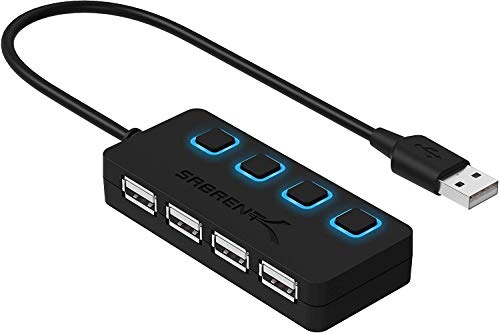
- Four individual LED-lit power switches
- Plug-and-play USB 2.0 connectivity
- Compact design for basic peripherals
Best For: Data-only PC and Mac accessories that do not need charging
Best with Extra Features

- Seven USB 3.0 data ports
- Individual on/off switches
- Dedicated 2.4A charging port
Best For: Busy PC workstations needing extensive switched USB expansion
Best Compact Aluminum Pick

- Four 5Gbps data ports
- Aluminum alloy enclosure
- Individual switches with LEDs
Best For: Home and office desks with moderate USB expansion needs
Best Maximum-Port Pick

- Ten USB 3.0 data ports
- Individual LED power switches
- 24-month warranty
Best For: Large PC setups with many peripherals and USB devices
Best Compact Pick – Sabrent 4-Port USB 3.0 Hub
If you need usb hubs with individual switches for pc use, the SABRENT HB-UM43 offers four individually controlled USB 3.0 ports in a slim, portable design. Its 2-foot cable can make access easier when a computer’s built-in ports are difficult to reach.
Best For: PC and Mac users who need a compact hub for selectively connecting everyday USB peripherals.
Pros:
- Individual on/off switches and LED power indicators for each port
- USB 3.0 data speeds up to 5Gbps, with backward compatibility for USB 2.0 and 1.1
- Plug-and-play, hot-swappable setup with a flexible 2-foot cable
Cons:
- Designed for data connectivity rather than charging
- Only four total USB ports
This is a straightforward choice for a desk or travel setup where independent port control matters more than high port capacity or charging support.
Best High-Capacity Option – Zeroffi 14-Port Powered USB Hub
For demanding desks, this powered hub combines 14 total ports with individual LED switches, making it one of the more flexible usb hubs with individual switches for pc setups. It includes dedicated charging ports alongside high-speed data connections.
Best For: Power users, gamers, creators, and professionals who need to connect and charge several devices at once.
Pros:
- 14 ports, including 10 data ports and four smart charging ports
- Seven individual LED switches for selective device control
- Powered design with a 60W adapter and USB 3.0 transfer speeds up to 5Gbps
- Front-access ports and plug-and-play compatibility with Windows and macOS
Cons:
- Uses a powered adapter, requiring additional desk and outlet space
- Only seven ports have individual switches according to the supplied specifications
Its large port count and separate charging section make it suited to a busy workstation, particularly when reducing repeated unplugging and reconnecting is a priority.
Best Powered Expansion – Sabrent 10-Port USB 3.0 Hub
The SABRENT HB-BU10 is a practical powered choice among usb hubs with individual switches for pc users who need more connections without giving up port-by-port control. It expands one USB 3.0 connection into 10 USB 3.0 ports and includes a 60W power adapter.
Best For: Desktop users with multiple hard drives, card readers, phones, and other USB peripherals.
Pros:
- Ten USB 3.0 ports with individual power switches and blue LED indicators
- Powered by an included 60W, 12V/5A adapter
- Up to 5Gbps transfer speeds with USB 2.0 and 1.1 backward compatibility
- Plug-and-play support for Windows, Mac, and Linux
Cons:
- Requires a separate power adapter and occupies more desk space than a compact hub
- Does not provide the dedicated USB-C charging-port layout described for some larger hubs
This model strikes a useful balance between capacity and manageable size, with enough powered ports for a multi-device desktop while keeping controls easy to identify.
Best Seven-Port Value – Onfinio 7-Port USB 3.0 Hub
The ONFINIO seven-port hub provides individual on/off switches and status lights in a slim, portable format. It is a useful option for usb hubs with individual switches for pc users who want several controlled ports without moving to a larger powered hub.
Best For: Laptop, PC, gaming-console, and travel setups using keyboards, mice, drives, printers, and other peripherals.
Pros:
- Seven USB 3.0 ports with individual switches and indicator lights
- Up to 5Gbps data transfer with backward compatibility for USB 2.0 and 1.0 devices
- Plug-and-play design with a built-in 3.3-foot cable
- Compatible with Windows, macOS, Linux, and Chrome OS
Cons:
- Power-hungry devices may require an extra power supply
- Charging performance is not presented as a dedicated feature
Choose this hub when portability and independent control are important, but your setup does not require the dedicated power adapter and charging ports found on powered models.
Best Powered USB 3.0 Pick – SABRENT 4-Port Hub
If you need USB hubs with individual switches for PC use, the SABRENT HB-UMP3 adds four USB 3.0 ports and lets you control each connected device separately. Its included 2.5A power adapter makes it a practical choice for a powered desktop setup.
Best For: PC or Mac users who want fast USB 3.0 data transfers and individual control over peripherals.
Pros:
- Four LED-lit power switches control ports independently.
- Supports USB 3.0 transfer speeds up to 5Gbps.
- Includes a 5V/2.5A power adapter and supports plug-and-play setup.
- Compact, lightweight design is easy to place or travel with.
Cons:
- Provides only four additional ports.
- Plastic enclosure may feel less substantial than a metal hub.
The HB-UMP3 is a straightforward powered hub for a PC workstation where fast transfers and port-by-port power control matter. It also remains compatible with USB 2.0 and USB 1.1 devices.
Best Charging-Friendly Option – atolla 4-Port USB 3.0 Hub
For USB hubs with individual switches for PC, the atolla powered hub combines four switched USB 3.0 data ports with a separate charging port. Its long 65 cm cable and included 5V/3A adapter can make it easier to position on a desktop.
Best For: Desktop users who want switched data ports plus a dedicated port for charging compatible mobile devices.
Pros:
- Four illuminated switches make it easy to disable individual ports.
- USB 3.0 data ports support speeds up to 5Gbps.
- Dedicated charging port can provide up to 2.4A.
- Includes a 5V/3A adapter and supports Windows, Mac OS X, and Linux.
Cons:
- The charging port is separate from the four switched data ports.
- The plastic case may not suit users seeking a metal enclosure.
With its charging-focused extra port, longer cable, and broad operating-system compatibility, the atolla is a versatile choice for a PC desk supporting both peripherals and mobile devices.
Best Budget USB 2.0 Choice – SABRENT Switchable Data Hub
If your PC peripherals do not require USB 3.0, this SABRENT hub offers four USB 2.0 ports with individual LED-lit switches. It is a compact, plug-and-play option for controlling keyboards, mice, flash drives, and other USB-compatible devices.
Best For: PC and Mac users who need simple switched USB 2.0 expansion for data peripherals.
Pros:
- Individual on/off switches simplify connecting and disconnecting devices.
- LED indicators show the power status of each port.
- Compact design supports easy placement and organization.
- Plug-and-play and hot-swappable operation requires no driver installation.
Cons:
- USB 2.0 limits transfer speeds to 480Mbps.
- Does not support charging.
- Provides data connectivity only.
The HB-UMLS is best suited to basic peripherals and accessories where individual switching matters more than USB 3.0 performance or charging capability. It can also be daisy-chained with other hubs, up to the stated 127-device maximum.
Best with Extra Features – Atolla 8-Port USB 3.0 Hub
If you need usb hubs with individual switches for pc, this powered Atolla model provides seven USB 3.0 data ports plus a dedicated smart-charging port. Its 5Gbps transfer rate, included power adapter, and individual controls make it practical for a busy desktop setup.
Best For: PC users who need many switched data ports and a separate charging port.
Pros:
- Seven USB 3.0 data ports support transfer speeds up to 5Gbps.
- Individual on/off switches let you disable devices without unplugging them.
- Dedicated charging port can provide up to 2.4A with the included 5V/4A adapter.
- Supports Windows, macOS, Linux, hot swapping, and plug-and-play operation.
Cons:
- The larger port count may take up more desk space than a compact hub.
- The charging port is separate from the seven data ports.
Choose this model when expansion capacity matters most. The included 100cm USB cable and powered design also make it easier to position connected peripherals around a workstation.
Best Compact Aluminum Pick – Atolla 5-Port USB 3.0 Hub
For shoppers comparing usb hubs with individual switches for pc, this five-port Atolla hub offers a smaller setup with four USB 3.0 data ports and one smart-charging port. Its aluminum enclosure suits home and office desks, while LED indicators show each port’s status.
Best For: Users who want a compact, metal-bodied hub for everyday peripherals and charging.
Pros:
- Four USB 3.0 data ports support speeds up to 5Gbps and work with older USB devices.
- Individual switches control each port without requiring repeated unplugging.
- LED indicators show whether each port is on or off.
- Includes a 5V/3A power adapter and supports plug-and-play use.
Cons:
- It provides fewer total ports than the larger models in this roundup.
- The charging port is intended for charging rather than USB data transfer.
This is a sensible middle ground for a PC desk with a keyboard, mouse, storage device, and one additional accessory. The aluminum construction adds a more polished feel without moving to a larger hub.
Best Maximum-Port Pick – Wenter 11-Port USB 3.0 Hub
If your PC setup uses many accessories, this Wenter hub is one of the usb hubs with individual switches for pc designed for maximum expansion. It combines ten USB 3.0 data ports with a dedicated charging port, individual LED switches, and a 12V/3A power adapter.
Best For: Users running numerous peripherals, storage devices, and USB-powered accessories from one hub.
Pros:
- Ten USB 3.0 data ports provide transfer speeds up to 5Gbps.
- Individual on/off switches and LEDs make port-level power control easy.
- Dedicated charging port can deliver up to 2.4A per port with the included adapter.
- Includes a 100cm USB cable, a long power cable, and a 24-month warranty.
Cons:
- The 11-port layout is likely more space-consuming than a five-port hub.
- The product notes contain two different stated power-cable lengths, so verify the included cable if reach is important.
This model is the strongest fit when port count outweighs compactness. Broad compatibility with USB 3.0, 2.0, 1.1, and 1.0 peripherals also helps when a setup mixes newer and older devices.
How We Picked the Best USB Hubs with Individual Switches for PC
We focused on hubs that provide individually controlled USB ports, since per-port switches are the defining feature of this category. We also compared port count, USB generation, external power, charging support, switch visibility, and practical desktop use. The selection includes USB 2.0 and USB 3.0 models, compact hubs for basic peripherals, and powered units designed for several devices or higher-demand accessories.
Because specifications can vary by configuration, check the listing for exact data rates, power-adapter output, charging limits, operating-system compatibility, and whether every port supports data. A dedicated charging port may not provide the same function as a standard data port.
Quick Comparison
| Best For | What to Look For |
|---|---|
| Keyboard, mouse, and occasional accessories | Four ports, USB 3.0, compact design |
| Multiple storage devices | Powered USB 3.0 ports and adequate adapter capacity |
| Charging phones or peripherals | A dedicated smart-charging port and clear power specifications |
| Many connected devices | Eight to 14 ports, external power, and accessible switches |
| Older or low-bandwidth accessories | USB 2.0 can be sufficient and may cost less |
Key Buying Factors for USB Hubs with Individual Switches for PC
Port Type and Speed
USB 3.0 is the better default for external SSDs, flash drives, card readers, and other devices that move files. USB 2.0 remains suitable for keyboards, mice, printers, and similar low-bandwidth peripherals. Confirm whether the upstream connection and individual ports support the speed you need.
Power and Charging
A powered hub draws electricity from an included adapter rather than relying entirely on the PC. This helps when several devices are connected or when bus-powered drives need more stable power. Do not assume a charging port transfers data, or that a high port count means every port can deliver maximum power simultaneously.
Switch Layout and LEDs
Individual switches are most useful when they are easy to reach and clearly labeled. LEDs make the active ports visible, but bright indicators can be distracting in a bedroom or office. Also consider whether the switches control data, power, or both according to the manufacturer’s specifications.
Size, Cable, and Compatibility
Measure the space near your PC and check the hub’s cable length. A model designed for a desktop tower may be less convenient with a laptop or monitor. Most modern USB hubs are broadly compatible, but verify support for your operating system and any specialized devices before buying.
Who Should Buy Which USB Hubs with Individual Switches for PC?
Choose a compact four-port USB 3.0 hub if you mainly need convenient control for a few peripherals. Pick a powered eight- to 11-port model for a busy workstation with storage, input devices, and accessories. A 14-port hub makes sense when maximum expansion matters more than desk space. Select a USB 2.0 model only when your devices do not need fast file transfers. If phone or accessory charging is a priority, favor a powered hub with a clearly identified smart-charging port and suitable output ratings.