
Finding the right remote can make television easier and less frustrating for seniors, especially when small buttons, crowded layouts, and complicated streaming controls get in the way.
We compared 10 large-button universal remotes across button design, setup, compatibility, device support, and ease of everyday use so you can choose a practical match for the viewer and TV system.
Best 10 Universal Remote Controls for Seniors Picks for 2026
Best Value
GE Big Button 2-Device Universal Remote

- Large, readable buttons with an ergonomic design
- Controls a TV and one additional compatible device
- Supports automatic setup and master volume control
Best For: Simple two-device entertainment setups
Best Simplified Pick

- Controls an IR TV and cable box
- Six large, backlit buttons
- Learning mode and wrist strap
Best For: Seniors needing simple TV and cable-box control
Best for Multiple Devices
RCA Big Button Three-Device Remote

- Controls up to three devices
- Supports many major TV brands
- Offers four setup methods
Best For: Managing a TV and two additional compatible devices
Best for Easy TV Setup
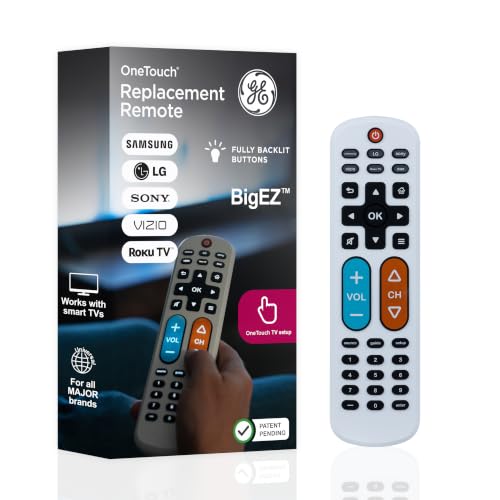
- Preset setup for five TV brands
- Large, fully backlit buttons
- Controls a TV plus one device
Best For: Seniors wanting visible controls and quick setup
Best Value – GE Big Button 2-Device Universal Remote
For shoppers comparing universal remote controls for seniors, the GE Big Button Universal Remote is a practical choice for simple two-device setups. Its large, easy-to-read buttons, ergonomic shape, and support for TVs, soundbars, cable boxes, and similar devices help reduce remote clutter.
Best For: Seniors who need a readable remote for a TV plus one additional compatible device.
Pros:
- Large buttons and an ergonomic design support easier handling and reading.
- Controls up to two compatible devices, with master volume control.
- Offers automatic code search, direct code entry, and U.S.-based technical support.
Cons:
- Requires two AA batteries, which are not included.
- Its two-device limit may not suit more complex entertainment systems.
This GE remote is a strong all-around pick for basic home, nursing-home, hotel, or assisted-living setups. It provides more flexibility than a TV-only remote without adding many controls.
Best for Dementia Care – Flipper Big Button TV Remote
The Flipper Big Button TV Remote is designed specifically for seniors, including people with dementia, Alzheimer’s, low vision, or dexterity challenges. Among universal remote controls for seniors, it stands out for its color-coded layout and intentionally limited everyday controls.
Best For: Seniors and caregivers who want simple control of basic TV and cable or satellite functions.
Pros:
- Color-coded, oversized buttons make power, volume, channels, and mute easier to identify.
- Controls compatible TVs and cable or satellite boxes from one remote.
- Can be customized with up to 25 favorite channels.
Cons:
- Does not navigate streaming apps or devices such as Roku, Fire TV, or Apple TV.
- Requires two AA batteries, which are not included.
Flipper is especially useful when simplicity matters more than broad functionality. Its hidden customization buttons and favorite-channel feature can help caregivers create a less confusing viewing experience.
Best Plug-and-Play Pick – Gvirtue Big Button TV Remote
The Gvirtue Big Button Universal Remote is a straightforward option for shoppers seeking universal remote controls for seniors that work with a TV without programming. Its large controls and tactile feedback are intended to make everyday operation easier for users with limited vision or dexterity.
Best For: Seniors who need a simple replacement remote for a compatible television only.
Pros:
- Large buttons, tactile feedback, and an extra-large Enter button support accessibility.
- Works with many major TV brands, including Samsung, LG, VIZIO, Sony, and Hisense.
- Requires no programming when used with a Samsung TV.
Cons:
- Controls one television only.
- Is not compatible with streaming devices, cable boxes, or unrelated TV platforms.
- Requires two AAA batteries, which are not included.
This is best treated as a TV-only remote rather than a complete entertainment-system controller. Confirm the television’s compatibility before buying, particularly if the setup includes a cable box or streaming device.
Best Long-Range Option – EZClicker Simple Big Button Remote
The EZClicker TV Remote is a compact, TV-only choice for those comparing universal remote controls for seniors. It combines large buttons with a straightforward setup process and a listed range of up to 45 feet, while avoiding the complexity of streaming and cable-box controls.
Best For: Seniors who want a lightweight remote for a compatible television from across the room.
Pros:
- Large buttons and tactile feedback are designed for easier use.
- Programming uses a simple Mute and Volume+ button sequence.
- Compact, lightweight design and a listed 45-foot maximum range.
Cons:
- Works with TVs only and does not control cable boxes or streaming devices.
- Requires checking the listed compatible TV models before purchase.
- Two AAA batteries are required and not included.
EZClicker makes sense for a basic television setup where reach and handling comfort are priorities. It is not suitable for households that need one remote to operate a cable box, Roku Stick, Firestick, or streaming apps.
Best Simplified Pick – EasyMote Big Button TV Remote
For shoppers comparing universal remote controls for seniors, the EasyMote focuses on essential TV and cable-box functions without a crowded layout. Its six large, backlit buttons, wrist strap, and learning mode make everyday operation easier, including in low-light settings.
Best For: Seniors or caregivers seeking a simple remote for one infrared TV and set-top box.
Pros:
- Controls both an IR television and cable box from one remote.
- Six large, clearly labeled buttons are backlit for visibility in the dark.
- Quick Search and learning mode support straightforward setup and custom commands.
- Includes a strong wrist strap to help prevent misplacement.
Cons:
- Supports a maximum of one device category setup rather than multiple devices.
- Has a stated range of 10 feet.
- Two AA batteries are required and not included.
The EasyMote is a particularly focused choice when simplicity matters more than extensive device control. Confirm that the TV and cable box use infrared, and note that IR may need to be activated on some Xfinity or Dish equipment.
Best for Multiple Devices – RCA Big Button Three-Device Remote
The RCA RCR313BE is a practical option among universal remote controls for seniors who want to consolidate several entertainment remotes. It supports up to three devices and offers multiple setup methods, while its big-button design keeps the controls relatively straightforward.
Best For: Households that need one remote for a TV, disc player, and cable, satellite, or digital TV device.
Pros:
- Controls up to three devices with long-range infrared operation.
- Includes keys for TV, DVD or VCR, and satellite, cable, or digital TV equipment.
- Works with many major brands, including Samsung, Vizio, TCL, LG, Sony, and Hisense.
- Offers automatic, brand, manual, and direct code search setup methods.
Cons:
- Requires two AA batteries, which are not specified as included.
- Its listed warranty is limited to 30 days.
- Setup and device switching may be less minimal than a single-device remote.
This RCA model makes the most sense when consolidating several compatible devices is a priority. It also lists streaming controls for Roku, Apple TV, and other streaming boxes, but buyers should verify compatibility with their specific setup.
Best for Easy TV Setup – GE BigEZ OneTouch Remote
The GE BigEZ OneTouch is designed for shoppers seeking universal remote controls for seniors with a quick TV setup process. Large backlit buttons, color-coded volume and channel controls, and preset support for five TV brands make it approachable for everyday viewing.
Best For: Seniors who want a large, visible remote for a Samsung, LG, Vizio, Sony, or Roku TV, plus one additional device.
Pros:
- Preset TV buttons support Samsung, LG, Vizio, Sony, and Roku TVs.
- Large backlit buttons and color-coded volume and channel controls improve visibility.
- Can operate a TV plus one device such as a Blu-ray player, cable box, streaming player, or soundbar.
- Includes U.S.-based technical support and online programming videos.
Cons:
- Two AA batteries are required and not included.
- Its preset TV support is centered on five listed brands.
- The AUX button is preset for Roku boxes and must be programmed for another device.
For compatible TVs, the BigEZ offers a notably simple path from battery installation to normal operation: press the TV button for the brand, then press power. Its 30-foot listed range and limited-lifetime warranty add practical appeal for a long-term replacement remote.
Best Illuminated Pick – Big Button TV Remote Replacement
For shoppers comparing universal remote controls for seniors, this Gvirtue model emphasizes visibility, compatibility, and quick response. Its illuminated keys, large buttons, four shortcut keys, and support for major TV brands make everyday TV operation simpler, especially in low light.
Best For: Seniors who want a backlit, big-button remote for a single compatible TV.
Pros:
- Compatible with Samsung, VIZIO, LG, Sony, Philips, and other TVs.
- Illuminated keys become visible after exposure to indoor light.
- Offers four shortcut buttons and infrared control up to 40 feet.
- Memory reportedly remains when batteries are changed.
Cons:
- Controls one device only: a television.
- Battery setup may require following the included instructions if automatic use does not work.
- Batteries are not specified as included in the supplied details.
This is a practical choice when clear button visibility matters most. Confirm your TV brand and model before ordering, then consider it for rooms where low-light operation is common.
Best Simple Setup – EZclicker Big Button Universal TV Remote
This EZclicker is designed for shoppers seeking universal remote controls for seniors with a straightforward layout. Its extra-large Enter button, tactile feedback, 13-button design, and guided programming process prioritize ease of handling over controlling multiple devices.
Best For: Seniors or users with limited dexterity or vision who need a lightweight remote for a television.
Pros:
- Large buttons and tactile feedback support easier operation.
- Programming uses a simple Mute and Volume+ button sequence.
- Works with major TV brands and has a stated range of up to 45 feet.
- Includes a five-year warranty.
Cons:
- For televisions only; it does not control cable boxes, Firesticks, or Roku sticks.
- Two AAA batteries are required but not included.
- Compatibility should be checked against the provided model list.
Choose this remote when a compact, deliberately simplified control scheme is more important than smart-device or cable-box compatibility. Its limitations are clear, but that focus can make it less confusing for many users.
Best No-Program Option – LuckyStar Big Button Universal Remote
Among universal remote controls for seniors, the LuckyStar A-TV2 stands out for its minimal setup. The manufacturer says users can put in the batteries and begin using it without programming, while its automatic search function expands compatibility beyond the listed LG, Vizio, Sharp, Zenith, Panasonic, Philips, and RCA modes.
Best For: Seniors who want a basic television remote with minimal setup and a comfortable shape.
Pros:
- No programming is needed according to the supplied product notes.
- Automatic search supports more than 1,000 U.S. market TV brands.
- Offers three mode choices for several major TV brands.
- Includes a one-year manufacturer warranty.
Cons:
- Compatibility with the newest models is not guaranteed.
- Controls one television only.
- Requires two AAA batteries, which are not included.
This model is most appealing for buyers who want a straightforward replacement rather than a feature-heavy controller. Its short 10-foot listed range and possible limits with newer TVs make model verification worthwhile before purchase.
How We Picked the Best Universal Remote Controls for Seniors
We focused on the features that matter most in real living rooms: large, readable buttons; simple layouts; dependable TV compatibility; accessible power and volume controls; and setup instructions that do not require extensive technical knowledge. We also considered whether a remote supports only a television or can control additional devices such as a cable box, streaming player, or sound system.
Because needs vary, this list includes both basic replacement remotes and more specialized options. Some prioritize minimal controls, while others add backlighting, learning functions, or multi-device support.
Quick Comparison
- Simplest TV-only options: Flipper, GE BigEZ OneTouch, and EZclicker models.
- Best for several devices: RCA RCR313BE and EasyMote models with multi-device support.
- Best for dark rooms: Backlit EasyMote designs.
- Best for broad TV compatibility: GE, RCA, LuckyStar, and the multi-brand replacement remotes.
- Best for streaming setups: Models that explicitly include Roku or other streaming-device compatibility.
Key Buying Factors for Universal Remote Controls for Seniors
Button Size and Layout
Large, high-contrast buttons are helpful for users with reduced vision or limited dexterity. Look for clearly separated controls and a layout that places power, volume, channel, and mute where they are easy to find.
Setup and Compatibility
Check the remote’s listed compatibility with the television brand and model. Automatic code search can simplify setup, while brand-specific presets may be faster. If the TV uses a separate cable box or streaming device, confirm that the remote supports it before buying.
Control Scope
A TV-only remote can reduce confusion, but a multi-device remote may eliminate the need to manage several controllers. Avoid paying for advanced functions that the intended user will not need.
Backlighting and Special Features
Backlighting is useful in dim rooms, while learning functions can copy commands from an existing remote. These features are convenient, but they may add setup complexity, so prioritize simplicity when assistance is limited.
Who Should Buy Which Universal Remote Controls for Seniors?
Choose a minimalist TV-only remote for someone who wants dependable power, volume, and channel control without streaming buttons. Pick a multi-device model for households using a cable box, DVD player, or audio system. A backlit remote suits viewers who watch in low light, while a Roku-compatible option is better for homes that regularly stream content. For users with memory or dexterity challenges, favor the clearest layout and fewest unnecessary buttons over the greatest number of features.