
A standing desk can improve workspace flexibility, but loose power and monitor cables quickly undermine a clean setup. The best models combine reliable height adjustment with a built-in tray or cable-management system that keeps cords controlled.
We compared 10 standing desks with cable management trays across sizes, storage features, frame designs, work-surface materials, and setup needs to help you choose a practical fit for your office or home workspace.
Best 10 Standing Desks with Cable Management Tray Picks for 2026
Storage-Focused Choice

- Hidden rear tray conceals desk cables
- Includes two drawers, keyboard tray, and monitor shelf
- Built-in outlets, USB ports, and three memory heights
Best For: Feature-rich home-office workstations
Best Charging Features
55-Inch White Electric Standing Desk

- Metal rear cable box and routing channel organize cords
- USB-C controller includes timer and memory functions
- 176-pound capacity with reinforced T-frame
Best For: Dual-monitor and equipment-heavy workspaces
Best for Corner Workspaces

- Large reversible 70.8-by-39.4-inch workspace
- Cable tray, clips, and hooks organize accessories
- Dual crossbars, four presets, and 176-pound capacity
Best For: Corner offices and multi-monitor setups
Compact Storage Pick

- Electric adjustment with four memory presets
- Integrated keyboard tray and two drawers
- Supports up to 154 pounds
Best For: Small offices, dorms, and organized workstations
Large Surface Value
TIQLAB Electric Desk with Cable Management

- Extra-depth tabletop for larger setups
- Cable tray, cable box, drawers, and hooks
- Listed 176-pound load capacity
Best For: Roomy home offices, gaming, drafting, and study areas
Best Value Maple Desk
TIQLAB 47.2-Inch Standing Desk
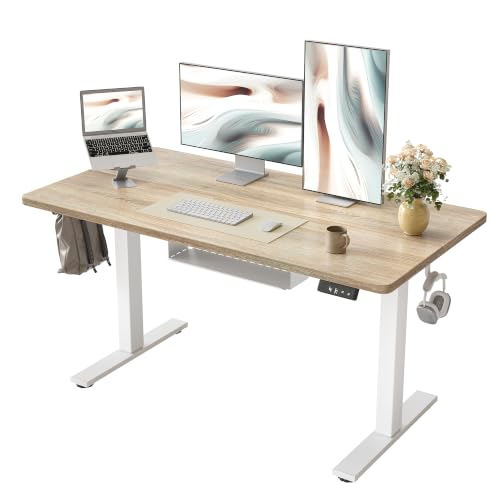
- 28.3–45.6-inch electric height range
- Two memory presets and cable tray
- 176-pound capacity with quiet operation
Best For: Compact home offices, study spaces, and gaming setups
Best Executive Design
FLEXISPOT 63-Inch Solid Wood Standing Desk

- Solid rubberwood top with walnut finish
- Cable tray, drawer, and built-in power outlet
- Dual motors, four presets, and 222-pound capacity
Best For: Spacious executive home offices and multi-monitor workstations
Best for Monitor Setup
FLEXISPOT 60-Inch Standing Desk

- Integrated monitor riser and cable tray
- One-piece, 1-inch-thick desktop
- 60-inch width with 176-pound capacity
Best For: Multi-monitor home offices, studying, and remote work
Stable Cable-Managed Pick – FEZIBO 48-Inch Electric Standing Desk
If you want standing desks with cable management tray features without taking up too much space, this 48-by-24-inch FEZIBO model is a practical choice. Its L-shaped crossbar, magnetic cable track, and built-in pegboard help organize wiring, while the electric frame adjusts from 28.3 to 46.5 inches.
Best For: Home offices, gaming setups, and compact workspaces that need organized cables and a stable sit-stand frame.
Pros:
- L-shaped crossbar is designed to reduce wobble and improve frame stability.
- Built-in pegboard, magnetic cable track, and included cable management tray help conceal and route wires.
- Three memory presets and a 50,000-cycle motor rating support regular sit-stand use.
- Most components come pre-assembled, with setup estimated at about 30 minutes.
Cons:
- The 48-inch surface offers less room than larger desks for multiple accessories.
- Its engineered-wood top may not feel as substantial as a solid-wood surface.
The FEZIBO stands out when stability and built-in organization matter more than maximum desktop space. It is a well-suited option for users who want a tidy, moderately sized workstation with simple electric height control.
Storage-Focused Choice – AODK 55-Inch Standing Desk
This AODK model combines the appeal of standing desks with cable management tray storage and office-friendly extras. The 55-inch desk includes a hidden rear cable tray, two drawers, a keyboard tray, a monitor shelf, and an electric height range of 29.9 to 46.1 inches.
Best For: Home-office users who want storage, charging ports, monitor elevation, and concealed cables in one workstation.
Pros:
- Hidden cable-management tray keeps wires out of sight behind the desk.
- Two drawers and a keyboard tray provide accessible storage for office accessories.
- Built-in three-outlet, two-USB power system adds convenient device charging.
- Three height-memory settings simplify switching between sitting and standing.
Cons:
- The drawers are fabric rather than hard-sided cabinet drawers.
- The monitor shelf and storage components add assembly complexity compared with a basic desktop.
- The 21.25-inch depth provides less front-to-back space than some larger work surfaces.
Choose the AODK if organization extends beyond cable routing. Its storage, keyboard tray, monitor shelf, LED lighting, and built-in power make it a feature-rich workstation, though buyers should confirm that the compact depth suits their equipment.
Best Charging Features – 55-Inch White Electric Standing Desk
For shoppers comparing standing desks with cable management tray systems, this 55-inch white desk offers a thorough approach to wire organization. A rear metal box holds a power strip, a center routing area helps the desk sit close to the wall, and a movable cable clip handles loose cords.
Best For: Dual-monitor, gaming, and office setups that need strong cable routing, USB-C charging, and a broad desktop.
Pros:
- Rear metal cable box, routing channel, and movable clip provide multiple cable-management options.
- Controller includes a USB-C charging port, height display, memory functions, and timer reminders.
- Reinforced T-frame, 2.6-inch support columns, leveling feet, and a 176-pound capacity support heavier setups.
- Anti-collision protection reverses the desktop when it detects an obstacle.
Cons:
- The tabletop is listed as wood, but the supplied notes do not specify the exact wood construction.
- Two people are recommended for assembly.
- The feature-rich controller may require more setup and adjustment than a basic control panel.
This desk is particularly compelling when cable routing and charging are priorities. Its broad surface and stated 176-pound capacity also make it suitable for equipment-heavy setups, while anti-collision protection adds a useful safety feature.
Best for Corner Workspaces – HUANUO L-Shaped Standing Desk
This HUANUO L-shaped desk is a spacious option for shoppers seeking standing desks with cable management tray features and room for multitasking. Its 70.8-by-39.4-inch reversible layout includes a cable tray, clips, and two hooks, while the electric frame adjusts from 28 to 45.7 inches.
Best For: Corner offices, multi-monitor users, and anyone who needs a large reversible workstation with organized accessory storage.
Pros:
- Large L-shaped surface provides separate main and return sections for equipment and work materials.
- Cable tray, clips, and two hooks help organize cords and accessories beneath the desk.
- Dual S-shaped crossbars, widened feet, and a 176-pound capacity are designed for stability.
- Four memory presets and reversible left- or right-facing configuration improve flexibility.
Cons:
- The 70.8-by-39.4-inch footprint requires considerably more room than a standard rectangular desk.
- Two-person assembly is recommended.
- Its maximum height of 45.7 inches is slightly lower than some competing models.
The HUANUO is the strongest fit here for users who need a true corner workstation rather than a compact desk. Its substantial surface, thickened tabletop, reversible design, and included cable accessories make it practical for expansive, equipment-heavy setups.
Compact Storage Pick – SHW 48-Inch Electric Desk
The SHW 48-inch desk is a practical choice among standing desks with cable management tray features, especially for smaller offices, dorm rooms, and study spaces. Its electric height adjustment, memory presets, keyboard tray, and drawers combine ergonomic flexibility with useful everyday storage.
Best For: Home offices, dorm rooms, and users who want built-in storage and an integrated keyboard tray.
Pros:
- Electric height adjustment from approximately 30 to 45 inches with four memory presets.
- Integrated keyboard tray supports a more ergonomic typing setup.
- Two sliding drawers and listed cable-management features help keep supplies and cords organized.
- Supports up to 154 pounds.
Cons:
- The 48-by-24-inch work surface is more compact than larger desk options.
- Assembly is required, and the manufacturer recommends two people.
Choose this model if storage and a keyboard tray matter as much as sit-stand adjustment. It is less suited to users who need a very large surface for multiple monitors and extensive equipment.
Large Surface Value – TIQLAB Electric Desk with Cable Management
The TIQLAB desk stands out among standing desks with cable management tray designs for shoppers who want generous working space and built-in organization. Its extra-depth top, cable management tray, drawers, hooks, and electric lifting system support work, study, drafting, and gaming setups.
Best For: Users who need a roomy workstation with cable organization, storage drawers, and extra tabletop depth.
Pros:
- Includes a cable management tray and cable management box for tidier wiring.
- Extra-depth 28-inch tabletop provides room for larger setups.
- Two drawers and two hooks add practical storage and hanging space.
- Electric frame is listed with a 176-pound load capacity and two preset heights.
Cons:
- The supplied specifications list both 55-inch and 63-inch widths, so shoppers should verify the selected configuration.
- Assembly is required, with two people recommended.
This is a strong fit when tabletop room and cable organization take priority. Verify the exact size before ordering, particularly if your available space is limited.
Heavy-Duty Cable Control – VIVO 60-Inch Electric Desk
The VIVO electric desk is a polished option among standing desks with cable management tray systems, pairing a spacious 59-by-29.5-inch surface with two concealed under-desk trays. Its four memory presets, full-size desk pad, and steel frame make it well suited to organized multi-device workstations.
Best For: Multi-monitor users and home-office setups that need substantial cable storage and a higher weight capacity.
Pros:
- Two hidden cable trays can conceal cables, extension cords, and power strips.
- Electric height range runs from 29 to 48.2 inches with four memory presets.
- All-steel frame supports up to 220 pounds.
- Includes a full-size microfiber desk pad and spacious 60-inch-class top.
Cons:
- There are no drawers or other listed storage options.
- Assembly is required, and the desk arrives in three sections.
Consider the VIVO if concealed cable storage and load capacity are more important than drawers. Its larger top is helpful for monitor and laptop setups, while the lack of built-in storage may require separate organizers.
Best Value Maple Desk – TIQLAB 47.2-Inch Standing Desk
The TIQLAB standing desk with cable management tray is a practical choice for a home office, study area, or gaming setup. Its electric height adjustment, two memory presets, and 47.2-by-23.6-inch maple desktop provide a straightforward sit-to-stand workstation without taking up excessive space.
Best For: Buyers seeking an affordable, compact electric standing desk for everyday work, studying, or gaming.
Pros:
- Electric height adjustment from 28.3 to 45.6 inches with two memory presets.
- Built-in cable management tray helps keep cords organized.
- Supports up to 176 pounds and operates below 45 dB.
- Includes labeled parts and a specialized Allen wrench for assembly.
Cons:
- The desktop is smaller than the larger executive models in this roundup.
- Assembly is still required, even with the included instructions and tools.
Choose this model if you want the core benefits of an electric standing desk with useful cable organization and a manageable footprint. The maple finish and scratch-resistant desktop also make it easy to use as a general-purpose workstation.
Best Executive Design – FLEXISPOT 63-Inch Solid Wood Standing Desk
The FLEXISPOT 63-inch solid wood executive desk combines a furniture-style walnut finish with practical cable organization. Its built-in cable and storage tray, drawer, power outlet, dual-motor lift, and four memory presets make it suited to larger professional workspaces.
Best For: Professionals who want a spacious, premium-looking standing desk with storage and room for multiple monitors or a desktop PC.
Pros:
- 100% solid rubberwood desktop with a mid-century-inspired V-frame design.
- Integrated 2-in-1 cable management and storage tray, drawer, and power outlet.
- Dual motors adjust the desk from 27.6 to 46.8 inches with four presets.
- Supports up to 222 pounds and includes a 5-year frame and motor warranty.
Cons:
- At 150 pounds, the desk is substantially heavier than the other listed options.
- Ships in four packages, which may arrive separately.
- The executive-size design requires more floor space.
This is the strongest fit for buyers prioritizing materials, workspace, and built-in organization over a lightweight setup. The solid wood construction and sculptural base give it a more traditional furniture presence, while the dual-motor system supports frequent height changes.
Best for Monitor Setup – FLEXISPOT 60-Inch Standing Desk
The FLEXISPOT 60-inch standing desk with monitor riser and cable management is designed to keep a multi-monitor workspace organized. Its one-piece, 1-inch-thick desktop provides a broad surface, while the integrated riser elevates the display and frees up room below.
Best For: Remote workers, students, and office users who want a wide desk with an integrated monitor riser and cable tray.
Pros:
- Built-in monitor riser and cable tray help reduce desktop clutter.
- One-piece 1-inch-thick desktop offers a solid, seamless work surface.
- 60-by-24-inch layout supports dual monitors, laptops, and accessories.
- Electric adjustment and a 176-pound capacity suit everyday work and study.
Cons:
- The supplied details do not specify the desk’s minimum and maximum height range.
- The fixed integrated riser may be less flexible than a separate monitor stand.
Consider this model when monitor positioning and built-in organization are more important than a traditional flat desktop. Its thick one-piece top and 60-inch width make it a useful option for multitasking, while the cable tray keeps the standing workstation looking cleaner.
How We Picked the Best Standing Desks with Cable Management Trays
We focused on desks that pair sit-stand functionality with a dedicated cable tray, integrated cable-management system, or clearly stated cable-routing features. We also considered desktop size, height-adjustment design, frame stability, storage, keyboard support, charging options, and the needs of single-monitor and multi-monitor setups.
Because desk layouts vary widely, the list includes compact 47- and 48-inch options, larger 55- to 63-inch desks, L-shaped designs, and executive-style workstations. Features such as drawers, monitor risers, USB-C ports, and keyboard trays were treated as useful advantages rather than substitutes for a stable frame.
Quick Comparison
- Best for compact spaces: A 47.2- or 48-inch desk offers a smaller footprint while still supporting a basic monitor, laptop, and accessories.
- Best for larger setups: 60- to 63-inch tops provide more room for multiple monitors, speakers, and paperwork.
- Best for corner offices: An L-shaped standing desk uses two adjoining surfaces for work, gaming, or multiple devices.
- Best for storage: Models with drawers or risers help keep frequently used accessories off the main desktop.
- Best for charging convenience: A desk with USB-C or integrated power features can reduce the need for an external hub.
Key Buying Factors for Standing Desks with Cable Management Tray
Desktop Size and Layout
Measure the available floor area, including clearance behind the desk for cables and at the sides for movement. A deeper surface is especially useful for monitor stands, while an L-shaped desk can maximize a corner but requires more planning.
Height Range and Adjustment
Check whether the desk reaches a comfortable seated height and a standing height that suits the primary user. Electric controls are generally more convenient for frequent transitions; memory presets can make switching positions faster.
Frame Stability and Weight Capacity
Look for a sturdy dual-leg or reinforced crossbar design when using heavy monitors, speakers, or desktop computers. Stability can also depend on correct assembly and a level floor, so follow the manufacturer’s instructions carefully.
Cable Tray Design
Confirm the tray has enough room for power bricks, surge protectors, and excess cable length. A rear tray is useful for routing cords out of sight, but verify that it does not interfere with wall clearance or the desk’s lowest position.
Storage and Accessories
Drawers, keyboard trays, monitor risers, and USB ports can improve organization, but they may reduce usable legroom or desktop space. Choose only the features that match your equipment and daily workflow.
Who Should Buy Which Standing Desks with Cable Management Tray?
Choose a compact desk if you work from a laptop or one monitor and have limited room. Select a larger rectangular model for dual monitors, productivity accessories, or shared equipment. An L-shaped option suits users who need separate zones for work and peripherals. If organization is the priority, choose a desk with drawers or a monitor riser in addition to the cable tray. For frequent height changes, prioritize a smooth electric frame, a suitable height range, and accessible controls over decorative extras.