
A standing desk with built-in power can make a home office easier to organize by putting outlets and USB charging within reach. The right model also gives you enough surface area, stable height adjustment, and practical cable management for your equipment.
We compared 10 electric desks across compact, large, executive, L-shaped, and storage-focused designs to help you find a setup that fits your space, devices, and working style.
Best 10 Standing Desks with Built in Power Picks for 2026
Best Compact Power Pick
Huuger 47-Inch Electric Standing Desk

- 4 AC, USB, and USB-C charging station
- Three height presets with digital display
- Quiet under-35 dB motor and cable management
Best For: Compact home offices and multi-device charging
Best Large-Workspace Setup
60-Inch Electric Standing Desk

- 60-by-30-inch surface for multi-monitor setups
- Flip-top cable compartment and two baskets
- 250-pound dual-beam frame with included power strip
Best For: Large workstations and gaming rigs
Best Deep Desktop Value

- Four AC, two USB, and one USB-C port
- 55-by-27.6-inch deep work surface
- Three presets, hooks, cable managers, and anti-collision safety
Best For: Work-and-gaming setups needing extra depth
Best Executive Storage Desk
71-Inch Electric Standing Desk

- 71-inch executive surface with built-in outlet
- Lockable file drawer and four open compartments
- Three memory heights with customizable stop positions
Best For: Professional home offices needing storage
Best Quiet Power Hub
Huuger 47-Inch Electric Standing Desk

- Four AC outlets plus USB and USB-C charging
- Three height presets from 28.7 to 46.5 inches
- Quiet motor with 220-pound support
Best For: Compact offices, gaming, and quiet shared spaces
Best Storage-Rich Power Desk

- Four outlets and two USB charging ports
- Three drawers, six compartments, and pegboard
- 61-inch surface with 28.3- to 47.2-inch adjustment
Best For: Equipment-heavy offices needing storage and charging
Best with Extra Features
Huuger 55-Inch Electric Standing Desk
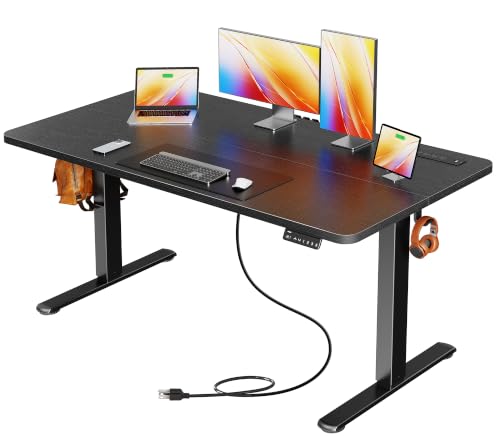
- Four AC outlets plus USB and USB-C charging
- Three height presets from 28.7 to 46.5 inches
- Quiet steel frame supports up to 220 pounds
Best For: Home offices and gaming setups needing compact, organized charging
Storage-Packed Workstation
SEDETA 55-Inch Standing Desk with Drawers
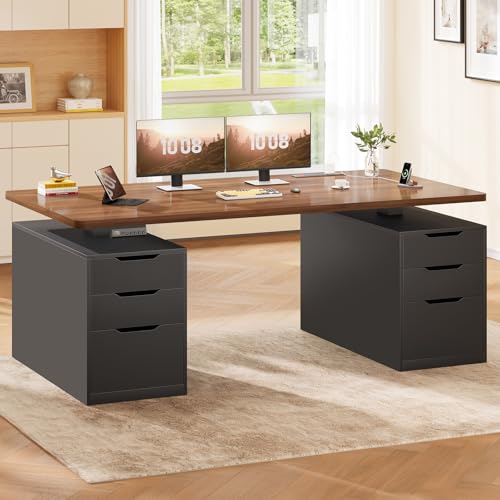
- Six drawers organize supplies and accessories
- Four outlets and two USB ports charge up to six devices
- Three presets and a 28.3- to 47.2-inch height range
Best For: Organized home offices needing storage and integrated power
Spacious Rustic Setup
Huuger 63-Inch Electric Standing Desk

- Extra-wide 62.9-inch desktop for larger setups
- Four AC outlets plus USB and USB-C charging
- Stable steel frame with three height presets
Best For: Multi-monitor workspaces and gaming setups needing extra room
Best Compact Power Pick – Huuger 47-Inch Electric Standing Desk
If you want standing desks with built in power without giving up too much room, this 47-by-24-inch Huuger model is a practical fit for smaller home offices. Its charging station, quiet motor, three presets, and cable management help keep everyday work organized.
Best For: Compact workspaces, remote work, and users who need convenient charging for several devices.
Pros:
- Built-in charging station includes four AC outlets, one USB port, and one USB-C port.
- Three memory presets and a digital height display simplify sit-stand adjustments.
- Quiet motor operates under 35 dB, with anti-collision protection and a tested 220-pound capacity.
- Integrated cable management helps reduce cord clutter.
Cons:
- The 47-by-24-inch desktop offers less workspace than larger models.
- Its 220-pound capacity is lower than the 60-by-30-inch alternative in this roundup.
This is a well-rounded choice when built-in power and quiet operation matter more than maximum desktop area. The compact footprint makes it easier to place in a bedroom or smaller office.
Best Large-Workspace Setup – 60-Inch Electric Standing Desk
This 60-by-30-inch desk stands out among standing desks with built in power for users who need room for multiple monitors or gaming equipment. Its flip-top cable compartment, included clamp power strip, and dual-beam frame address both organization and stability.
Best For: Multi-monitor workstations, gaming setups, and larger home offices.
Pros:
- Spacious 60-by-30-inch desktop supports broad work or gaming setups.
- Flip-top cable management conceals the power strip, while two baskets provide extra storage.
- Included power strip has three AC outlets and two USB ports.
- Dual-beam steel frame supports up to 250 pounds and was tested for 60,000 lift cycles.
Cons:
- Its 78-pound weight and larger footprint may be difficult to move or fit in tight rooms.
- The included power strip is clamp-mounted rather than integrated directly into the desktop.
Choose this model if desktop capacity and cable concealment are priorities. The adjustable two-panel top also gives monitor-arm clamps a solid mounting area while leaving room to route cables.
Best Deep Desktop Value – Huuger 55-Inch Standing Desk
For shoppers comparing standing desks with built in power, this Huuger combines a 55-by-27.6-inch desktop with a useful mix of outlets and ports. The deeper work surface, accessory hooks, cable managers, and three height presets make it suitable for work, gaming, or a walking-pad setup.
Best For: Users who want extra desktop depth and built-in charging in a mid-size desk.
Pros:
- Built-in power includes four AC outlets, two USB ports, and one USB-C port.
- 55-by-27.6-inch surface provides more depth for monitors, peripherals, or work materials.
- Three customizable presets cover a 28.3-to-46.5-inch height range.
- Headphone hooks, cable managers, adjustable feet, and anti-collision technology improve convenience and stability.
Cons:
- The motor operates under 45 dB, so it is not as quiet as the smaller Huuger model.
- Its 220-pound capacity is below the 250-pound rating of the larger 60-inch desk.
This desk offers a useful middle ground: more depth than a compact model without the full footprint of a 60-inch workstation. It is especially practical when direct access to both AC and USB-C charging is important.
Best Executive Storage Desk – 71-Inch Electric Standing Desk
This 71-inch executive model takes standing desks with built in power in a more furniture-oriented direction. Along with electric height adjustment, it provides a lockable file drawer, four open compartments, and a built-in outlet for a more organized professional workspace.
Best For: Executive home offices that need substantial storage and a wide sit-stand work surface.
Pros:
- Wide 71-inch surface provides ample room for office work and equipment.
- Lockable file drawer and four open compartments keep documents and supplies organized.
- Built-in desktop outlet provides convenient charging access.
- Three memory heights and customizable stop positions support flexible sitting and standing.
Cons:
- At 138.9 pounds, it is considerably heavier than the other desks listed here.
- The storage-focused design and 31.5-inch depth require substantial floor space.
- The supplied details do not specify the outlet count or motor noise level.
This is the strongest option for buyers who want a sit-stand desk to function as a complete executive workstation. Its storage system adds organization, but the large, heavy construction makes it less suited to frequently changing rooms.
Best Quiet Power Hub – Huuger 47-Inch Electric Standing Desk
The Huuger 47-inch desk is a practical choice among standing desks with built in power for compact home offices, gaming setups, and study spaces. Its integrated charging station provides four AC outlets, one USB port, and one USB-C port, while the 28.7- to 46.5-inch height range and three memory presets make sit-stand transitions straightforward.
Best For: Users who want quiet height adjustment, convenient device charging, and a compact workstation.
Pros:
- Built-in charging station powers up to six devices.
- Height presets and digital display simplify adjustments.
- Motor operates below 35 dB and supports up to 220 pounds.
- Anti-collision protection and integrated cable management add convenience.
Cons:
- The 47.2-by-23.6-inch surface may feel limited for larger multi-monitor arrangements.
- It has no drawers for built-in storage.
Choose this model if a quiet motor, charging access, and stability matter more than extra desktop storage. Its reinforced frame and adjustable feet also make it suitable for shared spaces and everyday computer work.
Best for Cable Organization – FEZIBO 48-Inch Electric Standing Desk
The FEZIBO 48-inch desk focuses on structural support and cable organization for home offices and gaming areas. Its L-shaped crossbar, built-in pegboard, magnetic cable track, and 28.3- to 46.5-inch electric adjustment help create a cleaner sit-stand workstation.
Best For: Users prioritizing a stable frame and organized cables in a minimalist workspace.
Pros:
- L-shaped crossbar is designed to reduce wobble at standing height.
- Pegboard and magnetic cable track help keep wires managed.
- Three memory presets support quick sitting and standing changes.
- Many components come pre-assembled, with setup taking about 30 minutes.
Cons:
- The supplied notes do not specify built-in outlets or USB charging ports.
- Its motor runs below 45 dB, so it may be less quiet than some alternatives.
This is a strong fit for shoppers who want a tidy, stable adjustable desk and do not require an integrated power strip. The cable-management hardware is the main differentiator for a streamlined workstation.
Best Storage-Rich Power Desk – SEDETA 61-Inch Standing Desk
The SEDETA 61-inch model combines the workspace of a large executive desk with the charging features expected from standing desks with built in power. It includes four outlets, two USB ports, three drawers, six open compartments, and a pegboard, while its electric frame adjusts from 28.3 to 47.2 inches.
Best For: Users who need extensive desktop storage and charging capacity for a busy home office.
Pros:
- Large 61-inch desktop provides room for office equipment and accessories.
- Four outlets and two USB ports include an on-off switch.
- Three drawers, six open compartments, and a pegboard help reduce clutter.
- Motor operates below 30 dB and supports up to 200 pounds.
Cons:
- The 19.7-inch depth is shallower than many standard desk surfaces.
- Its storage components make it heavier and potentially more involved to assemble.
- The supplied notes describe three memory settings rather than fully continuous preset storage.
Consider the SEDETA when storage and charging are as important as height adjustment. Its broad layout suits equipment-heavy workstations, while the integrated drawers and shelves help keep office supplies close at hand.
Best with Extra Features – Huuger 55-Inch Electric Standing Desk
The Huuger 55-inch desk is a practical choice among standing desks with built in power, combining a compact work surface with convenient charging access. Its built-in station includes four AC outlets, one USB port, and one USB-C port, while the electric frame offers three saved height positions.
Best For: Home-office users, gamers, and anyone who wants a quiet, organized desk with integrated charging.
Pros:
- Charges up to six devices through four AC, one USB, and one USB-C connection.
- Three memory presets and a 28.7- to 46.5-inch height range simplify sit-stand adjustments.
- Steel frame, support bar, adjustable feet, and a 220-pound capacity support stability.
- Motor operates below 35 dB and includes anti-collision rebound protection.
Cons:
- The 55.1-by-23.6-inch surface may feel limited for larger multi-monitor setups.
- There are no drawers for storing office supplies.
This model stands out for pairing a useful USB-C charging setup with quiet, precise height adjustment. Choose it if integrated power and a straightforward, space-conscious design matter more than built-in storage.
Storage-Packed Workstation – SEDETA 55-Inch Standing Desk with Drawers
The SEDETA combines the convenience of standing desks with built in power and the organization of six drawers. Its 55.1-inch desktop includes four power outlets and two USB ports, making it useful for work, study, or gaming areas where storage is just as important as charging access.
Best For: Users who need substantial built-in storage alongside an adjustable sit-stand workspace.
Pros:
- Six drawers provide dedicated space for files, supplies, and gaming accessories.
- Built-in charging station powers up to six devices and includes a one-touch power switch.
- Electric adjustment ranges from 28.3 to 47.2 inches with three memory presets.
- Motor operates below 30 dB, lifts at 25 mm/s, and supports up to 220 pounds.
Cons:
- The engineered-wood base and drawer configuration may be less open than a standard steel-leg desk.
- The desktop is 23.6 inches deep, which may constrain larger equipment layouts.
For buyers who dislike separate filing cabinets or storage bins, the six-drawer design is the main advantage. It offers a fuller furniture-style workstation while retaining electric height adjustment and integrated power.
Spacious Rustic Setup – Huuger 63-Inch Electric Standing Desk
The larger Huuger 63-inch model is one of the more spacious standing desks with built in power, giving monitors, peripherals, and other equipment extra room to spread out. It includes four AC outlets, USB and USB-C charging, plus a cable manager to help keep the expanded desktop tidy.
Best For: Multi-device work or gaming setups that need more desktop space without giving up integrated charging.
Pros:
- The 62.9-by-23.6-inch desktop offers more lateral room than the smaller Huuger model.
- Four AC outlets, one USB port, and one USB-C port can power up to six devices.
- Three memory presets support quick transitions across the 28.7- to 46.5-inch range.
- Reinforced steel construction supports up to 220 pounds and includes anti-collision protection.
Cons:
- The nearly 63-inch width requires more available wall or floor space.
- There are no drawers or other built-in storage compartments.
This is the strongest fit of the three for buyers who want a broad work surface for dual monitors or gaming gear. Its rustic-brown finish, cable management, and integrated USB-C power make the larger footprint more functional.
How We Picked the Best Standing Desks with Built in Power
We focused on electric standing desks that combine height adjustment with integrated power features, such as AC outlets, USB ports, or USB-C charging. We also considered desktop size, usable work area, storage, cable management, control convenience, and the kind of workspace each design suits best.
Because product configurations can vary, confirm the current outlet layout, USB specifications, height range, weight capacity, assembly requirements, and finish before ordering.
Quick Comparison
| Best For | What to Look For |
|---|---|
| Small home offices | Compact 47-by-24-inch desktops and built-in USB charging |
| Multiple monitors | Wider 55-, 60-, 63-, or 71-inch surfaces |
| Organized workstations | Flip-top or integrated cable management |
| Storage needs | Drawers, file cabinets, or executive-style layouts |
| Corner setups | L-shaped designs with a supportive crossbar |
Key Buying Factors for Standing Desks with Built-In Power
Desktop Size and Layout
Measure the available floor and wall space before choosing a desk. A compact model works well for a laptop and one monitor, while larger desktops are better for dual monitors, speakers, notebooks, and accessories. Leave room behind the desk for cables and movement.
Power and Charging Features
Check how many AC outlets are included and whether the desk has USB-A, USB-C, or both. Built-in ports are useful for low-power devices such as phones, tablets, lamps, and peripherals, but they may not replace a high-wattage charger or surge-protected power strip. Avoid exceeding the desk’s electrical rating.
Height Adjustment and Stability
Choose a height range that suits both sitting and standing positions. Programmable memory controls can make transitions faster. For stability, consider the desk’s frame design, desktop depth, construction, and expected equipment weight. A deeper surface can also provide a more comfortable monitor viewing distance.
Cable Management and Storage
Integrated trays, flip-top compartments, and cable-routing openings help keep power cords away from your feet. Drawers and file cabinets add useful organization, though they can increase the desk’s footprint and weight. Plan where your computer tower, power strip, and monitor cables will go before assembly.
Who Should Buy Which Standing Desks with Built in Power?
Choose a compact Huuger model if you have limited space and need convenient outlets or USB-C charging for a focused laptop or single-monitor setup. Choose a 55- or 63-inch desk for a balance of workspace and flexibility with multiple devices. Choose the 60-inch flip-top model if keeping cables contained is a priority.
Choose a larger executive or drawer-equipped SEDETA model if storage, paperwork, and a substantial desktop matter more than a minimal footprint. Choose the FEZIBO L-shaped desk for a corner workstation or separate zones for computing and writing. Before buying, compare the listed dimensions with your chair, monitor arms, wall outlets, and available walking space.