
If you still need physical discs for backups, distribution, or archiving, the right duplicator can save hours and reduce errors. The best standalone optical disc duplicators make it easy to copy CDs, DVDs, and Blu-ray discs without a computer.
In this roundup, we focus on practical features that matter most: target count, supported formats, drive quality, and copy protection options.
Best 10 Standalone Optical Disc Duplicators Picks for 2026
1-to-1 Standalone Duplicator
1-to-1 CD/DVD Tower with M-Disc Support

- No PC required for operation
- Up to 24x DVD and 52x CD-R speeds
- Supports M-Disc and free DVD Video copy protection
Best For: Standalone copying with archival media support
Standalone 5-Target Duplicator
5-target DVD/CD standalone duplicator tower

- No computer required for duplication
- LCD one-step copy plus Test/Verify/Compare
- Supports common DVD and CD blank formats
Best For: Small batch DVD/CD copying in a simple tower
Standalone Blu-ray Tower
Blu-ray BDXL M-Disc standalone duplicator
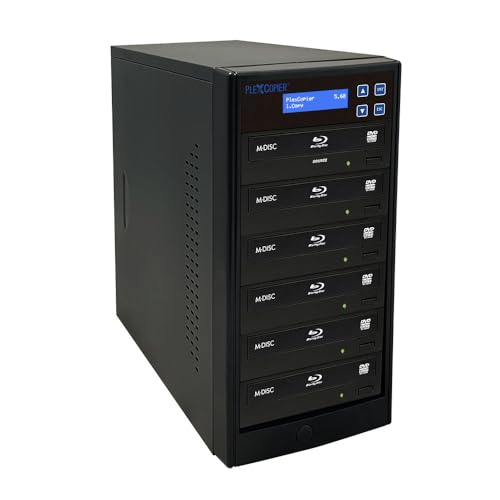
- Supports Blu-ray, BDXL, M-Disc, CD, and DVD
- Standalone copier tower design
- Includes free copy protection per title
Best For: Blu-ray and BDXL duplication in a standalone tower
Standalone 1-to-5 Tower
1-to-5 CD/DVD duplicator with mix CD support

- No computer or software needed
- Automatic master disc recognition
- Supports mix CDs and many CD/DVD formats
Best For: Users who need custom mix CDs plus disc duplication
BDXL Home Tower

- Standalone Blu-ray, DVD, and CD duplication
- Up to 16x BD-R, 24x DVD, 52x CD-R speeds
- Free copy protection for compatible DVD video copies
Best For: Standalone users needing Blu-ray support and DVD copy-protection capability
Wytron 1-to-5 Tower

- Standalone 1-to-5 DVD/CD duplication
- Up to 24x DVD and 52x CD-R speeds
- Supports M-Disc and audio CD compilation
Best For: Batch DVD/CD duplication with archival media support
Pioneer Drive Tower

- Standalone 1-to-1 Blu-ray, DVD, and CD copying
- Authentic Pioneer writer/reader drives
- Supports 25GB and 50GB BD media
Best For: Single-disc duplication with Pioneer drive reliability
Premium Workflow Pick
11-Target Standalone 24X CD/DVD Duplicator

- Standalone tower with no PC required
- Includes 2 TB hard drive for saved master jobs
- USB 3.0 file transfer plus 24x/52x speeds
Best For: High-volume users who want hard-drive storage and repeat-job convenience.
Simple Standalone Pick
1-to-1 Standalone 24X M-Disc DVD Duplicator

- No PC required for standalone operation
- Audio CD modes include DAO, TAO, and Mix Compilation
- Selectable 24x DVD and 52x CD-R speeds
Best For: Basic 1-to-1 duplication with useful audio copying modes.
Compact Everyday Pick
1-to-1 Standalone CD/DVD Duplicator with M-Disc

- Standalone operation with no PC required
- Supports common CD formats like CD-TEXT and ISRC
- Up to 24x DVD and 52x CD-R write speeds
Best For: Simple everyday CD/DVD duplication with broad basic format support.
1-to-1 Standalone Duplicator – 1-to-1 CD/DVD Tower with M-Disc Support
PlexCopier 24X 1 to 1 CD DVD M-Disc Supported Duplicator Copier Tower with Free Copy Protection
Check Price On AmazonIf you want standalone optical disc duplicators for simple one-to-one copying, this tower keeps the workflow straightforward with no PC required. It supports up to 24x DVD write speed and 52x CD-R speed, while also adding M-Disc compatibility and free copy-protection creation for DVD Video using OptoDisc MID media.
Best For: Users who need a no-computer 1-to-1 duplicator with M-Disc support and copy-protection options.
Pros:
- Complete standalone operation with no computer needed
- Supports up to 24x DVD and 52x CD-R write speeds
- Records M-Disc DVD media for archival use
- Includes lifetime free tech support and a 1-year parts and labor warranty
Cons:
- Will not copy encrypted discs
- Free copy protection is limited to DVD Video copies using OptoDisc MID media
Overall, this is a practical choice if you want a simple standalone tower with strong media support and built-in duplication features. It is best suited to users who value speed, archive-grade recording, and support coverage over advanced disc-copying flexibility.
Standalone 5-Target Duplicator – 5-target DVD/CD standalone duplicator tower
For buyers comparing standalone optical disc duplicators, this 1-to-5 tower focuses on easy batch copying without a computer. The LCD interface offers a one-step copy process, and the unit also includes Test, Verify, and Compare functions plus automatic disc-format detection for stable burning.
Best For: Users who want a simple standalone 5-target duplicator for DVD and CD batches.
Pros:
- Standalone operation with no computer required
- One-step copy function through a user-friendly LCD interface
- Supports Test, Verify, and Compare functions
- Handles DVD±R/RW, DVD±R DL, CD-R, and CD-RW media
Cons:
- Will not copy encrypted discs
- Limited to 5 copies per burn cycle
This model is a good fit if you mainly need reliable, repeatable duplication from a standalone tower and do not need PC-based control. Its broad format support and built-in checks make it a sensible everyday option for disc copying tasks.
Standalone Blu-ray Tower – Blu-ray BDXL M-Disc standalone duplicator
PlexCopier 1 to 5 Blu-ray BD BDXL M-Disc CD DVD Duplicator Copier Tower with FREE Copy Protection
Check Price On AmazonThis standalone optical disc duplicator is aimed at users who need more than standard DVD and CD copying. It supports Blu-ray, BDXL, M-Disc, CD, and DVD formats in a tower-style copier, making it a flexible choice when you want a single unit that can handle different disc types without a computer.
Best For: Buyers who need a standalone tower for Blu-ray, BDXL, M-Disc, CD, and DVD duplication.
Pros:
- Supports Blu-ray and BDXL in addition to CD and DVD
- M-Disc compatibility adds archival recording support
- Standalone copier design avoids the need for a PC
- Includes free copy protection according to the product title
Cons:
- No detailed feature notes were supplied beyond the title
- Capacity and speed specifics are not provided in the supplied information
Because the provided details are limited, this model is best evaluated for its format range and standalone convenience. If your priority is Blu-ray duplication in a no-computer tower, it stands out on compatibility alone.
Standalone 1-to-5 Tower – 1-to-5 CD/DVD duplicator with mix CD support
Produplicator 1 to 5 24X Burner CD DVD Duplicator - Standalone Copier Duplication Tower
Check Price On AmazonIf you are comparing standalone optical disc duplicators for CD and DVD work, this 1-to-5 tower offers a practical no-computer workflow. It automatically recognizes the master disc format, supports a wide range of DVD and CD media, and adds an uncommon mix-CD creation feature for custom track compilation.
Best For: Users who want a standalone 1-to-5 duplicator with mix-CD creation and broad format support.
Pros:
- Complete standalone operation with no computer or software needed
- Automatic master disc recognition for source formatting
- Supports DVD±R/RW, DVD±R DL, CD-R, CD-RW, Mini CD, and Photo CD formats
- Can create and edit mix CDs from multiple source discs
Cons:
- Only duplicates up to 5 targets at a time
- Notes do not mention Blu-ray support
This tower is especially appealing if you need more than basic duplication and want the ability to build custom audio compilations. Its broad compatibility and standalone operation make it a versatile choice for mixed CD and DVD tasks.
BDXL Home Tower – 1 to 3 Blu-ray BD Duplicator
PlexCopier 1 to 3 Blu-ray BD BDXL M-Disc CD DVD Duplicator Copier Tower with Free Copy Protection
Check Price On AmazonIf you want a standalone optical disc duplicators setup for Blu-ray, DVD, and CD work, this 1-to-3 tower is built for simple, no-PC copying. It supports Blu-ray duplication, including BD-R and BD media, while also handling DVD and CD burning at practical speeds for home or small office use.
Best For: Users who need a compact standalone tower for Blu-ray, DVD, and CD duplication with copy-protection features for compatible DVD video workflows.
Pros:
- Standalone operation, so no computer is required.
- Copies Blu-ray, DVD, and CD discs.
- Supports up to 16x BD-R SL, 24x DVD, and 52x CD-R write speeds.
- Includes free copy protection for DVD video copies using OptoDisc MID media.
Cons:
- Will not copy discs that are encrypted with copy protection.
- Copy protection feature is limited to compatible DVD video workflows.
This is a useful pick if you want Blu-ray support in a standalone tower and value the extra DVD copy-protection option. It is still a duplication tool with clear format limits, so it fits best when your source discs are not encrypted.
Wytron 1-to-5 Tower – 1 to 5 DVD Duplicator
WYTRON 1 to 5 DVD Duplicator SATA CD DVD Burner Standalone Copier | Multiple Discs Duplication Tower
Check Price On AmazonThis standalone optical disc duplicators tower is aimed at straightforward DVD and CD copying without needing a PC. The 1-to-5 layout makes it practical for batch duplication, and it also supports archival media, including M-Disc, for users who want longer-term storage options.
Best For: People who need a standalone DVD/CD duplicator for batch work, archival media, and audio CD compilation.
Pros:
- Complete standalone operation with no PC required.
- 1-to-5 tower design suits batch duplication.
- Supports up to 24x DVD and 52x CD-R write speeds.
- Can burn archival media, including M-Disc, and create mix compilation audio CDs.
Cons:
- Will not copy discs that use copy protection, such as retail movies and TV shows.
- DVD/CD focused, with no Blu-ray support listed.
For users who mainly duplicate DVD and CD content, this is a practical standalone tower with solid speed and media flexibility. Its archival-media support and audio CD compilation make it especially handy for longer-form or mixed-source projects.
Pioneer Drive Tower – 1 to 1 Blu-ray Duplicator
If you want a standalone optical disc duplicators unit with more of a premium drive focus, this 1-to-1 tower uses authentic Pioneer Blu-ray writer/reader drives. It supports Blu-ray, DVD, and CD copying in a self-contained setup, with high-capacity disc support for 25GB and 50GB BD media.
Best For: Users who want a reliable standalone Blu-ray duplicator built around Pioneer drives for single-disc copying.
Pros:
- Complete standalone operation, so no PC is needed.
- Uses authentic Pioneer Blu-ray writer/reader drives.
- Supports up to 16x BD-R SL, 16x DVD, and 40x CD-R write speeds.
- Handles both 25GB single-layer and 50GB double-layer BD-R/RE discs.
Cons:
- 1-to-1 design is less suited to batch duplication.
- Will not copy discs that are encrypted with copy protection.
This model makes sense if drive quality and dependable standalone operation matter more than high-volume output. It is a straightforward choice for single-disc Blu-ray duplication and broader CD/DVD support.
Premium Workflow Pick – 11-Target Standalone 24X CD/DVD Duplicator
If you need standalone optical disc duplicators for higher-volume CD and DVD jobs, this Vinpower SharkCopier model is built around speed, storage, and workflow efficiency. The included 2 TB hard drive lets you save master projects for quick recall, so you can repeat jobs without recreating the source each time. It also supports USB 3.0 file transfer for multi-file projects, making it a practical pick for organized duplication work.
Best For: Users who want a standalone tower duplicator with a built-in hard drive for faster repeat jobs and file recall.
Pros:
- Complete standalone operation with no PC required.
- Installed 2 TB hard drive for storing and recalling master projects.
- USB 3.0 multi-file copy/connect support for transferring folder files from a PC.
- Supports up to 24x DVD and 52x CD-R write speeds.
Cons:
- Will not copy discs with copy protection features.
- Large tower format may be more machine than casual users need.
This is the most feature-rich option in the group if your priority is repeated standalone disc duplication with fast job recall. It stands out for hard-drive-based workflows and audio/video-oriented features, but it is best suited to users who need those extra capabilities rather than a basic copier.
Simple Standalone Pick – 1-to-1 Standalone 24X M-Disc DVD Duplicator
For buyers comparing standalone optical disc duplicators, this 1-to-1 tower keeps the setup simple and focused on direct disc copying. It runs without a PC and supports selectable write speeds up to 24x for DVDs and 52x for CD-R, which is enough flexibility for everyday duplication tasks. The included audio-copy modes also make it useful when your work involves music CDs as well as data discs.
Best For: Users who want a straightforward standalone copier for basic 1-to-1 disc duplication and audio CD options.
Pros:
- Complete standalone operation with no PC required.
- Supports DAO, TAO, and Mix Audio Compilation for CD audio jobs.
- Selectable up to 24x DVD and 52x CD-R write speeds.
- Drive firmware upgradeability for supported brands.
Cons:
- Will not copy discs with copy protection features.
- Does not include the hard-drive workflow features found on some higher-end duplicators.
This model is a practical fit if you want a no-frills standalone tower for copying discs without extra complexity. Its audio options and upgradeable drive support add flexibility, but the design stays centered on simple 1-to-1 duplication.
Compact Everyday Pick – 1-to-1 Standalone CD/DVD Duplicator with M-Disc
This compact pick in the standalone optical disc duplicators category keeps the workflow simple while covering the common CD and DVD formats most people need. It operates without a PC, supports up to 24x DVD and 52x CD-R write speeds, and adds mix-compilation audio CD creation for projects that combine tracks from multiple sources. If you want a basic standalone burner with broad format support, it is designed to stay practical.
Best For: Buyers who want a straightforward standalone duplicator for common CD/DVD jobs and mix audio discs.
Pros:
- Complete standalone operation with no PC required.
- Supports common CD formats, including CD-TEXT, ISRC, and over-burned CD.
- Up to 24x DVD and 52x CD-R write speeds.
- Can create mix compilation audio CDs.
Cons:
- Will not copy discs with copy protection features.
- Fewer advanced workflow features than hard-drive-based duplicators.
This is the most straightforward choice if you mainly need a compact standalone duplicator for standard disc copying. It offers useful CD format support and solid speed ratings, but it is best viewed as a simple utility machine rather than an advanced production tower.
How We Picked the Best Standalone Optical Disc Duplicators
We focused on Standalone Optical Disc Duplicators that are built for direct disc-to-disc copying, with an emphasis on dependable burners, broad media support, and sensible target counts for home offices, studios, and small duplication runs. We also looked for models that support common use cases such as M-Disc archiving, Blu-ray duplication, and copy-protection workflows.
Because these systems are meant to work without a PC, usability matters too. Clear controls, stable tower design, and sensible drive configurations all help reduce failed burns and wasted media.
Quick Comparison: Which Type Fits Your Workflow?
Single-target units are best when you need occasional master copies or archive discs with maximum control. 1-to-3 and 1-to-5 systems are the sweet spot for many buyers because they balance output and cost. Higher-capacity towers, such as 11-target models, are better for busier environments where turnaround time matters.
If you mostly duplicate CDs and DVDs, a CD/DVD-only unit can be the most cost-effective choice. If you need premium archival support or modern media flexibility, look for Blu-ray and BDXL compatibility along with M-Disc support.
Key Buying Factors for Standalone Optical Disc Duplicators
Format Support
Confirm whether the unit supports CD, DVD, Blu-ray, and BDXL. Not every duplicator handles all formats, and some are optimized for only one disc type.
Target Count
Choose the number of target drives based on how many discs you need per run. More targets improve throughput, but they also increase cost and physical size.
Drive Quality and Media Compatibility
Reliable optical drives matter more than raw speed claims. If you plan to archive important data, prioritize M-Disc support and strong compatibility with quality blank media.
Standalone Features
Since these are Standalone Optical Disc Duplicators, the onboard interface should be easy to navigate. Copy settings, erase functions, and error reporting should be clear enough to use without a computer.
Copy Protection and Workflow Tools
Some buyers need copy protection, hashing, or other workflow options for content distribution. If that applies to you, verify those features before buying rather than assuming they are included.
Who Should Buy Which Standalone Optical Disc Duplicators?
Choose a 1-to-1 tower if you value precision, occasional use, or archival copies. Pick a 1-to-3 or 1-to-5 model if you want the best balance of speed and affordability for small batches. Step up to an 11-target tower if you need higher-volume duplication and want to minimize repeat runs.
For Blu-ray projects, make sure your choice explicitly supports BD and BDXL. For long-term storage, M-Disc compatibility is especially important. Matching the machine to your disc format and output needs is the fastest way to avoid overspending or underbuying.