
If you need to copy CDs, DVDs, or Blu-ray discs in volume, the right duplicator can save time and reduce errors. The best models balance speed, media support, and ease of use.
Below, we focus on practical options for home studios, schools, offices, and duplication work that need consistent results without unnecessary complexity.
Best 10 Optical Disc Duplicators Picks for 2026
Standalone DVD/CD Tower
24x 1-to-1 Duplicator with M-Disc Support

- No-PC standalone operation
- Up to 24x DVD / 52x CD-R
- Supports M-Disc DVD media
Best For: Standalone DVD/CD duplication and archival burning
Portable External Optical Drive

- USB 3.0 and Type-C
- Works with major desktop and laptop OSes
- Best with standard retail discs
Best For: Portable disc playback and burning on computers
Standalone Blu-ray Tower
1-to-3 Blu-ray BD BDXL Duplicator

- Copies Blu-ray, DVD, and CD
- No-PC standalone operation
- Up to 16x BD-R speed
Best For: Standalone Blu-ray duplication with DVD/CD support
1-to-1 Standalone Duplicator
Vinpower 24x DVD/CD Duplicator Tower

- No-PC standalone operation
- Supports CD-TEXT, ISRC, and over-burned CD
- Supports M-Disc DVD media
Best For: Simple standalone DVD/CD copying with archive support
Flash and Disc Backup Duplicator
EZ Dupe 1-to-4 Media Mirror Plus

- Copies between USB and card media.
- Supports disc-to-media and media-to-disc jobs.
- Can duplicate one flash source to up to 5 discs.
Best For: Mixed-format backup and small duplication jobs.
High-Capacity Standalone Tower
Vinpower 1-to-11 DVD/CD Duplicator Tower

- No PC required for standalone use.
- Copies to up to 11 target discs.
- Supports up to 24x DVD and 52x CD-R speeds.
Best For: High-volume DVD/CD duplication without a computer.
Audio-Ready One-to-One Tower
Optiarc 1-to-1 M-Disc Duplicator

- Standalone one-to-one copying.
- Audio CD modes include DAO, TAO, and Mix.
- Supports M-Disc and up to 24x DVD speeds.
Best For: Audio CD duplication and simple standalone disc copying.
Multi-Format Tower
1 to 5 Blu-ray, BD/BDXL, M-Disc Copier
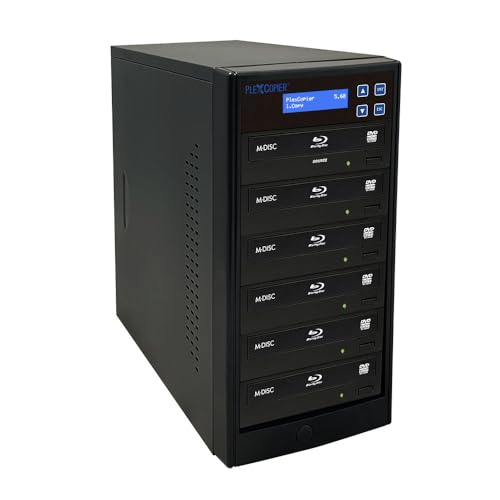
- Supports Blu-ray, BDXL, M-Disc, CD, and DVD
- Works with Windows and macOS
- Includes free copy protection
Best For: Users who need flexible multi-format duplication in a small tower
Standalone 11-Target
SharkCopier 24X CD/DVD Duplicator

- Standalone operation with no PC required
- Built-in 2 TB hard drive for stored masters
- Supports up to 11 targets
Best For: Teams that want a standalone CD/DVD duplicator with stored projects
Standalone 1-to-5
24X SATA M-Disc DVD Duplicator

- Standalone operation with no PC required
- Supports M-Disc DVD recording
- Up to 24x DVD and 52x CD-R speeds
Best For: Small business users needing standalone DVD/CD duplication with M-Disc support
Standalone DVD/CD Tower – 24x 1-to-1 Duplicator with M-Disc Support
PlexCopier 24X 1 to 1 CD DVD M-Disc Supported Duplicator Copier Tower with Free Copy Protection
Check Price On AmazonIf you want optical disc duplicators that work without a computer, this 1-to-1 tower is built for straightforward standalone copying. It supports CD, DVD, and M-Disc media, and it can also create free copy-protected DVD Video copies using OptoDisc MID media from an original master.
Best For: Users who need a no-PC duplicator for DVD/CD jobs, archival M-Disc burning, and basic copy-protected DVD Video creation.
Pros:
- Complete standalone operation, so no PC is required.
- Up to 24x DVD and 52x CD-R write speeds for fast everyday duplication.
- Supports 1000-year archival-grade M-Disc DVD media.
- Includes lifetime free tech support plus a 1-year parts and labor warranty.
Cons:
- Will not copy discs that are encrypted with copy protection.
- Free copy protection only applies to DVD Video copies made with OptoDisc MID media.
For buyers focused on dependable standalone disc production, this tower covers the essentials without extra software or PC setup. Its mix of speed, M-Disc support, and support coverage makes it a practical fit for small duplication workflows.
Portable External Optical Drive – USB 3.0 Type-C DVD/CD Drive
This optical drive is a portable option for reading and writing CDs and DVDs through USB 3.0 or Type-C connections. Unlike dedicated optical disc duplicators, it is designed as an external drive for laptops and desktops, with compatibility listed for Windows, Linux, Mac, and MacBook systems.
Best For: Laptop and desktop users who need a portable external DVD/CD drive for normal disc playback and burning.
Pros:
- USB 3.0 and Type-C connectivity for broad device use.
- Works with Windows, Linux, Apple Mac, and MacBook systems.
- Handles standard original retail CDs and normally-burned blank CD-R/CD-RW well.
- Portable form factor makes it easy to carry.
Cons:
- Not all discs can be read normally, especially scratched, aged, or encrypted discs.
- It is an external optical drive, not a standalone duplication tower.
If you mainly need a compact optical drive rather than a full duplicator, this model fits the role well. The compatibility notice is important: it is best treated as a general-purpose drive for standard discs, not a solution for problematic or copy-protected media.
Standalone Blu-ray Tower – 1-to-3 Blu-ray BD BDXL Duplicator
PlexCopier 1 to 3 Blu-ray BD BDXL M-Disc CD DVD Duplicator Copier Tower with Free Copy Protection
Check Price On AmazonAmong optical disc duplicators, this tower stands out because it can duplicate Blu-ray, DVD, and CD media in a standalone setup. It supports up to three target discs, includes free copy protection for DVD Video using OptoDisc MID media, and is built for users who need a flexible all-in-one disc copying station.
Best For: Small duplication workflows that need Blu-ray support along with DVD/CD copying and standalone operation.
Pros:
- Copies Blu-ray, DVD, and CD discs.
- Complete standalone operation with no PC required.
- Up to 16x BD-R, 24x DVD, and 52x CD-R write speeds.
- Supports free copy-protected DVD Video creation with OptoDisc MID media.
Cons:
- Will not copy encrypted discs.
- Windows operating system support is listed in the details.
This is a strong choice if Blu-ray is part of your duplication work and you want the convenience of a tower-style standalone unit. It balances format support and speed well, while keeping the workflow focused on direct disc-to-disc copying.
1-to-1 Standalone Duplicator – Vinpower 24x DVD/CD Duplicator Tower
Vinpower Digital Standard 1 to 1 Target 24x DVD CD Disc Duplicator Tower SATA Optical Drives - Black
Check Price On AmazonThis 1-to-1 tower is a straightforward pick for optical disc duplicators buyers who want a simple DVD and CD copying setup without relying on a PC. It supports common CD formats, M-Disc DVD media, and free copy protection for DVD Video using OptoDisc MID media from an original master.
Best For: Users who want a reliable standalone DVD/CD duplicator for common disc formats and archival media.
Pros:
- Complete standalone operation, so no PC is needed.
- Up to 24x DVD and 52x CD-R write speeds.
- Supports common CD formats including CD-TEXT, ISRC, and over-burned CD.
- Supports M-Disc DVD media for long-term archiving.
Cons:
- Will not copy encrypted discs.
- Only 1-to-1 duplication, so it is not suited to higher-volume simultaneous copying.
If your work centers on standard DVD/CD duplication, this tower keeps the process simple and focused. The added support for special CD formats and archival M-Disc media makes it more versatile than a basic copier.
Flash and Disc Backup Duplicator – EZ Dupe 1-to-4 Media Mirror Plus
If you want optical disc duplicators that can also work across flash media, the EZ Dupe 1 to 4 Media Mirror Plus stands out for mixed-format backup jobs. It can copy between USB and card media, move discs to media, and also burn from flash to multiple discs, making it useful when your workflow involves both removable storage and CD, DVD, or Blu-ray formats.
Best For: Users who need one standalone unit for flash-to-disc, disc-to-media, and small-scale duplication across several formats.
Pros:
- Copies media to media across USB, CF, SD, Micro SD, and MS formats.
- Supports disc-to-media backup from CD, DVD, and Blu-ray sources.
- Can duplicate from one flash source to up to 5 discs.
- Includes disc spanning and multi-session features for larger flash backups.
Cons:
- Flash-copying depends on using one media type at a time in the reader.
- Primarily aimed at backup and duplication, not advanced authoring workflows.
This is a flexible option if you need more than a basic disc-only copier. The combination of optical and flash support makes it especially practical for users handling mixed archives or transferring data between different storage formats.
High-Capacity Standalone Tower – Vinpower 1-to-11 DVD/CD Duplicator Tower
For buyers comparing optical disc duplicators, this Vinpower Digital tower is built around straightforward standalone copying with a high target count. It does not require a PC, supports up to 11 targets, and offers write-speed controls for DVD and CD jobs, which makes it a practical choice for recurring duplication tasks.
Best For: Users who want a standalone DVD/CD tower duplicator with a larger target count and no PC requirement.
Pros:
- Standalone operation with no PC required.
- Supports up to 11 target discs for one-to-many copying.
- Offers up to 24x DVD and 52x CD-R write speeds.
- Includes support for M-Disc DVD media and copy-protection-aware behavior.
Cons:
- Will not copy encrypted discs.
- Focused on DVD and CD formats rather than newer mixed-media workflows.
If your priority is a traditional disc tower with high target capacity, this model fits that brief well. It is geared toward users who need dependable standalone duplication and do not need PC-driven control.
Audio-Ready One-to-One Tower – Optiarc 1-to-1 M-Disc Duplicator
This optical disc duplicator is built for simple one-to-one copying, with a strong emphasis on standalone operation and audio CD flexibility. It supports Disc at Once, Track at Once, and Mix Audio Compilation modes, so it is a better fit when your disc work includes music or custom audio compilations in addition to standard DVD and CD copying.
Best For: Users who need a standalone 1-to-1 duplicator for audio CDs and everyday DVD/CD copies.
Pros:
- Standalone operation requires no PC.
- Supports DAO, TAO, and Mix Audio Compilation for audio CD copying.
- Selectable write speeds up to 24x DVD and 52x CD-R.
- Supports M-Disc media and drive firmware upgrades.
Cons:
- Only duplicates one disc to one disc at a time.
- Cannot copy protected discs such as retail movies and TV shows.
As a single-target tower, this model is best for users who value control and format flexibility over volume. The audio-copy features make it especially useful for music libraries, while the M-Disc support adds archival appeal.
Multi-Format Tower – 1 to 5 Blu-ray, BD/BDXL, M-Disc Copier
PlexCopier 1 to 5 Blu-ray BD BDXL M-Disc CD DVD Duplicator Copier Tower with FREE Copy Protection
Check Price On AmazonThis optical disc duplicators tower is built for users who need broad format support in a compact 1-to-5 setup. It handles Blu-ray, BDXL, M-Disc, CD, and DVD media, and it works with Windows and macOS for home, professional, or educational duplication tasks.
Best For: Small teams or individuals who want a versatile disc duplicator for mixed Blu-ray, DVD, and archival media jobs.
Pros:
- Supports Blu-ray, BDXL, M-Disc, CD, and DVD formats
- Compatible with Windows and macOS
- Includes free copy protection
- Uses a tower form factor with USB connectivity
Cons:
- Only duplicates up to 5 targets at once
- Requires a connected PC for operation
- Not aimed at high-volume production runs
For buyers who need flexibility more than sheer capacity, this model stands out for its wide media compatibility and support for archival M-Disc use. It is a practical choice when your duplication work spans multiple disc types.
Standalone 11-Target – SharkCopier 24X CD/DVD Duplicator
This optical disc duplicators tower is designed for users who want a standalone workflow without relying on a PC during copying. With 11 targets, a built-in 2 TB hard drive, and USB 3.0 multi-file transfer support, it is suited to repeat jobs that benefit from stored master projects and quick recall.
Best For: Offices, studios, and duplication shops that want a standalone CD/DVD copier with stored projects and higher target count.
Pros:
- Standalone operation with no PC required
- Installed 2 TB hard drive for master storage and recall
- Supports up to 11 targets
- Offers USB 3.0 multi-file copy transfer
Cons:
- Does not copy discs with copy protection
- Limited to CD and DVD formats
- Best suited to users who can work within its supported media list
For repeated disc jobs, the hard drive and standalone controller make this model efficient and easier to manage than a PC-tethered setup. Its strength is convenience and workflow speed, especially when the same masters are used again and again.
Standalone 1-to-5 – 24X SATA M-Disc DVD Duplicator
This optical disc duplicators tower is a practical fit for business users who need standalone DVD and CD copying with M-Disc support. It offers 1-to-5 duplication, up to 24x DVD and 52x CD-R write speeds, and free DVD video copy protection using OptoDisc MID media from an original master.
Best For: Small business duplication tasks that need standalone operation, M-Disc support, and DVD/CD copying.
Pros:
- Complete standalone operation with no PC required
- Supports M-Disc DVD media for archival recording
- Offers up to 24x DVD and 52x CD-R write speeds
- Includes free copy protection for DVD video copies
Cons:
- Only duplicates up to 5 discs at a time
- Will not copy encrypted discs
- Focused on DVD/CD rather than Blu-ray
This model is a solid option if you want a straightforward standalone tower for routine disc jobs and archival media. It balances useful features with a simple duplication workflow, making it especially relevant for business use.
How We Picked the Best Optical Disc Duplicators
We prioritized duplication speed, supported disc formats, target count, standalone operation, and useful features such as M-Disc support, copy protection, and hard drive integration. We also considered whether a unit is better suited to simple one-to-one copying or higher-volume production.
Quick Comparison
As you compare Optical Disc Duplicators, think in terms of workflow. 1-to-1 towers are the simplest and most affordable. 1-to-many duplicators are better when you need multiple copies per master, while hybrid media duplicators can handle flash media and discs in the same workflow.
Key Buying Factors for Optical Disc Duplicators
Format Support
Confirm support for CD, DVD, and Blu-ray if you need flexibility. If archiving is important, look for M-Disc compatibility. For video distribution, verify that the unit handles the disc types you plan to burn most often.
Target Count and Throughput
The target count determines how many copies you can make in one run. A 1-to-1 model is ideal for direct disc-to-disc copying, while 1-to-3, 1-to-5, or 1-to-11 systems are better for batch jobs and repeated production.
Standalone Vs. Computer-Based Use
Standalone towers are usually easier to operate and more reliable in production settings because they do not depend on a host computer. Computer-connected drives can be a better fit for light use, portability, or situations where you only need an external burner.
Media Protection and Extra Features
Some Optical Disc Duplicators include copy protection tools, USB connectivity, or internal hard drives for storing masters. These features can improve workflow, but only pay for them if they solve a real need in your environment.
Who Should Buy Which Optical Disc Duplicators?
Choose a simple 1-to-1 duplicator if you mostly make occasional single copies or need a compact setup. Choose a multi-target tower if you handle recurring batches for clients, churches, schools, or internal distribution. Choose a Blu-ray-capable or M-Disc-supported model if longevity and higher-capacity media matter. If you also work with flash media, a hybrid duplicator is the most efficient choice.
For the best results, match the duplicator to your disc type, daily volume, and need for standalone convenience. That keeps the workflow fast without overbuying features you will not use.