
Portable book scanners make it easier to digitize bound books, loose documents, receipts, and photos without committing to a bulky flatbed scanner. The models in this roundup range from compact wand scanners to overhead systems with OCR and book-flattening features.
We compare scanning formats, portability, image quality, software features, and workflow flexibility to help you choose the right scanner for home offices, research, classrooms, and business use.
Best 10 Portable Book Scanners Picks for 2026
Best Overall for Books

- Laser-assisted flattening for curved pages
- About two seconds per page
- A3 capture with multilingual OCR
Best For: Home offices and frequent book digitization
Best Lightweight Sheet Scanner

- Weighs only 9.44 ounces
- USB-powered with no battery required
- OCR for searchable and editable files
Best For: Traveling users scanning loose documents
Best Handheld Option

- Lightweight 0.66-pound handheld design
- Scans to an included 16GB SD card
- Up to 900 dpi for A4 pages and photos
Best For: Mobile, occasional scanning without a desk
Best for A3 and A4 Capture

- Scans A3 and A4 materials in two seconds
- Outputs JPG, Word, and searchable PDF
- Laser flattening supports curved book pages
Best For: Mixed-size book and document scanning
Best Budget Handheld

- Battery-powered and lightweight
- 300/600/900 dpi settings
- Includes 16GB Micro SD card
Best For: Travelers and occasional document or book-page scanning
Best for Thin Books

- About one-second page scanning
- OCR supports 180+ languages
- Foldable A3/A4 document-camera design
Best For: Fast digitization of thin books and oversized documents
Best Smart Features
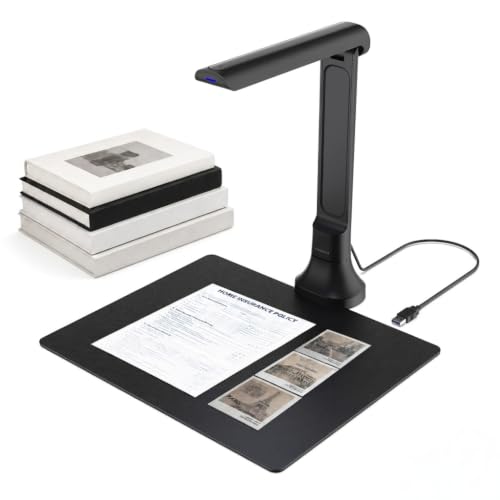
- 16MP autofocus document camera
- OCR and text-to-speech tools
- Foldable USB design for Windows/macOS
Best For: Accessible scanning, teaching, and searchable digital documents
Best Lightweight Pick

- 8MP camera with 270 DPI scanning
- Scans an A4 page in about one second
- Foldable 0.93-pound USB design
Best For: Portable A4 document and card scanning
Best for Book Pages
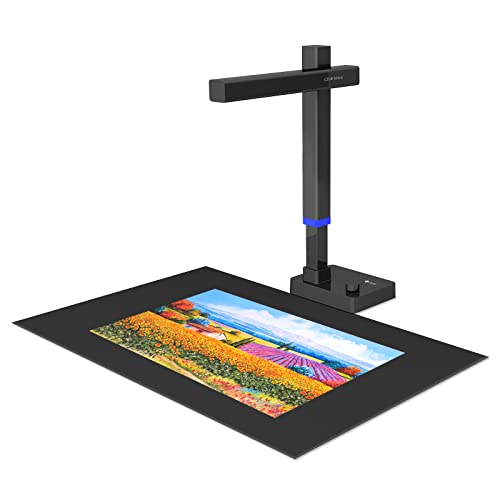
- 24MP camera with 5696 × 4272 resolution
- Flattens curved book surfaces digitally
- Exports JPG, PDF, searchable PDF, Word, and Excel
Best For: Digitizing bound books and curved pages
Best Resolution Balance

- 12MP camera with 330 DPI
- Fast A4 scanning and multi-target capture
- Compact 14.88-ounce foldable design
Best For: Portable high-resolution A4 document scanning
Best Overall for Books – CZUR Aura Pro A3 Book Scanner
For shoppers comparing portable book scanners, the CZUR Aura Pro is a versatile desktop-style option built for curved books, A3-size materials, and rapid page capture. Its laser-assisted page flattening, automatic page detection, and supplemental lighting are useful for digitizing books with less manual correction.
Best For: Home offices, researchers, and readers scanning books and larger documents.
Pros:
- Laser-line technology helps flatten curved book pages for clearer scans.
- Scans pages in about two seconds and supports materials smaller than A3.
- OCR supports more than 180 languages, and auto-scan can detect page turns.
- Includes a desk lamp with four color modes and six brightness levels.
Cons:
- At 3 kg, it is less convenient to transport than handheld scanners.
- Requires a USB connection and compatible Windows or macOS computer.
- Thai, Hebrew, and Arabic are not supported by the listed OCR system.
The Aura Pro is a strong choice when book handling and image correction matter more than minimum size or weight. Its foot-pedal support and automatic scanning features can also make large projects more efficient.
Best Lightweight Sheet Scanner – Epson WorkForce ES-50
The Epson WorkForce ES-50 is a compact choice among portable book scanners for loose pages, receipts, ID cards, and travel documents. It is USB-powered, weighs 9.44 ounces, and feeds single sheets automatically, making it practical for mobile office scanning.
Best For: Travelers, students, and users who primarily scan loose documents rather than bound books.
Pros:
- Compact, lightweight design for on-the-go use.
- Scans a single page in as little as 5.5 seconds.
- Handles documents up to 8.5 by 72 inches, plus receipts and ID cards.
- Includes OCR for searchable PDFs and editable Word or Excel files.
Cons:
- Its single-sheet feed is less suitable for bound books and curved pages.
- Requires a USB connection to a computer.
- The listed minimum system requirements specify Windows 7.
If portability and straightforward loose-sheet scanning are your priorities, the ES-50 is an efficient fit. Buyers seeking dedicated book-page flattening should consider a larger overhead scanner instead.
Best Handheld Option – MUNBYN 900 DPI Wand Scanner
The MUNBYN wand scanner offers a highly portable approach to scanning book pages, photos, and documents. It scans independently to an included 16GB SD card, weighs 0.66 pounds, and can capture A4-size material at up to 900 dpi.
Best For: Users who need a compact scanner for occasional book pages, photos, and documents away from a desk.
Pros:
- Small 0.66-pound design fits easily in a bag.
- Scans book pages and other material in roughly 3–5 seconds.
- Includes a 16GB SD card for storing thousands of scan files.
- Works without a driver and transfers files through USB.
Cons:
- Handheld scanning requires practice to maintain consistent alignment.
- Unlike a feeding scanner, it does not provide automatic page handling.
- OCR conversion relies on separate software.
The MUNBYN is appealing when size, independence, and easy storage outweigh automated scanning features. It is particularly convenient for quick captures, though users scanning many pages may prefer a faster hands-free design.
Best for A3 and A4 Capture – CZUR Aura Pro Book Scanner
This CZUR Aura Pro is designed for users comparing portable book scanners that can handle both book pages and larger documents. It combines two-second scanning, laser-assisted curved-page flattening, supplemental lighting, and output options including JPG, Word, PDF, and searchable PDF.
Best For: Users digitizing books and mixed-size documents who want broad file-format support.
Pros:
- Captures A3 and A4 materials with rapid two-second scanning.
- Three laser lines help reproduce curved book pages more accurately.
- Supports JPG, Word, PDF, and searchable PDF output.
- Includes 32 LEDs and supplemental side lights for an improved lighting setup.
Cons:
- The tall 17.44-inch design takes more desk space than handheld models.
- Requires USB and a compatible Windows or macOS computer.
- Listed OCR support excludes Thai, Hebrew, and Arabic.
Choose this Aura Pro when document size and flexible digital output are central to your workflow. Its lighting and page-flattening features make it better suited to book projects than a conventional sheet-fed mobile scanner.
Best Budget Handheld – Hczrc Portable Scanner
For shoppers seeking portable book scanners for occasional pages, receipts, photos, and documents, the Hczrc is a simple battery-powered option. It saves scans directly to the included 16GB Micro SD card in JPEG or PDF format, without requiring software installation.
Best For: Travelers, students, home users, and anyone who wants a lightweight scanner for quick, occasional document or book-page capture.
Pros:
- No software installation is required for direct scanning.
- Compact 9.6-ounce design runs on two AA batteries for travel use.
- Offers 300, 600, and 900 dpi settings with JPEG or PDF output.
- Includes a 16GB Micro SD card and supports cards up to 32GB.
Cons:
- Two AA batteries are required but not included.
- Handheld scanning requires steady, manual movement across the page.
- It stores scans on a memory card rather than offering built-in wireless transfer.
The Hczrc stands out for portability and straightforward operation. It is best for basic capture needs rather than automated, high-volume book digitization.
Best for Thin Books – CZUR Shine Ultra
The CZUR Shine Ultra is a strong choice among portable book scanners when you want faster, computer-assisted digitization. Its overhead design scans pages in about one second, supports A3 and A4 materials, and uses software features such as OCR, auto-cropping, and curved-page flattening.
Best For: Users digitizing thin books, papers, and oversized documents on Windows or macOS, as well as teachers who need document-camera functionality.
Pros:
- Scans pages in about one second and handles materials up to A3 size.
- OCR supports more than 180 languages, with export and text-recognition functions.
- Patented technology helps flatten curved pages from thinner books.
- Foldable, height-adjustable design weighs about 4 pounds and includes a foot pedal.
Cons:
- Not compatible with Android or iOS devices.
- Curved-page flattening is intended for thinner books; thicker books may require the ET series.
- Some OCR languages, including Thai, Hebrew, and Arabic, are not supported.
With its rapid scanning and document-camera mode, the Shine Ultra is more capable than a handheld wand scanner. Its main limitation is book thickness, so confirm that your materials fit its intended use.
Best Smart Features – VIISAN DB8401 Book Scanner
The VIISAN DB8401 is designed for shoppers who want portable book scanners with camera-style versatility. Its 16MP autofocus camera captures books, papers, receipts, photos, and 3D objects, while OCR, text-to-speech, and optional Gemini features support editing, accessibility, translation, and summaries.
Best For: Remote teaching, language learning, accessibility-focused workflows, and users building searchable digital files from books and documents.
Pros:
- 16MP autofocus camera captures documents and physical objects with sharp detail.
- OCR can convert scans into editable Word, Excel, PDF, and searchable text files.
- Text-to-speech can read scanned content aloud and supports multiple languages.
- Foldable USB design works with Windows and macOS without drivers.
Cons:
- Requires a USB connection to a Windows or macOS computer.
- Gemini features require the VisualCam Lite Web UI in Chrome and connection to Gemini AI.
- It is a camera-based scanner, so consistent page positioning and lighting may still matter.
The DB8401 is the most feature-rich option here, especially for OCR and read-aloud functions. Choose it when software-assisted workflows and live document presentation matter more than battery-powered, standalone scanning.
Best Lightweight Pick – CZUR Lens800 Pro
For shoppers comparing portable book scanners, the CZUR Lens800 Pro is a compact option for everyday documents, cards, and letters. Its 8MP camera scans an A4 page in about one second and connects with a single USB cable for both power and data.
Best For: Travelers, students, and home offices that need a lightweight scanner for A4 documents and business cards.
Pros:
- Foldable 0.93-pound design is easy to carry.
- Scans at up to 1 second per page and can capture multiple targets.
- OCR software exports to Word, Excel, PDF, and editable PDF in more than 180 languages.
- Can also function as an HD webcam.
Cons:
- Not recommended for very glossy paper.
- OCR does not currently support Thai, Hebrew, or Arabic.
- Maximum capture size is A4.
The Lens800 Pro emphasizes portability and document protection: pages do not need to be fed into the scanner, reducing the risk of jams or damage. It is a practical fit when convenience matters more than oversized-document support.
Best for Book Pages – CZUR Shine Ultra Pro
The CZUR Shine Ultra Pro stands out among portable book scanners for handling bound pages. Its software can flatten curved book surfaces after pixel transformation, while the 24MP camera supports high-resolution document capture and conversion to several useful file formats.
Best For: Users digitizing books and documents who want a foldable scanner with book-page flattening capability.
Pros:
- 24MP resolution reaches 5696 × 4272.
- Can flatten curved book pages through pixel transformation.
- Exports scans to JPG, PDF, searchable PDF, Word, and Excel.
- 90-degree foldable, height-adjustable design weighs 2 pounds.
Cons:
- Heavier than the CZUR Lens models at 2 pounds.
- Requires a USB connection.
- Its listed minimum system requirements include Windows XP or later and macOS 12 or later for Intel Macs.
With its higher-resolution camera and book-page flattening feature, the Shine Ultra Pro is the most specialized choice here for bound material. The foldable design helps with storage, though it is less lightweight than the other two options.
Best Resolution Balance – CZUR Lens1200 Pro
The CZUR Lens1200 Pro is a strong middle ground for portable book scanners, combining a 12MP camera with a compact 0.93-pound body. It scans A4-size documents at up to one page per second and includes OCR plus document-processing tools for routine office and schoolwork.
Best For: Users who want more camera resolution than the Lens800 Pro without moving to a larger scanner.
Pros:
- 12MP camera provides 4032 × 3024 resolution and 330 DPI.
- Scans at about one second per page and can capture multiple cards.
- OCR converts documents to Word, Excel, PDF, and editable PDF in more than 180 languages.
- Foldable 14.88-ounce design can also serve as an external webcam.
Cons:
- Not recommended for very glossy paper or books.
- OCR does not currently support Thai, Hebrew, or Arabic.
- Capture area is limited to documents within 8.27 × 11.69 inches.
The Lens1200 Pro offers a useful resolution upgrade while retaining the Lens line’s small footprint and single-cable setup. Choose it for portable document work, but consider the Shine Ultra Pro instead if scanning bound books is a priority.
How We Picked the Best Portable Book Scanners
We focused on the features that matter most when scanning books and mixed documents away from a traditional office setup. Our comparison considers maximum document size, scanner design, claimed resolution, OCR support, file formats, connection options, included software, and overall portability.
Overhead scanners are generally better for bound books because they reduce the need to press pages against glass. Compact mobile scanners and handheld wand models can be more convenient for receipts, single sheets, and travel, but they may require slower, steadier movements. We also considered whether each model is best suited to occasional home use, frequent document capture, or more demanding archival and research workflows.
Quick Comparison
- Best for books and large pages: A3 overhead scanners such as the CZUR Aura Pro models.
- Best for travel: Compact mobile scanners such as the Epson WorkForce ES-50.
- Best for handheld flexibility: Wand-style models such as the MUNBYN Portable Scanner.
- Best for OCR and organized files: Document-camera scanners with dedicated OCR software.
- Best for image detail: Higher-resolution models such as the CZUR Shine Ultra Pro and Lens1200 Pro.
Key Buying Factors for Portable Book Scanners
Scanner Design and Page Size
Choose an overhead scanner for bound books, magazines, and pages that are difficult to flatten. A4 models are smaller and easier to store, while A3 scanners provide more room for large books, newspapers, artwork, and oversized documents.
Resolution and Image Quality
Higher claimed resolution can preserve small print, illustrations, and photographs, but lighting, focus, page curvature, and software processing also affect the final result. For ordinary text, reliable capture and even illumination may matter more than the highest advertised DPI.
OCR, File Formats, and Connectivity
OCR converts scanned pages into searchable or editable text, which is especially useful for research and business records. Check whether the scanner supports PDF, JPG, searchable PDF, and common export tools. USB connection is common, while some handheld units use internal storage or memory cards for more mobile workflows.
Portability and Power
Consider the scanner’s folded or stored footprint, weight, cable requirements, and setup time. A lightweight mobile scanner is convenient for travel, while an overhead unit may be more practical if it stays on a desk and delivers faster multi-page capture.
Who Should Buy Which Portable Book Scanners?
Students and researchers should prioritize overhead book scanners with page-curvature correction and OCR. Traveling professionals may prefer a compact single-sheet scanner that fits in a laptop bag. Small businesses should look for fast document handling, searchable PDFs, and dependable software. Photographers, archivists, and educators may benefit from higher-resolution document cameras with strong lighting and autofocus.
Before buying, confirm operating-system compatibility, included accessories, software support, and the scanner’s actual page-size limits. The best choice is the model that matches your usual documents and workflow—not necessarily the one with the highest resolution rating.