
Looking for a faster way to connect servers, Wi-Fi access points, NAS devices, and desktop PCs? The best network switches with SFP ports make it easier to mix copper and fiber while leaving room to expand later.
In this 2026 roundup, we focused on practical options for home labs, prosumers, and small offices that want better multi-gig performance without overbuying.
Best 10 Network Switches with Sfp Ports Picks for 2026
Desktop 10G Uplink Switch
NETGEAR GS108X 8-Port Unmanaged

- 8 x 1GbE ports for wired devices
- 1 x 10G SFP+ port for fiber uplink
- Fanless plug-and-play metal design
Best For: Small offices or home setups that need an unmanaged switch with a 10G SFP+ uplink
All-SFP 10G Switch
MokerLink 8-Port Fanless 10G SFP+

- 8 x 10Gbps SFP+ slots
- Supports 1G/2.5G/10G modules
- Fanless 160Gbps unmanaged design
Best For: Fiber-centric networks needing multiple SFP+ ports and quiet operation
PoE Smart Switch with SFP
NETGEAR GS110TP 8-Port PoE+ Smart Managed
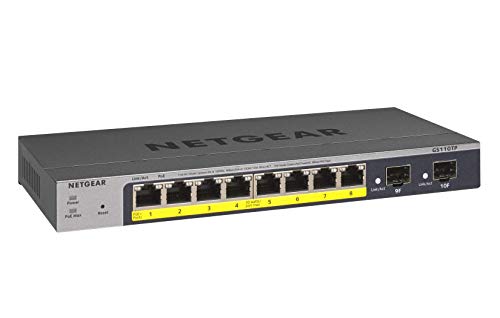
- 8 PoE+ ports with 55W budget
- 2 x 1G SFP ports for fiber
- Smart managed with SNMP and Insight
Best For: Small business networks that need PoE+ and dual 1G SFP uplinks
Multi-Gig Cloud Pick
Omada ES210X-M2 8-Port 2.5G Switch

- Eight 2.5Gbps RJ45 ports
- Dual 10G SFP+ uplinks
- Fanless Omada-managed metal build
Best For: Quiet home offices and small networks needing 2.5G access plus 10G uplinks
Flexible Budget Uplink
UGREEN 6-Port 2.5G Switch with 10G SFP+

- Five 2.5Gb ports and one 10G SFP+
- Supports fiber or RJ45 SFP+ modules
- Has VLAN and link aggregation modes
Best For: Small networks that want a simple 2.5G switch with one flexible 10G uplink
Rack-Ready Value
TRENDnet TEG-S5061 6-Port 2.5G Switch

- Five 2.5GBASE-T ports and one SFP+
- Unmanaged, fanless, wall-mountable
- Lifetime protection and NDAA/TAA compliant
Best For: Simple SMB or compliant deployments needing one fast SFP+ uplink
Quiet 2.5G Pick
Real HD 8 Port 2.5G Switch with 10G SFP+

- 8 x 2.5G RJ45 ports
- 1 x 10G SFP+ uplink
- Fanless metal plug-and-play design
Best For: Quiet multi-gig upgrades with lots of 2.5G ports
Best Budget Dual-SFP
YuanLey 6-Port 2.5G Switch with Dual 10G SFP

- 2 x 10G SFP ports
- 4 x 2.5G RJ45 ports
- One-key VLAN and fanless metal build
Best For: Small networks that need dual SFP and simple VLAN isolation
Desktop 10G Uplink Switch – NETGEAR GS108X 8-Port Unmanaged
If you want network switches with sfp ports for a simple desktop or wall-mounted setup, the NETGEAR GS108X is a practical option. It gives you 8 auto-negotiating 1GbE ports plus a 10G SFP+ uplink, so you can keep copper devices connected while adding fiber for expansion.
Best For: Small offices or home networks that need an easy, unmanaged switch with a 10G SFP+ connection for fiber uplinks.
Pros:
- 8 x 1Gbps Ethernet ports for everyday wired devices
- 1 x 10G SFP+ port for fiber optic connectivity and expansion
- Plug-and-play unmanaged design with no configuration required
- Fanless metal build supports silent operation
Cons:
- No managed features like VLAN or traffic controls
- Only one SFP+ port, so expansion is limited on the fiber side
Overall, this is a straightforward choice if you mainly want reliable copper switching with one fast SFP+ uplink. The silent, energy-efficient design and flexible mounting make it easy to fit into a home or office environment.
Easy-Managed 2.5G Switch – TP-Link Omada ES206X-M2 5-Port 2.5G
The TP-Link Omada ES206X-M2 stands out among network switches with sfp ports if you want faster 2.5G copper access plus a 10G SFP+ slot. It supports plug-and-play use out of the box, while also adding cloud management and useful network features for more control.
Best For: Users who want a compact, easy-managed switch with 2.5G ports, a 10G SFP+ uplink, and centralized Omada management.
Pros:
- 5 x 2.5Gbps RJ45 ports for faster wired connections
- 1 x 10Gbps SFP+ slot for fiber or uplink expansion
- Centralized cloud management via the web or Omada app
- Useful features like VLAN, loop prevention, and IGMP snooping
Cons:
- Only five RJ45 ports, so it is not ideal for larger wired networks
- Managed features may be more than casual users need
This switch makes sense when you want more than basic plug-and-play hardware but still need a compact footprint. It combines higher-speed access ports with management tools that can help keep a small network organized.
All-SFP 10G Switch – MokerLink 8-Port Fanless 10G SFP+
For buyers comparing network switches with sfp ports, the MokerLink 8-port model is built around fiber-first expansion. Every port is an SFP+ slot, and it supports 1G, 2.5G, and 10G modules, making it a flexible choice for high-bandwidth links and long-distance fiber runs.
Best For: Fiber-heavy setups that need multiple SFP+ connections in a quiet, unmanaged switch.
Pros:
- 8 x 10Gbps SFP+ slots for all-fiber connectivity
- Supports 1G/2.5G/10G SFP modules for flexible speeds
- 160Gbps switching capacity for non-blocking forwarding
- Fanless metal case for quiet operation
Cons:
- No RJ45 copper ports at all
- SFP modules are not included
- Unmanaged design offers no advanced control features
This is a strong fit when your network is already built around fiber and you want a simple, high-capacity switch. Just make sure you already have the right SFP modules, since the switch is sold without them.
PoE Smart Switch with SFP – NETGEAR GS110TP 8-Port PoE+ Smart Managed
The NETGEAR GS110TP is a useful pick if you want network switches with sfp ports and also need power for connected devices. It combines 8 PoE+ copper ports with 2 SFP ports, giving you a compact smart-managed switch that can handle both device power and fiber expansion.
Best For: Small business or advanced home networks that need PoE+ ports plus dual 1G SFP connections.
Pros:
- 8 x PoE+ ports with a 55W total power budget
- 2 x 1G SFP ports for fiber optic connections and expansion
- Smart managed interface with secure setup and SNMP support
- Compact metal desktop or wall-mount design
Cons:
- Only 1Gbps on the SFP ports, not 10G
- PoE power budget may be limiting for heavier deployments
- Managed features add complexity compared with basic unmanaged switches
Compared with basic switches, this model is better when you need both power delivery and fiber uplinks in one box. The dual SFP ports and smart management make it a flexible option for smaller networks that need more control.
Multi-Gig Cloud Pick – Omada ES210X-M2 8-Port 2.5G Switch
If you want network switches with sfp ports for a fast desktop or small-office setup, the Omada ES210X-M2 is built around 2.5GbE access ports with dual 10G SFP+ uplinks. It is a practical fit when you need more than gigabit for Wi‑Fi 6/7 access points, NAS devices, or a gaming PC, while still keeping management simple through Omada SDN.
Best For: Home offices and small networks that need quiet 2.5G switching with 10G uplinks.
Pros:
- Eight 2.5Gbps RJ45 ports for multi-gig wired devices
- Two 10G SFP+ slots for fast uplinks to core switches or servers
- Easy managed features include VLAN support, IGMP Snooping, and Auto Loop Prevention
- Fanless metal design runs silently on a desk or in a quiet room
Cons:
- SFP+ ports are uplinks, not additional Ethernet RJ45 ports
- Best suited to users who want simple centralized management, not full enterprise complexity
This switch makes sense if you want a quiet, compact multi-gig hub with flexible 10G uplink options. The Omada cloud management support and durable metal build add convenience for users who prefer straightforward control over advanced configuration.
Flexible Budget Uplink – UGREEN 6-Port 2.5G Switch with 10G SFP+
For buyers comparing network switches with sfp ports, this UGREEN model is appealing because it combines five 2.5Gb ports with a single 10Gb SFP+ slot in a simple plug-and-play package. It is aimed at small teams, NAS users, and gamers who want faster wired transfers and the option to connect a high-speed backbone over fiber or copper modules.
Best For: Small setups that need an affordable 2.5G switch with a flexible 10G SFP+ uplink.
Pros:
- Five 2.5Gb ports plus one 10Gb SFP+ port
- Supports 1G, 2.5G, and 10G SFP+ optical or RJ45 copper modules
- One-touch Standard, Link Aggregation, and VLAN modes
- Metal case with 4KV lightning protection and wall-mount support
Cons:
- SFP+ module is not included
- Only one SFP+ slot, so it is not ideal if you need multiple fiber uplinks
This is a straightforward choice if you want multi-gig speed without a complicated setup. The mode switch and flexible SFP+ support make it versatile, but its single uplink slot keeps it focused on smaller network roles.
Rack-Ready Value – TRENDnet TEG-S5061 6-Port 2.5G Switch
If you need network switches with sfp ports in a no-fuss form factor, the TRENDnet TEG-S5061 delivers five 2.5GBASE-T ports and one 10G SFP+ slot in an unmanaged design. It is a solid fit for adding a faster uplink to an SMB network while keeping compatibility with existing 10/100/1000Mbps devices and Cat5e or better cabling.
Best For: SMB and government-oriented installs that want an unmanaged 2.5G switch with a 10G SFP+ uplink.
Pros:
- Five 2.5GBASE-T ports plus one 10G SFP+ slot
- Unmanaged operation keeps setup simple
- Fanless metal housing with wall-mountable design
- Lifetime protection and NDAA/TAA compliance for eligible buyers
Cons:
- No advanced management features like VLAN configuration in the switch itself
- Only one SFP+ port, so it is best for a single uplink
This model is best when reliability and simplicity matter more than features. Its fanless build, broad backward compatibility, and compliance-focused positioning make it easy to slot into practical deployments.
Quiet 2.5G Pick – Real HD 8 Port 2.5G Switch with 10G SFP+
If you want network switches with sfp ports for a fast desktop or small-office upgrade, this Real HD model is built around 8 x 2.5G RJ45 ports plus a 10G SFP+ uplink. It keeps setup simple with plug-and-play operation, while the metal fanless housing is designed for quiet use and steady heat dissipation.
Best For: Users who want a quiet unmanaged switch with plenty of 2.5G wired ports and one high-speed SFP+ uplink.
Pros:
- 8 x 2.5G RJ45 ports plus 1 x 10G SFP+ port
- Fanless metal design for quiet operation
- Plug-and-play setup with no software needed
- Supports a range of devices like 2.5G PCs, NAS, WiFi 6 gear, and 4K video
Cons:
- To reach 2.5G speeds, connected devices also need 2.5G-capable networking
- Only one SFP+ port is included
- No PoE support mentioned
Overall, this is a practical choice if you want a simple multi-gig switch with SFP+ expansion and lots of 2.5G copper ports. It fits well in environments where quiet operation and straightforward setup matter more than advanced management features.
Best Budget Dual-SFP – YuanLey 6-Port 2.5G Switch with Dual 10G SFP
Among network switches with sfp ports, this YuanLey model stands out for giving you two 10G SFP ports alongside four 2.5G Base-T ports. It is an unmanaged desktop or wall-mount switch with plug-and-play operation, plus a one-key VLAN mode for isolating RJ45 ports when you want a cleaner network layout.
Best For: Buyers who want an affordable unmanaged switch with dual SFP uplinks and basic VLAN isolation.
Pros:
- 2 x 10G SFP ports for high-speed uplinks
- 4 x 2.5G RJ45 ports with auto-adaptive support up to 2.5G
- One-key VLAN mode for port isolation
- Fanless metal case with wall-mount or desktop placement
Cons:
- SFP modules are not included
- Only four copper ports are available
- Unmanaged design offers limited control beyond VLAN mode
This is a strong fit if you need a simple multi-gig switch with two SFP ports and don’t want to spend more than necessary. The mix of 2.5G copper, dual SFP, and quiet fanless construction makes it versatile for small networks with NAS, APs, and gaming PCs.
Warranty-Focused Choice – TRENDnet TEG-S562 4×2.5G + 2x10G SFP+
If you’re comparing network switches with sfp ports for a dependable small-business setup, the TRENDnet TEG-S562 offers four 2.5GBASE-T ports and two 10G SFP+ ports in a compact unmanaged design. It emphasizes easy installation, fanless operation, and long-term support, making it a sensible option when you want a straightforward upgrade path.
Best For: Buyers who want a compact unmanaged multi-gig switch with strong warranty support and dual 10G SFP+ ports.
Pros:
- 4 x 2.5GBASE-T ports and 2 x 10G SFP+ ports
- Fanless design keeps operation quiet
- Lifetime TRENDnet Manufacturer Protection
- Wall-mountable, compact metal housing
Cons:
- Only four copper ports are included
- No configuration or management features beyond unmanaged operation
- SFP+ transceivers are not included in the notes
Overall, the TEG-S562 is a polished option for users who value brand support and a clean, compact layout. The combination of 2.5G access ports and 10G SFP+ uplinks gives it flexibility without adding setup complexity.
How We Picked These Network Switches with Sfp Ports
We prioritized port mix, uplink flexibility, multi-gig support, management features, fan noise, and value. That means looking at whether a switch offers 1G, 2.5G, or 10G access ports, plus whether the SFP or SFP+ uplinks fit your fiber transceivers and cabling plans.
We also considered real-world use cases: simple plug-and-play desktop switching, small-business VLAN segmentation, and faster backbone connections for NAS or access points.
Quick Comparison: What Matters Most
For many buyers, the biggest decision is whether you need copper access ports, SFP uplinks, or full SFP+ speed. If you mainly want a low-maintenance home or office upgrade, unmanaged models are easiest. If you need traffic control, VLANs, or PoE, a smart managed switch is the better fit.
In short: 2.5G models are ideal for everyday multi-gig upgrades, while 10G-capable Network Switches with Sfp Ports are better for storage, workstation, and backbone connections.
Key Buying Factors for Network Switches with Sfp Ports
Port Type and Speed
Check whether the SFP cage supports standard SFP or higher-speed SFP+. Match that to your fiber modules and the upstream speed you actually need. A 10G SFP+ uplink is useful for NAS, routers, or aggregation links, while 1G SFP may be enough for lighter workloads.
Number of Copper Ports
Count your wired devices first. If you only need a few high-speed endpoints, a compact 5- or 6-port switch may be perfect. If you are wiring several PCs, APs, or cameras, 8-port designs offer more breathing room.
Managed Vs Unmanaged
Unmanaged switches are best for simple expansion and minimal setup. Smart managed options are worth it if you need VLANs, link aggregation, or traffic prioritization. For offices and advanced home labs, that flexibility can matter more than raw port count.
Cooling and Noise
Fanless models are attractive for desks, media cabinets, and quiet rooms. Higher-power 10G switches may run warmer, so check whether the thermal design matches your environment.
Future-Proofing
If you are choosing between 1G and multi-gig, think ahead. Even if your current devices are mostly 1G, a 2.5G or 10G switch can reduce bottlenecks as you upgrade APs, workstations, or storage.
Who Should Buy Which Network Switches with Sfp Ports?
Choose an unmanaged 2.5G model if you want a simple speed boost for gaming PCs, NAS units, and Wi-Fi 6/6E access points. Pick a smart managed switch if your network needs VLANs, PoE, or better traffic control. Go for a 10G SFP+ option if your priority is a fast uplink, fiber connectivity, or a high-speed backbone between storage and core equipment.
If you are unsure, start with the port count and speed you need today, then add one tier of headroom for future devices. That is usually the safest way to buy Network Switches with Sfp Ports without overspending.