
When you need to copy the same data to many drives at once, the right duplicator saves time, reduces mistakes, and keeps production moving.
This roundup of multi target usb duplicators highlights standout options for different target counts, workflows, and deployment needs.
Best 10 Multi Target USB Duplicators Picks for 2026
PC-Based Speed Pick
SSUSB160PC 16-target USB 3.0 duplicator

- 16 target USB 3.0 duplication
- PC-connected with Nexcopy software
- Copies at flash drive maximum transfer speeds
Best For: PC users needing fast 16-target USB cloning
Standalone 23-Target Option
DupliM 1:23 standalone USB duplicator

- Standalone 1-to-23 copy system
- Copies bootable flash drives
- Supports multiple file systems and some SSD/HDD use
Best For: Standalone users needing up to 23 targets
15-Target Capacity Pick
Ily DM-ATS-FMAX15 15-target duplicator

- 15 target USB flash duplication
- Capacity-focused USB FlashMax model
- Limited details supplied on specs
Best For: Users prioritizing a 15-target duplicator
Advanced Feature Pick
USB160PRO 16-target USB 3.0 duplicator
- 16 target PC-connected USB 3.0 duplicator
- Read-only and CD-ROM partition tools
- Hard-coded serial numbers plus data streaming
Best For: Advanced duplication and partition management
High-Capacity Standalone Copying
USB131SA 1 to 31 Standalone USB Duplicator
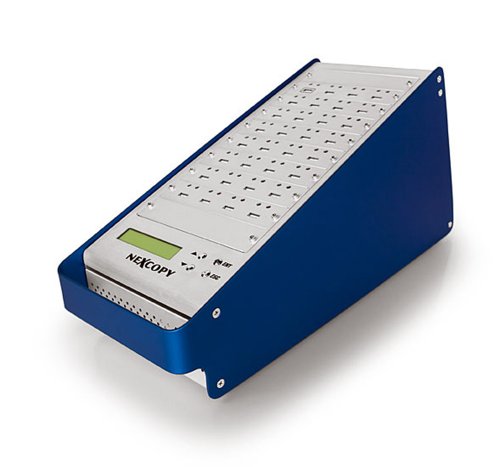
- 1 master to 31 targets for high-volume runs
- Standalone use with no PC or software
- Over 1800MB per minute copy speed per port
Best For: Large duplication jobs that need many target drives at once
Quick-Swap Professional Series
U-Reach UB910G Intelligent 9 Series Gold Factory Series
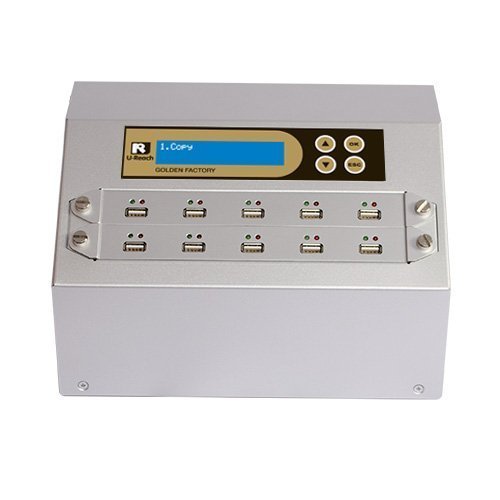
- 1 to 9 target standalone duplication
- Up to 2 GB/min per port in actual test
- Quick socket swap module for easier operation
Best For: Fast standalone duplication with easy drive swapping
Dual-Purpose Drive Management
StarTech 1:15 Standalone USB Flash Drive Duplicator Cloner Eraser, LCD

- 1 to 15 standalone duplication and erasure
- System/file copy plus sector-by-sector modes
- LCD menu for drive info and error scanning
Best For: Technicians who need cloning and erasing in one device
High-Capacity Standalone Duplicator
U-Reach UB920S 1-19 Target USB Cloner
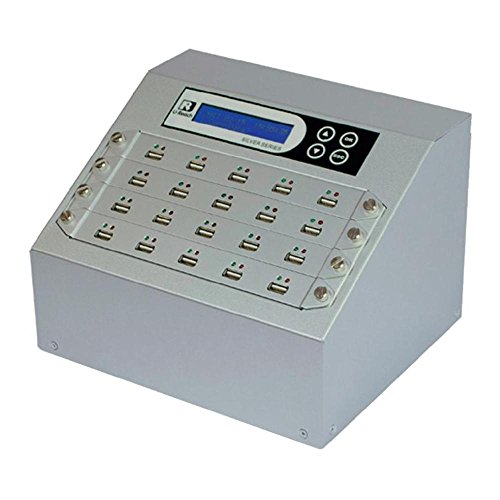
- 1 to 19 target USB duplication
- Standalone copy and erase operation
- Bit-by-bit support for many file systems
Best For: High-volume teams needing a standalone USB cloner with erase options
Asynchronous 15-Target Cloner
Vinpower USBDBL 15 Target Standalone Cloner

- 15-target standalone USB duplication
- Asynchronous copy mode for independent targets
- Smart Copy, Raw Mode, and secure erase
Best For: Users needing fast 15-drive duplication with flexible copy modes
Compact 7-Target Duplicator
Systor SYS-USBD-7 1-to-7 USB Sanitizer

- Standalone 1-to-7 USB duplication
- Up to 2GB per minute transfer rate
- Synchronous and asynchronous modes
Best For: Small teams needing a compact duplicator with dependable speed
PC-Based Speed Pick – SSUSB160PC 16-target USB 3.0 duplicator
If you need multi target usb duplicators that focus on speed and software control, the SSUSB160PC is built around a PC-connected USB 3.0 workflow. It’s designed to copy flash drives at maximum transfer speeds and comes with Nexcopy Drive Manager software for a straightforward duplication process.
Best For: Users who want a PC-based 16-target USB 3.0 duplicator with included management software.
Pros:
- Supports 16 target USB duplication.
- Uses USB 3.0 for fast copying and is backward compatible with USB 2.0.
- Includes Nexcopy Drive Manager software.
- Simple photocopier-style workflow.
Cons:
- Requires a connected PC rather than standalone operation.
- Limited to the features described for the included software and hardware.
This model fits buyers who value speed and a software-driven process over standalone simplicity. If your priority is high-volume flash drive duplication on a PC platform, it offers a focused and practical setup.
Standalone 23-Target Option – DupliM 1:23 standalone USB duplicator
DupliM 1:23 USB Flash Drive Duplicator Stand-Alone Burner Cloner Copier (1 to 23)
Check Price On AmazonFor buyers comparing multi target usb duplicators that can run without a computer, the DupliM 1:23 is a standalone copier with a simple three-step process. It supports USB 2.0 and 3.0 flash drives, can copy bootable drives, and also works with external 2.5-inch hard drives or SSDs within the stated limits.
Best For: Standalone duplication of up to 23 targets with broad file system support.
Pros:
- Standalone operation with LCD-based copy workflow.
- Supports up to 23 target drives.
- Copies USB flash drives and some 2.5-inch external HDD/SSD devices.
- Supports FAT, FAT32, NTFS, HFS, Ext2, Ext3, and Ext4.
Cons:
- Read/write speed is listed up to 1.5GB/m.
- External hard drive support is limited to under 2TB.
This is a practical pick if you want a high-port standalone machine with broad compatibility and easy operation. Its appeal is the simple copy process and the ability to handle a wide range of file systems and drive types.
15-Target Capacity Pick – Ily DM-ATS-FMAX15 15-target duplicator
If you’re shopping for multi target usb duplicators and want a straightforward 15-target model, the Ily DM-ATS-FMAX15 is positioned as a USB FlashMax duplicator. Based on the supplied details, it’s a dedicated 15-target flash drive duplicator for buyers who need high-count copying without extra feature complexity.
Best For: Buyers needing a 15-target USB flash drive duplicator.
Pros:
- Supports 15 target drives.
- Dedicated USB flash drive duplicator format.
- Clear high-capacity duplication focus.
Cons:
- No detailed feature notes were supplied.
- No interface, speed, or compatibility specifics provided.
This model is best viewed as a capacity-first option when your main requirement is hitting 15 targets. Because the notes are sparse, it makes sense to compare it mainly on port count and overall fit for your workflow.
Advanced Feature Pick – USB160PRO 16-target USB 3.0 duplicator
Nexcopy USB160PRO - 16 Target USB 3.0 Duplicator with Partition Tool Module Drive Manager Software
Check Price On AmazonAmong multi target usb duplicators, the USB160PRO stands out for buyers who want more than basic copying. It uses PC-connected USB 3.0 technology for fast duplication, works with USB 2.0 devices, and adds advanced tools such as read-only partitions, USB CD-ROM partitions, hard-coded serial numbers, data streaming, and data extraction features.
Best For: Advanced users who need 16-target duplication with partition and serial-number tools.
Pros:
- Supports 16 target USB duplication.
- PC-connected USB 3.0 design with USB 2.0 compatibility.
- Includes partition and serial-number management features.
- Offers data streaming and data extraction tools.
Cons:
- Requires Nexcopy USB media for advanced features.
- Depends on a connected PC rather than standalone operation.
This is a feature-rich choice when duplication needs extend into drive configuration and media management. It makes the most sense for users who want a fast 16-target platform with extra control over how each USB drive is presented.
High-Capacity Standalone Copying – USB131SA 1 to 31 Standalone USB Duplicator
If you need multi target usb duplicators for large batch jobs, the USB131SA is built for high-volume standalone copying without a PC or software. Its 1-to-31 layout and LCD status feedback make it practical for technicians who want to keep multiple targets moving at once.
Best For: Shops and IT teams that need to duplicate one master drive to up to 31 targets without using a computer.
Pros:
- 1 master to 31 target configuration supports very large duplication runs
- Standalone operation means no computer or software is required
- Copies at over 1800MB per minute to each port
- LCD provides real-time performance feedback and status
Cons:
- Asynchronous duplication is limited to masters up to 256MB
- Best suited to duplication workflows rather than broader drive management tasks
Overall, this model is focused on scale and speed, making it a straightforward choice when the priority is pushing the same USB content to many drives efficiently. The LCD feedback and standalone design help keep the process simple in busy environments.
Quick-Swap Professional Series – U-Reach UB910G Intelligent 9 Series Gold Factory Series
Among multi target usb duplicators, the U-Reach UB910G is aimed at users who want a compact standalone system with strong speed and easier handling. It supports flash drives and external USB hard drives, and its quick socket swap module is designed to make day-to-day operation less fussy.
Best For: Users who want a standalone duplicator with fast per-port copying and quick drive swapping.
Pros:
- Supports 1 to 9 target duplication in a standalone system
- High-speed copy support up to 2 GB/min per port in actual testing
- Quick socket swap module can simplify drive changes
- Built-in multi-core processor is designed for advanced performance
Cons:
- Lower target count than larger multi-bay duplicators
- Specific speed claim is based on actual test performance, not a universal guarantee
This is a practical pick if you want a balance of speed, ease of use, and flexible media support. It is less about maximum target count and more about efficient standalone duplication in a smaller batch workflow.
Dual-Purpose Drive Management – StarTech 1:15 Standalone USB Flash Drive Duplicator Cloner Eraser, LCD
If your multi target usb duplicators shortlist includes both cloning and sanitizing, this StarTech unit stands out for doing both in one standalone box. It supports duplication and erasure modes, includes an LCD menu, and is built for technicians who need to manage multiple USB drives without a computer.
Best For: IT pros and technicians who need a standalone duplicator that can also erase USB drives.
Pros:
- 1 to 15 standalone USB drive duplicator, cloner, and eraser
- Supports USB 3.0/2.0 flash media and external USB storage
- Includes system/file copy, sector-by-sector copy, and erase modes
- LCD menu shows drive info, performance, and error scanning
Cons:
- Asynchronous copy mode is limited to source content under 128 MB
- External USB devices may need their own power source
- Target count is lower than some larger standalone duplicators
For teams that need more than simple copying, this model adds useful erase and verification-oriented features. It is a solid operational choice when the workflow includes both creating drives and securely wiping them afterward.
High-Capacity Standalone Duplicator – U-Reach UB920S 1-19 Target USB Cloner
If you need multi target usb duplicators for large batch jobs, the U-Reach Intelligent 9 Series UB920S is built for standalone USB cloning without a computer or software. It supports USB 2.0/3.0/3.1 devices and external USB-powered hard drives, and its bit-by-bit copy mode helps preserve all file types, including Linux, Mac, NTFS, and FAT formats.
Best For: Teams that need a standalone duplicator for copying or sanitizing USB drives across many targets.
Pros:
- Standalone operation means no PC or software is required.
- Supports 1 to 19 target outputs for high-volume duplication.
- Bit-by-bit copying works with proprietary and unknown formats.
- Offers Quick Erase, Full Erase, and DoD Erase options.
Cons:
- External USB-powered HDD support is listed, but drive compatibility still depends on the media used.
- Best suited to users who need a dedicated hardware workflow rather than a general-purpose PC tool.
This model stands out when copy integrity and flexibility matter more than software features. The modular socket design is also useful for maintenance, since individual ports can be swapped quickly to reduce downtime.
Asynchronous 15-Target Cloner – Vinpower USBDBL 15 Target Standalone Cloner
Among multi target usb duplicators, the Vinpower USBDBL focuses on asynchronous duplication so multiple USB drives can be copied independently without needing a PC. It offers Smart Copy for accessible content and Raw Mode for bit-by-bit duplication, plus secure erase for clearing drives when finished.
Best For: Users who want a 15-target standalone cloner with flexible copy modes and secure erase.
Pros:
- Standalone operation requires no computer.
- Asynchronous duplication copies multiple drives independently.
- Smart Copy and Raw Mode provide both fast and exact copying options.
- Secure Erase helps fully clear USB media.
Cons:
- Alternative flash media needs the proper Interface Adaptor Module add-on.
- The feature set is centered on duplication and erasure, not broader storage management.
This is a strong pick if you need a 15-slot workflow that can scale without slowing down to match the slowest target. Its compatibility with optional adapters also adds flexibility for teams handling more than just standard USB flash drives.
Compact 7-Target Duplicator – Systor SYS-USBD-7 1-to-7 USB Sanitizer
If you want multi target usb duplicators for smaller production runs, the Systor SYS-USBD-7 delivers standalone copying and sanitizing in a 1-to-7 format. It supports bit-by-bit duplication, synchronous and asynchronous copy modes, and transfer speeds up to 2GB per minute, with performance that stays the same as the load increases.
Best For: Small teams that need a compact standalone USB duplicator and sanitizer with consistent copy speed.
Pros:
- Standalone design needs no computer or software.
- Supports both synchronous and asynchronous copy modes.
- Copies at up to 2GB per minute with consistent speed across loads.
- Bit-by-bit duplication is included for accurate cloning.
Cons:
- Target count is limited to 7, so it is better for smaller batches.
- External hard drive support is optional, not built in.
The SYS-USBD-7 is a practical fit when you want reliable standalone duplication without moving up to a larger system. It also comes with a warranty package that includes parts, labor, and lifetime technical support.
How We Picked the Best Multi Target USB Duplicators
We focused on the features that matter most in production environments: target count, transfer speed, standalone versus PC-based operation, media compatibility, and ease of use. We also considered whether each unit is better suited for small-batch office tasks or higher-volume fulfillment, IT, and manufacturing workflows.
Quick Comparison
In general, higher target-count systems are best for large duplication runs, while lower target-count models can be a better fit when speed, portability, and lower upfront cost matter more. PC-based units may offer added control and workflow tools, while standalone models are often simpler and faster to deploy.
Key Buying Factors for Multi Target USB Duplicators
Target Count
Choose a unit that matches your typical job size with a little room to grow. If you routinely burn 10 or more drives at a time, a 15-, 16-, 19-, 23-, or 31-target model can improve throughput significantly.
Speed and Workflow
Speed ratings matter, but real-world performance also depends on the source content, drive quality, and whether the system can duplicate and verify efficiently. For recurring jobs, look for models that support quick setup and repeatable processes.
Standalone Vs. PC-Based
Standalone duplicators are usually preferred for simple, self-contained operation. PC-based systems can be a better choice when you need software-driven control, partition management, or a more integrated production workflow.
Media Compatibility
Make sure the unit supports the drive types you use most often. Some Multi Target USB Duplicators are focused on flash drives, while others also support external USB hard drives or offer broader formatting and sanitizing functions.
Who Should Buy Which Multi Target USB Duplicators?
Small teams and occasional users may be best served by lower-target standalone units that are easy to operate and store. IT departments, educators, and fulfillment teams that regularly image many drives should lean toward higher-capacity duplicators with dependable verification and consistent output. If your workflow includes drive preparation, partitioning, or mixed media handling, consider a PC-based or feature-rich model for more control.
The best choice ultimately depends on how many drives you need to duplicate, how often you run jobs, and whether simplicity or advanced workflow control matters more in your environment.