
Mini PCs with Core Ultra 9 bring desktop-class responsiveness to a footprint that fits almost anywhere. They’re a smart fit for creators, professionals, and power users who want strong performance without a full tower.
In this roundup, we focused on models that balance CPU speed, AI capability, connectivity, and expansion potential so you can choose the right compact system for work or demanding everyday use.
Best 10 Mini PCs with Core Ultra 9 Picks for 2026
Performance-First Barebone Choice
MINISFORUM M1 Pro-285H AI Mini PC

- Core Ultra 9 285H with up to 5.4GHz
- Barebone design with DDR5 and dual M.2 slots
- OCuLink, USB4, Wi‑Fi 7, and quad-display output
Best For: Power users who want a configurable Core Ultra 9 mini PC
Balanced AI Workstation Pick

- Core Ultra 9 285H with 99 TOPS AI performance
- 32GB DDR5 and 1TB SSD included
- Dual USB4, dual HDMI, and Wi‑Fi 7
Best For: Professionals needing a ready-to-use Core Ultra 9 mini PC
Expandable Desktop-Class Pick
MINISFORUM MS-02 Ultra Barebone Mini PC

- Core Ultra 9 285HX with 24 cores
- Up to 256GB RAM and 16TB storage support
- PCIe 5.0 x16, 10GbE, and USB4 V2
Best For: Advanced users needing maximum expansion in a compact system
Elite 4K Workhorse
ASUS NUC 15 Pro+ Core Ultra 9 Mini PC

- Intel Core Ultra 9 285H with Arc 140T graphics
- Up to four 4K displays via HDMI 2.1 and Thunderbolt 4
- Wi‑Fi 7, Bluetooth 5.4, and toolless upgrades
Best For: Professionals needing a compact Windows mini PC for office and multi-display use
Quiet AI Creator Box
GEEKOM IT13 Max Core Ultra 9 Mini PC

- Core Ultra 9 185H with dedicated NPU for AI tasks
- 24GB LPDDR5 and 500GB SSD for smooth multitasking
- Quiet IceBlast 3.0 cooling with Windows and Linux support
Best For: Creators and developers who want a quiet AI-ready mini PC
Expandable Ultra Workstation
MINISFORUM MS-02 Ultra Core Ultra 9 Workstation
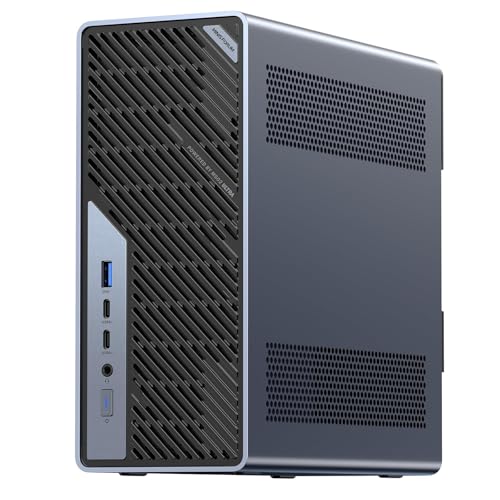
- Core Ultra 9 285HX with PCIe 5.0 x16 support
- Four DDR5 slots and four M.2 slots for major expansion
- Dual 25GbE plus Wi‑Fi 7 and vPro management
Best For: Power users and IT teams needing a highly expandable mini workstation
Best Spec-Rich Option
Core Ultra 9 Mini PC with 64GB RAM

- Core Ultra 9 285H with 64GB DDR5 and 2TB SSD
- 99 TOPS AI performance and Intel Arc 140T graphics
- Dual USB4, 2.5G LAN, Wi-Fi 7, and OCuLink support
Best For: Heavy multitasking, creators, and AI-focused workflows
Best Value Configuration
Core Ultra 9 Mini PC with 32GB and OCuLink

- Core Ultra 9 285H with 32GB DDR5 and 1TB SSD
- 99 TOPS AI performance plus Intel Arc 140T graphics
- Dual USB4, OCuLink adapter, and quad-display support
Best For: Value-conscious buyers who still want strong expansion and AI features
Performance-First Barebone Choice – MINISFORUM M1 Pro-285H AI Mini PC
If you want mini pcs with core ultra 9 for serious multitasking, the MINISFORUM M1 Pro-285H stands out as a barebone option built around the Intel Core Ultra 9 285H. It is aimed at users who want strong CPU performance, fast DDR5 support, flexible storage, and broad display/output options without paying for a preconfigured memory and SSD bundle.
Best For: Power users, creators, and buyers who want a configurable Core Ultra 9 mini PC with RAID, OCuLink, and quad-display support.
Pros:
- Intel Core Ultra 9 285H with 16 cores, 16 threads, and up to 5.4GHz
- Supports DDR5-5600 with up to 128GB and dual PCIe 4.0 M.2 slots
- OCuLink, USB4, Wi-Fi 7, and Bluetooth 5.4 for modern connectivity
- Quad 4K display output for multi-monitor work setups
Cons:
- Barebone configuration means you must supply RAM, SSD, and OS
- Best value depends on whether you will use the expansion features
This is the most flexible pick in the group if you want to build around the platform rather than buy a fixed configuration. Its appeal is in the mix of performance, storage expansion, and external GPU support.
Balanced AI Workstation Pick – GEEKOM IT15 AI Mini PC
For buyers comparing mini pcs with core ultra 9, the GEEKOM IT15 focuses on a ready-to-use productivity setup. It pairs the Intel Core Ultra 9 285H with 32GB of DDR5 memory and a 1TB SSD, making it a practical choice for office work, creative apps, coding, and AI-assisted tasks without requiring upgrades out of the box.
Best For: Professionals who want a prebuilt Core Ultra 9 mini PC for productivity, content creation, and light gaming.
Pros:
- Intel Core Ultra 9 285H with claimed 99 TOPS AI performance
- Includes 32GB DDR5 RAM and 1TB SSD
- Dual USB4, dual HDMI, and support for up to four displays
- Wi‑Fi 7, Bluetooth 5.4, and 2.5GbE Ethernet for fast networking
Cons:
- Less builder-friendly than a barebone system
- Gaming performance is positioned for casual and mid-tier use, not a dedicated gaming desktop
This is a strong all-rounder if you want a compact workstation that is ready to go immediately. The included memory and storage, plus the 3-year warranty, make it especially appealing for business and creator use.
Expandable Desktop-Class Pick – MINISFORUM MS-02 Ultra Barebone Mini PC
If your search for mini pcs with core ultra 9 is really about desktop-class expandability, the MINISFORUM MS-02 Ultra pushes further than typical compact systems. It uses the Core Ultra 9 285HX and adds unusually strong memory, storage, networking, and PCIe expansion options for users building a serious compact workstation or lab machine.
Best For: Advanced users who need maximum expandability in a compact Core Ultra 9 system.
Pros:
- Core Ultra 9 285HX with 24 cores and up to 5.5GHz
- Supports up to 256GB DDR5 across four SO-DIMM slots
- Dual PCIe 4.0 NVMe slots with up to 16TB total storage
- PCIe 5.0 x16 expansion, 10GbE, 2.5GbE, and USB4/USB4 V2
Cons:
- Barebone design adds extra cost for RAM, SSDs, and OS
- Feature set is more complex than a typical plug-and-play mini PC
This model is the most desktop-like option here, especially if you value expansion and networking over simplicity. It is a better fit for advanced workflows than casual home use.
High-End Creator Pick – GEEKOM GT15 Max Mini PC
Among mini pcs with core ultra 9, the GEEKOM GT15 Max is built for users who want strong everyday performance plus creator-friendly hardware. With the Core Ultra 9 285H, 32GB of DDR5, and a 1TB SSD, it targets AI work, coding, content creation, and multitasking in a compact Windows 11 system.
Best For: Creators and professionals who want a well-equipped Core Ultra 9 mini PC with strong graphics and connectivity.
Pros:
- Intel Core Ultra 9 285H with up to 99 TOPS platform AI performance
- Intel Arc 140T graphics for casual gaming and creative apps
- 32GB DDR5 RAM and 1TB SSD included, with upgrade options
- Dual USB4, dual HDMI, Mini DP, and dual 2.5G LAN
Cons:
- Product notes emphasize professional use more than gaming specialization
- Some buyers may not need the extra networking and display flexibility
This is a well-rounded premium pick if you want a mini PC that can handle demanding work without feeling stripped down. Its combination of upgradeability, multi-display support, and enterprise features makes it especially practical for creators and office power users.
Elite 4K Workhorse – ASUS NUC 15 Pro+ Core Ultra 9 Mini PC
If you want mini pcs with core ultra 9 for a premium business setup, the ASUS NUC 15 Pro+ keeps the focus on speed, quiet operation, and modern connectivity. Its Intel Core Ultra 9 285H, Arc 140T graphics, and Wi‑Fi 7 make it a strong fit for everyday productivity and multi-display work without taking up much desk space.
Best For: Professionals who want a compact Windows mini PC for office work, 4K displays, and easy upgrades.
Pros:
- Core Ultra 9 285H with integrated Intel Arc 140T graphics for responsive daily performance.
- Supports up to four 4K displays through dual HDMI 2.1 and Thunderbolt 4.
- Wi‑Fi 7 and Bluetooth 5.4 for fast wireless connectivity.
- 0.7L chassis with toolless upgrade design and quieter cooling.
Cons:
- Integrated graphics are fine for productivity, but not a substitute for a discrete GPU.
- Premium positioning may be more than casual users need.
The NUC 15 Pro+ is the most polished all-around option here if you value small size, strong connectivity, and a clean professional build. It is especially appealing when dual HDMI plus Thunderbolt 4 and quiet cooling matter as much as CPU performance.
Quiet AI Creator Box – GEEKOM IT13 Max Core Ultra 9 Mini PC
Among mini pcs with core ultra 9, the GEEKOM IT13 MAX is aimed at users who want a quiet machine for AI-assisted work, editing, and heavy multitasking. The Core Ultra 9 185H, LPDDR5 memory, and 500GB SSD are paired with cooling designed for stable 24/7 operation, making it a practical compact desktop for creators and developers.
Best For: Creators, developers, and business users who want a quiet AI-ready mini PC with Linux support.
Pros:
- Intel Core Ultra 9 185H with dedicated NPU for AI workloads.
- 24GB LPDDR5 memory and 500GB SSD for responsive multitasking.
- Quiet IceBlast 3.0 cooling built for sustained 65W performance.
- Supports Windows and major Linux distros, with dual Ethernet and quad-display output.
Cons:
- Memory is on-board, so upgrades are less flexible than SODIMM-based systems.
- Storage starts at 500GB, which may be light for large media projects.
This model stands out when you want a small, quiet system that can handle AI tasks, editing, and long work sessions without sounding like a desktop tower. The broad OS support also makes it appealing for homelabs and developer setups.
Expandable Ultra Workstation – MINISFORUM MS-02 Ultra Core Ultra 9 Workstation
If your search for mini pcs with core ultra 9 is really about workstation-class expansion, the MINISFORUM MS-02 Ultra is in a different league. With a Core Ultra 9 285HX, PCIe 5.0 x16 support, four DDR5 slots, four M.2 slots, and dual 25GbE networking, it is built for demanding compute, storage, and networking workloads.
Best For: Power users, teams, and enterprise environments that need a highly expandable mini workstation.
Pros:
- Core Ultra 9 285HX with up to 5.5GHz boost and 13 TOPS NPU.
- PCIe 5.0 x16 support plus multiple PCIe and USB4 v2 expansion options.
- Four DDR5 slots and four M.2 slots for up to 256GB RAM and 24TB storage.
- Dual 25GbE, 10GbE, 2.5GbE, Wi‑Fi 7, and vPro for advanced networking and management.
Cons:
- More complex and expensive than a simple plug-and-play mini PC.
- Best suited to users who will actually use the expansion headroom.
The MS-02 Ultra is the strongest choice here when upgradeability, networking, and workstation-style flexibility matter more than absolute simplicity. It is especially compelling for creators, engineers, and IT teams that need a compact system with serious growth potential.
Top Pick for Balanced Performance – Core Ultra 9 AI Mini PC with Quad 4K Output
If you want mini pcs with core ultra 9 for a compact workstation that can also handle light gaming and creative work, the MINISFORUM M1 Pro-285H is a strong all-rounder. It pairs the Intel Core Ultra 9 285H with DDR5 memory, PCIe 4.0 storage, USB4, OCuLink, and quad-display support, making it a flexible choice for everyday productivity and more demanding multitasking.
Best For: Users who want a well-rounded Core Ultra 9 mini PC for productivity, content creation, and multi-monitor setups.
Pros:
- Intel Core Ultra 9 285H with 16 cores/16 threads and integrated Intel Arc graphics
- Dual M.2 PCIe 4.0 slots, RAID 0/1 support, and 32GB DDR5-5600 memory
- Two USB4 ports, OCuLink support, and Wi-Fi 7/Bluetooth 5.4
- Quad 4K display output support for up to four monitors
Cons:
- Ships with 32GB RAM and 1TB SSD, so heavier users may want to upgrade later
- OCuLink requires one M.2 PCIe 4.0 slot and is not hot-swappable
- Performance-focused features may be more than casual users need
This model stands out for combining strong compute, flexible storage, and broad connectivity in a small chassis. If quad displays, fast external expansion, and quiet cooling matter, it is one of the more practical Core Ultra 9 mini PC options.
Best Spec-Rich Option – Core Ultra 9 Mini PC with 64GB RAM
For buyers comparing mini pcs with core ultra 9, this MINISFORUM M1 Pro leans hard into workstation-style specs. The Intel Core Ultra 9 285H, 64GB DDR5 memory, 2TB SSD, 99 TOPS AI claim, and dual USB4 ports make it a compelling pick if you want a mini desktop built for heavier multitasking and creator workloads.
Best For: Power users who want a highly configured Core Ultra 9 mini PC for creative work, AI tasks, and large multitasking loads.
Pros:
- 64GB DDR5-5600 RAM and a 2TB PCIe 4.0 SSD come preinstalled
- 99 TOPS total AI performance with Intel Arc 140T graphics
- Dual USB4, HDMI, DisplayPort, and quad-display support
- 2.5GbE, Wi-Fi 7, Bluetooth 5.4, and OCuLink for external GPU use
Cons:
- Higher-spec configuration may be overkill for basic office use
- OCuLink requires an M.2 PCIe 4.0 SSD slot, which reduces flexibility
- Premium spec list likely comes at a higher cost than simpler models
This version is the most capable out of the box if you want fewer compromises on memory and storage. It is especially appealing when you value expansion, fast networking, and a stronger default setup for demanding workflows.
Best Value Configuration – Core Ultra 9 Mini PC with 32GB and OCuLink
If you want mini pcs with core ultra 9 but prefer a more affordable starting point, this M1 Pro configuration keeps the same Intel Core Ultra 9 285H platform while trimming memory and storage to 32GB RAM and 1TB SSD. It still includes 99 TOPS AI performance, dual USB4, quad-display output, and OCuLink, so you get the core features that matter for performance-minded buyers.
Best For: Buyers who want Core Ultra 9 performance and expansion features without paying for the top memory and storage configuration.
Pros:
- Core Ultra 9 285H with 16 cores/16 threads and Intel Arc 140T graphics
- 32GB DDR5-5600 RAM, 1TB PCIe 4.0 SSD, and dual M.2 expansion
- Dual USB4, HDMI, DisplayPort, and support for four displays
- Wi-Fi 7, Bluetooth 5.4, 2.5GbE, and included OCuLink adapter
Cons:
- Lower base memory and storage than the 64GB/2TB version
- OCuLink still depends on an M.2 PCIe 4.0 slot
- Best value if you actually plan to use the expansion and AI features
This is the practical pick if you want the same Core Ultra 9 platform without stepping up to the highest-preinstalled configuration. It keeps the expansion options and display output that make the M1 Pro line attractive.
How We Picked the Best Mini PCs with Core Ultra 9
We prioritized Mini PCs with Core Ultra 9 that offer a practical mix of performance, thermals, memory options, storage flexibility, and modern ports. We also favored systems that make sense for real-world desktop use, not just benchmark numbers.
Because these systems target different buyers, we looked at both ready-to-use configurations and barebone models, plus options with stronger connectivity for multi-monitor setups, fast storage, and dock-friendly workflows.
Quick Comparison
The main differences come down to configuration and expansion. Some models arrive fully built with 32GB RAM and 1TB SSDs, which is ideal if you want an easy setup. Others are barebone workstations with more upgrade room, making them better for advanced users who want to customize memory, storage, or internal expansion.
Chip choice also matters. The Core Ultra 9 285H is a strong all-around option for high-performance compact PCs, while the 285HX class is better suited to workstation-style builds that may need more sustained output and broader upgrade potential.
Key Buying Factors for Mini PCs with Core Ultra 9
Memory and Storage
For productivity, 32GB RAM is the sweet spot for most buyers. If you run heavy multitasking, creative apps, virtual machines, or larger project files, 64GB is a safer long-term choice. Storage matters too: 1TB is a sensible minimum for most users, while 2TB is better if you keep large media libraries or local project files.
Ports and Display Support
Look for USB4, HDMI, DisplayPort, and fast networking if you plan to drive multiple monitors or use high-speed peripherals. Mini PCs in this category are often chosen for compact office setups, so strong display output and wired networking can make a big difference.
Upgrade Path
If you want a plug-and-play desktop replacement, a fully configured system is easiest. If you prefer to tune performance over time, a barebone or more expandable chassis may be the better investment. This is especially relevant with Mini PCs with Core Ultra 9 that are meant to serve as long-term work machines.
Who Should Buy Which Mini PCs with Core Ultra 9?
Choose a fully configured model if you want the simplest setup for office work, content creation, coding, or general high-performance use. Choose a higher-spec version with 64GB RAM and 2TB storage if you handle heavier multitasking or creative workloads. Choose a barebone workstation if you need the most upgrade flexibility, more internal expansion, or a system that can grow with your workflow.
In short, the best choice depends on whether you value convenience, capacity, or expansion. For most buyers, the best Mini PCs with Core Ultra 9 are the ones that match your workload today while leaving enough headroom for tomorrow.