
A thoughtful PC gift can make everyday work, creative projects, gaming, or home organization more enjoyable. These picks range from compact accessories to larger desk and display upgrades, so consider the recipient’s setup before choosing.
Unique Christmas Gifts for PC Users
1. Anker Prime Thunderbolt 5 Docking Station
A Connected Desk Upgrade
Anker Prime Thunderbolt 5 Docking Station

- Combines 14 ports, including Thunderbolt 5, USB-C, USB-A, Ethernet, and card readers.
- Supports a single display up to 8K@60Hz; dual 8K@60Hz is specified for Thunderbolt 5 Windows laptops.
- Provides up to 140W through its Thunderbolt 5 upstream port.
Best For: Someone who connects a compatible laptop to several desk accessories.
2. UGREEN DXP2800 2-Bay NAS
A Shared Home File Hub

- Centralizes photos, videos, backups, and other files across supported devices.
- Supports two HDD bays and two M.2 NVMe SSD slots, with up to 80TB listed capacity.
- Diskless unit; HDDs and SSDs are sold separately.
Best For: A tech enthusiast organizing a growing digital library.
3. AV Access Dual-Monitor KVM Dock
A Two-Computer Desk Switch
AV Access Dual-Monitor KVM Dock

- Lets two laptops share a dual-monitor setup, keyboard, mouse, and peripherals.
- Includes HDMI outputs, USB ports, Ethernet, headset connection, and an SD card slot.
- Check compatibility first: laptops need USB-C DP Alt Mode and DP MST; Mac models mirror displays.
Best For: Someone who uses two compatible computers at one desk.
4. XPPen Artist 13.3 Pro Drawing Display
A Screen for Digital Art
XPPen Artist 13.3 Pro Drawing Display

- The 13.3-inch display pairs with a computer or laptop; a 3-in-1 cable is included.
- Includes a tilt-supporting, battery-free stylus, a red dial, and eight customizable shortcut keys.
- Compatible with Windows, Mac OS, Chrome OS, and Linux, and major creative software.
Best For: A digital artist, student, or photo editor with a compatible computer.
5. ErGear Dual-Motor Standing Desk Frame
A Custom Sit-Stand Workspace
ErGear Dual-Motor Standing Desk Frame

- Electric frame adjusts from 28 to 47 inches and has four memory presets.
- Adjustable width accommodates desktops from 44 to 90 inches long.
- Includes an under-desk cable tray and two side hooks; desktop is not listed as included.
Best For: Someone building a home office around a desktop they choose.
6. TRALT Ergonomic Office Chair
A Desk Comfort Upgrade

- Features adjustable lumbar support, headrest, height, and flip-up armrests.
- Mesh backrest and molded foam seat are described in the product notes.
- Seat height adjusts from 17.7 to 21.7 inches; listed weight capacity is 330 pounds.
Best For: A PC user who spends long stretches seated at a desk.
7. HUANUO Dual Monitor Desk Mount
A Clearer View of Two Screens
HUANUO Dual Monitor Desk Mount

- Fits two 13–32-inch monitors weighing 4.4–19.8 pounds each with VESA 75x75 or 100x100 holes.
- Offers tilt, swivel, rotation, and height adjustment, plus cable routing along the arms.
- Mounts to a wooden desk 0.59–3.54 inches thick; check the desk underside for clearance.
Best For: A dual-monitor user with a compatible desk and screens.
8. EMEET NOVA 4K Webcam
A Sharper Video-Call Setup

- Supports 4K at 30fps, though video defaults to 1080p and must be switched in software or an app.
- Includes PDAF autofocus, automatic light adjustment, and two built-in microphones.
- USB-A connection, privacy cover, and compatibility with Zoom, Teams, and Google Meet.
Best For: Someone who takes video calls or streams from a PC.
9. INIU 20,000mAh 65W Laptop Power Bank
Portable Power for Busy Days
INIU 20,000mAh 65W Laptop Power Bank

- Has 20,000mAh capacity and three charging ports: two USB-C and one USB-A.
- Can charge a laptop, phone, and Apple Watch or earbuds simultaneously, according to the notes.
- Includes a detachable 4.7-inch USB-C cable that also serves as a carry handle.
Best For: Someone who carries compatible devices between home, school, and work.
10. WOLFBOX MegaFlow 50 Electric Air Duster
A Reusable Desk-Cleaning Tool
WOLFBOX MegaFlow 50 Electric Air Duster

- Three speed settings and four nozzles are listed for cleaning PCs, keyboards, and other items.
- Rechargeable design weighs 0.45 pounds and includes a lanyard.
- The notes list up to 240 minutes of use on the lowest setting.
Best For: A PC owner who likes keeping electronics and workspaces tidy.
11. Univivi 36-Inch Under-Desk Cable Tray
A Tidy Cable Solution
Univivi 36-Inch Under-Desk Cable Tray

- The 36-inch fabric tray is designed to hold and conceal power adapters and cords.
- Offers clamp-on or screw-fixing installation and includes built-in ties.
- Measure first: the notes call for at least 5.3 inches of edge space if the desk has drawers or a back rod.
Best For: Someone who wants to organize cables under a home computer desk.
12. Redragon K668 Hot-Swap RGB Keyboard
A Keyboard to Make Their Own
Redragon K668 Hot-Swap RGB Keyboard

- The wired, full-size keyboard has 108 keys and four dedicated shortcut keys.
- Hot-swappable sockets accept many 3-pin or 5-pin switches without soldering.
- Includes two sets of mixed-color keycaps and up to 19 RGB lighting modes.
Best For: A PC enthusiast who enjoys customizing a keyboard.
13. HUION Keydial Mini Shortcut Keypad
A Shortcut Dial for Creative Work
HUION Keydial Mini Shortcut Keypad

- Bluetooth keypad has 18 customizable keys and a dial that can switch among three functions.
- The keys and dial can be configured for supported creative software through the Huion driver.
- Works with Mac OS and Windows; listed battery life is up to 70 hours.
Best For: A digital artist, editor, or power user who repeats desktop tasks.
14. Wildflower XXL Desk Mat
A Floral Touch for the Desk

- The desk mat measures about 31.5 by 15.8 inches and has a floral pattern.
- Cloth surface and non-slip rubber backing are described in the product notes.
- Designed for mouse use, browsing, office work, and gaming.
Best For: A PC user who wants a coordinated, more comfortable desk surface.
15. HARDELL 6-Inch Digital Caliper
A Handy Maker’s Measuring Kit
HARDELL 6-Inch Digital Caliper

- Measures up to 6 inches or 150mm, with inch and millimeter conversion.
- Supports inside, outside, depth, and step measurements, with a large LCD.
- Includes a case, two batteries, a mini screwdriver, and a stainless steel ruler.
Best For: A maker, DIYer, or 3D-printing hobbyist measuring small parts.
16. FDUCE SL40+ USB/XLR Microphone Kit
A Voice Setup for Calls and Streams
FDUCE SL40+ USB/XLR Microphone Kit

- Dynamic microphone offers both USB and XLR connections and a one-key mute function.
- Includes a boom stand, table mount clamp, USB audio cable, and cable ties.
- Headphone jack and volume control are listed for USB mode.
Best For: A gamer, streamer, podcaster, or remote worker recording voice.
17. ASUS ProArt PA279CRV 27-Inch 4K Monitor
A Display for Color Work
ASUS ProArt PA279CRV 27-Inch 4K Monitor

- 27-inch 4K display has a 3840 × 2160 resolution and an IPS panel.
- Notes list 99% DCI-P3 and Adobe RGB coverage, plus factory calibration to Delta E under 2.
- USB-C provides up to 96W power delivery; the stand adjusts for height, tilt, swivel, and pivot.
Best For: A photographer, designer, or video editor with a compatible computer.
18. TP-Link Deco 7 Pro Wi-Fi 7 Mesh System
Whole-Home Network Coverage
TP-Link Deco 7 Pro Wi-Fi 7 Mesh System

- Tri-band Wi-Fi 7 mesh system lists coverage up to 6,000 square feet for over 200 devices.
- Each unit includes 10Gbps, 2.5Gbps, and 1Gbps WAN/LAN ports, plus USB 3.0.
- Requires a modem for most internet providers; supports earlier Wi-Fi generations.
Best For: A PC user looking to extend wireless coverage around the home.
19. LG UltraGear 34-Inch Curved Gaming Monitor
An Expansive Gaming Display
LG UltraGear 34-Inch Curved Gaming Monitor
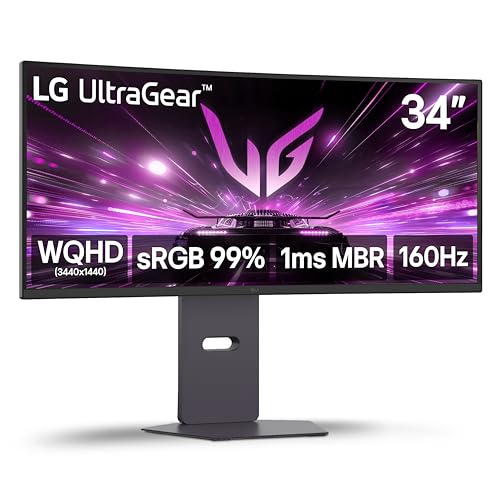
- 34-inch curved ultrawide screen has a 3440 × 1440 resolution and 21:9 aspect ratio.
- Features a 160Hz refresh rate, HDR10, and AMD FreeSync Premium.
- Includes built-in stereo speakers and a stand with height, tilt, and swivel adjustment.
Best For: Someone who games or works across several windows.
How to Choose a Gift for a PC User
Start with the recipient’s actual routine. A remote worker who switches between a personal and work laptop may value the KVM dock, while someone who takes a single laptop between locations may get more use from the power bank. A digital artist may appreciate the drawing display or shortcut keypad. For a gift that supports a hobby beyond screen time, the digital caliper can suit someone who makes or measures small parts.
Think about how much setup the gift requires. A desk mat or air duster is relatively simple to add to an existing space. A monitor, standing desk frame, NAS, mesh network, or dual-monitor arm can involve more planning. These larger upgrades can still be thoughtful Christmas gifts, but the recipient’s current equipment and preferences matter more.
Set a Budget That Includes the Rest of the Setup
Some products are complete accessories; others may call for additional parts or compatible equipment. The NAS enclosure is diskless, so storage drives are separate purchases. The standing desk frame is meant for a desktop chosen to fit its adjustable dimensions. The XPPen display needs a computer or laptop, though its notes say a 3-in-1 cable is included. A monitor arm also assumes the recipient already has compatible screens.
For a modest desk refresh, consider a keyboard, desk mat, cable tray, webcam, or air duster. For a substantial upgrade, a chair, monitor, desk frame, NAS, or mesh system may be more suitable. Set the total gift budget with possible extras in mind, including any cables, drives, or other accessories the recipient’s setup might require. Avoid assuming a listed feature means every needed accessory is included; check the product details before purchase.
Check Compatibility Before Choosing
Compatibility is especially important with PC accessories. For the KVM dock, confirm that each laptop supports USB-C DP Alt Mode and DP MST for extended dual displays. Its notes say Mac models support mirrored displays only. For the docking station, check the laptop’s Thunderbolt support and the operating-system requirements. For the ASUS ProArt monitor, confirm the recipient has a suitable video connection and desk space.
A monitor arm needs VESA mounting holes, screens within its size and weight ranges, and a compatible wooden desk with enough clearance below. The desk frame needs a desktop within its supported length and width. For the NAS, plan for separately purchased compatible storage drives. With the keypad or drawing display, check that the recipient’s operating system and creative programs are supported. These checks can turn a surprising gift into a useful one.
Personalization Makes Practical Gifts Feel Thoughtful
PC gifts can feel personal when they match what someone likes doing. A keyboard with interchangeable switches and extra keycaps gives a customization-minded recipient room to adjust the setup. A floral desk mat adds a visual detail to an everyday workspace. The drawing display and programmable keypad suit people who spend time making art or editing media, while the microphone can support streaming, podcasting, or clearer voice work.
If you are unsure about a major hardware choice, personalize a smaller accessory around the person’s habits: a tidy cable tray for someone who values an uncluttered desk, or an air duster for a careful PC owner. A note explaining why you chose it can make even a practical tool feel considered.
Timing and Last-Minute Decisions
For an early purchase, use the extra time to check dimensions, ports, and any separate components the gift may require. Larger gifts can also involve arranging desk space or coordinating a setup. For a last-minute decision, favor an item that fits what you already know about the recipient, rather than guessing at a major system change. A webcam, desk mat, keyboard, or cleaning tool may be easier to match when you know their general use but not every device specification.
Before ordering, confirm the current product listing, included accessories, and compatibility details. If you are choosing a monitor, dock, or network system, ask a simple question about the recipient’s setup or discreetly check their device model. A well-matched gift is more useful than one chosen only for its headline feature, and careful preparation helps make Christmas morning easier.