
A mini PC with room for several drives can consolidate backups, media, and home-server tasks without a full-size tower. But drive bays alone do not tell you whether a system fits your plans.
These 10 picks span two-bay starter systems, all-flash designs, and larger NAS-focused machines. The right choice depends on your drives, network, workload, and willingness to configure the software.
Best 10 Mini PC with Multiple Storage Bays Picks for 2026
Flexible Home NAS

- Four HDD bays plus two M.2 slots
- Up to 136TB supported storage
- 2.5GbE and 1GbE ports
Best For: Custom home backup and media servers
Modular Media Server

- Two SATA bays plus three M.2 slots
- Intel N95 with 12GB LPDDR5
- Drawer-style access for maintenance
Best For: Home media storage with HDDs and SSDs
High-Capacity Powerhouse

- Five SATA bays plus three M.2 slots
- Ryzen 7 255 and expandable DDR5
- 10GbE and 5GbE networking
Best For: Large multi-user storage and media workloads
Fast-Network Two-Bay NAS

- Two SATA bays plus three M.2 slots
- 16GB RAM and 1TB SSD included
- 5GbE and 2.5GbE ports
Best For: Two-drive NAS builds needing faster networking
Compact Home NAS
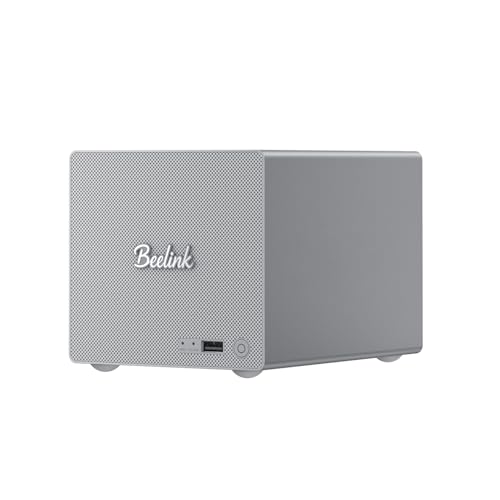
- Two SATA bays; up to three M.2 SSDs
- Includes 16GB RAM and a 1TB SSD
- 5GbE and 2.5GbE ports
Best For: Low-power home backups and media storage
High-Capacity NAS

- Five HDD slots and multiple SSD options
- MinisCloud OS with ZFS and Docker support
- 10GbE plus 5GbE networking
Best For: Large, customizable NAS builds
DIY Home Lab
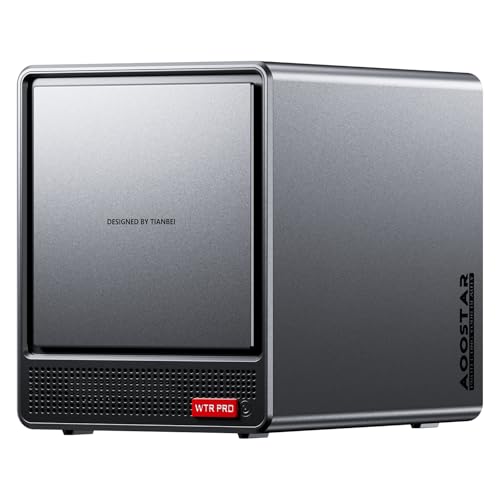
- Four HDD bays plus two M.2 slots
- Ryzen 7 5825U and dual 2.5GbE
- Barebones: add RAM, drives, and OS
Best For: Custom NAS and home-lab builds
Compact All-SSD NAS

- Six M.2 SSD slots; up to 24TB total
- Dual 2.5GbE and Wi-Fi 6
- No operating system included
Best For: Compact home NAS builds using M.2 SSDs
Best Heavy-Duty Pick

- Five HDD slots plus SSD options
- 10GbE and 5GbE networking
- Drive needed to create a storage pool
Best For: Expandable, high-capacity NAS builds
DIY Four-Bay NAS
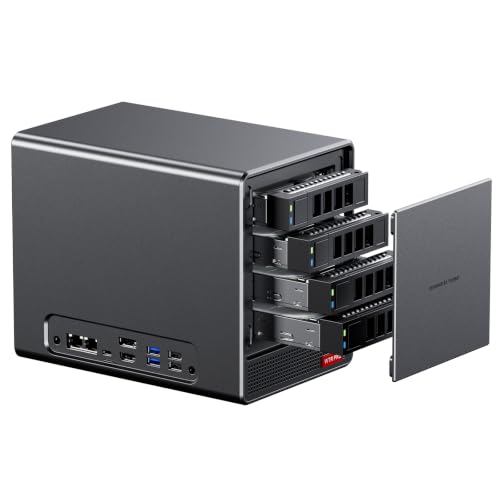
- Four SATA bays and two M.2 slots
- Dual 2.5GbE ports
- Barebone: add RAM, drives, and OS
Best For: Custom home NAS and server builds
Flexible Home NAS – ACEMAGIC N3A 4-Bay
If you want a mini pc with multiple storage bays for backups and media, the ACEMAGIC N3A offers four 3.5-inch HDD bays and two M.2 PCIe 3.0 NVMe slots. It includes 8GB DDR4 memory and a 128GB SSD, but you’ll need to buy the drives for your storage array separately.
Best For: Home users building a customizable backup or media server with room for four hard drives.
Pros:
- Four HDD bays and two M.2 slots support up to 136TB total storage.
- 2.5GbE and 1GbE ports provide two wired-network connections.
- Supports Windows 11 Pro, TrueNAS, Unraid, and other operating systems.
Cons:
- Storage drives for the bays and slots must be purchased separately.
- The 128GB preinstalled SSD leaves large-scale storage to your added drives.
The N3A is a practical choice when four hard-drive bays and OS flexibility matter more than getting a ready-to-use storage array out of the box.
The Beelink ME Pro is a mini pc with multiple storage bays that pairs two SATA drive bays with three M.2 2280 PCIe 3.0 slots. Its Intel N95 processor, 12GB LPDDR5 memory, and included 128GB SSD make it a starting point for a home media or file server.
Best For: Home users who want two large hard drives alongside several SSDs for a customizable media server.
Pros:
- Two bays accept 2.5-inch or 3.5-inch SATA drives, with up to 30TB supported per drive.
- Three M.2 slots support up to 4TB each.
- Drawer-style design allows motherboard access for upgrades and dust removal.
- Dual LAN, Wi-Fi 6, and Bluetooth 5.4 offer multiple connection options.
Cons:
- 12GB LPDDR5 memory is listed as the maximum, limiting RAM expansion.
- The supplied 128GB SSD is modest if you also plan to store media on it.
Choose this model if its two-HDD, three-SSD layout and accessible drawer design suit your plans; factor additional drives into your setup.
For a mini pc with multiple storage bays built around larger workloads, the MINISFORUM N5 Air combines five SATA HDD slots with three M.2 NVMe slots. Its Ryzen 7 255 processor, 16GB DDR5 memory, and 10GbE plus 5GbE ports make it suited to multi-user file access and demanding media setups.
Best For: Users who need five HDD bays, fast wired networking, and room to expand memory and SSD storage.
Pros:
- Five SATA bays support a stated maximum of 174TB.
- Ryzen 7 255 offers eight cores and 16 threads.
- 10GbE and 5GbE ports support high-speed network connections.
- Two DDR5 SO-DIMM slots support up to 96GB RAM.
Cons:
- The preinstalled 64GB SSD is intended for MinisCloud OS, not a substantial media library.
- Reaching the stated storage capacity requires adding high-capacity drives.
The N5 Air stands out when bay count, CPU headroom, and network speed are priorities; its capacity figures describe expansion potential rather than included storage.
The Beelink ME Pro N150 is a mini pc with multiple storage bays for buyers who want two SATA hard drives, three M.2 slots, and faster wired connectivity in one machine. It arrives with 16GB LPDDR5 memory and a 1TB SSD, giving you more included SSD capacity than the N95 configuration in this roundup.
Best For: Home storage setups that need two large HDDs, several SSD slots, and 5GbE networking.
Pros:
- Supports two SATA hard drives up to 30TB each and three M.2 drives up to 4TB each.
- Includes 16GB LPDDR5 memory and a 1TB SSD.
- 5GbE and 2.5GbE ports support fast wired connections.
- Drawer-style chassis simplifies access for cleaning and supported motherboard changes.
Cons:
- Two hard-drive bays may be limiting if you need a larger HDD array.
- Listed maximum RAM is 16GB.
This ME Pro configuration makes sense if you value its included 1TB SSD and 5GbE port, while accepting the two-bay HDD ceiling and fixed listed memory capacity.
Compact Home NAS – Beelink ME Pro N150
If you want a mini pc with multiple storage bays for backups and media, the Beelink ME Pro pairs two 2.5/3.5-inch SATA bays with support for up to three M.2 SSDs. It comes with 16GB LPDDR5 memory and a 1TB SSD, so the included storage is ready for use while the extra bays leave room to expand.
Best For: A compact home NAS or media center that can run around the clock.
Pros:
- Two SATA bays plus support for up to three M.2 SSDs.
- Low-power Intel N150 is suited to quiet, 24/7 operation.
- Separate 5GbE and 2.5GbE ports offer flexible wired connectivity.
Cons:
- 16GB LPDDR5 memory is listed as the maximum.
- The N150’s four cores are a modest choice for demanding server workloads.
The ME Pro makes the most sense when storage flexibility and low power draw matter more than heavy multitasking performance. Check drive costs separately if you plan to fill its empty bays.
The MINISFORUM N5 Air is a mini pc with multiple storage bays built for larger NAS projects. Its five HDD slots and multiple SSD connections offer substantial room to grow, while the Ryzen 7 255, 10GbE and 5GbE ports, and preloaded MinisCloud OS support a more capable storage setup.
Best For: Buyers building a high-capacity NAS with RAID options, fast networking, and room for apps.
Pros:
- Five HDD slots plus multiple SSD expansion options.
- MinisCloud OS supports ZFS snapshots, Docker apps, and remote access.
- 10GbE and 5GbE ports suit fast wired networks.
Cons:
- You need at least one additional SSD or 3.5-inch HDD to create a NAS storage pool.
- Its many drive and RAID options can take planning to configure well.
Choose the N5 Air if its drive count and built-in NAS software match your plans. Budget for storage drives, and verify which SSD slots and connections you intend to use before purchasing.
For a mini pc with multiple storage bays that you can configure yourself, the AOOSTAR WTR PRO provides four HDD bays and two M.2 slots. Its Ryzen 7 5825U and dual 2.5GbE ports make it a practical starting point for a home NAS, virtual machines, or a small home lab—but this version ships without RAM, storage, or an operating system.
Best For: DIY buyers who want to choose their own memory, drives, and NAS or server software.
Pros:
- Four HDD bays and two M.2 slots allow mixed storage setups.
- Eight-core, 16-thread Ryzen 7 5825U supports multitasking.
- Dual 2.5GbE ports and support for up to 64GB DDR4 RAM.
Cons:
- No RAM, SSD, or operating system is included.
- Requires more setup than a NAS with preinstalled software.
The WTR PRO offers useful hardware flexibility if you are comfortable assembling and configuring your own system. Include memory, drives, and software in your total budget.
Compact All-SSD NAS – Beelink Me Mini N150
If you want a mini pc with multiple storage bays but prefer SSDs to hard drives, the Beelink Me Mini offers six M.2 PCIe 3.0 slots in a compact 3.9-inch cube. Its Intel N150, 12GB LPDDR5 memory, and 64GB eMMC provide a starting point for a home NAS or media server.
Best For: Home users building a compact, SSD-based NAS or private cloud.
Pros:
- Six M.2 slots support 2230, 2242, and 2280 SSDs, with up to 24TB total capacity.
- Dual 2.5GbE ports, Wi-Fi 6, and Bluetooth 5.2 offer flexible connectivity.
- Built-in 45W power supply needs only a single AC cable.
Cons:
- No operating system is included.
- No 3.5-inch hard-drive bays; the six expansion slots are for M.2 SSDs.
Choose this model when a small footprint and several SSD slots matter more than accommodating large hard drives. Plan to add your preferred operating system and storage drives.
For buyers seeking a mini pc with multiple storage bays and room to scale, the MINISFORUM N5 Air combines five HDD slots with M.2 and U.2 storage options. Its eight-core, 16-thread Ryzen 7 255 and two DDR5 SODIMM slots make it a fit for more demanding NAS workloads.
Best For: Users building a high-capacity NAS for shared files, backups, and applications.
Pros:
- Five HDD slots plus solid-state storage options support flexible configurations and a stated maximum capacity of 144TB.
- 10GbE and 5GbE ports provide fast wired networking.
- Supports multiple RAID modes and includes a 64GB SSD with MinisCloud OS pre-installed.
Cons:
- At least one additional SSD or 3.5-inch HDD is needed to create a NAS storage pool.
- Its storage and networking options may be more than a basic home setup needs.
The N5 Air stands out if you expect to add drives over time or want faster-than-2.5GbE networking. Budget for the drives required to put its NAS storage pool to work.
The AOOSTAR WTR PRO is a mini pc with multiple storage bays for buyers who want to choose their own components. Its 4+2 layout provides four SATA drive bays and two M.2 NVMe slots, backed by an eight-core, 16-thread Ryzen 7 5825U.
Best For: DIY home-server builders who want to select their own memory, drives, and operating system.
Pros:
- Four SATA bays and two M.2 NVMe slots support up to 96TB of stated storage capacity.
- Dual 2.5GbE ports suit a wired NAS or soft-router setup.
- Two DDR4 slots support memory upgrades up to 64GB.
Cons:
- Barebone configuration includes no RAM, SSDs, hard drives, or operating system.
- Under sustained heavy Linux workloads, some drive bays may need a udev rule to avoid SATA speed reductions or CRC errors.
This is the most hands-on choice of the three: its mix of SATA and NVMe storage is useful, but account for the missing components and potential Linux configuration before buying.
How We Picked the Best Mini PC with Multiple Storage Bays
We prioritized the number and type of usable drive positions, then considered processor capability, memory options, network ports, and what is included out of the box. A preconfigured system and a barebone chassis can have very different final costs. Several listings are variants of the same product family, so compare the exact configuration rather than assuming each name represents a different platform.
Quick Comparison: Match the Bays to the Job
The Beelink ME Pro models are compact choices for a small two-drive setup. The Beelink Me Mini takes a different approach with six M.2 SSD slots for an all-flash build; it is not a substitute for a box that accepts several large hard drives. ACEMAGIC’s N3A offers a four-bay NAS format. The AOOSTAR WTR PRO listings target buyers who want four main bays plus additional storage options and are comfortable completing a barebone build. The MINISFORUM N5 Air listings provide five HDD positions and additional SSD expansion for larger storage plans. Check the specific listing’s included RAM, boot storage, and operating system before comparing prices.
Key Buying Factors for a Mini PC with Multiple Storage Bays
Drive Fit and Expansion
Count usable bays, not just advertised storage capacity. Confirm whether each position accepts a 3.5-inch HDD, 2.5-inch drive, or M.2 SSD, and check supported M.2 lengths. If you want to reuse existing hard drives, an M.2-only machine is the wrong fit. Leave room for future drives, but remember that a RAID array is not a backup.
Networking and Workload
Dual LAN ports can provide flexibility for separate networks or supported link aggregation, but they do not automatically double the speed of one file transfer. Multi-gigabit ports are most useful when your switch, cabling, and client devices can take advantage of them. For basic file sharing and backups, a lower-power Intel model may be sufficient; heavier virtualization, multiple services, or media processing make the Ryzen-based options more compelling. Verify hardware transcoding support against your specific apps and media formats.
Setup and Running Costs
Decide whether you want an included OS or a blank system for your preferred NAS software. Budget for drives, any missing RAM or SSD, and potentially a faster switch. Also consider fan noise, drive vibration, power use, and ventilation if the unit will run continuously near a desk or living area.
Who Should Buy Which Mini PC with Multiple Storage Bays?
Choose a two-bay Beelink ME Pro for a modest backup or file-sharing setup where footprint matters. Pick the Beelink Me Mini if you specifically want multiple SSDs and no HDD bays. Consider the ACEMAGIC N3A when four hard-drive bays match your growth plans. Look at the AOOSTAR WTR PRO if you want a configurable multi-drive barebone system, or a MINISFORUM N5 Air configuration if five HDD bays and a stronger CPU justify the added cost. Before ordering any Mini PC with Multiple Storage Bays, verify the exact drive compatibility and included components on the seller’s current listing.