
Choosing the right machine for metal jewelry comes down to precision, control, and the ability to mark small details cleanly without damaging delicate pieces.
This roundup of laser engravers for metal jewelry highlights options for hobbyists, small shops, and creators who want dependable results on rings, pendants, charms, and other small items.
Best 10 Laser Engravers for Metal Jewelry Picks for 2026
Flagship Dual-Laser Power
xTool F1 Ultra 20W Fiber & Diode Dual Laser Engraver

- 20W fiber laser engraves gold, silver, brass, and titanium
- 16MP camera with batch-oriented production workflow
- Up to 10,000mm/s speed for fast metal customization
Best For: High-volume jewelry customization and mixed-material shops
Portable Gift-Ready Metal Engraver
Ortur R1 Foldable Infrared Laser Engraver
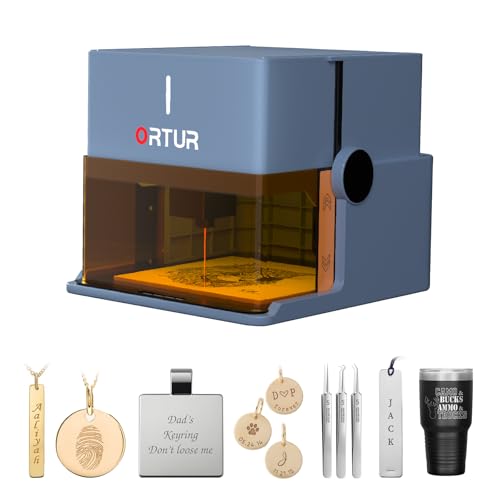
- 1064nm IR laser targets gold, silver, platinum, and copper
- Foldable, no-install design for fast setup
- Class 1 safety features for home-friendly use
Best For: Beginners and gift makers doing jewelry personalization
Fast Small-Batch Metal Marking
xTool F2 5W IR & 15W Diode Dual Laser Engraver

- 5W IR laser makes vivid metal marks on jewelry
- 50MP camera helps with precise small-piece alignment
- 6000mm/s speed for quick batch engraving
Best For: Small-batch jewelry studios and on-site personalization
Touchscreen Metal Engraver for Jewelry
AlgoLaser Pixi 1064nm Infrared Laser Engraver

- 3.5-inch touchscreen with built-in AlgoOS
- 1064nm IR laser for stainless steel, brass, and aluminum
- Class 1 enclosed design with safety features
Best For: Compact jewelry studios and computer-free metal engraving
Smart Enclosed Starter

- Pre-calibrated camera and presets simplify setup
- Fast 600mm/s CoreXY motion system
- Not suitable for highly reflective metal jewelry
Best For: Beginners wanting an enclosed, guided engraver for non-reflective materials
Portable Hand Engraver

- Cordless 1200mAh battery for portable use
- 37,000 RPM motor for fast hand engraving
- Works on jewelry, rings, glass, and more
Best For: Light DIY personalization on jewelry and small craft items
Metal Jewelry Marker

- 1064nm infrared laser is made for metal marking
- Clean, fine surface marks on jewelry and tags
- 3.5-inch touchscreen enables standalone operation
Best For: Precise surface marking on jewelry and small metal items
Editor’s Pick

- 0.01mm ultra-fine accuracy
- Includes enclosure, honeycomb bed, and materials
- Class 1 safety with auto-stop protection
Best For: Beginners making personalized jewelry and coated metal projects
Value Pick
Twotrees TTS-55 Pro 5.5W Engraver

- 0.08 x 0.46mm fine spot focus
- Air-assisted nozzle with red laser shield
- Wi-Fi, TF card, and LightBurn support
Best For: Makers and small sellers doing detailed small-format projects
Power Pick
Twotrees TTS-10 Pro 10W Engraver

- 10W output for faster engraving
- Supports coated/anodized metal, not bare stainless steel
- 300x300mm area fits jewelry-sized projects
Best For: Users engraving jewelry on coated or anodized metal surfaces
Flagship Dual-Laser Power – xTool F1 Ultra 20W Fiber & Diode Dual Laser Engraver
If you want laser engravers for metal jewelry that can handle both precision marking and serious throughput, the xTool F1 Ultra is built for that job. Its 20W fiber laser engraves gold, silver, copper, stainless steel, brass, titanium, and other metals in seconds, while the diode side expands the machine to wood, acrylic, leather, glass, and more.
Best For: High-volume jewelry customization, batch engraving, and shops that need a premium dual-laser machine for mixed materials.
Pros:
- 20W fiber laser supports engraving on many metals, including jewelry metals like gold, silver, brass, and titanium.
- 16MP camera and Auto Streamline Production help with batch work and shape recognition.
- Up to 10,000mm/s speed is designed for fast turnaround and in-store customization.
- 3D embossing and deep engraving add more design depth for metal and other materials.
Cons:
- Auto Conveyor is not included and must be purchased separately for expanded batch workflows.
- It is a Class 4 laser engraver, so it is better suited to experienced users or supervised commercial setups.
- Large capability set may be more machine than a casual hobby user needs.
The F1 Ultra stands out if your main priority is speed plus true metal versatility, especially for commercial jewelry personalization. It is one of the strongest all-around choices here for shops that need both detail and production efficiency.
Portable Gift-Ready Metal Engraver – Ortur R1 Foldable Infrared Laser Engraver
For buyers focused on laser engravers for metal jewelry, the Ortur R1 is a compact, beginner-friendly option with a 1064nm infrared module tuned for metal work. It specializes in engraving gold, silver, platinum, and copper, making it a practical pick for jewelry personalization and small custom gifts.
Best For: Beginners, home users, and gift makers who want an easy-to-use metal and jewelry engraver.
Pros:
- 1064nm infrared laser is designed for clear, precise metal engraving.
- Specializes in jewelry materials like gold, silver, platinum, and copper.
- Foldable, no-install design makes setup quick and simple.
- Class 1 safety features add confidence for home or classroom use.
Cons:
- 1,000mW output is more modest than larger commercial engravers.
- Better suited to personalization than heavy production workloads.
- Smaller, gift-style form factor may not fit high-volume shop needs.
The R1 is a smart choice if you want an approachable machine that leans into jewelry and metal personalization without a complicated setup. It is especially appealing when safety, portability, and presentation matter.
Fast Small-Batch Metal Marking – xTool F2 5W IR & 15W Diode Dual Laser Engraver
If you need laser engravers for metal jewelry that balance speed, precision, and portability, the xTool F2 is an appealing middle ground. Its 5W infrared laser creates deep, dark, vivid color marking on metal, while the 15W diode side handles 3D embossing and broader material flexibility.
Best For: Small-batch jewelry studios, pop-up personalization, and users who want fast on-site metal marking.
Pros:
- 5W IR laser is optimized for vivid metal marking.
- 50MP camera supports up to 0.1 mm alignment accuracy on small pieces.
- 6000mm/s speed is built for quick turnaround and batch efficiency.
- Fully enclosed, portable design works well for workshop or event use.
Cons:
- IR power is lower than some dedicated metal-only systems.
- Slide Extension and other accessories are needed for larger batch workflows.
- Best results will depend on using the right laser side for the material.
The F2 is a strong option when you want a fast, modern machine for jewelry marking without moving to a larger industrial setup. Its camera-assisted positioning and compact design make it especially practical for small, precise items.
Touchscreen Metal Engraver for Jewelry – AlgoLaser Pixi 1064nm Infrared Laser Engraver
For shoppers comparing laser engravers for metal jewelry, the AlgoLaser Pixi stands out for its built-in touchscreen workflow and metal-focused 1064nm infrared laser. It is designed to engrave stainless steel, aluminum, brass, and other compatible metals, making it a practical desktop choice for jewelry names, logos, QR codes, and custom tags.
Best For: Jewelry studios, small businesses, and makers who want a compact metal engraver that can run without a computer.
Pros:
- Built-in AlgoOS and 3.5-inch touchscreen let you work directly on the machine.
- 1064nm infrared laser is optimized for metal marking and jewelry engraving.
- Class 1 enclosed design with lid-open pause and password protection adds safety.
- Compact 3kg footprint is easy to move between desks, studios, and events.
Cons:
- Focused on metal engraving rather than broader cutting tasks.
- Touchscreen workflow may feel less flexible than a full computer-based setup for some users.
- Best for compact jobs, not large-format production.
The Pixi is a strong fit if you want simple operation with a professional metal engraving focus. Its combination of onboard controls and IR precision makes it especially useful for jewelry work where convenience and accuracy both matter.
Smart Enclosed Starter – CREALITY FALCON A1 10W
If you’re comparing laser engravers for metal jewelry, the Creality Falcon A1 is a workflow-first desktop machine with smart positioning, preset parameters, and a built-in camera to help you place designs accurately. It is a stronger fit for creators who want a guided setup for wood and general craft work, but its notes also make one limitation clear: this 10W diode model is not meant for highly reflective metals like mirror-finished jewelry.
Best For: Makers who want an enclosed, easy-to-use engraver for general crafting and layout accuracy, not reflective metal jewelry.
Pros:
- Ready to use out of the box with preset parameter settings
- HD camera and graphic outline extraction help with precise placement
- Fast CoreXY motion system reaches up to 600mm/s
- Enclosed Class 1 design includes auto-lock, emergency stop, and smoke control
Cons:
- Not compatible with highly reflective materials, including mirror-finished metals
- 10W diode setup is not the right choice for metal jewelry marking
- Acrylic use is limited and cutting acrylic is not supported
For shoppers focused on laser engravers for metal jewelry, this model is better treated as an enclosure and ease-of-use pick than a dedicated metal marker. Its strengths are speed, safety, and software support, while the material restrictions are important if jewelry engraving is your main goal.
Portable Hand Engraver – Tarlido Engraving Pen
For shoppers looking at laser engravers for metal jewelry, this Tarlido engraving pen is really a portable rotary etching tool rather than a laser. It is aimed at quick hand-guided personalization on small items like rings, jewelry, and gifts, with a cordless body and compact form that make it easy to move around a craft table.
Best For: Light DIY jewelry personalization and hand engraving when portability matters more than laser precision.
Pros:
- Cordless design with a 1200mAh rechargeable battery
- 37,000 RPM motor for high-speed engraving work
- Pen-style grip makes it easy to hold and control
- Can be used on jewelry, rings, glass, wood, leather, and more
Cons:
- It is an engraving pen, not a laser engraver
- Best for light craft work rather than precision machine marking
- Requires hand control, so consistency depends on the user
This is a practical pick if you want a handheld tool for simple personalization and small DIY projects. For more detailed or repeatable metal jewelry marking, a true laser marker would be the more appropriate category.
Metal Jewelry Marker – AlgoLaser Pixi 1064nm
If you need laser engravers for metal jewelry, the AlgoLaser Pixi stands out because its 1064nm infrared laser is designed specifically for surface marking on stainless steel, aluminum, coated metal, and jewelry. It focuses on fine detail work like names, logos, and patterns, and its touchscreen plus standalone control make it easier to run without staying tied to a PC.
Best For: Jewelry makers and small studios that need precise metal surface marking on small items.
Pros:
- 1064nm infrared laser is designed for metal marking and jewelry
- Produces cleaner, finer marks than standard diode engravers on metal
- 3.5″ touchscreen and AlgoOS support standalone operation
- Compact desktop size suits small workspaces and personalization setups
Cons:
- Designed for surface marking, not deep engraving or cutting
- Reflective metals may need slower speeds or marking spray for better results
- Not intended for large-scale projects like high-power diode machines
Among these options, this is the most directly aligned with metal jewelry marking. Its infrared wavelength and metal-first design make it the most relevant choice when your priority is clean, detailed personalization on small jewelry pieces.
Editor’s Pick – BlazeX M3 10W Laser Engraver
If you want one of the more capable laser engravers for metal jewelry, the BlazeX M3 is built for detailed desktop work and small-batch personalization. Its 0.01mm claimed accuracy and support for coated metal make it a strong fit for fine patterning, name tags, and jewelry-style customization, while the included enclosure and honeycomb bed help make setup more practical for beginners.
Best For: Beginners and hobby creators who want a safety-focused, all-in-one machine for personalized jewelry and coated metal projects.
Pros:
- 0.01mm ultra-fine accuracy for detailed engraving work
- Supports coated metal plus wood, glass, leather, and more
- Includes enclosure, honeycomb bed, 13 materials, goggles, and tools
- Class 1 safety design with smoke extraction and tilt/lid auto-stop
Cons:
- Metal engraving is specified for coated metal rather than bare steel
- More of a desktop starter bundle than a heavy-production system
- Accessory ecosystem is optional for advanced cylindrical work
Overall, the BlazeX M3 stands out if you want a beginner-friendly package with strong detail and safety features. For jewelry makers who need clean personalization on coated metal surfaces, it offers a balanced mix of precision and convenience.
Value Pick – Twotrees TTS-55 Pro 5.5W Engraver
The Twotrees TTS-55 Pro is a practical choice in laser engravers for metal jewelry if you want a compact machine with solid control and air-assist support. It offers fine spot focus, a 300x300mm work area, and compatibility with LightBurn and LaserGRBL, making it suitable for small projects where repeatable detail matters more than brute power.
Best For: Makers and small sellers who want a feature-rich engraver for small jewelry pieces and mixed-material projects.
Pros:
- Fine 0.08 x 0.46mm spot focus for detailed work
- Includes metal air-assisted nozzle and red laser shield
- Supports online, TF card offline, and Wi-Fi control
- Compatible with LightBurn and LaserGRBL
Cons:
- 5.5W power is more modest than higher-output 10W models
- Metal cutting/engraving claims are broad, so material testing may be needed
- No enclosure is mentioned in the supplied details
For buyers who value control options and cleaner cutting support, the TTS-55 Pro is a well-rounded middle-ground option. It makes most sense for detailed hobby work, prototypes, and small jewelry customization rather than the toughest metal-marking jobs.
Power Pick – Twotrees TTS-10 Pro 10W Engraver
The Twotrees TTS-10 Pro is aimed at buyers who need more power from laser engravers for metal jewelry and related accessories. Its 10W optical output is described as suitable for coated or anodized metal, and the 300x300mm work area is a good fit for jewelry, keychains, and other small custom pieces that benefit from stronger, faster marking.
Best For: Users who want a higher-power desktop engraver for jewelry-sized projects on coated or anodized metal.
Pros:
- 10W optical power for faster, deeper engraving on supported materials
- Works with coated/anodized metal, plus wood, acrylic, leather, and more
- 300x300mm work area suits jewelry and other small items
- Includes TF card offline workflow and LightBurn/LaserGRBL compatibility
Cons:
- Not recommended for bare stainless steel without marking spray or prep
- Larger metal-jewelry projects still need careful measuring to fit the work area
- Assembly and setup may be more involved than an all-in-one bundle
As a higher-power desktop option, the TTS-10 Pro is best when you need stronger performance on the right kind of metal surface. If your jewelry work involves coated or anodized pieces, it offers a solid mix of speed, compatibility, and offline convenience.
How We Picked These Laser Engravers for Metal Jewelry
We focused on models that are practical for jewelry work, with an emphasis on fine-detail output, compatibility with metal marking, compact footprints, and features that help reduce setup errors. We also considered ease of use, software control, and whether a machine is better suited to engraving, marking, or more general-purpose cutting.
Quick Comparison
For metal jewelry, fiber and infrared machines are usually the strongest match because they can mark metals more reliably than standard blue diode units. Dual-laser systems can offer more versatility, while enclosed machines and camera-assisted positioning are helpful if you also work on templates, batches, or very small parts. Handheld or pen-style tools are better for simple personalization than for consistent professional engraving.
Key Buying Factors for Laser Engravers for Metal Jewelry
Laser Type
Look first at wavelength and laser technology. Infrared and fiber setups are typically best for direct marking on metal jewelry, especially stainless steel, gold-plated items, titanium, and anodized pieces. Diode machines may still be useful for coated metals or mixed-material workflows, but they are not usually the first choice for clean bare-metal engraving.
Precision and Detail Control
Jewelry engraving often involves tiny text, serial numbers, logos, and decorative patterns. A machine with stable motion, fine spot control, and reliable focusing will produce sharper results and reduce the risk of blurred edges on curved or narrow surfaces.
Work Area and Part Handling
Make sure the bed size and accessories fit the items you actually make. Small rings, tags, bracelets, and pendants benefit from fixturing, rotation support, or easy positioning tools. If you plan to mark batches, a camera or alignment aid can save time and improve consistency.
Software, Workflow, and Safety
Simple software and responsive controls matter more than many buyers expect. A touchscreen, app support, or camera-guided placement can speed up production, but safety should still come first. Enclosed designs, proper ventilation, and material-specific settings are important when using Laser Engravers for Metal Jewelry in a home studio or retail environment.
Who Should Buy Which Laser Engravers for Metal Jewelry?
If you want the strongest all-around performance for professional jewelry marking, choose a fiber or infrared machine. If you need a flexible setup for both metal and nonmetal projects, a dual-laser model is the most versatile option. If your priority is occasional personalization or mobile use, a compact engraver or handheld rotary tool may be the better fit. For beginners, pick the machine with the simplest alignment and software workflow, not just the highest power rating.