
Finding the right laptop under $500 means focusing on the essentials: smooth everyday performance, a decent display, enough storage, and battery life that lasts through real work. The best options in this range can handle school, office tasks, web browsing, streaming, and light productivity without overspending.
In this roundup of the best laptops under 500, we’ve prioritized practical value, current hardware, and buyer-friendly features so you can compare the strongest choices quickly and confidently.
Best 10 Laptops Under 500 Picks for 2026
Everyday Productivity Pick
Dell 15.6" FHD Laptop with Intel Core 3

- 15.6-inch Full HD matte display
- 512GB SSD and 8GB RAM for daily use
- Wi-Fi 6, Bluetooth 5.3, and HDMI support
Best For: Students and home users who want a roomy budget Windows laptop.
Simple Cloud Computing Choice
Lenovo Chromebook S330 14-Inch
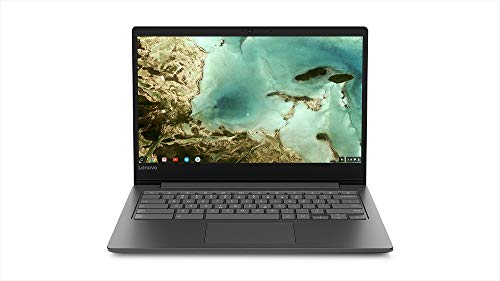
- 3.3-pound Chromebook with Chrome OS
- Up to 10 hours of battery life
- USB-C, microSD, and Wi-Fi/Bluetooth support
Best For: Light users who mainly browse, stream, and use Google apps.
Portable Office Assist
HP Essential 14-Inch with Microsoft 365

- Includes Microsoft 365 Personal for a year
- 3.24-pound portable Windows design
- Wi-Fi 6, Bluetooth 5.4, USB-C, and HDMI
Best For: Students and remote workers who need a lightweight starter laptop.
Balanced Budget Performer
Acer Aspire 3 15.6" Full HD Ryzen

- 15.6-inch Full HD IPS display
- Ryzen 3 with 8GB LPDDR5 memory
- 128GB NVMe SSD and Wi-Fi 6
Best For: Shoppers wanting a thin budget Windows laptop with a larger screen.
Essential Everyday Pick
Lenovo Essential 15.6-inch FHD Everyday Laptop

- Intel N100 with 4GB RAM for basic productivity
- 15.6-inch FHD anti-glare display and privacy shutter
- Wi-Fi 6, USB-C, HDMI, and SD card reader
Best For: students and home users who need a simple everyday laptop
Refurbished Workhorse
Dell Latitude 5480 Refurbished Laptop

- Core i5-6300 with 8GB DDR4 for everyday work
- 500GB drive gives plenty of room for files
- Windows 11 Pro and 90-day refurbished warranty
Best For: buyers who want a refurbished office-style laptop with more storage
Battery-Friendly Value
HP Everyday Slim Laptop 2026 Edition

- Up to 11 hours of video playback for travel and school
- 128GB SSD plus Wi-Fi 6 and Bluetooth 5.4
- Light 3.24 lb chassis with 720p camera
Best For: travelers and students who prioritize portability and battery life
AI-Ready Everyday Pick

- Core 3 N355 with 8GB DDR5
- 15.6-inch FHD IPS display
- Dual USB-C, HDMI 2.1, Wi-Fi 6
Best For: Students and home users who want a larger screen and modern basics
Everyday Productivity Pick – Dell 15.6" FHD Laptop with Intel Core 3
If you want laptops under 500 for everyday computing, this Dell 15.6-inch model is built around practical speed and comfort. The Intel Core 3 100U, 8GB of memory, and 512GB SSD make it a solid fit for schoolwork, browsing, documents, and light entertainment.
Best For: Students, home users, and workers who want a roomy 15.6-inch Windows laptop for daily tasks.
Pros:
- 15.6-inch Full HD matte display with 120Hz refresh rate
- 512GB SSD gives you generous storage for the class or work files that matter
- Wi-Fi 6, Bluetooth 5.3, and HDMI support make it easy to stay connected
- Comfort features like a numeric keypad, lifted hinges, and ComfortView help with long sessions
Cons:
- Integrated Intel UHD graphics are best for basic visuals, not demanding gaming
- At 4.2 pounds, it is less portable than smaller 14-inch options
Overall, this Dell is a straightforward choice if you care more about usable screen space and everyday reliability than ultra-light portability. The roomy storage and practical feature set make it one of the more balanced budget Windows picks here.
Simple Cloud Computing Choice – Lenovo Chromebook S330 14-Inch
For shoppers comparing laptops under 500, the Lenovo Chromebook S330 stands out as a simple, low-maintenance option for web-based work. Its Chrome OS, 4GB of memory, and lightweight 3.3-pound build make it a practical fit for browsing, school portals, streaming, and everyday cloud apps.
Best For: Light users who want a portable Chromebook for browsing, streaming, and Google-based tasks.
Pros:
- Light 3.3-pound design is easy to carry
- Up to 10 hours of battery life supports a full day away from the charger
- Chrome OS includes built-in virus protection and automatic updates
- USB-C, microSD, USB 3.0, Wi-Fi, and Bluetooth cover the basics
Cons:
- 14-inch HD 1366 x 768 display is modest compared with Full HD screens
- 32GB eMMC storage is limited for offline files and large local installs
- 4GB RAM is fine for basics but not heavy multitasking
This is best viewed as a budget Chromebook for users who live mostly in the browser. If you want something easy, compact, and good for cloud-first workflows, it fits the brief well.
Portable Office Assist – HP Essential 14-Inch with Microsoft 365
If you need laptops under 500 for school or office basics, this HP Essential model focuses on practical performance and portability. The Intel N150 chip, 4GB LPDDR5 memory, 128GB UFS storage, and included Microsoft 365 Personal subscription make it a tidy starter machine for documents, browsing, and video calls.
Best For: Students and remote workers who want a lightweight Windows laptop with office apps included.
Pros:
- Includes 1-year Microsoft 365 Personal for Word, Excel, and PowerPoint
- Light 3.24-pound build is easy to pack and carry
- Wi-Fi 6, Bluetooth 5.4, USB-C, HDMI, and SD card reader add flexibility
- Anti-glare HD display, 720p camera, and AI noise reduction support calls and classes
Cons:
- 4GB RAM is limited for heavier multitasking
- HD 1366 x 768 resolution is basic, not sharp like Full HD
- 128GB storage is modest if you keep many large files locally
This HP works best as a lightweight productivity laptop rather than a power machine. The included software and modern connectivity help it feel more complete than many entry-level systems.
Balanced Budget Performer – Acer Aspire 3 15.6" Full HD Ryzen
Among laptops under 500, the Acer Aspire 3 is a strong all-around pick if you want a modern budget Windows machine with a bigger screen. The Ryzen 3 7320U, 8GB LPDDR5 memory, and 128GB NVMe SSD are aimed at smooth everyday use, while the 15.6-inch Full HD IPS display gives it a more comfortable viewing experience than basic HD models.
Best For: Buyers who want a thin 15.6-inch Windows laptop for school, home, and general productivity.
Pros:
- 15.6-inch Full HD IPS screen with narrow bezels
- Ryzen 3 7320U and 8GB LPDDR5 are well suited to everyday tasks
- 128GB NVMe SSD offers faster storage than older eMMC-based budget laptops
- HD camera with TNR and Acer PurifiedVoice help improve online meetings
Cons:
- 128GB storage may feel small if you keep lots of files locally
- Built-in graphics are fine for basics, not intensive creative work or gaming
The Aspire 3 lands in a sweet spot for budget shoppers who still want a full-size display and modern memory. It is a sensible pick when you want a little more screen comfort without moving far beyond an entry-level budget.
Essential Everyday Pick – Lenovo Essential 15.6-inch FHD Everyday Laptop
If you want one of the more practical laptops under 500 for basic school, home, and office tasks, this Lenovo keeps the focus on everyday essentials. The Intel N100, 4GB LPDDR5 RAM, and 128GB UFS 3.1 storage are built for browsing, document editing, streaming, and video calls without adding extra bulk or complexity.
Best For: Students and casual users who want a lightweight, dependable Windows 11 laptop with a full HD screen and useful ports.
Pros:
- 15.6-inch FHD anti-glare display with 250 nits brightness and an 88% screen-to-body ratio
- Wi-Fi 6, Bluetooth 5.2, USB-C with Power Delivery, HDMI, and SD card reader
- Light 3.42 lb design with MIL-STD-810H testing for added durability
- Includes Windows 11 Home in S mode plus Microsoft 365 Personal
Cons:
- 4GB RAM limits heavier multitasking
- 128GB storage is modest if you keep lots of files locally
This is a straightforward budget laptop that prioritizes portability, connectivity, and basic productivity over raw speed. For everyday computing, it covers the key needs well without complicating the buying decision.
Refurbished Workhorse – Dell Latitude 5480 Refurbished Laptop
Among laptops under 500, this refurbished Dell Latitude 5480 stands out for users who want a more traditional work machine with Windows 11 Pro already installed. The Intel Core i5-6300, 8GB DDR4 RAM, and 500GB HDD make it a sensible option for browsing, office work, and streaming with plenty of local storage.
Best For: Budget buyers who want a refurbished business laptop with 8GB RAM, Windows 11 Pro, and a roomy 500GB drive.
Pros:
- Intel Core i5-6300 provides solid everyday performance
- 8GB DDR4 RAM supports smoother multitasking than entry-level 4GB systems
- 500GB HDD offers generous space for files and applications
- Professionally refurbished, tested, and backed by a 90-day warranty
Cons:
- 500GB HDD is slower than SSD-based storage
- Older processor generation may not suit demanding workloads
This is a practical pick if storage capacity and business-ready software matter more than the latest hardware. It is best viewed as a value-focused refurbished laptop for everyday computing rather than a performance machine.
Battery-Friendly Value – HP Everyday Slim Laptop 2026 Edition
If battery life and portability matter most, this HP is a strong fit in the laptops under 500 category. It pairs an AMD processor with 4GB DDR5 RAM and 128GB SSD storage, giving you the basics for schoolwork, browsing, and video calls in a slim 3.24 lb design.
Best For: Travelers, students, and casual users who want a lightweight Windows 11 laptop with long battery life and modern wireless support.
Pros:
- Up to 11 hours of video playback or 7.5 hours of wireless streaming
- Wi-Fi 6, Bluetooth 5.4, USB-C, USB-A, HDMI, and SD card reader
- True Vision 720p camera with temporal noise reduction and dual array microphones
- 128GB SSD for faster startup and everyday responsiveness
Cons:
- 4GB RAM may feel tight with multiple apps open
- 128GB storage is limited for large media libraries or big installs
Overall, this HP is a good match if you want a lightweight laptop that emphasizes mobility, battery life, and the core features most people use daily. It does not try to be a powerhouse, but it covers the essentials cleanly.
AI-Ready Everyday Pick – Acer Aspire Go 15
If you want one of the more balanced laptops under 500 for school, streaming, and everyday productivity, the Acer Aspire Go 15 keeps the focus on practical basics. It pairs an Intel Core 3 N355, 8GB of DDR5 memory, and 128GB UFS storage with a 15.6-inch Full HD IPS display, so it should feel responsive for daily tasks without overcomplicating the setup.
Best For: Students and home users who want a larger 15.6-inch screen, Wi-Fi 6, and AI-assisted features in a budget-friendly Windows laptop.
Pros:
- Intel Core 3 N355 and 8GB DDR5 for everyday multitasking
- 15.6-inch 1080p IPS display for casual browsing and streaming
- Dual USB-C ports plus HDMI 2.1 for flexible connections
- Copilot key and AcerSense add simple AI and device controls
Cons:
- 128GB storage is modest if you keep lots of files locally
- Windows 11 Home in S mode may require switching out for broader app use
Overall, this Aspire Go model is a solid value choice if display size and modern connectivity matter more than maximum storage. It looks especially useful for basic productivity, media, and light school workloads.
Portable Student Workhorse – Lenovo 15.6 Business Laptop
Among laptops under 500, this Lenovo is built around efficient day-to-day use rather than heavy workloads. The Intel N150, 8GB LPDDR5 memory, and 128GB UFS 2.2 storage are aimed at quick boot times, smooth browsing, document editing, and light multitasking, while the 15.6-inch Full HD anti-glare screen keeps it practical for work or class.
Best For: Students, travelers, and everyday users who want a lightweight Windows laptop with a full-size display and easy portability.
Pros:
- Intel N150 and 8GB LPDDR5 handle everyday tasks smoothly
- 15.6-inch FHD anti-glare display is comfortable for long sessions
- At 3.42 lbs and 0.70 inches thin, it’s easy to carry
- Wi-Fi 6, Bluetooth 5.2, and multiple ports add flexibility
Cons:
- 128GB storage is limited for large media collections
- TN panel is less premium than IPS alternatives
This Lenovo makes sense if you value a thin, light design with enough performance for school and office basics. The included Microsoft 365 Personal and Copilot hotkey also make it feel ready to use right away.
Lightweight Budget Basic – HP Everyday Slim 14
If your priority is a simple, low-cost option in the laptops under 500 category, this HP Everyday Slim keeps things straightforward. It uses an Intel N150 processor, 4GB of DDR5 RAM, and a 128GB SSD for browsing, online classes, office work, and streaming, while the 14-inch design and light weight make it easy to move around.
Best For: Students and casual users who want a compact laptop for basic everyday tasks and portability.
Pros:
- Intel N150 is suited to everyday browsing and light productivity
- 14-inch lightweight design is easy to carry
- Wi-Fi 6, Bluetooth 5.4, and USB-C support modern connectivity
- 720p camera, dual microphones, and Copilot key help with video calls
Cons:
- 4GB RAM is the most limiting spec in this group
- 1366×768 display resolution is lower than Full HD models
- 128GB storage may feel tight for larger files
This HP is best viewed as a basic everyday laptop rather than a performance pick. It fits well if you want a compact machine for school, web use, and messaging without paying for extras you may not need.
How We Picked These Laptops Under 500
We focused on models that offer the best mix of usable performance, display quality, storage, and portability for budget buyers. Since Laptops Under 500 vary widely, we favored systems with modern processors, at least 8GB of memory where possible, and SSD storage for faster boot times and app loading. We also considered whether a model is better suited for Windows productivity, ChromeOS simplicity, or lightweight travel use.
Quick Comparison: What Stands Out
For general everyday use, the Windows laptops with 8GB RAM and SSD storage are the safest all-around picks. Chromebooks can be a smart choice for cloud-based work, browsing, and school, especially if you mainly use Google apps. Renewed business laptops may deliver stronger build quality or a better keyboard, but they can trade newer components for lower price. If you want the best balance in Laptops Under 500, look closely at display resolution, memory, and storage type before anything else.
Key Buying Factors for Laptops Under 500
Processor and Memory
Entry-level chips are fine for email, documents, streaming, and multitasking, but 8GB RAM is a major advantage. It helps prevent slowdowns when you keep several tabs or apps open. If a laptop only has 4GB, it is better for very light use.
Storage and Speed
SSD storage is strongly preferred over a hard drive. Even a modest 128GB SSD usually feels much faster than older mechanical storage, and it improves everyday responsiveness. If you store lots of photos, videos, or large files, look for expandable storage or cloud-friendly workflows.
Display and Portability
A Full HD screen is a meaningful upgrade for text clarity and general comfort. If you plan to move around often, pay attention to weight, battery claims, and chassis size. A 15.6-inch laptop may feel better for productivity, while a 14-inch model is easier to carry.
Operating System
Windows is the best fit for users who need compatibility with common desktop software. ChromeOS is simpler, often faster on modest hardware, and ideal for web-first users. Renewed Windows business laptops can be a good value if you want sturdier construction and don’t mind older internals.
Who Should Buy Which Laptops Under 500?
If you need a dependable all-purpose machine, choose a Windows laptop with 8GB RAM and an SSD. Students and casual users who spend most of their time in a browser may prefer a Chromebook. Shoppers looking for the most capable office-style setup should prioritize Full HD, modern processors, and better storage over flashy extras. For anyone comparing Laptops Under 500, the smartest purchase is usually the one that matches your workload instead of simply the lowest price.